
Last updated on
Oct 31, 2026

Get the free KYC Change Request Form
We are not affiliated with any brand or entity on this form

Fill out
Complete the form online in a simple drag-and-drop editor.

eSign
Add your legally binding signature or send the form for signing.

Share
Share the form via a link, letting anyone fill it out from any device.

Export
Download, print, email, or move the form to your cloud storage.
Why pdfFiller is the best tool for your documents and forms


End-to-end document management
From editing and signing to collaboration and tracking, pdfFiller has everything you need to get your documents done quickly and efficiently.
Accessible from anywhere
pdfFiller is fully cloud-based. This means you can edit, sign, and share documents from anywhere using your computer, smartphone, or tablet.
Secure and compliant
pdfFiller lets you securely manage documents following global laws like ESIGN, CCPA, and GDPR. It's also HIPAA and SOC 2 compliant.
What is KYC Change Form
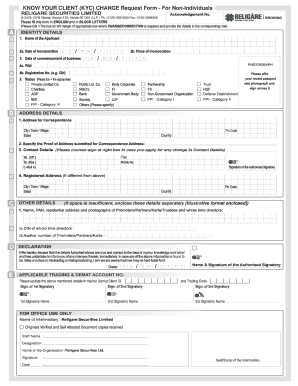
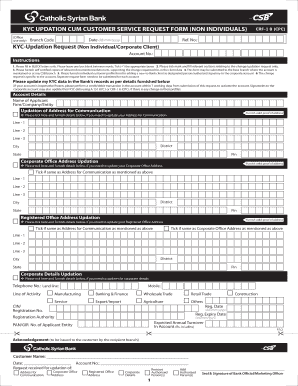
The KYC Change Request Form is a document used by non-individual entities to update their KYC information with Religare Securities Limited.
pdfFiller scores top ratings on review platforms




Who needs KYC Change Form?
Explore how professionals across industries use pdfFiller.

KYC Change Form is needed by:
-
NGOs requiring KYC updates
-
Government bodies updating client information
-
Businesses with trading accounts needing KYC changes
-
Limited Liability Partnerships (LLPs) modifying KYC records
-
Organizations involved in securities trading
-
Entities managing demat accounts
Comprehensive Guide to KYC Change Form
What is the KYC Change Request Form?
The KYC Change Request Form serves as a vital tool for non-individual entities such as NGOs and government bodies to update their Know Your Client (KYC) information with Religare Securities Limited. By ensuring that the KYC details are current, organizations comply with relevant regulations and maintain transparent operations. This form plays a crucial role within the broader context of business registration, allowing for updated data on trading and demat accounts.
Purpose and Benefits of the KYC Change Request Form
Updating KYC information is essential to meet regulatory demands and foster effective account management. Organizations benefit from streamlined operations, reducing potential regulatory penalties while enhancing the credibility of their account management practices. Timely submissions with accurate information are critical advancements in elevating compliance and responsiveness to any changes in an organization’s status or operations.
Who Needs the KYC Change Request Form?
The KYC Change Request Form is required by various types of organizations, including:
-
Non-governmental organizations (NGOs)
-
Government bodies
-
Limited liability partnerships (LLPs)
Each type of entity has unique criteria that must be met, which ensures that only eligible organizations submit this essential document. Understanding the relevance of KYC updates across different sectors enhances the clarity of compliance requirements.
How to Fill Out the KYC Change Request Form Online
Filling out the KYC Change Request Form online involves a few essential steps:
-
Access the form on the designated platform.
-
Provide required information such as PAN and proof of address.
-
Complete all fillable fields accurately, ensuring clarity and completeness.
-
Check and verify the details, including signatures of authorized signatories.
By following these steps, organizations can ensure that their form is completed accurately, reducing delays in processing due to errors.
Common Errors and How to Avoid Them
When completing the KYC Change Request Form, errors can be detrimental. Common mistakes include:
-
Incomplete fields or missing information
-
Incorrect signatures from authorized signatories
-
Submitting outdated proof of address
To avoid such issues, a checklist can be valuable. Review the completed form for accuracy, confirm signature requirements, and ensure all necessary documents are included before submission.
Submission Methods for the KYC Change Request Form
Organizations can submit the KYC Change Request Form through several methods, allowing for flexibility based on their unique situations:
-
Online submission via the designated portal
-
Mailing the completed form to the appropriate address
-
In-person submission at relevant offices
Depending on location-specific rules, compliance with submission methods is crucial. Organizations should track their submission status following filing to ensure timely processing.
What Happens After You Submit the KYC Change Request Form?
Upon submission, the KYC Change Request Form undergoes a review process that may yield various outcomes. The expected steps include:
-
Confirmation of receipt by the processing department
-
Review timelines, which may vary based on submitted information
-
A waiting period before organizations can expect an outcome
Organizations can follow up on their application status periodically to expedite resolution and address any additional queries.
Why Use pdfFiller for Your KYC Change Request Form?
pdfFiller provides an efficient solution for filling out digital forms. Benefits of using pdfFiller include:
-
Easily edit text and images on the form
-
Enhanced security features to protect sensitive data
-
Accessibility on any device, allowing for convenience in form management
Utilizing pdfFiller simplifies the KYC Change Request process while prioritizing data security and user experience.
Security and Compliance When Submitting KYC Forms
Maintaining data security during the handling of KYC forms is paramount. pdfFiller ensures compliance with regulations such as HIPAA and GDPR, providing users with confidence in their privacy. With 256-bit encryption and other protective measures, organizations can safely submit sensitive information while adhering to legal standards.
Ready to Get Started?
Embarking on the process of completing the KYC Change Request Form is straightforward with pdfFiller. The platform's user-friendly interface, combined with robust security features, empowers organizations to efficiently manage their KYC documentation.
How to fill out the KYC Change Form
-
1.Begin by accessing the pdfFiller website and logging into your account. If you do not have an account, create one.
-
2.In the search bar, type 'KYC Change Request Form' and locate the form from the results.
-
3.Click on the form title to open it in the pdfFiller interface.
-
4.Before you start filling out the form, gather all necessary information such as your PAN, organization name, and proof of address. This information is essential to complete the form accurately.
-
5.Use the fillable fields provided; enter your PAN in the designated box. Make sure it is accurate as this is a critical identifier.
-
6.Next, fill in the 'Proof of Address' section with your current address documentation. Ensure the details match the submitted documents.
-
7.Locate the fields for 'Signature of the Authorised Signatory' and input the name of the signing representative, followed by their signature. If there are multiple signatories, complete the additional fields accordingly.
-
8.As you complete each section, review the filled fields for accuracy. Double-check spellings, especially on names and addresses.
-
9.Once all fields are filled and verified, navigate to the review section on pdfFiller. This section allows you to preview the completed form before finalizing it.
-
10.If everything appears correct, proceed to download your form. You can also choose to save it within your pdfFiller account.
-
11.Finally, you can submit the completed form directly through pdfFiller if applicable, or download and print it for physical submission. Follow any specific submission procedures provided by Religare Securities Limited.

Who is eligible to use the KYC Change Request Form?
Non-individual entities such as NGOs, government bodies, and companies that need to update their KYC information with Religare Securities Limited are eligible to use this form.
What documents are required for completion?
You will need your PAN, proof of address, and the signatures of the authorized signatories to complete the KYC Change Request Form.
How do I submit the completed form?
You can submit the KYC Change Request Form via pdfFiller for an online submission or download it for physical submission to Religare Securities Limited, following their specific guidelines.
Is there a deadline for submitting the form?
While the form itself does not have a defined deadline, it is advisable to submit it as soon as your KYC details need updating to ensure compliance with regulations.
What are common mistakes to avoid when filling out the form?
Common mistakes include incorrect PAN entries, mismatched addresses, and forgeting to sign the document. Always double-check your information before submission.
How long does it take for the KYC update to be processed?
Processing times can vary, but it typically takes a few business days for KYC updates to be reflected once the completed form is submitted.
Can the KYC Change Request Form be notarized?
No, the KYC Change Request Form does not require notarization, simplifying the completion process.
Related Forms




Get the latest insights from our blog


If you believe that this page should be taken down, please follow our DMCA take down process
here
.
This form may include fields for payment information. Data entered in these fields is not covered by PCI DSS compliance.