
Last updated on
Nov 7, 2026
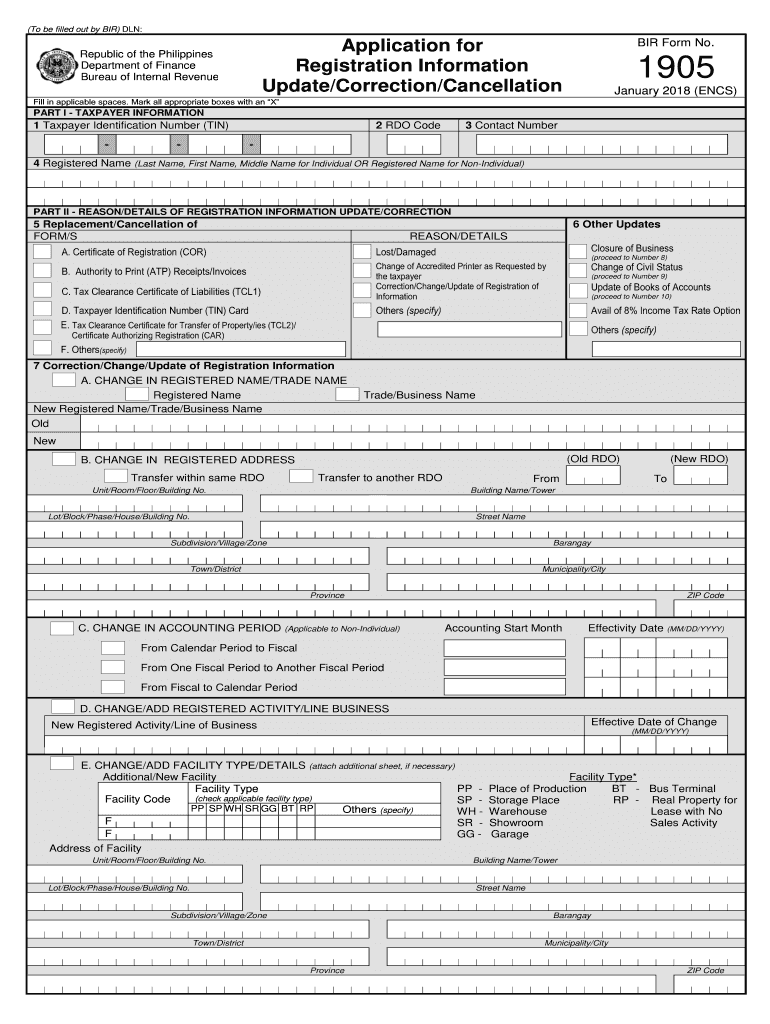
PH BIR 1905 2018 free printable template
pdfFiller is not affiliated with any government organization

Fill out
Complete the form online in a simple drag-and-drop editor.

eSign
Add your legally binding signature or send the form for signing.

Share
Share the form via a link, letting anyone fill it out from any device.

Export
Download, print, email, or move the form to your cloud storage.
Why pdfFiller is the best tool for your documents and forms


End-to-end document management
From editing and signing to collaboration and tracking, pdfFiller has everything you need to get your documents done quickly and efficiently.
Accessible from anywhere
pdfFiller is fully cloud-based. This means you can edit, sign, and share documents from anywhere using your computer, smartphone, or tablet.
Secure and compliant
pdfFiller lets you securely manage documents following global laws like ESIGN, CCPA, and GDPR. It's also HIPAA and SOC 2 compliant.
What is PH BIR 1905
The BIR Form 1905 is a tax document used by taxpayers in the Philippines to update, correct, or cancel taxpayer registration information with the Bureau of Internal Revenue (BIR).
pdfFiller scores top ratings on review platforms




so far, so good...I think it is a pretty good product
This program is very intuitive and gets the job done.
Who needs PH BIR 1905?
Explore how professionals across industries use pdfFiller.

PH BIR 1905 is needed by:
-
Individual taxpayers looking to update their registration details.
-
Authorized representatives managing tax affairs for clients.
-
Tax agents filing on behalf of individuals or businesses.
-
Businesses needing to correct their tax registration information.
-
Anyone requiring to cancel their registration with the BIR.
Comprehensive Guide to PH BIR 1905
What is the BIR Form 1905?
BIR Form 1905 is a crucial document in the Philippines, utilized for updating, correcting, or canceling taxpayer registration information with the Bureau of Internal Revenue (BIR). This form plays a significant role in ensuring compliance with the country's tax regulations, facilitating accurate taxpayer records. Accurate use of BIR Form 1905 helps in maintaining proper tax records, which is essential for tax compliance in the Philippines.
Purpose and Benefits of BIR Form 1905
The primary purpose of submitting BIR Form 1905 is to maintain accurate taxpayer information. This form not only aids in updating crucial details but also assists taxpayers in avoiding potential penalties and legal issues stemming from inaccurate or outdated information. Proper utilization of this form ensures that the taxpayer's registration data remains current, thus promoting a smooth relationship with the BIR.
Who Needs to File the BIR Form 1905?
Various entities and individuals are required to file BIR Form 1905. This includes:
-
Taxpayers seeking to update their registration details.
-
Authorized representatives and tax agents tasked with filing on behalf of taxpayers.
-
Individuals facing changes in personal information, such as name or address.
Understanding the target audience for this form is vital for ensuring compliance with tax regulations.
When to File the BIR Form 1905
Filing BIR Form 1905 should occur promptly in certain situations, especially when there are changes in taxpayer information. Late filing or failure to submit the form can lead to significant penalties and complications with the BIR. It's essential to be aware of the specific circumstances that warrant immediate submission to avoid potential legal repercussions.
How to Fill Out the BIR Form 1905 Online
Completing BIR Form 1905 online can be accomplished seamlessly through pdfFiller. Here’s a step-by-step guide to filling out the form:
-
Access the BIR Form 1905 template on pdfFiller.
-
Fill in the required fields, including your taxpayer identification number (TIN) and registered name.
-
Provide your updated contact details and explain the reason for the updates.
-
Review each section thoroughly to ensure accuracy before submission.
pdfFiller’s user-friendly platform simplifies this process, ensuring that users can easily navigate the form’s requirements.
Review and Validation Checklist for BIR Form 1905
Before submitting BIR Form 1905, it is advisable to complete a review and validation checklist, ensuring no common errors were made. Some key points to check include:
-
All required fields are filled out completely and accurately.
-
Supporting documents that may be necessary accompany the form.
-
Review for any typographical errors or omissions.
This checklist serves as a valuable tool to prevent submission issues.
Submission Methods for the BIR Form 1905
After completing BIR Form 1905, it can be submitted via different channels, including:
-
Online submission through the BIR’s official platform.
-
In-person drop-off at designated BIR offices.
Each submission method has specific instructions regarding fees, deadlines, and processing times that must be observed to ensure successful filing.
What Happens After You Submit the BIR Form 1905?
After submitting BIR Form 1905, taxpayers can expect a confirmation of submission. There may also be tracking options available to verify the status of the submitted form. In some cases, follow-up actions may be required post-submission, especially if the BIR requests additional information or documentation.
Privacy and Security for BIR Form 1905 Users
When handling BIR Form 1905, privacy and data security are paramount. pdfFiller employs robust security features, including 256-bit encryption, to ensure user data is protected. Compliance with regulations such as GDPR further enhances user confidence, making pdfFiller a reliable choice when managing sensitive documents.
Why Choose pdfFiller for Your BIR Form 1905 Needs?
pdfFiller stands out for efficiently handling BIR Form 1905 due to its array of features that streamline the entire process. Users can conveniently edit text, create fillable forms, and ensure their submissions are accurate and timely. By leveraging pdfFiller, taxpayers can simplify form management, making the tax filing experience less cumbersome.
How to fill out the PH BIR 1905
-
1.Access pdfFiller and search for 'BIR Form 1905' to open the form.
-
2.Review the form layout to familiarize yourself with the sections and instructions provided.
-
3.Gather necessary information such as your Tax Identification Number (TIN), registered name, and contact details before you begin filling out the form.
-
4.Use pdfFiller's interface to click on each fillable field and enter the corresponding information accurately.
-
5.Follow the included instructions for filling in applicable spaces and ensure to check the relevant boxes where indicated.
-
6.Once all fields are completed, double-check the information for accuracy to avoid common mistakes like typos or missing details.
-
7.Use the review functionalities in pdfFiller to finalize the form, ensuring all required sections have been addressed.
-
8.Save your progress regularly and use the download option to keep a digital copy of the filled form.
-
9.Submit the finalized form directly to the Bureau of Internal Revenue (BIR) as required, using pdfFiller’s submission options to ensure it is sent securely.

Who is eligible to file BIR Form 1905?
Any individual or entity registered with the Bureau of Internal Revenue (BIR) in the Philippines can file BIR Form 1905 to update, correct, or cancel their registration details.
What types of updates can I make with this form?
BIR Form 1905 allows you to update or correct taxpayer details such as registered name, contact information, and the reasons for such updates, ensuring compliance with tax regulations.
How do I submit BIR Form 1905?
BIR Form 1905 can be submitted directly to the Bureau of Internal Revenue (BIR) either in person or via the electronic filing methods provided by the BIR.
What supporting documents do I need to submit with the form?
While specific supporting documents may vary based on the nature of the update, typically a valid ID and any relevant documents justifying the update or cancellation are required.
Are there any common mistakes to avoid when filling this form?
Common mistakes include failing to check all applicable boxes, providing incorrect TINs or contact details, and overlooking the need for signatures by the taxpayer or authorized representative.
What is the processing time for BIR Form 1905?
Processing times can vary, but generally, the Bureau of Internal Revenue aims to process updates submitted through BIR Form 1905 within a few working days, depending on their workload.
Do I need to notarize BIR Form 1905 before submission?
No, BIR Form 1905 does not require notarization prior to submission, but it must be signed by the taxpayer or an authorized representative.
PH BIR 1905 Form Versions
Related Content
Related Forms





Related Catalogs
Get the latest insights from our blog


If you believe that this page should be taken down, please follow our DMCA take down process
here
.
This form may include fields for payment information. Data entered in these fields is not covered by PCI DSS compliance.