
Last updated on
Oct 31, 2026
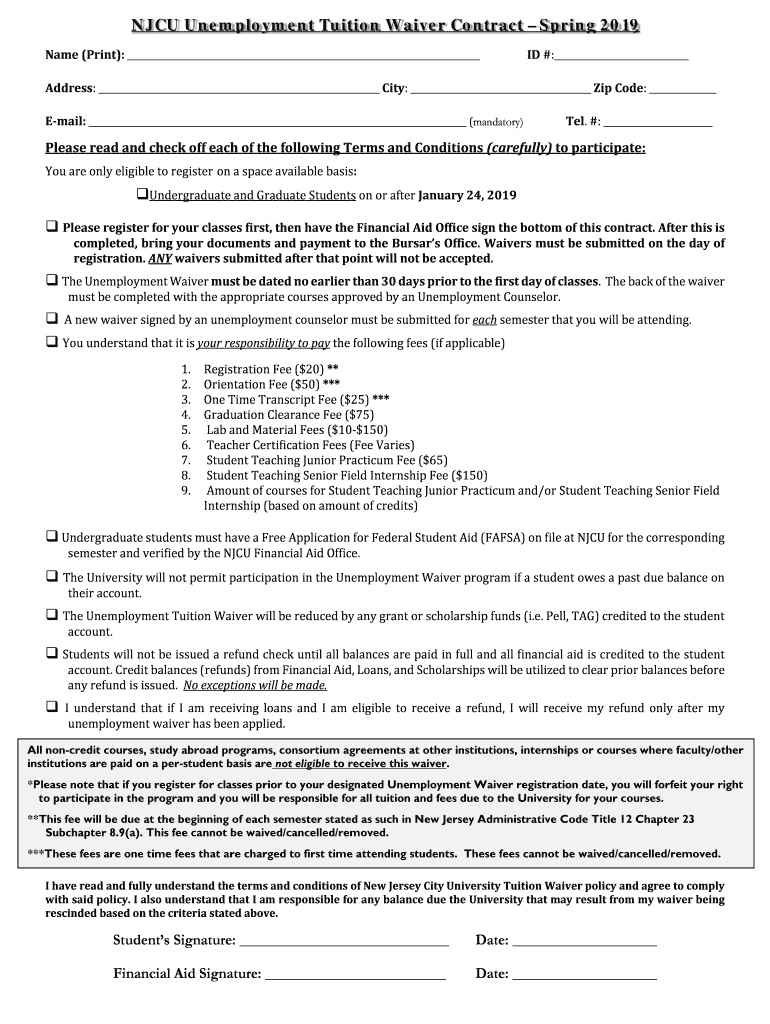
NJCU Unemployment Tuition Waiver Contract 2019 free printable template
pdfFiller is not affiliated with any government organization

Fill out
Complete the form online in a simple drag-and-drop editor.

eSign
Add your legally binding signature or send the form for signing.

Share
Share the form via a link, letting anyone fill it out from any device.

Export
Download, print, email, or move the form to your cloud storage.
Why pdfFiller is the best tool for your documents and forms


End-to-end document management
From editing and signing to collaboration and tracking, pdfFiller has everything you need to get your documents done quickly and efficiently.
Accessible from anywhere
pdfFiller is fully cloud-based. This means you can edit, sign, and share documents from anywhere using your computer, smartphone, or tablet.
Secure and compliant
pdfFiller lets you securely manage documents following global laws like ESIGN, CCPA, and GDPR. It's also HIPAA and SOC 2 compliant.
What is NJCU Unemployment Tuition Waiver Contract
The NJCU Unemployment Tuition Waiver Contract is a financial aid application used by students to waive tuition fees due to unemployment.
pdfFiller scores top ratings on review platforms




Who needs NJCU Unemployment Tuition Waiver Contract?
Explore how professionals across industries use pdfFiller.

NJCU Unemployment Tuition Waiver Contract is needed by:
-
Undergraduate students at NJCU
-
Graduate students at NJCU
-
Students facing unemployment
-
Financial Aid Office staff
-
Bursar's Office personnel
-
Unemployment Counselors
Comprehensive Guide to NJCU Unemployment Tuition Waiver Contract
What is the NJCU Unemployment Tuition Waiver Contract?
The NJCU Unemployment Tuition Waiver Contract is essential for students facing unemployment. This form is designed for both undergraduate and graduate students at New Jersey City University, enabling them to waive tuition fees due to their unemployment status. To successfully utilize this waiver, students must register for classes and ensure all necessary signatures are obtained.
Proper completion and submission of the form are critical to securing financial relief. Without the appropriate signatures, including those from the Financial Aid Office, the process may be delayed or denied. Students should familiarize themselves with the NJCU student registration form to ensure a smooth experience.
Purpose and Benefits of the NJCU Unemployment Tuition Waiver Contract
This contract offers significant benefits, primarily aimed at alleviating financial burdens for unemployed students at NJCU. Through the unemployment tuition waiver, eligible students can access education without the added stress of tuition fees.
One of the key requirements for this waiver is having a FAFSA on file, which plays a crucial role in determining eligibility. By utilizing the NJCU financial aid form, students can maximize their chances of receiving the necessary financial assistance.
Eligibility Criteria for the NJCU Unemployment Tuition Waiver Contract
To qualify for the NJCU Unemployment Tuition Waiver Contract, students must meet specific eligibility criteria. These criteria include:
-
Proof of unemployment status.
-
Proper documentation submitted along with the application.
-
Awareness that grant or scholarship funds may reduce the waiver amount.
Students should ensure that they gather and prepare all necessary documentation before applying for the unemployment waiver, as this will facilitate the process and help avoid delays.
How to Fill Out the NJCU Unemployment Tuition Waiver Contract Online
Completing the NJCU Unemployment Tuition Waiver Contract online requires attention to detail. Follow these steps for successful form submission:
-
Access the form using pdfFiller.
-
Fill out required fields such as Name, ID, Address, and Email.
-
Ensure to review all information for accuracy.
-
Obtain signatures from both the student and the Financial Aid Office.
Once the form is filled out correctly, the student must submit it to the designated office during registration, ensuring compliance with all requirements for the waiver.
Common Errors and How to Avoid Them When Submitting the NJCU Unemployment Tuition Waiver Contract
When submitting the NJCU Unemployment Tuition Waiver Contract, common mistakes can lead to processing delays. Some frequent errors include:
-
Inaccurate or incomplete personal information.
-
Lack of required signatures from the Financial Aid Office.
-
Submission without checking for correct dates and documentation.
To ensure a smooth submission, students should validate their information thoroughly before sending the form and have it reviewed by a trusted individual if necessary.
Submission Methods and Where to Submit the NJCU Unemployment Tuition Waiver Contract
Students have several options for submitting the NJCU Unemployment Tuition Waiver Contract. Typically, the form should be submitted to the Bursar’s Office on registration day. It is important to adhere to submission deadlines, which require that the waiver is submitted no earlier than 30 days before classes begin.
Tracking the status of the submission is critical. Students should request confirmation upon submission to ensure the contract is processed without issues.
What Happens After You Submit the NJCU Unemployment Tuition Waiver Contract?
Once the NJCU Unemployment Tuition Waiver Contract has been submitted, students can expect the following:
-
Processing times may vary; expect confirmation notifications after submission.
-
Potential outcomes include approval, requests for additional information, or rejections needing amendments.
If the contract is rejected, students should follow up with the Financial Aid Office to understand the necessary corrections and assist with resubmission.
Security and Compliance for Handling the NJCU Unemployment Tuition Waiver Contract
Security is paramount when handling sensitive documents like the NJCU Unemployment Tuition Waiver Contract. pdfFiller employs robust security measures, including 256-bit encryption, to protect user data. Compliance with data protection regulations such as HIPAA and GDPR ensures users can trust the platform when filling out forms.
Using a secure platform for form completion is essential; pdfFiller provides an environment focused on user privacy, ensuring that sensitive information remains confidential.
Simplifying Your NJCU Unemployment Tuition Waiver Contract Process with pdfFiller
PdfFiller enhances the experience of filling out the NJCU Unemployment Tuition Waiver Contract. The platform allows users to edit, sign, and submit the form efficiently, streamlining the entire process.
With its user-friendly interface, pdfFiller simplifies the task of contract completion, making it easier for students to manage their financial aid applications and ensuring timely submissions.
How to fill out the NJCU Unemployment Tuition Waiver Contract
-
1.Access pdfFiller and search for the NJCU Unemployment Tuition Waiver Contract form using the provided search bar.
-
2.Once located, click on the form to open it in the editor.
-
3.Before filling out the form, gather necessary information such as your name, student ID, address, email, and telephone number.
-
4.Use the fillable fields in pdfFiller to input your personal information accurately.
-
5.Ensure you mark the checkboxes for terms and conditions as required.
-
6.After completing all sections, review the form carefully to ensure all information is correct before proceeding.
-
7.You can use the preview feature to see how the completed form looks.
-
8.If any corrections are needed, go back and edit the respective fields.
-
9.Once finalized, save your progress on pdfFiller, and consider downloading a copy for your records.
-
10.To submit the form, follow the prompts to either email it directly from pdfFiller or download it to submit in person at the Bursar’s Office.

Who is eligible to use the NJCU Unemployment Tuition Waiver Contract?
Eligibility for the NJCU Unemployment Tuition Waiver Contract is primarily for undergraduate and graduate students at NJCU who are currently unemployed and have a FAFSA on file.
What is the deadline for submitting the tuition waiver contract?
The waiver contract must be submitted on the day of class registration. Ensure that it is dated no earlier than 30 days before the first day of classes.
How should I submit the completed waiver contract?
Completed waiver contracts should be submitted to the Bursar's Office. You can either deliver it in person or possibly email it, depending on NJCU policies.
What documents do I need to attach when submitting this form?
Aside from the completed waiver contract, you may need to include your FAFSA confirmation and any additional documents the Financial Aid Office requires.
What common mistakes should I avoid while filling out the tuition waiver form?
Common mistakes include forgetting to gather all necessary personal information beforehand, not signing the form, or submitting it without Financial Aid Office approval.
How long does it take to process the tuition waiver request?
Processing times can vary based on the volume of applications but may take a few days after submission. It's advisable to follow up with the Financial Aid Office for updates.
What fees are students responsible for paying despite the tuition waiver?
Even with the tuition waiver, students are typically responsible for certain fees, which may include registration fees, lab fees, or other miscellaneous costs associated with enrollment.
NJCU Unemployment Tuition Waiver Contract Form Versions
Related Forms


Get the latest insights from our blog


If you believe that this page should be taken down, please follow our DMCA take down process
here
.
This form may include fields for payment information. Data entered in these fields is not covered by PCI DSS compliance.