
Last updated on
Oct 31, 2026
OR Form 5252OR 2017-2026 free printable template
pdfFiller is not affiliated with any government organization

Fill out
Complete the form online in a simple drag-and-drop editor.

eSign
Add your legally binding signature or send the form for signing.

Share
Share the form via a link, letting anyone fill it out from any device.

Export
Download, print, email, or move the form to your cloud storage.
Why pdfFiller is the best tool for your documents and forms


End-to-end document management
From editing and signing to collaboration and tracking, pdfFiller has everything you need to get your documents done quickly and efficiently.
Accessible from anywhere
pdfFiller is fully cloud-based. This means you can edit, sign, and share documents from anywhere using your computer, smartphone, or tablet.
Secure and compliant
pdfFiller lets you securely manage documents following global laws like ESIGN, CCPA, and GDPR. It's also HIPAA and SOC 2 compliant.
What is OR Form 5252OR
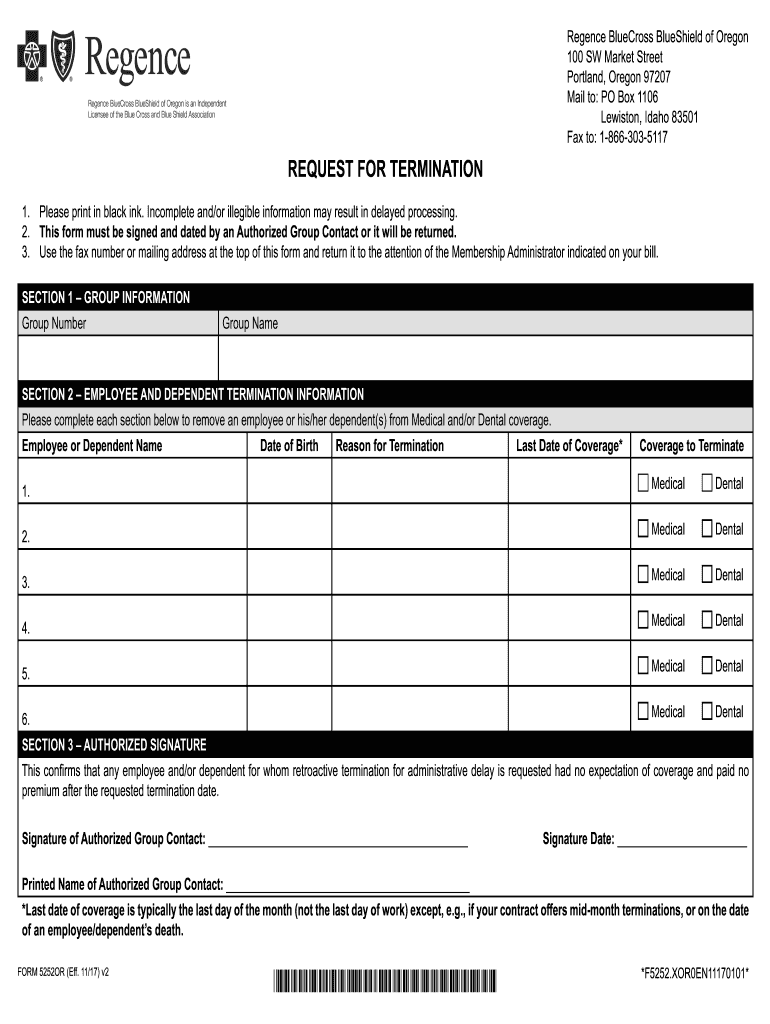
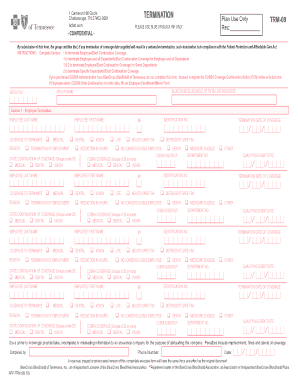
The Regence BlueCross BlueShield of Oregon Termination Request is a healthcare form used by authorized group contacts to remove employees or dependents from medical and/or dental coverage.
pdfFiller scores top ratings on review platforms




Who needs OR Form 5252OR?
Explore how professionals across industries use pdfFiller.

OR Form 5252OR is needed by:
-
Authorized group contacts managing employee health coverage
-
Businesses looking to terminate employee or dependent coverage
-
HR professionals handling employee benefits administration
-
Insurance coordinators requiring official termination documentation
-
Employees needing to verify termination processes
-
Dependents affected by health coverage changes
Comprehensive Guide to OR Form 5252OR
What is the Regence BlueCross BlueShield of Oregon Termination Request?
The Regence BlueCross BlueShield of Oregon Termination Request form serves a vital role in the removal of employees or their dependents from medical and dental coverage. This form must be completed accurately, as it includes essential information such as the employee's name, date of birth, and the last date of coverage. An Authorized Group Contact is required to sign the form, ensuring that all necessary approvals are in place. Accurate completion is crucial to prevent any delays in processing the termination, which could lead to complications in coverage.
Purpose and Benefits of the Regence BlueCross BlueShield of Oregon Termination Request
This termination request form is essential for both businesses and employees. It allows for the smooth removal from medical and dental coverage, ensuring compliance with insurance policies. By using the correct form, companies can avoid financial implications associated with untimely submissions or incorrect processing. Timely submission of this form not only streamlines the transition for employees but also respects the contractual obligations that may come with group health insurance policies.
Who Needs the Regence BlueCross BlueShield of Oregon Termination Request?
The Authorized Group Contact is the individual responsible for submitting the termination request. This role is critical in ensuring that the proper procedures are followed. Employees or dependents who may be terminated from coverage must meet specific eligibility criteria, such as enrollment in the health plan for a requisite period. Understanding the form's requirements is crucial to avoid incorrect submissions that could result in denial of coverage termination or other administrative issues.
How to Fill Out the Regence BlueCross BlueShield of Oregon Termination Request Form Online (Step-by-Step)
-
Navigate to the online form and enter the employee's name.
-
Fill in the date of birth accurately to identify the individual.
-
Specify the last date of coverage, commonly the last day of the month.
-
Complete the reason for termination field with accurate details.
-
Ensure the form is signed and dated by an Authorized Group Contact before submission.
Double-check each field for completeness and clarity to avoid any issues during processing.
Submission Methods for the Regence BlueCross BlueShield of Oregon Termination Request
Once the termination request is filled out, it can be submitted via two main methods: fax or mail. Ensure you use the correct fax number or mailing address specified by Regence BlueCross BlueShield. Submissions must be timely to prevent any disruption in coverage; thus, it’s essential to adhere to any stated deadlines for proper processing.
What Happens After You Submit the Regence BlueCross BlueShield of Oregon Termination Request?
After submitting the termination request, the next step is to await confirmation of receipt. Users can track their submission status, which is important for ensuring that the request is being processed. Common outcomes may include notification of successful termination or requests for additional information. It is advisable to keep a copy of the submission for your records, as it can be useful for future reference.
Common Errors and How to Avoid Them When Filing the Termination Request
Filing errors can cause significant delays or complications with the termination process. Frequent mistakes include missing signatures or providing incorrect dates. To mitigate these risks, review the form thoroughly prior to submission. Several resources, including the company’s HR department, may be available to provide assistance and ensure the form is completed correctly.
How pdfFiller Can Help with the Regence BlueCross BlueShield of Oregon Termination Request
pdfFiller offers valuable features that simplify the completion of the termination request. Highlights include editing capabilities for ensuring all information is accurate and eSigning options that facilitate secure submissions. With rigorous security measures in place to protect sensitive data, pdfFiller provides a reliable environment for managing healthcare termination forms seamlessly.
Next Steps for Ensuring Effective Coverage Management Post-Termination Request
After submitting the termination request, it is essential to manage any subsequent changes in coverage carefully. Options for securing new coverage or ensuring a seamless transition should be explored promptly. Regular communication with HR or insurance representatives can help to clarify benefits and coverage needs for remaining employees, preventing any future confusion.
How to fill out the OR Form 5252OR
-
1.Access the Regence BlueCross BlueShield of Oregon Termination Request form on pdfFiller by logging into your account and searching for the form title or navigating through the healthcare forms section.
-
2.Once you open the form, familiarize yourself with the layout. You will see blank fields for group and employee information, checkboxes for coverage types, and areas designated for signatures.
-
3.Before filling out the form, gather all necessary information. This includes the employee's name, date of birth, reason for termination, last date of coverage, and your group information.
-
4.Begin with the group information section. Fill in the authorized group's name and contact details accurately. Ensure all relevant fields are completed before moving on.
-
5.Next, proceed to the employee section. Input the employee's name, date of birth, and indicate whether you are terminating their coverage or their dependent's coverage.
-
6.Select the coverage type you wish to terminate by checking the appropriate boxes. Verify that the last date of coverage is correctly noted; typically, it is the last day of the month.
-
7.Once all fields are completed, review the form thoroughly to ensure there are no errors. Make sure your information matches what is in your records.
-
8.After verifying the details, sign and date the form in the designated signature area. Remember, the form must be signed and dated by an Authorized Group Contact.
-
9.Finalize by saving your changes on pdfFiller. You can download the completed form for your records and submit it via fax or mail as required by Regence BlueCross BlueShield.
-
10.To submit, select the submission option on pdfFiller, upload any necessary attachments, and follow the prompts to ensure your form is sent correctly.

Who is eligible to submit the Regence Termination Request?
The form can be submitted by authorized group contacts responsible for managing employee health coverage on behalf of their organization. It is crucial that the signatory has appropriate authority to act on behalf of the group.
Is there a deadline for submitting the termination request?
It is best to submit the termination request form as soon as the decision to terminate coverage has been made. Timely submission helps ensure that coverage ends on the last day of the month or the specified last date.
What are the submission methods for this form?
The Regence Termination Request form can be submitted via fax or traditional mail to Regence BlueCross BlueShield of Oregon. Ensure to check the latest submission guidelines on their official website.
What documents are required to accompany the termination request?
Typically, no additional documents are needed alongside the termination request form. However, it is advisable to confirm any specific requirements with Regence BlueCross BlueShield.
What common mistakes should be avoided when filling out this form?
Common mistakes include failing to sign and date the form, omitting necessary information about the employee or dependents, and not using the last day of the month correctly as the coverage termination date.
How long does it take to process the termination request?
Processing times can vary; however, it is generally advisable to allow 7-10 business days for the termination request to be processed by Regence BlueCross BlueShield after submission.
Can I modify the termination request after submitting?
Once submitted, changes to the termination request may not be possible. If alterations are necessary, contact Regence BlueCross BlueShield directly for guidance on how to proceed.
Related Forms



Get the latest insights from our blog


If you believe that this page should be taken down, please follow our DMCA take down process
here
.
This form may include fields for payment information. Data entered in these fields is not covered by PCI DSS compliance.