
Last updated on
Oct 31, 2026
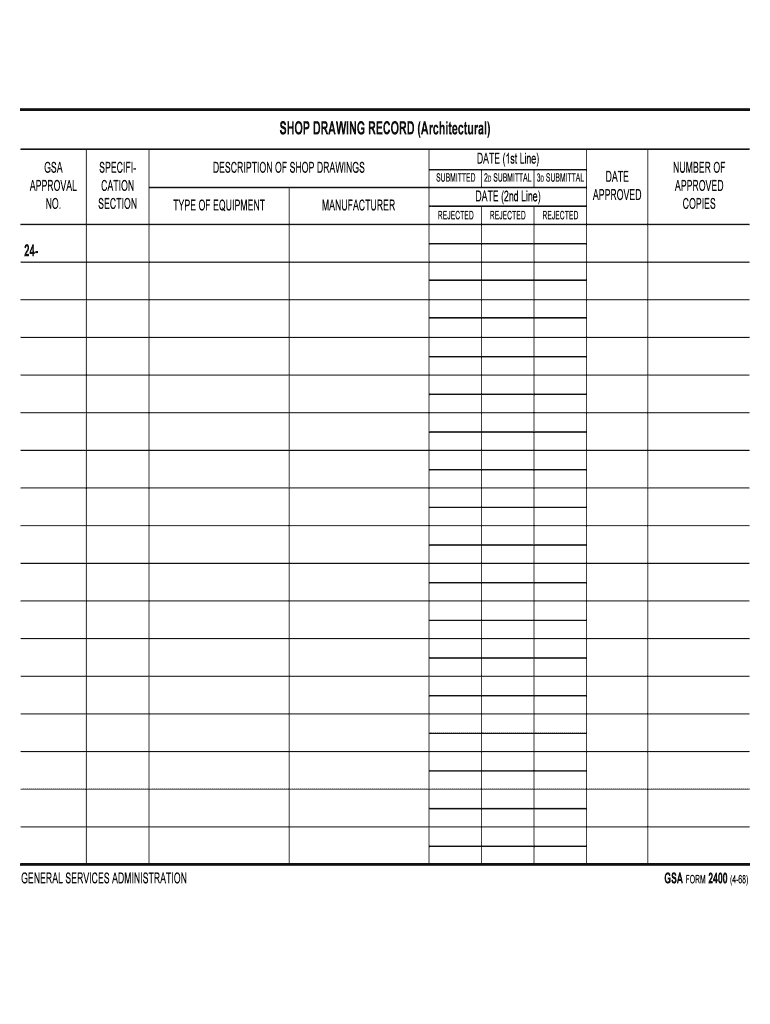
GSA Form 2400 1968-2026 free printable template
pdfFiller is not affiliated with any government organization

Fill out
Complete the form online in a simple drag-and-drop editor.

eSign
Add your legally binding signature or send the form for signing.

Share
Share the form via a link, letting anyone fill it out from any device.

Export
Download, print, email, or move the form to your cloud storage.
Why pdfFiller is the best tool for your documents and forms


End-to-end document management
From editing and signing to collaboration and tracking, pdfFiller has everything you need to get your documents done quickly and efficiently.
Accessible from anywhere
pdfFiller is fully cloud-based. This means you can edit, sign, and share documents from anywhere using your computer, smartphone, or tablet.
Secure and compliant
pdfFiller lets you securely manage documents following global laws like ESIGN, CCPA, and GDPR. It's also HIPAA and SOC 2 compliant.
What is GSA Form 2400
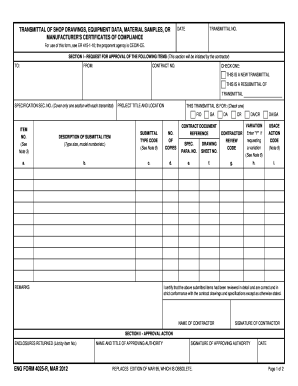
The GSA Form 2400 Shop Drawing Record is a government form used by the General Services Administration (GSA) to document and approve shop drawings for architectural and engineering projects.
pdfFiller scores top ratings on review platforms




Who needs GSA Form 2400?
Explore how professionals across industries use pdfFiller.

GSA Form 2400 is needed by:
-
Architects involved in federal projects
-
Engineers submitting shop drawings for approval
-
Contractors managing project compliance
-
Federal agencies overseeing construction
-
Project managers coordinating document submissions
-
Quality assurance teams in construction
Comprehensive Guide to GSA Form 2400
What is the GSA Form 2400 Shop Drawing Record?
The GSA Form 2400 serves as a vital document for tracking shop drawings within architectural and engineering projects. Designed to facilitate communication, this form helps in documenting the approval processes of drawings submitted by contractors and architects. Utilizing the GSA Form 2400 enhances the organization and oversight of projects, ensuring that all parties involved remain informed about the status of submitted shop drawings.
This form is crucial in maintaining the integrity of project workflows, allowing for effective tracking of changes and approvals necessary for successful project completion. Its structured approach aids in the seamless exchange of vital information amongst stakeholders in the building process.
Purpose and Benefits of the GSA Form 2400 Shop Drawing Record
The primary purpose of the GSA Form 2400 is to document approvals for shop drawings, which is essential in the construction and design fields. By using this form, architects and contractors can maintain clear records of submissions and approvals, streamlining the overall project flow.
-
Enhances accountability in the approval process.
-
Facilitates efficient communication between stakeholders.
-
Reduces the potential for misunderstandings regarding shop drawings.
-
Improves project tracking and management.
Ultimately, leveraging the GSA Form 2400 can significantly benefit professionals involved in architectural projects by providing a structured means to oversee drawing approvals.
Key Features of the GSA Form 2400 Shop Drawing Record
The GSA Form 2400 is equipped with several critical features designed for effective record-keeping. This includes multiple fields that capture essential details regarding shop drawings, ensuring users can provide comprehensive information during submission.
-
Date fields to track submission timelines.
-
Checkboxes to indicate if submissions have been rejected.
-
Sections for documenting the number of copies submitted.
The form's user-friendly layout is intended to simplify the documentation process, allowing professionals to focus on the quality of their submissions rather than navigating a complex form.
Who Needs the GSA Form 2400 Shop Drawing Record?
The target audience for the GSA Form 2400 includes a range of professionals involved in architectural and engineering projects. Key users of this form consist of:
-
Architects responsible for design submissions.
-
Engineers who review shop drawings for compliance.
-
Contractors submitting drawings for approval during project execution.
Understanding when and why to utilize this form can significantly improve workflow efficiency and project outcomes across various roles in the industry.
How to Fill Out the GSA Form 2400 Shop Drawing Record Online
Completing the GSA Form 2400 digitally is a straightforward process. To access the form online, users should first navigate to the designated portal. Once the form is loaded, follow these steps:
-
Enter the required date information on the first line.
-
Complete the second line date field as necessary.
-
Indicate the number of copies required for distribution.
-
Select the rejected checkboxes when applicable.
Each field serves a specific purpose, so paying attention to detail ensures accuracy and completeness in submissions.
Submission Methods for the GSA Form 2400 Shop Drawing Record
Upon completing the GSA Form 2400, users have several submission options. Choosing the right method ensures that the forms are received promptly and processed without issues.
-
Online submission through the official platform for immediate processing.
-
Mail submission, ensuring that all copies are mailed to the correct address.
-
In-person delivery to designated offices to guarantee immediate receipt.
It's crucial to verify submission deadlines to ensure compliance and avoid project delays.
What Happens After You Submit the GSA Form 2400 Shop Drawing Record?
After submitting the GSA Form 2400, users can expect a systematic follow-up process. Confirmation of receipt is typically provided to assure users that their submission has been acknowledged. Tracking the status of the form is also advisable to monitor any potential actions required following submission.
-
Review confirmations to verify submission details.
-
Be prepared for possible follow-up actions or additional approvals.
This transparency helps maintain communication between all parties involved, reinforcing overall project efficiency.
Common Errors and How to Avoid Them When Submitting the GSA Form 2400
Submitting the GSA Form 2400 can be straightforward, but several common errors can hinder the process. Awareness of these pitfalls can help users submit accurately and efficiently.
-
Omitting required fields, particularly dates and copy counts.
-
Failing to indicate rejection correctly when necessary.
-
Not adhering to submission deadlines, which can derail project timelines.
Best practices include double-checking entries and consulting with colleagues to confirm accuracy before submission.
Security and Compliance When Using the GSA Form 2400 Shop Drawing Record
When utilizing the GSA Form 2400, users can rest assured that measures are in place to protect sensitive data. pdfFiller employs advanced security protocols such as 256-bit encryption to safeguard user information. Compliance with regulations like HIPAA and GDPR is also a significant commitment, ensuring that documents are handled appropriately.
Understanding these security measures is vital, especially when dealing with confidential or sensitive project information, allowing users to focus on their work without privacy concerns.
Enhance Your Experience with pdfFiller for the GSA Form 2400
Using pdfFiller for the GSA Form 2400 elevates the user experience significantly. The platform allows easy editing, filling, and submitting of the form with added features such as:
-
eSigning capabilities for streamlined approval processes.
-
Secure sharing options to ensure sensitive information is protected.
-
Conversion features that enhance document usability.
By utilizing pdfFiller, users can maximize efficiency throughout the document management process, reinforcing security and compliance at every step.
How to fill out the GSA Form 2400
-
1.To access the GSA Form 2400 on pdfFiller, visit the pdfFiller website and use the search feature to locate the form by its title or keyword.
-
2.Once you find the GSA Form 2400, click on it to open the document in the pdfFiller interface.
-
3.Before you begin filling out the form, gather necessary details such as equipment type, manufacturer information, submission dates, and the current approval status.
-
4.As you navigate through the form, utilize pdfFiller's editable fields to input the required information, including all blank fields like 'DATE (1st Line)' and 'NUMBER OF COPIES'.
-
5.Move to each section systematically, ensuring all details are accurately filled in, and make use of options like checkboxes for 'REJECTED' statuses where applicable.
-
6.After completing all entries, carefully review the filled form to ensure all information is correct and consistent with your gathered data.
-
7.Once you are satisfied with your entries, utilize pdfFiller to save the completed form. You can download it directly to your device or choose to submit it electronically via email.

Who is required to fill out the GSA Form 2400?
The GSA Form 2400 must be filled out by architects, engineers, and contractors working on federal projects that require submission of shop drawings for approval.
What supporting documents are needed when submitting the GSA Form 2400?
While the GSA Form 2400 primarily focuses on shop drawings, it may require additional documents such as product specifications and drawings that explain the equipment details being submitted for approval.
What common mistakes should I avoid when filling out the GSA Form 2400?
Common mistakes include omitting critical information, failing to check the 'REJECTED' status accurately, or not providing all necessary supporting documents. Double-checking all entries is essential.
How can I submit the GSA Form 2400 once it's completed?
You can submit the completed GSA Form 2400 directly through pdfFiller by using the submission options available, or download and email it to the designated approving authority.
Are there any deadlines for submitting the GSA Form 2400?
Deadlines depend on project specifications outlined by the GSA or the contract agreement. It's crucial to check with your project manager for time-sensitive submission requirements.
What is the processing time for the GSA Form 2400 approval?
Processing times can vary widely based on the project and the volume of submissions. Generally, it may take several days to weeks for approval based on the stage of the project.
Related Forms



Get the latest insights from our blog


If you believe that this page should be taken down, please follow our DMCA take down process
here
.
This form may include fields for payment information. Data entered in these fields is not covered by PCI DSS compliance.