
Last updated on
Oct 31, 2026
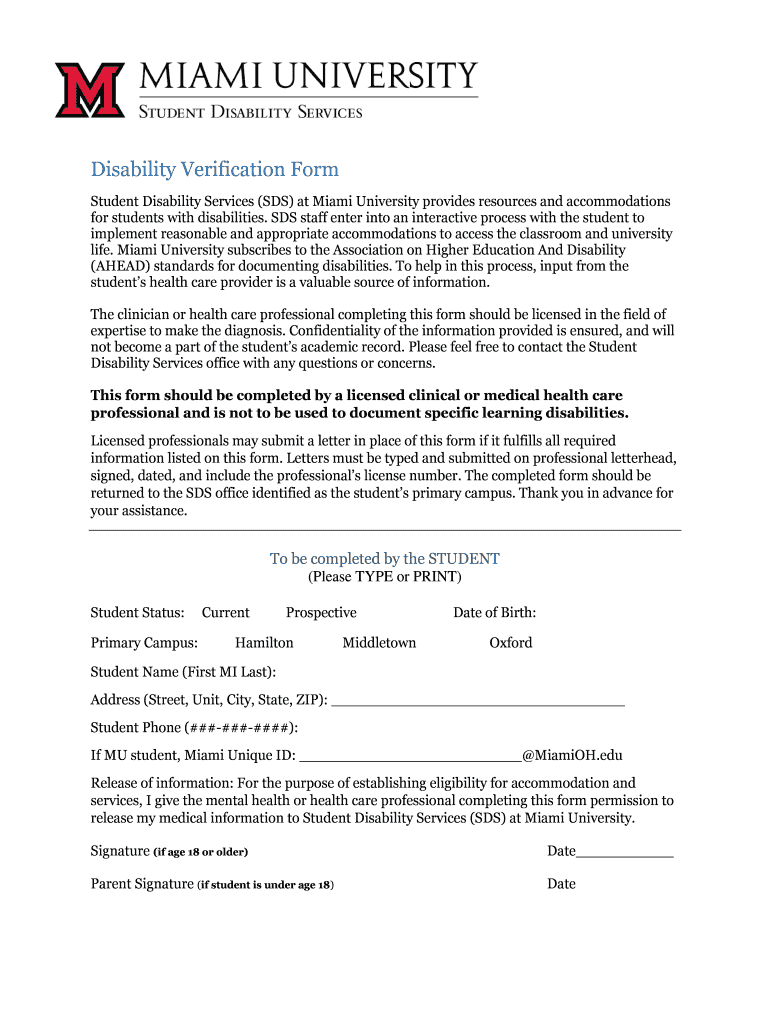
Miami University SDS Disability Verification Form 2017-2026 free printable template
pdfFiller is not affiliated with any government organization

Fill out
Complete the form online in a simple drag-and-drop editor.

eSign
Add your legally binding signature or send the form for signing.

Share
Share the form via a link, letting anyone fill it out from any device.

Export
Download, print, email, or move the form to your cloud storage.
Why pdfFiller is the best tool for your documents and forms


End-to-end document management
From editing and signing to collaboration and tracking, pdfFiller has everything you need to get your documents done quickly and efficiently.
Accessible from anywhere
pdfFiller is fully cloud-based. This means you can edit, sign, and share documents from anywhere using your computer, smartphone, or tablet.
Secure and compliant
pdfFiller lets you securely manage documents following global laws like ESIGN, CCPA, and GDPR. It's also HIPAA and SOC 2 compliant.
What is Miami University SDS Disability Verification Form
The Disability Verification Form is a medical consent document used by Miami University’s Student Disability Services to verify a student’s disability and recommend necessary accommodations.
pdfFiller scores top ratings on review platforms




Who needs Miami University SDS Disability Verification Form?
Explore how professionals across industries use pdfFiller.

Miami University SDS Disability Verification Form is needed by:
-
Students seeking accommodations for a disability
-
Parents of students requiring disability services
-
Certifying professionals verifying student disabilities
-
Educational institutions supporting disability programs
-
Healthcare providers completing disability documentation
Comprehensive Guide to Miami University SDS Disability Verification Form
What is the Disability Verification Form?
The Disability Verification Form is a crucial document utilized by Miami University's Student Disability Services (SDS) to officially document a student's disability. This form is vital for ensuring that students receive the necessary accommodations to support their educational journey. It must be completed by students, parents, and certifying professionals, illustrating its collaborative nature in supporting student needs.
Both students and parents play a role in gathering the required information, while licensed healthcare professionals provide necessary verification of the disability to guide appropriate accommodations. This ensures a comprehensive approach to addressing student disability needs.
Purpose and Benefits of the Disability Verification Form
The primary purpose of the Disability Verification Form is to assist students in documenting their disabilities for accommodation purposes. By having verified disability documentation, students gain access to essential educational support services tailored to facilitate their learning experience. This documentation not only opens the door to necessary resources but also empowers students in their advocacy for themselves within academic settings.
-
Helps in securing accommodations tailored to individual disabilities.
-
Legitimizes student requests for support based on verified documentation.
-
Involves healthcare professionals, adding a layer of credibility to the process.
Who Needs the Disability Verification Form?
The Disability Verification Form is required for specific groups within Miami University. Primarily, students seeking accommodations must complete this form. Additionally, parents may need to assist in the process, particularly for dependents, while certifying professionals contribute by verifying the student's diagnosis. Understanding the eligibility criteria ensures that all necessary parties fulfill their responsibilities in this collaborative effort.
-
Students requesting accommodations based on their disabilities.
-
Parents who need to support their child’s application.
-
Certifying professionals validating the disability diagnosis.
How to Fill Out the Disability Verification Form Online
To complete the Disability Verification Form online, follow these steps using pdfFiller:
-
Access the form through your pdfFiller account.
-
Fill out the designated fields for students, parents, and certifying professionals.
-
Ensure accuracy by cross-checking provided information.
-
Save the document periodically to avoid data loss.
-
Finalize the form by signing it and submitting.
Accuracy is crucial; therefore, it is recommended to review each section thoroughly before submission.
Common Errors and How to Avoid Them
While filling out the Disability Verification Form, users often encounter common errors that can hinder the submission process. Frequent mistakes include leaving required fields blank or entering inconsistent information between sections. To minimize these errors, it is advisable to review the completed form carefully prior to submission.
-
Double-check all entries for accuracy and completeness.
-
Consult provided instructions for any unclear sections.
-
Utilize a checklist to verify that all parts of the form are filled out appropriately.
Submission Process for the Disability Verification Form
Once the Disability Verification Form is completed, it must be submitted according to specified guidelines. There are several methods available for submission, including online submission and physical mailing. Ensuring that the form is correctly signed and includes any required supplemental documentation is essential for smooth processing.
-
Submit online through your pdfFiller account for instant processing.
-
Mail the printed form to the SDS office if preferred.
-
Make sure all required signatures are provided before submission.
What Happens After You Submit the Disability Verification Form?
After submitting the Disability Verification Form, it undergoes a processing timeline that may vary. Students can expect to receive confirmation regarding their submission status, which is important for tracking the progress of their requests. Adhering to deadlines is crucial; missing the submission timeline may result in delayed processing of accommodations.
-
Check the status of your form periodically for updates.
-
Be aware of the consequences of not submitting on time.
Security and Compliance with the Disability Verification Form
Handling sensitive disability documentation requires robust security measures. pdfFiller employs features such as 256-bit encryption and adheres to HIPAA compliance to ensure data protection for users completing the Disability Verification Form. This commitment to security reassures users that their information is handled with the utmost confidentiality.
-
Utilizes advanced encryption technologies for data protection.
-
Ensures compliance with legal standards for secure handling of sensitive information.
Sample or Example of a Completed Disability Verification Form
Providing a visual reference can significantly aid users in filling out the Disability Verification Form accurately. By examining a sample form, students and associated parties can identify key sections and typical responses, making the process more straightforward. Therefore, referring to the example can enhance understanding and compliance with form requirements.
Maximize Your Experience with the Disability Verification Form Using pdfFiller
Utilizing pdfFiller to fill out and submit your Disability Verification Form simplifies the entire process. The platform allows for easy editing, filling, and signing of documents, providing a secure and efficient way to manage your form submissions. Embracing the capabilities of pdfFiller ensures that users have a smooth and secure experience while navigating the complexities of disability documentation.
How to fill out the Miami University SDS Disability Verification Form
-
1.Access the Disability Verification Form on pdfFiller by using the direct link provided by Miami University or searching for it on the website.
-
2.Open the form and review the available sections to understand what information is required from you, including student details, parental consent, and healthcare professional verification.
-
3.Before starting, gather all necessary documentation, including the student’s medical records, diagnosis, and any previous accommodation details that may be requested.
-
4.Fill in the required fields clearly, ensuring that all information is accurate. Use pdfFiller’s editing tools to input text into the designated boxes.
-
5.For sections requiring signatures, ensure the relevant individuals (student, parent, certifying professional) are prepared to sign electronically or print for a handwritten signature.
-
6.Once all fields are completed, review the form carefully for any missing information or errors before finalizing it.
-
7.After review, use pdfFiller's options to save your form, download it for your records, or submit electronically to the Miami University Student Disability Services office.

Who is eligible to use the Disability Verification Form?
The Disability Verification Form is available for students at Miami University who require accommodations due to a documented disability, as well as their parents and certifying professionals.
What is the deadline for submitting the Disability Verification Form?
It is advisable to submit the Disability Verification Form well in advance of the semester to ensure timely processing of accommodations. Check Miami University's SDS office for specific deadlines.
How should I submit the completed Disability Verification Form?
Completed forms can be submitted electronically through pdfFiller directly to the Miami University Student Disability Services office or printed and mailed if preferred.
What supporting documents are required when submitting this form?
You will need to provide any necessary medical documentation that verifies the disability, as well as recommendations for accommodations from a licensed healthcare professional.
What are common mistakes to avoid when completing the form?
Ensure all sections are filled accurately, signatures are obtained, and that the required medical documentation is attached. Double-check for typos and unclear information.
What is the typical processing time for accommodations once the form is submitted?
Processing times can vary but generally allow several weeks for review. It’s recommended to submit the form early for faster accommodations.
Can this form be notarized?
No, the Disability Verification Form does not require notarization; however, signatures from all relevant parties must be provided.
Related Forms



Get the latest insights from our blog


If you believe that this page should be taken down, please follow our DMCA take down process
here
.
This form may include fields for payment information. Data entered in these fields is not covered by PCI DSS compliance.