
Last updated on
Oct 31, 2026

Get the free Real Estate Occupancy Agreement
We are not affiliated with any brand or entity on this form

Fill out
Complete the form online in a simple drag-and-drop editor.

eSign
Add your legally binding signature or send the form for signing.

Share
Share the form via a link, letting anyone fill it out from any device.

Export
Download, print, email, or move the form to your cloud storage.
Why pdfFiller is the best tool for your documents and forms


End-to-end document management
From editing and signing to collaboration and tracking, pdfFiller has everything you need to get your documents done quickly and efficiently.
Accessible from anywhere
pdfFiller is fully cloud-based. This means you can edit, sign, and share documents from anywhere using your computer, smartphone, or tablet.
Secure and compliant
pdfFiller lets you securely manage documents following global laws like ESIGN, CCPA, and GDPR. It's also HIPAA and SOC 2 compliant.
What is Pre-Possession Agreement
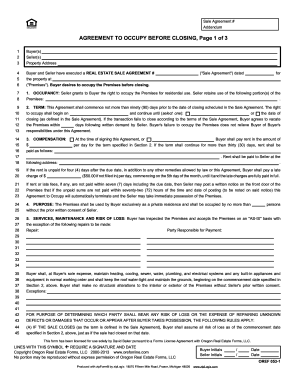
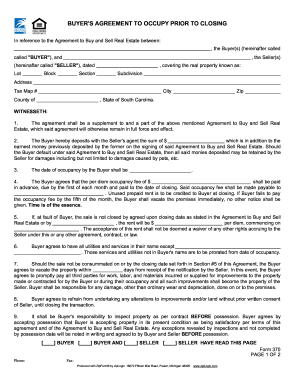
The Real Estate Occupancy Agreement is a document used by buyers and sellers to outline the terms for a buyer's early occupancy of a property before closing.
pdfFiller scores top ratings on review platforms




Who needs Pre-Possession Agreement?
Explore how professionals across industries use pdfFiller.

Pre-Possession Agreement is needed by:
-
Home buyers looking to occupy a property prior to closing.
-
Home sellers who want to set terms for pre-closing occupancy.
-
Real estate agents facilitating transactions involving early occupancy.
-
Investors purchasing real estate needing immediate access to a property.
-
Property management companies overseeing early occupancy situations.
Comprehensive Guide to Pre-Possession Agreement
What is the Real Estate Occupancy Agreement?
The Real Estate Occupancy Agreement serves as a complement to a Purchase and Sale Contract. It allows buyers to occupy a property before the closing date. Key terms within the agreement include "early occupancy" and “purchase addendum,” which clarify the conditions under which a buyer may access the property prior to finalizing the sale.
This agreement is critical in outlining the expectations related to occupancy, emphasizing the roles of both parties involved.
Purpose and Benefits of the Real Estate Occupancy Agreement
This agreement is essential for facilitating a smoother transition for buyers and sellers during the real estate transaction process. One of the main advantages is that it permits buyers to move into the property before closing, offering immediate access while also establishing clear terms regarding rental payments and responsibilities for utilities and maintenance.
Both buyers and sellers stand to benefit as the agreement mitigates misunderstandings related to occupancy and lays out the expectations surrounding early access to the property.
Key Features of the Real Estate Occupancy Agreement
The Real Estate Occupancy Agreement includes several key components that ensure thorough documentation of the terms. Fillable fields such as occupancy date, daily rental, and security deposit allow customization to fit the specific circumstances of the sale.
Additional features include signature lines for both the buyer and seller, ensuring legal binding once the document is completed.
Who Needs the Real Estate Occupancy Agreement?
This agreement is particularly beneficial for two types of parties. First, sellers who wish to grant buyers early access to the property will find this document essential. Second, buyers who require a place to live or operate before the official transfer of ownership should utilize the Real Estate Occupancy Agreement to secure their needs.
How to Fill Out the Real Estate Occupancy Agreement Online (Step-by-Step)
-
Access the form on pdfFiller’s platform.
-
Begin by filling out the "Premise" section with property details.
-
Clearly specify the occupancy date and per diem rental.
-
Complete fields for security deposit amounts.
-
Ensure both parties sign the document in the designated areas.
By following these steps, users can efficiently complete the Real Estate Occupancy Agreement, ensuring all important areas are addressed.
Common Errors and How to Avoid Them
When filling out the Real Estate Occupancy Agreement, users often encounter a few common pitfalls. Missing signatures are a frequent oversight, and incorrect dates can lead to legal complications. To avoid these issues, users should double-check all information entered in the form before submitting.
Reviewing the document multiple times can help catch any errors that may have been overlooked initially.
Signing the Real Estate Occupancy Agreement
Obtaining signatures from both the buyer and seller is a crucial step in finalizing the agreement. It is important to understand the differences between digital and wet signatures, as each carries legal weight. Ensure both parties verify their signature requirements before submitting the form.
How to Save and Submit the Real Estate Occupancy Agreement
After filling out the Real Estate Occupancy Agreement, users have a few options for saving their completed form. Instructions provide guidance for downloading and saving the PDF version for personal records. Once saved, users can share the document with relevant parties through various submission methods.
Security and Compliance for the Real Estate Occupancy Agreement
Users can feel secure knowing that pdfFiller incorporates robust security measures for their documents. With 256-bit encryption and adherence to HIPAA compliance, the platform aims to protect sensitive data effectively. Data protection is paramount, particularly in handling documents like the Real Estate Occupancy Agreement.
Experience Seamless Document Management with pdfFiller
pdfFiller is designed to enhance the document management experience by offering tools for editing, eSigning, and sharing PDFs without the need for additional downloads. Users will also appreciate the platform's security features that ensure data protection while managing their real estate forms.
How to fill out the Pre-Possession Agreement
-
1.Access pdfFiller and search for the Real Estate Occupancy Agreement form to open it in your browser.
-
2.Familiarize yourself with the interface, ensuring you know how to navigate to various sections of the document.
-
3.Gather necessary information, including the property's address, buyer and seller names, desired occupancy date, security deposit amount, and rental rates.
-
4.Fill in the designated fields in pdfFiller carefully; include accurate details for the premises, dates, and responsibilities associated with the agreement.
-
5.Utilize fillable fields for seller and buyer information, input per diem rental, and specify security deposit amounts clearly.
-
6.Review all information entered for accuracy to avoid common mistakes such as missing signatures or incorrect dates.
-
7.Once finalized, save the document on pdfFiller, ensuring you have the latest version of the agreement.
-
8.Download the completed form to your local device or submit it directly through pdfFiller if required.

What eligibility requirements are needed to use this form?
Both the buyer and seller must be legally competent individuals or entities capable of entering into contracts. Ensure all parties agree to the terms set in the Real Estate Occupancy Agreement before using this form.
Are there any deadlines I need to be aware of?
Timing is critical when completing the Real Estate Occupancy Agreement. It's important to establish occupancy dates clearly, preferably well before the closing date to ensure all terms are set and agreed upon.
What methods can I use to submit the form?
The Real Estate Occupancy Agreement can be submitted digitally through pdfFiller by downloading it and emailing it to the relevant parties. Alternatively, print and hand-deliver or mail the signed document.
What supporting documents are required with this form?
Typically, supporting documents may include the Purchase and Sale Contract, proof of identification for both parties, and any documented agreements regarding conditions of occupancy.
What common mistakes should I avoid when completing the form?
Common mistakes include leaving fields blank, not initializing changes, or miscommunicating occupancy terms. Ensure all details are accurate, and review the document thoroughly before signatures.
How long does it take to process this form?
Processing times may vary depending on both parties' responses. Once signed, the form is effective immediately unless specified otherwise within the agreement.
What special concerns should I consider regarding this form?
Consider including clear terms about liabilities and responsibilities during the occupancy period to prevent disputes. Early occupancy can complicate agreements, so clarity is essential.
Related Forms




Get the latest insights from our blog


If you believe that this page should be taken down, please follow our DMCA take down process
here
.
This form may include fields for payment information. Data entered in these fields is not covered by PCI DSS compliance.