
Last updated on
Nov 9, 2026
PA DL-17 2019 free printable template
pdfFiller is not affiliated with any government organization

Fill out
Complete the form online in a simple drag-and-drop editor.

eSign
Add your legally binding signature or send the form for signing.

Share
Share the form via a link, letting anyone fill it out from any device.

Export
Download, print, email, or move the form to your cloud storage.
Why pdfFiller is the best tool for your documents and forms


End-to-end document management
From editing and signing to collaboration and tracking, pdfFiller has everything you need to get your documents done quickly and efficiently.
Accessible from anywhere
pdfFiller is fully cloud-based. This means you can edit, sign, and share documents from anywhere using your computer, smartphone, or tablet.
Secure and compliant
pdfFiller lets you securely manage documents following global laws like ESIGN, CCPA, and GDPR. It's also HIPAA and SOC 2 compliant.
What is PA DL-17
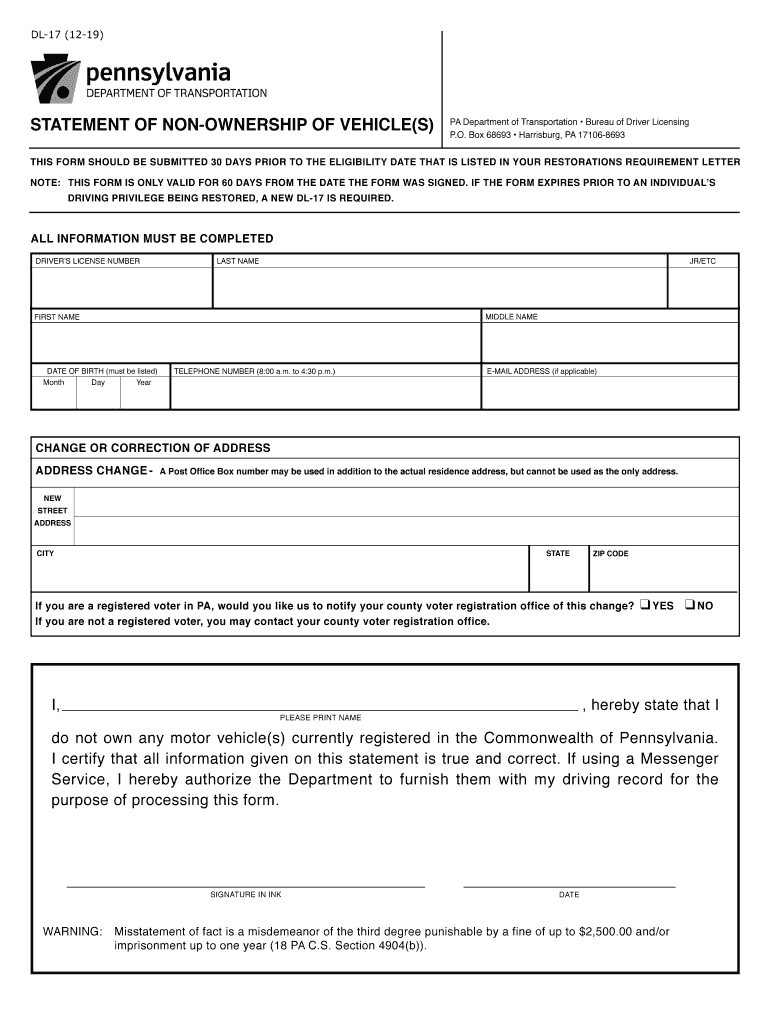
The Pennsylvania Non-Ownership Vehicle Statement is a government form used by residents to declare non-ownership of motor vehicles for the purpose of driver's license restoration.
pdfFiller scores top ratings on review platforms




i just started using it. so far very good. would like to be able to erase exhisting texts on a document
great help.. used it more than anticipated!
Who needs PA DL-17?
Explore how professionals across industries use pdfFiller.

PA DL-17 is needed by:
-
Individuals applying for driver's license restoration in Pennsylvania
-
Residents without vehicle ownership needing verification
-
Drivers whose license eligibility is contingent on non-ownership declaration
-
Applicants seeking to complete PA DOT documentation
-
People requiring a formal statement for personal records
Comprehensive Guide to PA DL-17
What is the Pennsylvania Non-Ownership Vehicle Statement?
The Pennsylvania Non-Ownership Vehicle Statement, known as the DL-17 form, is crucial for individuals seeking to restore their driver's licenses in Pennsylvania. This form allows applicants to declare that they do not own any motor vehicles, which is a necessary step in the license restoration process.
It is important to file the DL-17 form correctly, as it must be submitted 30 days before the eligibility date specified for restoration. Note that this form remains valid for 60 days from the date of signing.
Purpose and Benefits of the Pennsylvania Non-Ownership Vehicle Statement
The primary function of the Pennsylvania Non-Ownership Vehicle Statement is to facilitate the restoration of a driver’s license by confirming the non-ownership status of a vehicle. This declaration is significant for maintaining legal compliance within the state.
By utilizing this form, applicants ensure effective communication with the Pennsylvania Department of Transportation (PennDOT), which streamlines the overall restoration process. Filing the DL-17 form not only simplifies the requirements but also enhances the applicant's eligibility for a restored driver's license.
Who Needs to Fill Out the Pennsylvania Non-Ownership Vehicle Statement?
This form is specifically designed for individuals who have lost their driver's licenses due to vehicle ownership issues. It is especially relevant for those who have moved out of state, do not currently own a vehicle, or are otherwise in circumstances that necessitate a declaration of non-ownership.
Eligible applicants include a wide range of individuals dealing with licensing issues, making this form essential for many in the state.
How to Fill Out the Pennsylvania Non-Ownership Vehicle Statement Online (Step-by-Step)
-
Visit the pdfFiller website to access the DL-17 form PDF.
-
Complete the required personal information fields, including your name, driver's license number, and date of birth.
-
Upload any necessary supporting documentation as prompted.
-
Review the form for accuracy before eSigning.
-
Submit the completed form directly to PennDOT online or through other specified channels.
Utilizing resources like templates from the Pennsylvania DOT can provide further clarity during the filling process.
Field-by-Field Instructions for the Pennsylvania Non-Ownership Vehicle Statement
When filling out the Pennsylvania Non-Ownership Vehicle Statement, each section requires precise information. Key fields include your driver’s license number, full name, date of birth, and current address.
Additionally, there are checkboxes that applicants need to pay attention to, such as those for voter registration notification options. Accuracy in completing these fields is crucial to avoid common errors that could delay the process.
Submission Methods and Delivery of the Pennsylvania Non-Ownership Vehicle Statement
The DL-17 form can be submitted through various methods, including online via pdfFiller or by traditional mail. For mail submissions, ensure that you send the form to the appropriate PennDOT address.
Be mindful of deadlines, as timely submission is essential. Processing times can vary, so applicants should remain informed about their submission status to avoid any potential issues.
Security and Compliance When Submitting the Pennsylvania Non-Ownership Vehicle Statement
Concern regarding security is paramount when submitting sensitive documents. pdfFiller implements advanced encryption measures to safeguard your data during the submission process.
The platform adheres to HIPAA and GDPR compliance standards, ensuring that your personal information is handled appropriately and securely. Best practices for maintaining privacy include verifying the platform's security features during completion and submission of the DL-17 form.
What Happens After You Submit the Pennsylvania Non-Ownership Vehicle Statement?
Once the Pennsylvania Non-Ownership Vehicle Statement is submitted, applicants can expect confirmation messages, providing reassurance that their application has been received. There may also be tracking options available to monitor the status of the submission.
If any issues arise with your application, the communication process typically includes directives on how to address these concerns. Additionally, the time frame for receiving updates or approvals can vary, so stay attuned to any correspondence from PennDOT.
Utilizing pdfFiller for Your Pennsylvania Non-Ownership Vehicle Statement Needs
Leveraging pdfFiller can significantly enhance your experience when filling out the Pennsylvania Non-Ownership Vehicle Statement. The platform offers a range of capabilities, including editing, eSigning, and efficient document management.
Using pdfFiller not only simplifies the form-filling process but also reinforces security, making it easier for users to handle the DL-17 form and any associated personal data with confidence.
How to fill out the PA DL-17
-
1.To start, go to pdfFiller's website and log into your account or create a new account if you do not have one.
-
2.Once logged in, use the search bar to type 'Pennsylvania Non-Ownership Vehicle Statement' or enter 'DL-17 form' to find the specific document quickly.
-
3.After locating the form, click on it to open in pdfFiller's editing interface.
-
4.Ensure you have your personal information ready, including your driver's license number, name, date of birth, and current address.
-
5.Begin filling in the required fields. You can click directly on the fields for driver’s license number, name, date of birth, and address to enter your information.
-
6.If needed, check the boxes regarding voter registration notification as part of the submission process.
-
7.As you fill out the form, frequently save your progress to avoid data loss. Use the save option in pdfFiller.
-
8.After completing all necessary fields, review the entered information for accuracy and completeness. Double-check fields such as your name and date of birth.
-
9.Once finalized, add your signature by either drawing, uploading, or typing it into the designated signature field.
-
10.If your form is ready for submission, proceed to either download a copy for your records or choose to submit it electronically through pdfFiller's submission options.

Who needs to fill out the Pennsylvania Non-Ownership Vehicle Statement?
This form is required for individuals applying for driver's license restoration in Pennsylvania who do not own a vehicle. It verifies non-ownership for the Department of Transportation.
What is the deadline for submitting the DL-17 form?
The Pennsylvania Non-Ownership Vehicle Statement must be submitted 30 days prior to the eligibility date mentioned in your restoration requirement letter for effective processing.
How can I submit the Pennsylvania Non-Ownership Vehicle Statement?
You can submit the form either by downloading and mailing a physical copy to the relevant office or electronically via pdfFiller if your account permits online submissions.
Are there any supporting documents required with this form?
Typically, you may need to provide identification and any previously issued documentation or letters concerning your driver's license status along with your completed Non-Ownership Vehicle Statement.
What common mistakes should I avoid when filling out the form?
Always double-check that your name, license number, and other personal details are correctly entered. Ensure that all fields are completed, and avoid missing the signature at the end of the form.
How long is the Pennsylvania Non-Ownership Vehicle Statement valid for?
The DL-17 form remains valid for 60 days from the date you sign it, so ensure you submit it promptly to match your license restoration requirements.
What should I do if I need help completing the form?
If you need assistance, pdfFiller offers tutorials and customer support that can guide you through the document filling process, or you can contact local DMV offices for help.
PA DL-17 Form Versions
Related Content
Related Forms


Get the latest insights from our blog


If you believe that this page should be taken down, please follow our DMCA take down process
here
.
This form may include fields for payment information. Data entered in these fields is not covered by PCI DSS compliance.