
Last updated on
Nov 9, 2026
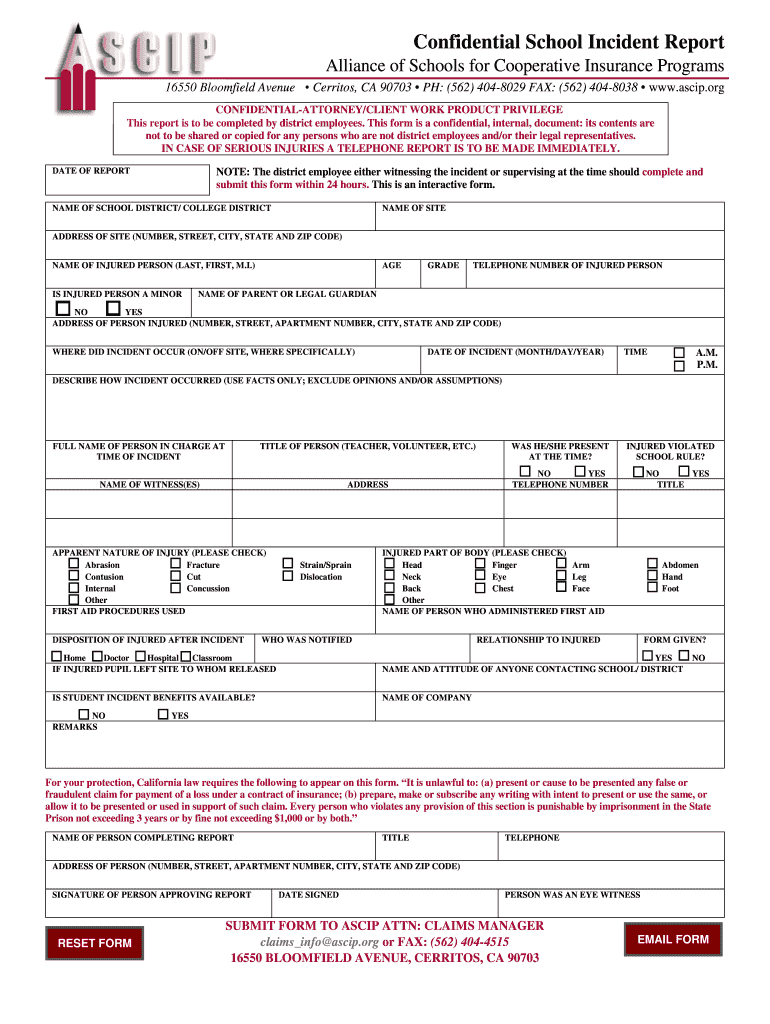
MTSAC ASCIP Confidential School Incident Report 2019 free printable template
pdfFiller is not affiliated with any government organization

Fill out
Complete the form online in a simple drag-and-drop editor.

eSign
Add your legally binding signature or send the form for signing.

Share
Share the form via a link, letting anyone fill it out from any device.

Export
Download, print, email, or move the form to your cloud storage.
Why pdfFiller is the best tool for your documents and forms


End-to-end document management
From editing and signing to collaboration and tracking, pdfFiller has everything you need to get your documents done quickly and efficiently.
Accessible from anywhere
pdfFiller is fully cloud-based. This means you can edit, sign, and share documents from anywhere using your computer, smartphone, or tablet.
Secure and compliant
pdfFiller lets you securely manage documents following global laws like ESIGN, CCPA, and GDPR. It's also HIPAA and SOC 2 compliant.
What is MTSAC ASCIP Confidential School Incident Report
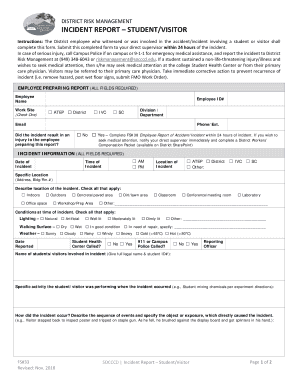
The Confidential School Incident Report is a documentation form used by district employees to report injuries occurring within a school or college district.
pdfFiller scores top ratings on review platforms




Who needs MTSAC ASCIP Confidential School Incident Report?
Explore how professionals across industries use pdfFiller.

MTSAC ASCIP Confidential School Incident Report is needed by:
-
School administrators responsible for incident reporting
-
Teachers involved in classroom management and safety
-
School nurses or medical staff managing injuries
-
District compliance officers ensuring legal adherence
-
Legal representatives addressing claims or disputes
Comprehensive Guide to MTSAC ASCIP Confidential School Incident Report
What is the Confidential School Incident Report?
The Confidential School Incident Report is a crucial document utilized within educational institutions to formally report incidents involving injuries. This report serves to document essential details such as the injured person's name, the nature of their injury, and any first aid that was administered. It underscores both legal significance and confidentiality, ensuring that sensitive information is protected while maintaining accountability.
Complying with legal standards, this report is designed for internal use only, thereby safeguarding the privacy of individuals involved. Schools and colleges rely on this form for transparency in their reporting practices.
Purpose and Benefits of the Confidential School Incident Report
Timely reporting using the Confidential School Incident Report is vital for ensuring safety and accountability in educational environments. By documenting incidents accurately, educational institutions can track patterns and enhance their safety policies, which can lead to improved risk management.
The confidentiality of the report helps in controlling access to sensitive information, allowing only authorized personnel to review it. This not only protects the privacy of the individuals involved but also supports legal protections against potential liabilities.
Key Features of the Confidential School Incident Report
This report is designed to be user-friendly, featuring fillable fields and checkboxes that streamline the completion process. Key sections of the form include spaces for signatures from both the person completing the report and the approver, which adds an additional layer of accountability.
-
Fillable fields for ease of entry
-
Clear instructions for accurate completion
-
Security features to safeguard sensitive information
Who Needs to Complete the Confidential School Incident Report?
The responsibility of completing the Confidential School Incident Report typically falls upon designated staff members or district employees trained to handle incident reporting. The approvers are usually administrators or higher-ups who review and ensure the accuracy of the submitted information.
It's critical that all personnel involved in the reporting process understand their roles and responsibilities. Training programs on filling out the report accurately can significantly improve the quality and reliability of incident documentation.
How to Fill Out the Confidential School Incident Report Online (Step-by-Step)
Filling out the Confidential School Incident Report online involves several systematic steps:
-
Access the report through the designated platform.
-
Gather all necessary information, such as witness statements and the details of the injury.
-
Complete each section, ensuring all required fields are accurately filled.
-
Review the form for any common mistakes, such as unfilled fields or incorrect data.
-
Submit the report according to the specified method.
Understanding Submission Methods and Delivery for the Confidential School Incident Report
After completing the Confidential School Incident Report, various submission methods are available. Reports can be submitted online, via email, or delivered in person to the district office, depending on the school's established protocols. Being aware of submission deadlines is critical to ensure timely processing of the report.
It is also recommended to confirm the status of the submission and, if necessary, obtain a confirmation upon submission to maintain records of the incident.
Security and Compliance Considerations for the Confidential School Incident Report
Ensuring the security and compliance of the Confidential School Incident Report is paramount. The report employs various security measures, including encryption, to protect sensitive information contained within.
Compliance with applicable regulations concerning school incidents is necessary for maintaining legal integrity. Furthermore, schools must adhere to record retention requirements while ensuring that confidentiality is preserved throughout the reporting process.
How pdfFiller Can Help with the Confidential School Incident Report
pdfFiller offers numerous advantages for completing the Confidential School Incident Report. Users can edit, fill out, and eSign the form directly online without needing to download additional software.
The platform's additional features, such as document management, tracking capabilities, and secure sharing options, simplify the process of managing important forms and records.
Sample or Example of a Completed Confidential School Incident Report
To aid users in completing the form accurately, a sample or example of a filled-out Confidential School Incident Report can be demonstrative. This example outlines each section, offering explanations to clarify how to appropriately fill in details.
Emphasizing accuracy in reporting is crucial, as each entry not only reflects individual incidents but can also impact school safety policies.
Final Steps for Using the Confidential School Incident Report
In summary, understanding the significance of the Confidential School Incident Report is vital for all stakeholders. Familiarizing oneself with the steps to complete the report and leveraging resources like pdfFiller can enhance form management efficiency.
Getting started with filling out the report can pave the way for improved safety measures within educational institutions.
How to fill out the MTSAC ASCIP Confidential School Incident Report
-
1.To access the Confidential School Incident Report, visit pdfFiller and search for the form title in the search bar.
-
2.Once located, click on the form to open it in the pdfFiller interface.
-
3.Before beginning to complete the form, gather necessary information including the injured person's name, the details of the injury, and any first aid actions taken.
-
4.Use the fillable fields to enter all required information, ensuring clarity and accuracy in each section.
-
5.Navigate through checkboxes for applicable conditions related to the incident, and follow prompts for any additional details required.
-
6.Carefully review the sections for content accuracy, ensuring that only factual information is included, excluding opinions or assumptions.
-
7.Once all information has been entered, utilize the options to preview the completed form for any errors or omissions.
-
8.To finalize, save your progress and either download the form to your device or submit it directly through pdfFiller.
-
9.Follow the prompts for submission to ensure the report is sent to the appropriate district personnel efficiently.

Who is required to complete the Confidential School Incident Report?
The report must be completed by district employees involved in the incident, typically teachers or administrators. It is essential for documentation of school-related injuries and must be submitted within 24 hours.
What information is necessary to fill out the form?
You will need specific details including the name of the injured person, the nature of the injury, a description of how the incident occurred, and information about any first aid provided.
How should I submit the completed report?
Once you have completed the report, you can submit it electronically through pdfFiller or download it and submit it in person to your district office according to your school’s procedure.
What are the deadlines for submitting the incident report?
The Confidential School Incident Report must be completed and submitted within 24 hours of the incident to ensure compliance with district reporting protocols.
Are there any supporting documents required with the incident report?
Typically, no additional supporting documents are required when submitting the report itself. However, keep any medical records or witness statements on hand in case they are requested later.
What should I avoid when completing the incident report?
Ensure that only factual information is included in the report. Avoid including personal opinions or assumptions about the incident to maintain clarity and accuracy.
How will the submitted incident report be processed?
After submission, the report will be reviewed by the appropriate district personnel. It helps to inform actions taken for legal compliance and to assess safety protocols within the school.
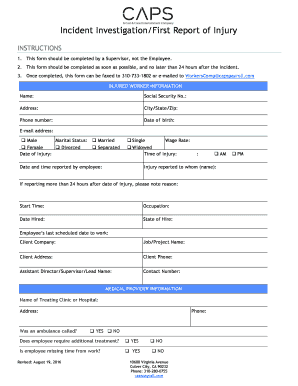
MTSAC ASCIP Confidential School Incident Report Form Versions
Related Forms





Get the latest insights from our blog


If you believe that this page should be taken down, please follow our DMCA take down process
here
.
This form may include fields for payment information. Data entered in these fields is not covered by PCI DSS compliance.