
Last updated on
Nov 9, 2026

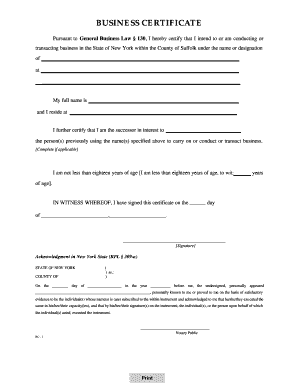
MA Business Certificate - City of Springfield 2017 free printable template
pdfFiller is not affiliated with any government organization

Fill out
Complete the form online in a simple drag-and-drop editor.

eSign
Add your legally binding signature or send the form for signing.

Share
Share the form via a link, letting anyone fill it out from any device.

Export
Download, print, email, or move the form to your cloud storage.
Why pdfFiller is the best tool for your documents and forms


End-to-end document management
From editing and signing to collaboration and tracking, pdfFiller has everything you need to get your documents done quickly and efficiently.
Accessible from anywhere
pdfFiller is fully cloud-based. This means you can edit, sign, and share documents from anywhere using your computer, smartphone, or tablet.
Secure and compliant
pdfFiller lets you securely manage documents following global laws like ESIGN, CCPA, and GDPR. It's also HIPAA and SOC 2 compliant.
What is MA Business Certificate - City of Springfield
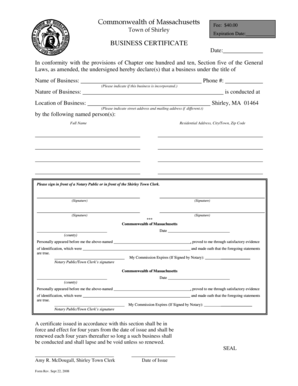
The Business Certificate is a document used by entrepreneurs to officially register a business in the City of Springfield, Massachusetts.
pdfFiller scores top ratings on review platforms




Who needs MA Business Certificate - City of Springfield?
Explore how professionals across industries use pdfFiller.

MA Business Certificate - City of Springfield is needed by:
-
Local business owners starting a new enterprise
-
Entrepreneurs seeking to operate in Springfield, MA
-
Individuals registering a partnership or LLC
-
Companies applying for business licenses in Massachusetts
-
Professionals needing to comply with local business regulations
Comprehensive Guide to MA Business Certificate - City of Springfield
What is a Business Certificate?
A Business Certificate, also known as a DBA (Doing Business As), is a crucial document for business registration in Springfield, Massachusetts. It legitimizes business operations by officially recording the business name with the City Clerk's office. This document is necessary when starting a business to ensure compliance with local regulations and establish credibility among customers and stakeholders.
Obtaining a business certificate is essential to secure proper licenses and permits, which contribute to a business's legal standing in the community. Without this document, entrepreneurs may face challenges in operating their businesses effectively.
Purpose and Benefits of the Business Certificate
The Business Certificate serves several purposes, significantly benefiting entrepreneurs and small business owners in Springfield. Firstly, it helps in establishing a brand presence and compliance with legal requirements. A registered business name can enhance trust among customers and stakeholders.
Furthermore, having a Business Certificate is often a prerequisite for opening a business bank account and applying for various licenses and permits. This foundational step in business registration is crucial for long-term success.
Who Needs a Business Certificate?
Various types of businesses in Springfield require a Business Certificate, including sole proprietorships, partnerships, and limited liability companies. For instance, if an individual plans to operate a bakery under a unique name, obtaining a business certificate is necessary to ensure legitimacy.
Additionally, while most businesses need this certificate, certain exceptions exist, such as specific nonprofit organizations or businesses operating under a corporate structure that do not require a DBA.
Eligibility Criteria for the Business Certificate
To qualify for a Business Certificate, applicants must meet certain eligibility criteria. Typical qualifications include being of legal age, usually 18 years or older, and having valid identification, such as a driver’s license or passport.
Moreover, residency requirements are enforced, meaning applicants should be residents of Springfield or conduct business primarily in the city. Ensuring all qualifications are met can streamline the application process.
How to Fill Out the Business Certificate Online (Step-by-Step)
Completing the Business Certificate form online is a straightforward process with the help of platforms like pdfFiller. Here’s a step-by-step guide on how to fill out the form:
-
Access the Business Certificate form on the pdfFiller website.
-
Utilize the editing tools to fill in all required fields accurately.
-
Double-check your entries for correctness to avoid common mistakes.
-
Save your completed form and prepare it for submission.
By following these steps, you can effectively complete the application and enhance the chances of a smooth submission process.
Required Documents and Supporting Materials
When applying for a Business Certificate, several documents must accompany the application. Essential identification documents include government-issued IDs, such as a driver's license or passport.
Alongside these, applicants might also need to provide business-related documents, such as proof of address and a detailed description of the business activities. Organizing these files efficiently can help prevent delays in processing your application.
Submission Methods and Fees
Business Certificates can be submitted both online and in-person at the City Clerk's office. It’s important to choose the method that aligns with your preferences and circumstances.
The filing fee for a Business Certificate is $50.00, which can be paid through various payment options. Note that timely submission is crucial, as there may be consequences for late filings, including potential fines.
What Happens After You Submit Your Business Certificate?
After submitting your Business Certificate, applicants can track the status of their submission through the City Clerk's office. Approval timelines can vary, so maintaining records of your application is advisable.
In the event of a rejection or if amendments are needed, applicants should promptly address any issues or resubmit the necessary changes to ensure their certificate is properly processed.
Security and Compliance While Filing Your Business Certificate
Handling sensitive business documents requires stringent security measures. Platforms such as pdfFiller prioritize data protection through strong security protocols, including data encryption and compliance with regulations like HIPAA and GDPR.
When completing and submitting your form, using trusted platforms is essential to safeguard your information. Ensuring privacy during the filing process can help protect your business’s integrity and sensitive data.
Ready to Start Your Business Journey?
Taking the first step in your business journey with is simplified using pdfFiller. This platform streamlines the process of filling and submitting essential business forms, such as the Business Certificate.
Utilizing pdfFiller empowers users to complete their documentation confidently while providing access to resources and support for navigating document management efficiently.
How to fill out the MA Business Certificate - City of Springfield
-
1.To access the Business Certificate form on pdfFiller, visit the website and enter 'Business Certificate Springfield' in the search bar. Select the correct document from the search results to open it.
-
2.Familiarize yourself with the pdfFiller interface. Use the toolbar to zoom in and out for better visibility. Click on the fields to update them sequentially.
-
3.Before you start filling out the form, gather necessary information such as your business name, address, and type of business structure you are using. You may also need to have your Social Security Number or Employer Identification Number (EIN) handy.
-
4.Complete all mandatory fields in the form. Ensure that you accurately enter your business details, as any error might delay your registration process.
-
5.Once you've filled out the form, carefully review each entry to confirm accuracy. Look for any missing information or fields that need correction. This step is crucial before finalizing your submission.
-
6.After finalizing the form, save your work on pdfFiller by clicking the 'Save' option in the toolbar. Choose the appropriate file format if prompted.
-
7.You can download a copy of the completed form by selecting 'Download' from the options available. Decide whether you want to print directly or save it to your device.
-
8.Finally, submit your Business Certificate to the City Clerk's office as required. Make sure to check the submission guidelines, as they may vary depending on local regulations.

Who is eligible to apply for a Business Certificate in Springfield?
Any individual or entity planning to operate a business in Springfield, Massachusetts is eligible to apply for a Business Certificate. This includes sole proprietors, partnerships, corporations, and LLCs.
What is the filing fee for the Business Certificate?
The filing fee for the Business Certificate in Springfield is $50.00. Make sure to provide the correct fee amount when submitting your application to avoid delays.
What types of businesses require a Business Certificate in Massachusetts?
Most businesses operating under a name other than their legal entity name in Massachusetts require a Business Certificate. This includes sole proprietorships, partnerships, and certain LLCs.
How should I submit my completed Business Certificate?
Completed Business Certificates can typically be submitted in person at the City Clerk's office. Some jurisdictions may offer online submission options, so it’s best to check local regulations for specifics.
What common mistakes should I avoid when filling out the Business Certificate?
Common mistakes include leaving blank fields, misspelling the business name, or providing incorrect information about ownership. Double-check your entries before submission to prevent any potential issues.
What is the processing time for a Business Certificate?
Processing times for a Business Certificate can vary. Generally, it may take a few days to a couple of weeks. Check with the City Clerk's office for more accurate estimates.
Are there any documents needed along with the Business Certificate?
When applying for your Business Certificate, bring valid identification and, if applicable, any supporting documents detailing your business structure. This can expedite the process.
MA Business Certificate - City of Springfield Form Versions
Related Forms





Get the latest insights from our blog


If you believe that this page should be taken down, please follow our DMCA take down process
here
.
This form may include fields for payment information. Data entered in these fields is not covered by PCI DSS compliance.