
Last updated on
Nov 9, 2026

TN AD-H-337 2007-2026 free printable template
pdfFiller is not affiliated with any government organization

Fill out
Complete the form online in a simple drag-and-drop editor.

eSign
Add your legally binding signature or send the form for signing.

Share
Share the form via a link, letting anyone fill it out from any device.

Export
Download, print, email, or move the form to your cloud storage.
Why pdfFiller is the best tool for your documents and forms


End-to-end document management
From editing and signing to collaboration and tracking, pdfFiller has everything you need to get your documents done quickly and efficiently.
Accessible from anywhere
pdfFiller is fully cloud-based. This means you can edit, sign, and share documents from anywhere using your computer, smartphone, or tablet.
Secure and compliant
pdfFiller lets you securely manage documents following global laws like ESIGN, CCPA, and GDPR. It's also HIPAA and SOC 2 compliant.
What is TN AD-H-337
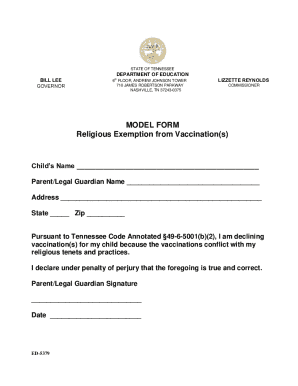
The Tennessee Vaccination Refusal Form is a legal document used by parents or guardians to refuse vaccination for their child due to personal religious beliefs in Tennessee.
pdfFiller scores top ratings on review platforms




Love it, easy to use without reading any instructions.
Easy to use. Had all the forms I needed to fill
Who needs TN AD-H-337?
Explore how professionals across industries use pdfFiller.

TN AD-H-337 is needed by:
-
Parents or guardians of school-aged children in Tennessee
-
Health care providers needing vaccination status confirmation
-
School administrators managing student health records
-
Legal guardians overseeing medical decisions
-
Religious organizations supporting vaccination exemptions
Comprehensive Guide to TN AD-H-337
What is the Tennessee Vaccination Refusal Form?
The Tennessee Vaccination Refusal Form serves a critical role for parents and guardians in Tennessee, allowing them to formally decline vaccinations for their children based on personal religious beliefs. This form is founded on the legal provisions outlined in Tennessee Code Annotated §49-6-5001(b)(2), which grants individuals the right to refuse vaccinations under specific circumstances.
Purpose and Benefits of the Tennessee Vaccination Refusal Form
This form empowers parents and guardians to make personal choices regarding their child’s vaccinations, encouraging autonomy in healthcare decisions. By utilizing the Tennessee Vaccination Refusal Form, families benefit from a clear legal framework that respects their beliefs while also adhering to school requirements across the state.
Who Needs the Tennessee Vaccination Refusal Form?
The primary users of the Tennessee Vaccination Refusal Form are parents and guardians of children attending schools and daycares throughout Tennessee. This form is essential when parents wish to formally declare their refusal of certain vaccinations for their children to meet school entry requirements.
How to Fill Out the Tennessee Vaccination Refusal Form Online (Step-by-Step)
Completing the Tennessee Vaccination Refusal Form online is a straightforward process. Follow these steps:
-
Access the form online and click to open.
-
Fill out your child's personal details, including their name and date of birth.
-
Provide your information as the parent or guardian, including your full name and contact details.
-
Specify the vaccinations you are declining by checking the relevant boxes.
-
Complete the signature line to validate the form.
Field-by-Field Instructions for the Tennessee Vaccination Refusal Form
Each field in the Tennessee Vaccination Refusal Form requires specific information for proper completion:
-
Child's Name: Enter the full name of the child as recorded on their birth certificate.
-
Parent/Guardian Name: Input your full name.
-
Address: Provide your current residential address.
-
Vaccinations Declined: Select the vaccines that you are formally refusing.
-
Signature: Sign to affirm your decision and understanding of the consequences.
Submission Methods and Delivery of the Tennessee Vaccination Refusal Form
Once completed, the Tennessee Vaccination Refusal Form must be submitted promptly. Parents can deliver the form to:
-
Local school districts, which may have specific offices to process health forms.
-
Childcare providers that require proof of vaccination or refusal.
It is important to inquire about deadlines and any potential fees associated with the delivery of this form.
Consequences of Not Submitting the Tennessee Vaccination Refusal Form
Failure to submit the Tennessee Vaccination Refusal Form in a timely manner may lead to mandatory vaccination requirements for school attendance. Parents and guardians must be aware of their legal obligations under Tennessee law, which necessitates verification of vaccination status for school enrollment.
Security and Compliance for the Tennessee Vaccination Refusal Form
When managing the Tennessee Vaccination Refusal Form, it is crucial to protect sensitive health information. Data security is paramount, and compliance with regulations such as HIPAA and GDPR is essential. pdfFiller ensures robust privacy measures while handling your documents.
How pdfFiller Can Help You Complete the Tennessee Vaccination Refusal Form
pdfFiller offers a seamless experience for users completing the Tennessee Vaccination Refusal Form. With capabilities for editing, signing, and sharing documents, pdfFiller simplifies the process of managing your forms securely and efficiently.
Sample of a Completed Tennessee Vaccination Refusal Form
For guidance, a visual example of a filled-out Tennessee Vaccination Refusal Form can help clarify the required sections. This sample serves to illustrate common mistakes and offer tips on how to complete the form accurately.
Take Action with pdfFiller to Manage Your Tennessee Vaccination Refusal Form
Using pdfFiller to fill out, sign, and submit your Tennessee Vaccination Refusal Form provides peace of mind, backed by 256-bit encryption and user-friendly access from any web browser. Leverage pdfFiller's features to simplify your experience today.
How to fill out the TN AD-H-337
-
1.Start by accessing the Tennessee Vaccination Refusal Form on pdfFiller by searching for its title in the platform’s search bar.
-
2.Once opened, navigate through the editable fields where you will enter your child's name and relevant information.
-
3.Before filling out the form, gather necessary documents, including your child's vaccination history and your identification.
-
4.Locate the section where you must indicate the specific vaccines you are refusing and check the corresponding boxes.
-
5.Complete all required fields, ensuring that all your information is accurate and up-to-date.
-
6.Review the form carefully, checking for any missed fields or errors to ensure completeness.
-
7.Once confirmed, you can finalize the form by saving or downloading it in your preferred format available on pdfFiller.
-
8.If required, print the form to sign it physically, or utilize pdfFiller’s e-signature feature before submitting it.

Who is eligible to use the Tennessee Vaccination Refusal Form?
The form is intended for parents or guardians of children who are enrolled in schools in Tennessee and wish to decline vaccinations for personal religious beliefs.
What is the deadline for submitting this form?
While specific deadlines may vary by school district, it is generally recommended to submit the Tennessee Vaccination Refusal Form before the school year starts or as soon as possible when considering a vaccination refusal.
How do I submit the completed form?
You can submit the completed Tennessee Vaccination Refusal Form to your child's school either by mail or in person. Check with the school for their preferred submission methods.
Are there any supporting documents needed with the form?
Typically, no additional documents are required. However, providing a parent or guardian identification can help, along with any prior vaccination records for clarity.
What are common mistakes to avoid when filling out the form?
Ensure all required fields are completed and clearly written. Double-check that you have correctly marked the vaccines you are declining to avoid processing delays.
How long does it take for the form to be processed?
Processing times for the Tennessee Vaccination Refusal Form can vary, but it is advisable to allow at least one to two weeks for the school to acknowledge the submission.
What should I do if I have questions about the form?
If you have any questions, contact your child's school’s administration or visit their official website for guidance on the vaccination refusal process.
Related Forms





Related Catalogs
Get the latest insights from our blog


If you believe that this page should be taken down, please follow our DMCA take down process
here
.
This form may include fields for payment information. Data entered in these fields is not covered by PCI DSS compliance.