
Last updated on
Oct 31, 2026

Get the free Illinois Answer and Affirmative Defenses
We are not affiliated with any brand or entity on this form

Fill out
Complete the form online in a simple drag-and-drop editor.

eSign
Add your legally binding signature or send the form for signing.

Share
Share the form via a link, letting anyone fill it out from any device.

Export
Download, print, email, or move the form to your cloud storage.
Why pdfFiller is the best tool for your documents and forms


End-to-end document management
From editing and signing to collaboration and tracking, pdfFiller has everything you need to get your documents done quickly and efficiently.
Accessible from anywhere
pdfFiller is fully cloud-based. This means you can edit, sign, and share documents from anywhere using your computer, smartphone, or tablet.
Secure and compliant
pdfFiller lets you securely manage documents following global laws like ESIGN, CCPA, and GDPR. It's also HIPAA and SOC 2 compliant.
What is IL Answer
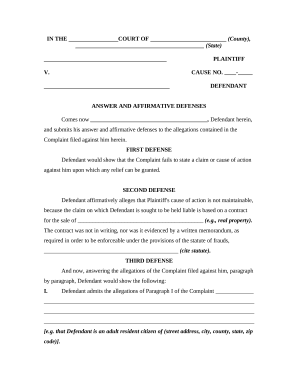
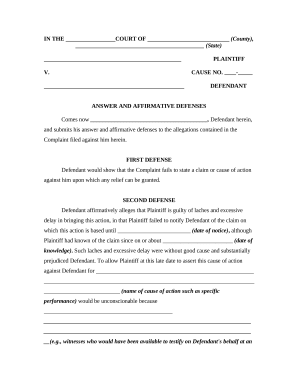
The Illinois Answer and Affirmative Defenses is a legal document used by defendants to respond to allegations in a complaint filed against them in the Circuit Court of Lake County, Illinois.
pdfFiller scores top ratings on review platforms




This software is absolutely amazing and easy to use. I would highly recommend this product to anyone who works with PDF forms on a daily basis, as it simplifies the process of typing on a PDF document.
Easy to use, allowed me to complete important documents safely
Simple and easy to use! As someone who is self-employed this keeps my overhead down. :) Thank you so much.
It's been great...easy to use and navigate! Thx so very much!
super easy to use. It's definitely worth the money!
It take some time getting use to, but appears to be a good program.
Who needs IL Answer?
Explore how professionals across industries use pdfFiller.

IL Answer is needed by:
-
Defendants responding to a court complaint
-
Attorneys representing defendants in Illinois
-
Individuals seeking to assert affirmative defenses
-
Legal professionals drafting court responses
-
Anyone requiring notarized legal filings in Illinois
Comprehensive Guide to IL Answer
What is the Illinois Answer and Affirmative Defenses?
The Illinois Answer and Affirmative Defenses form serves a critical role in responding to legal complaints within the context of the Circuit Court of Lake County, Illinois. This form is a defendant response template that allows individuals accused in a court complaint to articulate their position. Through this Illinois legal defense form, defendants can admit, deny, or state a lack of knowledge regarding the allegations presented against them.
Purpose and Benefits of the Illinois Answer and Affirmative Defenses
Filing the Illinois Answer and Affirmative Defenses offers defendants a structured way to legally respond to complaints. Key reasons for submitting this form include:
-
Formally addressing allegations made by the plaintiff.
-
Establishing affirmative defenses that may protect the defendant’s rights.
-
Meeting legal requirements for a court complaint response in Illinois.
This form is vital in ensuring that defendants present their case effectively and protect their legal interests.
Key Features of the Illinois Answer and Affirmative Defenses
Important components of the Illinois Answer and Affirmative Defenses include:
-
Fillable fields for personal information and case details.
-
Signature requirements for both the defendant and their attorney.
-
Notary blocks necessitating the notarization of the document.
The legal defense template is designed to ensure clarity and compliance with court standards, making it essential for valid court filings.
Who Needs the Illinois Answer and Affirmative Defenses?
This form is primarily intended for defendants and attorneys representing them. Eligibility criteria focus on individuals directly involved in legal proceedings, ensuring they are aware of their obligation to submit the defendant answer form. Understanding who needs to file is crucial for compliance with court requirements related to court documents and legal filings.
When and How to File the Illinois Answer and Affirmative Defenses
Timelines for submitting the Illinois Answer and Affirmative Defenses are critical. Defendants typically must file this form within a specific period after receiving a complaint, often established by court rules. The process involves:
-
Thoroughly completing the form with accurate information.
-
Reviewing the form for completeness and accuracy.
-
Submitting the completed form to the appropriate court office either in person or by other accepted delivery methods.
Understanding Illinois court filing procedures helps avoid unnecessary delays and legal complications.
How to Complete the Illinois Answer and Affirmative Defenses Online
Completing the Illinois Answer and Affirmative Defenses form online is a straightforward process. Here are key instructions:
-
Access the form through a reliable document platform.
-
Fill in required fields, such as the names of the defendant and the attorney.
-
Ensure all information is accurate and review each entry before submission.
Gathering information needed for each field beforehand simplifies this online process, enhancing efficiency.
Common Errors to Avoid When Filing the Illinois Answer and Affirmative Defenses
Defendants often make common mistakes that can lead to rejection of the form. Key areas to focus on include:
-
Incomplete or inaccurate information in fillable fields.
-
Failure to notarize the document before submission.
-
Lack of proper signatures from all required parties.
Implementing a review and validation checklist prior to filing can significantly reduce the chances of errors.
How to Sign and Notarize the Illinois Answer and Affirmative Defenses
Signing the Illinois Answer and Affirmative Defenses can be done either digitally or with a wet signature. Understanding the requirements for notarization is essential, as the form must be notarized to be considered valid. Ensure you meet specific requirements for both digital signature vs. wet signature options to comply with legal standards.
What Happens After You Submit the Illinois Answer and Affirmative Defenses
After submitting the Illinois Answer and Affirmative Defenses, defendants can expect the following:
-
Confirmation of filing from the court.
-
Potential tracking options for monitoring the status of the submission.
-
Awareness of fees, deadlines, and processing time associated with the court’s processing of the form.
Late filing or failure to submit can lead to significant legal consequences, underscoring the importance of timely action.
Why Choose pdfFiller for Your Illinois Answer and Affirmative Defenses?
Using pdfFiller for your Illinois Answer and Affirmative Defenses offers numerous advantages. This platform provides a user-friendly experience for creating and managing legal forms while ensuring security and compliance with legal standards. Features of pdfFiller include:
-
The ability to edit and fill out forms easily.
-
Secure handling of sensitive documents through advanced encryption.
-
Support for eSigning, making the process more efficient.
Choosing pdfFiller simplifies the preparation and management of your Illinois legal defense form.
How to fill out the IL Answer
-
1.To access the Illinois Answer and Affirmative Defenses form on pdfFiller, visit their website and log in or create an account if you don't have one.
-
2.Once logged in, use the search bar to find the form by entering its name or by navigating to the legal documents category.
-
3.After opening the form, familiarize yourself with the layout. Use the fillable fields to enter necessary information such as the 'Name of Defendant', 'Name of Attorney for Defendants', and 'Date'.
-
4.Before starting, gather all relevant details about the complaint, including the allegations made against you and any affirmative defenses you wish to assert.
-
5.Carefully review the fields to ensure correct entries. Avoid leaving any required fields blank to prevent delays or issues with your submission.
-
6.When all fields are complete, use the pdfFiller tools to review your answers. Make changes as necessary until the document is accurate and meets all legal requirements.
-
7.Finalize the document by previewing it in pdfFiller to check for errors before saving your progress.
-
8.To save, download, or submit the completed form, use the options provided in pdfFiller, ensuring that you choose the appropriate method for your needs, such as emailing it directly to the court or downloading it for manual submission.

Who needs to sign the Illinois Answer and Affirmative Defenses form?
The form requires signatures from both the defendants and their attorney to validate the responses and responses to the court allegations.
Is notarization required for this form?
Yes, the Illinois Answer and Affirmative Defenses form must be notarized, ensuring that the signatures are verified and legally binding.
What is the deadline for submitting this form?
While specific deadlines can vary, it is advisable to file the form as soon as possible after being served with the complaint to avoid default judgments.
How should I submit the completed form?
The completed form can typically be submitted in person at the Circuit Court of Lake County or may be sent by mail, depending on local court rules.
What common mistakes should I avoid when completing this form?
Common mistakes include leaving fields blank, failing to notarize the document, and not adhering to formatting requirements for court submissions.
Are there any fees associated with filing this form?
Generally, there could be filing fees associated with submitting forms to the court, so check with the Circuit Court of Lake County for specific fee information.
Can I amend the form after submission?
If you need to make changes after submission, you may need to file a motion to amend your answer, which varies by jurisdiction. Always consult with your attorney for guidance.
Related Forms




Related Catalogs
Get the latest insights from our blog


If you believe that this page should be taken down, please follow our DMCA take down process
here
.
This form may include fields for payment information. Data entered in these fields is not covered by PCI DSS compliance.