
Last updated on
Oct 31, 2026

Get the free Commission Summary Form
We are not affiliated with any brand or entity on this form

Fill out
Complete the form online in a simple drag-and-drop editor.

eSign
Add your legally binding signature or send the form for signing.

Share
Share the form via a link, letting anyone fill it out from any device.

Export
Download, print, email, or move the form to your cloud storage.
Why pdfFiller is the best tool for your documents and forms


End-to-end document management
From editing and signing to collaboration and tracking, pdfFiller has everything you need to get your documents done quickly and efficiently.
Accessible from anywhere
pdfFiller is fully cloud-based. This means you can edit, sign, and share documents from anywhere using your computer, smartphone, or tablet.
Secure and compliant
pdfFiller lets you securely manage documents following global laws like ESIGN, CCPA, and GDPR. It's also HIPAA and SOC 2 compliant.
What is Commission Summary
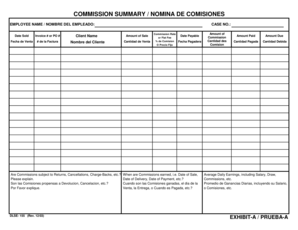
The Commission Summary Form is a business document used by sales teams to calculate and summarize commissions earned over a specified period.
pdfFiller scores top ratings on review platforms




Very glad to have this app
THE BEST ONE.
Kara was excellent
Kara was excellent, she handled my query quickly and efficiently. She sent me confirmation emails as requested. In short, I couldn't have asked for better customer service. Thank you.
Does everything I need it to do
Does everything I need it to do! A little bumpy to get used to, but am finding more uses for it daily!
pdfFiller is easy to use
pdfFiller is easy to use, fast and effective! Keep up the great work!
Good customer service
good customer service
Who needs Commission Summary?
Explore how professionals across industries use pdfFiller.

Commission Summary is needed by:
-
Salespersons tracking commission earnings
-
Sales managers overseeing commission calculations
-
Accountants managing financial reports
-
Business owners monitoring sales performance
-
Financial analysts analyzing commission structures
Comprehensive Guide to Commission Summary
What is the Commission Summary Form?
The Commission Summary Form is an essential document for accurately tracking sales commissions. It serves as a vital tool for salespersons and businesses to manage commissions effectively. By providing a structured format for entering crucial information, this form ensures that all parties involved can maintain a clear record of commissions earned.
This form includes fields such as the salesperson's name, commission periods, and financial totals, allowing users to understand their earnings and deductions. Utilizing a sales commission form streamlines the process of commission management and reinforces accountability across teams.
Purpose and Benefits of the Commission Summary Form
Using the Commission Summary Form comes with numerous advantages for both sales professionals and employers. Among the primary benefits is the enhancement of accuracy in commission tracking and reporting. This accuracy helps prevent disputes and fosters trust between sales teams and management.
Moreover, the form promotes transparency and accountability, ensuring that commission calculations are clear and justifiable. By implementing a structured approach to commission management, businesses can streamline their operations and provide better support for their sales teams.
Key Features of the Commission Summary Form
The Commission Summary Form boasts several essential features designed to facilitate smooth commission management. Key fields include:
-
Period From and Period To
-
Salesperson Name
-
Financial totals, including gross commissions and deductions
The form also details calculations for gross commissions, any applicable deductions, and the final amount payable. By using a commission calculation template, users can ensure accurate record-keeping and reporting.
Who Needs to Use the Commission Summary Form?
Various professionals can benefit from utilizing the Commission Summary Form. It is particularly useful for:
-
Sales professionals seeking to track their earnings
-
Accounting departments managing commission structures
-
Business owners overseeing commission payouts
Industries that typically rely on commission-based structures, including sales, finance, and retail, will find the Commission Summary Form indispensable for efficient management.
How to Fill Out the Commission Summary Form Online (Step-by-Step)
Filling out the Commission Summary Form online using pdfFiller is straightforward. Follow these step-by-step instructions to ensure accuracy:
-
Access the Commission Summary Form on pdfFiller.
-
Enter the required information in the designated fields, including Period From and Period To.
-
Fill in the Salesperson Name and total commission amounts.
-
Review all entries for correctness.
-
Save your progress as necessary to avoid data loss.
To prevent common errors during data entry, double-check totals and verify the accuracy of all information provided.
Review and Validation Checklist for the Commission Summary Form
To ensure the accuracy of your Commission Summary Form before submission, use the following checklist:
-
Verify total earnings and deductions.
-
Check all percentage calculations for correctness.
-
Review client information for completeness.
Taking the time to validate these details is crucial in preventing submission errors and ensuring that the information captured is precise.
How to Save and Submit the Commission Summary Form
Once you have completed the Commission Summary Form, you can save and submit it effectively. Follow these instructions to manage your form:
-
Download the completed form as a PDF format for your records.
-
Choose between electronic submission options or hard copy submission to relevant stakeholders.
This flexibility allows for seamless integration into your existing workflow, whether you prefer digital or physical documentation.
Security and Compliance with the Commission Summary Form
Handling sensitive information requires attention to security and compliance standards. pdfFiller prioritizes the safety of your data with robust security measures, including 256-bit encryption and compliance with HIPAA and GDPR regulations. It is imperative to maintain data privacy during the completion of the Commission Summary Form, safeguarding both the information of individuals and the interests of businesses.
Get Started Today with pdfFiller
Utilizing pdfFiller, you can easily access and fill out the Commission Summary Form. The platform simplifies the process of editing, filling, and electronically signing PDFs, making document management efficient and user-friendly. Take advantage of this cloud-based solution to enhance your workflow and manage your commissions without hassle.
How to fill out the Commission Summary
-
1.To access the Commission Summary Form on pdfFiller, navigate to the pdfFiller website and log into your account. Use the search bar to locate the form by name or browse through the business forms category.
-
2.Once you open the form, familiarize yourself with the provided fields. Each section is labeled clearly, making it easy to understand where to enter information.
-
3.Before filling in the form, gather all necessary information, including the salesperson's name, relevant territory, order numbers, client details, and commission percentages to ensure a smooth filling process.
-
4.Start by entering the period for which you are calculating the commissions. Fill in the 'Period From' and 'Period To' fields accurately to reflect the correct timeframe.
-
5.Next, input the salesperson's name and any associated details in the respective fields. Make sure to enter the correct financial amounts for total invoiced, gross commissions, and any deductions.
-
6.To make your process easier, use the tools provided by pdfFiller to navigate between fields quickly. Utilize the 'tab' key or click directly into the fields to move seamlessly from one entry point to another.
-
7.Review the completed form thoroughly. Check for any errors or omissions in both the data entry and the calculation of commissions.
-
8.Once satisfied with the information, utilize the 'Save' feature to ensure your work is not lost. You can also download the form in various formats or submit it directly through pdfFiller’s submission options.

Who is eligible to use the Commission Summary Form?
The Commission Summary Form is designed for salespersons, sales managers, and financial professionals who need to detail and summarize commission earnings within a specific reporting period.
What information do I need to complete the form?
To fill out the Commission Summary Form, you will need data such as the salesperson's name, territory, order numbers, client information, commission percentages, and details about invoiced amounts and deductions.
How should I submit the completed form?
Upon completing the form, you can save it as a PDF, download it, or submit it directly via pdfFiller. Ensure all fields are filled out correctly before submitting.
Are there any common mistakes to avoid while filling in the form?
Common mistakes include entering incorrect financial amounts, neglecting to include all necessary deductions, and omitting the required period or salesperson details. Double-check all entries.
How can I ensure my form is processed swiftly?
To enhance processing times, ensure that all required information is complete and accurate, and follow submission guidelines carefully. Check deadlines to avoid delays.
What should I do if I encounter issues accessing the form?
If you encounter access issues, ensure you have a pdfFiller account and are logged in. If problems persist, reach out to pdfFiller's customer support for assistance.
Where can I find more information about commission calculations?
For more detailed information on commission calculations, refer to industry-specific guidelines or consult a financial advisor who can provide insight into best practices.
Related Forms



Related Catalogs
Get the latest insights from our blog



If you believe that this page should be taken down, please follow our DMCA take down process
here
.
This form may include fields for payment information. Data entered in these fields is not covered by PCI DSS compliance.