
Last updated on
Nov 6, 2026

SUNY Upstate Medical University Thyroid Presentation free printable template
pdfFiller is not affiliated with any government organization

Fill out
Complete the form online in a simple drag-and-drop editor.

eSign
Add your legally binding signature or send the form for signing.

Share
Share the form via a link, letting anyone fill it out from any device.

Export
Download, print, email, or move the form to your cloud storage.
Why pdfFiller is the best tool for your documents and forms


End-to-end document management
From editing and signing to collaboration and tracking, pdfFiller has everything you need to get your documents done quickly and efficiently.
Accessible from anywhere
pdfFiller is fully cloud-based. This means you can edit, sign, and share documents from anywhere using your computer, smartphone, or tablet.
Secure and compliant
pdfFiller lets you securely manage documents following global laws like ESIGN, CCPA, and GDPR. It's also HIPAA and SOC 2 compliant.
What is SUNY Upstate Medical University Thyroid Presentation
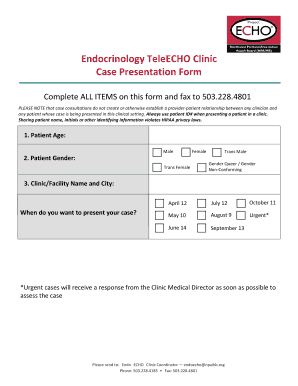
The Thyroid Presentation Template is a medical form used by healthcare providers to document patient information for telehealth consultations regarding thyroid health.
pdfFiller scores top ratings on review platforms




Who needs SUNY Upstate Medical University Thyroid Presentation?
Explore how professionals across industries use pdfFiller.

SUNY Upstate Medical University Thyroid Presentation is needed by:
-
Endocrinologists managing thyroid conditions
-
Primary care providers conducting telehealth visits
-
Patients preparing for thyroid-related consultations
-
Healthcare facilities implementing Project ECHO
-
Medical students studying endocrinology
-
Telehealth service coordinators
Comprehensive Guide to SUNY Upstate Medical University Thyroid Presentation
What is the Thyroid Presentation Template?
The Thyroid Presentation Template is a vital medical form used by healthcare providers to streamline patient information collection during telehealth consultations and Project ECHO® sessions. This comprehensive template encompasses essential fields such as patient demographics, symptoms, medical history, and current medications.
Its design effectively facilitates thorough discussions about thyroid-related diagnoses and treatments, ensuring that all pertinent information is readily available for healthcare providers during consultations.
Purpose and Benefits of the Thyroid Presentation Template
The primary objective of the thyroid patient intake form is to improve patient care through organized data collection. This template enhances communication among healthcare providers about thyroid issues, ensuring everyone involved has access to the necessary information.
Additionally, the thyroid medical history form introduces significant convenience, allowing for a more efficient patient registration and intake process. This improved workflow benefits both practitioners and patients, leading to better health outcomes.
Key Features of the Thyroid Presentation Template
-
Fillable fields for diverse patient information.
-
Checkboxes enabling concise responses, such as 'New' or 'Follow Up.'
-
Sections detailing 'Presenter Name' and mechanisms for tracking patient follow-ups.
-
Instructions for accuracy and completeness during data entry.
These features not only facilitate better record-keeping but also enhance patient management and care efficiency within healthcare practices.
Who Needs the Thyroid Presentation Template?
The thyroid presentation template is essential for healthcare professionals in endocrinology who require organized patient information for effective consultations. It proves particularly beneficial during initial consultations, follow-ups, and telehealth meetings.
Medical practices across the board can seamlessly integrate this thyroid patient registration form into their workflows, enhancing the quality of care provided to patients.
How to Fill Out the Thyroid Presentation Template Online
To effectively complete the thyroid consultation template using pdfFiller, follow these steps:
-
Gather crucial information such as patient demographics and relevant medical history.
-
Access the Thyroid Presentation Template via pdfFiller.
-
Fill in the designated fields carefully, ensuring accuracy in all entries.
-
Review the completed form for completeness before submission.
Accurate and comprehensive completion is vital for ensuring effective communication during consultations.
Field-by-Field Instructions for the Thyroid Presentation Template
The Thyroid Presentation Template comprises various fields, each serving a specific purpose:
-
Symptoms: Document common signs such as fatigue or weight changes.
-
Medications: List current medications, including dosages.
-
Lab Results: Clearly outline any relevant lab findings.
-
Medical History: Provide a brief overview of past health issues.
Proper documentation of these entries ensures that healthcare providers have a complete understanding of the patient's condition during consultations.
Submission Methods and Delivery for the Thyroid Presentation Template
Submitting the completed thyroid consultation template can be done electronically or physically, depending on practice preferences. Be aware of state-specific submission requirements, particularly for telehealth consultations, as these may vary.
Tracking submission status and understanding expected processing times can further enhance the efficiency of the patient management process.
Security and Compliance When Using the Thyroid Presentation Template
Ensuring the security of sensitive patient information is paramount when using the Thyroid Presentation Template. pdfFiller adheres to HIPAA and GDPR compliance standards, ensuring robust data protection measures are in place.
With features such as 256-bit encryption, healthcare providers can confidently manage patient records while safeguarding privacy and security.
Utilizing pdfFiller for Your Thyroid Presentation Template Needs
Using pdfFiller to create, edit, and manage the Thyroid Presentation Template offers numerous benefits. Users can explore features like eSigning, document merging, and secure sharing options that make document management a breeze.
Experience enhanced efficiency in handling medical forms by leveraging pdfFiller's capabilities for your thyroid presentation needs.
How to fill out the SUNY Upstate Medical University Thyroid Presentation
-
1.To access the Thyroid Presentation Template on pdfFiller, start by visiting the pdfFiller website and logging into your account or creating one if you don't have it yet.
-
2.Once logged in, use the search bar to enter 'Thyroid Presentation Template' and select the form from the search results to open it.
-
3.Before filling out the form, gather essential patient information including demographics, medical history, current medications, and any relevant lab results to ensure accuracy.
-
4.Begin completing the form by filling in the 'Date' field and providing the 'Presenter Name' in the designated spaces provided.
-
5.Navigate through the form using your mouse or keyboard to fill in text fields, and check the appropriate checkboxes for status such as 'New' or 'Follow Up'.
-
6.Make sure to fill in all required fields, indicated typically by asterisks or highlighted sections as per pdfFiller’s interface guidelines.
-
7.After completing all sections, review the form thoroughly for any missing or incorrect information to ensure everything is accurate.
-
8.Once you’re satisfied with the content, save your progress by clicking the 'Save' option on pdfFiller, allowing you to return later if needed.
-
9.To submit the form, choose the 'Download' button for a local copy or use the 'Submit' option to send it directly to your intended recipient.

Who is eligible to use the Thyroid Presentation Template?
This template is designed for healthcare providers, such as endocrinologists and primary care physicians, who are conducting telehealth consultations focusing on thyroid health.
What information is required to complete the form?
Users must provide patient demographics, symptoms, medical history, current medications, and lab results. Ensure this information is gathered before starting to fill out the form.
How can I submit the Thyroid Presentation Template once completed?
After filling in the form, you can submit it by either downloading it for local submission or using the direct submission feature on pdfFiller to send it to the healthcare provider.
Are there any common mistakes to avoid when filling out this form?
Common mistakes include leaving mandatory fields empty, entering incorrect patient information, or failing to sign the form if required. Double-check all details before finalizing.
What is the process for saving my progress on pdfFiller?
On pdfFiller, you can save your work by clicking the 'Save' button located in the upper right corner, which allows you to return to edit the document at a later time.
How long does it take to process this form after submission?
Processing times can vary depending on the healthcare provider’s review schedule. Typically, responses may be provided within a few days to a week after submission.
Can this form be used remotely via telehealth platforms?
Yes, the Thyroid Presentation Template is specifically designed for telehealth consultations, facilitating effective remote communication and patient assessment.
Related Forms





Get the latest insights from our blog


If you believe that this page should be taken down, please follow our DMCA take down process
here
.
This form may include fields for payment information. Data entered in these fields is not covered by PCI DSS compliance.