
Last updated on
Nov 6, 2026
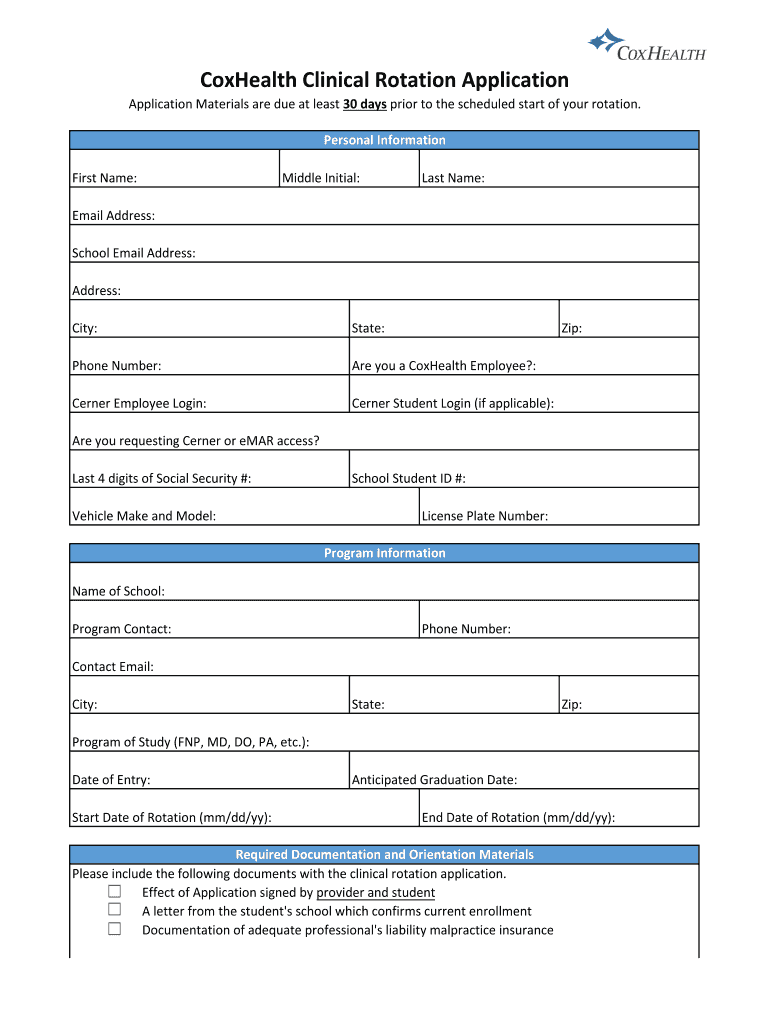
CoxHealth Clinical Rotation Application free printable template
pdfFiller is not affiliated with any government organization

Fill out
Complete the form online in a simple drag-and-drop editor.

eSign
Add your legally binding signature or send the form for signing.

Share
Share the form via a link, letting anyone fill it out from any device.

Export
Download, print, email, or move the form to your cloud storage.
Why pdfFiller is the best tool for your documents and forms


End-to-end document management
From editing and signing to collaboration and tracking, pdfFiller has everything you need to get your documents done quickly and efficiently.
Accessible from anywhere
pdfFiller is fully cloud-based. This means you can edit, sign, and share documents from anywhere using your computer, smartphone, or tablet.
Secure and compliant
pdfFiller lets you securely manage documents following global laws like ESIGN, CCPA, and GDPR. It's also HIPAA and SOC 2 compliant.
What is CoxHealth Clinical Rotation Application
The CoxHealth Clinical Rotation Application is an education document used by medical students to apply for clinical rotations at CoxHealth.
pdfFiller scores top ratings on review platforms




Who needs CoxHealth Clinical Rotation Application?
Explore how professionals across industries use pdfFiller.

CoxHealth Clinical Rotation Application is needed by:
-
Medical students seeking clinical rotations
-
Academic advisors guiding students
-
Administrative staff at healthcare institutions
-
Education coordinators managing student applications
-
Faculty members overseeing clinical programs
Comprehensive Guide to CoxHealth Clinical Rotation Application
What is the CoxHealth Clinical Rotation Application?
The CoxHealth Clinical Rotation Application is a pivotal tool for medical students seeking clinical rotations within the esteemed CoxHealth network. This application not only facilitates the application process but also ensures that students provide necessary personal and program details effectively. It bridges the gap between students and clinical opportunities, making it essential for aspiring healthcare professionals.
Understanding the application’s objectives can significantly enhance a student’s chances of securing a rotation, making it a crucial element in their medical education journey.
Purpose and Benefits of the CoxHealth Clinical Rotation Application
The primary purpose of the CoxHealth Clinical Rotation Application is to enable students to secure valuable clinical rotation placements that align with their educational goals. This application streamlines the process for educational institutions, effectively reducing administrative burdens and ensuring a more efficient allocation of spaces.
Additionally, it guarantees compliance with CoxHealth's stringent clinical requirements, thereby safeguarding both students and the institution. By utilizing this application, students can navigate their path to becoming healthcare professionals more smoothly.
Who Should Use the CoxHealth Clinical Rotation Application?
This application is designed for medical and healthcare students who are actively seeking clinical experience as part of their academic programs. Eligible candidates should meet specific criteria that may vary based on their respective programs.
Completing the application accurately is vital, as it ensures that all requirements are met and prevents unnecessary delays in processing. Understanding who qualifies for this application helps set clear expectations for applicants.
How to Fill Out the CoxHealth Clinical Rotation Application Online
Filling out the CoxHealth Clinical Rotation Application online is straightforward if you follow these steps:
-
Access the application form via the designated link on the CoxHealth website.
-
Complete each field thoroughly, including essential details such as your first name, last name, and student signature date.
-
Review your entries to avoid common errors such as typos or missing information.
By taking the time to fill out each section correctly, you increase the likelihood of successful submission and processing.
Submission Methods for the CoxHealth Clinical Rotation Application
Applicants can submit their completed applications using various methods for convenience:
-
Email the application directly to the Education Center.
-
Fax the completed form to the same center.
Be aware of important deadlines and the typical processing times associated with your submission. Following up on your application status is also recommended to ensure you receive timely feedback.
Required Documents and Supporting Materials
To complete the CoxHealth Clinical Rotation Application, several supporting documents are essential:
-
Proof of enrollment in a medical or healthcare program.
-
Letters of recommendation from faculty or professionals in the field.
Including these materials with your application not only strengthens your submission but also demonstrates your commitment to the process. Organizing these documents effectively before submission is key to a smooth application experience.
Security and Compliance of the CoxHealth Clinical Rotation Application
The security of your personal information is paramount in the application process. The application employs 256-bit encryption to safeguard your data, ensuring that it is protected from unauthorized access.
In addition, compliance with relevant regulations such as HIPAA and GDPR affirms the commitment to handling personal data responsibly. Utilizing platforms like pdfFiller can further enhance the security of the application process, providing peace of mind for applicants.
Using pdfFiller for the CoxHealth Clinical Rotation Application
pdfFiller simplifies the form-filling process for the CoxHealth Clinical Rotation Application. With its user-friendly interface, students can easily edit, eSign, and securely share documents as needed.
The platform also ensures compliance with healthcare regulations, providing a seamless experience for those handling sensitive information. Leveraging pdfFiller's capabilities can enhance not only convenience but also security throughout the application journey.
Follow-Up After Submitting the CoxHealth Clinical Rotation Application
After submitting your application, it's crucial to stay informed about its status. Regularly check back to confirm receipt and inquire about expected timelines for feedback.
Being proactive in following up can also help address any additional requests or requirements that may arise during the review process, ultimately improving your chances for a successful application outcome.
Starting Your Application with pdfFiller Today!
Engage in the process of completing the CoxHealth Clinical Rotation Application via pdfFiller. The platform offers an intuitive experience backed by robust security features, making it easier to navigate your application.
With direct support available, you can feel confident in your ability to manage the requirements without complication, leading you closer to securing your desired clinical rotation.
How to fill out the CoxHealth Clinical Rotation Application
-
1.To access the CoxHealth Clinical Rotation Application, go to pdfFiller and log in or create an account if you don’t have one.
-
2.Search for the form by entering its name in the search bar or browse the education forms category.
-
3.Once you locate the form, click on it to open the fillable PDF interface provided by pdfFiller.
-
4.Before you start filling out the form, gather necessary personal details such as your full name, contact information, and program details.
-
5.Begin completing the form by clicking on each blank field to input the required information, which may include your first name, middle initial, last name, and other relevant data.
-
6.Utilize the checkboxes for any applicable options within the form, ensuring you mark them clearly.
-
7.Refer to the instructions provided in the form while completing each section to ensure all fields are filled accurately.
-
8.Once you have completed the form, take a moment to review your entries, checking for accuracy and completeness.
-
9.Make sure to sign the form digitally where prompted, noting the 'Student Signature Date' field.
-
10.After you have reviewed the completed application, save your work and download the finalized PDF version to your device.
-
11.Lastly, submit the application as instructed, which typically involves emailing or faxing it to the Education Center at CoxHealth.

Who is eligible to apply using the CoxHealth Clinical Rotation Application?
The CoxHealth Clinical Rotation Application is designed for medical students who need to complete their clinical rotations as part of their education requirements.
What is the deadline for submitting the clinical rotation application?
It is advisable to check with CoxHealth for specific deadlines, as submission dates may vary based on the academic calendar and available rotation dates.
How do I submit the completed CoxHealth Clinical Rotation Application?
You can submit your completed application by either emailing or faxing the form to the Education Center at CoxHealth, as specified in the form's instructions.
What supporting documents are needed with the application?
Generally, you may need to provide personal identification, academic records, and any additional documentation required by CoxHealth. Always check the application for specific needs.
What are common mistakes to avoid when filling out the form?
Common mistakes include forgetting to sign the application, leaving fields blank, or providing incorrect information. Always double-check each section before submitting.
How long does it take to process the application after submission?
Processing times can vary, but typically you should allow a few weeks for the application to be reviewed and for the Education Center to respond with further instructions.
What should I do if I encounter technical issues on pdfFiller?
If you experience technical difficulties while filling out the form on pdfFiller, reach out to their customer support for assistance or consult their help resources.
Related Forms





Get the latest insights from our blog


If you believe that this page should be taken down, please follow our DMCA take down process
here
.
This form may include fields for payment information. Data entered in these fields is not covered by PCI DSS compliance.