
Last updated on
Nov 9, 2026
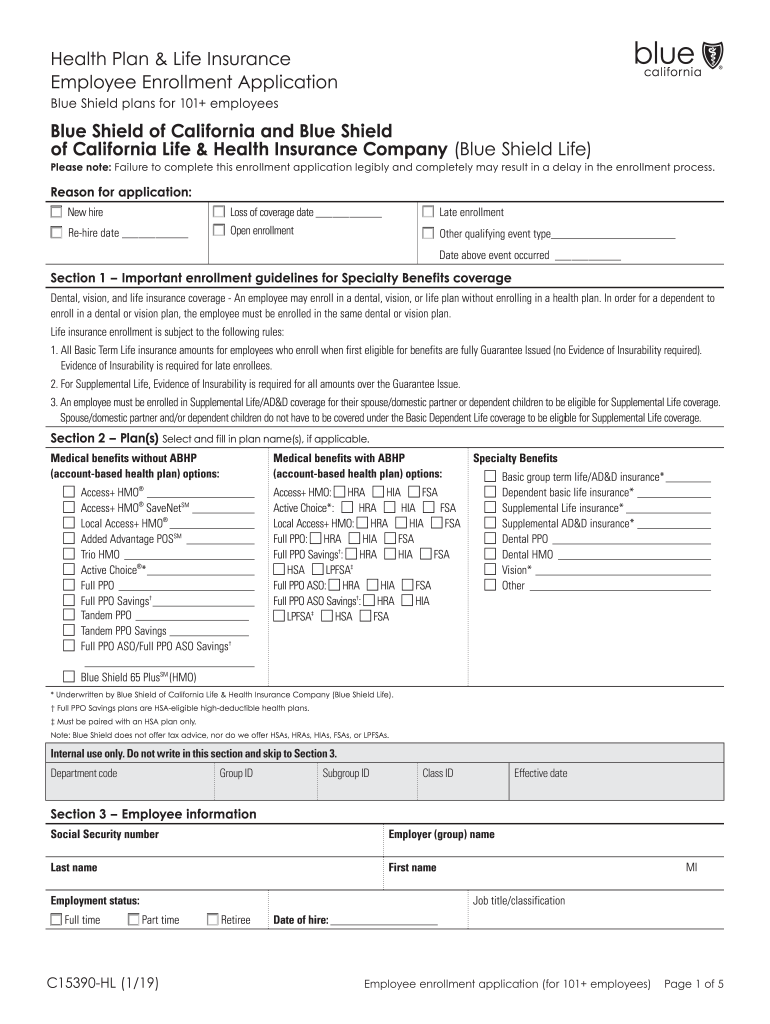
CA C15390-HL 2019-2026 free printable template
pdfFiller is not affiliated with any government organization

Fill out
Complete the form online in a simple drag-and-drop editor.

eSign
Add your legally binding signature or send the form for signing.

Share
Share the form via a link, letting anyone fill it out from any device.

Export
Download, print, email, or move the form to your cloud storage.
Why pdfFiller is the best tool for your documents and forms


End-to-end document management
From editing and signing to collaboration and tracking, pdfFiller has everything you need to get your documents done quickly and efficiently.
Accessible from anywhere
pdfFiller is fully cloud-based. This means you can edit, sign, and share documents from anywhere using your computer, smartphone, or tablet.
Secure and compliant
pdfFiller lets you securely manage documents following global laws like ESIGN, CCPA, and GDPR. It's also HIPAA and SOC 2 compliant.
What is CA C15390-HL
The Blue Shield Employee Enrollment Application is a healthcare form used by employees to enroll in Blue Shield of California health, dental, vision, and life insurance plans.
pdfFiller scores top ratings on review platforms




Who needs CA C15390-HL?
Explore how professionals across industries use pdfFiller.

CA C15390-HL is needed by:
-
Employees of companies with 101+ employees seeking health insurance coverage
-
Spouses or domestic partners who need to enroll in health benefits
-
Agents or brokers assisting with employee health enrollments
-
HR professionals responsible for managing employee benefits
-
Individuals requiring Medicare information as part of the enrollment process
Comprehensive Guide to CA C15390-HL
What is the Blue Shield Employee Enrollment Application?
The Blue Shield Employee Enrollment Application is a crucial form that facilitates the process of California health insurance enrollment for employees of companies with 101 or more employees. This application allows employees to enroll in a variety of insurance plans, including health, dental, vision, and life coverage. It is important for employees, their spouses, and agents who assist with enrollment.
By utilizing this form, employees can ensure they have access to essential health benefits for themselves and their families, reflecting its significance in their overall benefits package.
Purpose and Benefits of the Blue Shield Employee Enrollment Application
This application serves multiple functions that streamline the enrollment process. First, it guarantees that employees are properly and timely enrolled in Blue Shield plans, helping to avoid any gaps in coverage. Additionally, it simplifies the process of selecting and managing health coverage, making it easier for families to access the essential health benefits they need.
Overall, the application not only enhances efficiency but also provides peace of mind by ensuring employees and their families receive the health benefits they deserve.
Key Features of the Blue Shield Employee Enrollment Application
The Blue Shield Employee Enrollment Application includes distinctive features designed to facilitate user completion. Notably, it contains fillable sections where users must provide personal information and make plan selections. The form also mandates signatures from both employees and their spouses or domestic partners, ensuring all necessary parties are involved in the enrollment process.
-
Includes specific fields for Medicare information.
-
Designations for beneficiaries to manage life insurance options.
Who Needs the Blue Shield Employee Enrollment Application?
This form must be completed by various individuals involved in the enrollment process. Primarily, it is intended for employees of companies with 101 or more employees in California. In addition, spouses or domestic partners are required to enroll alongside the employee. Agents or brokers assisting in the enrollment are also required to complete this form to ensure a smooth process.
Eligibility Criteria and State-Specific Rules
Enrollment in the Blue Shield Employee Enrollment Application requires adherence to specific eligibility criteria and regulations unique to California. Individuals must meet predetermined eligibility requirements to enroll in the available plans. Furthermore, California has specific mandates that govern health insurance enrollment, including guidelines for registering domestic partners or spouses.
Understanding these criteria and rules is vital for ensuring compliance and securing coverage.
How to Fill Out the Blue Shield Employee Enrollment Application Online
Completing the Blue Shield Employee Enrollment Application online is a straightforward process that involves several steps. First, users should navigate to the online form interface, where they can begin inputting necessary information. Each field must be approached with care to ensure the accuracy of personal information and coverage choices.
-
Access the online application through the designated platform.
-
Enter personal details in the specified fields.
-
Make coverage selections based on your individual or family needs.
-
Review all information for accuracy before submission.
Following these steps helps guarantee that the application is complete and accurate, facilitating a smooth enrollment process.
Review and Validation Checklist
Before final submission of the application, it is essential to go through a review and validation checklist. This checklist assists applicants in ensuring that all required fields are completed and that supporting documentation is included. Double-checking personal information for accuracy is crucial, as is confirming that all necessary signatures have been added, particularly from spouses or domestic partners.
-
Review all entered information for errors.
-
Ensure signatures are obtained where required.
Submission Methods and Next Steps
There are several methods available for submitting the completed Blue Shield Employee Enrollment Application. Users can submit their application online or opt for traditional mail. After submission, applicants can expect to receive confirmation of receipt and may access information to track the application status.
If additional information is required from Blue Shield, applicants will be notified promptly, ensuring clear communication throughout the process.
Privacy, Security, and Compliance with Blue Shield Employee Enrollment Application
Ensuring the privacy and security of user data is paramount when submitting the Blue Shield Employee Enrollment Application. pdfFiller implements robust data protection measures, including encryption and compliance with relevant regulations. These efforts protect sensitive personal and health information, giving users confidence in the security of their submissions.
Trusting pdfFiller with sensitive applications enhances the overall experience of users looking to safeguard their personal information.
Getting Started with pdfFiller for Your Blue Shield Employee Enrollment Application
Utilizing pdfFiller significantly simplifies the process of completing the Blue Shield Employee Enrollment Application. The platform offers various features that assist in form completion, such as editing and signing capabilities. With a user-friendly interface, pdfFiller allows users to easily access and fill out necessary forms online.
Experience the benefits of managing healthcare forms with pdfFiller, streamlining your enrollment process for better efficiency and ease.
How to fill out the CA C15390-HL
-
1.Access the Blue Shield Employee Enrollment Application on pdfFiller by searching for 'Blue Shield Employee Enrollment Application' in the platform's search bar.
-
2.Once the form is opened, review the sections to understand what information is required, including personal details, plan selections, and beneficiary information.
-
3.Gather necessary documents beforehand, such as your social security number, health records, and any relevant information for beneficiaries or dependents.
-
4.Using pdfFiller's user-friendly interface, click on the fields to enter your information. Ensure all entries are complete and accurate.
-
5.Use checkboxes where applicable to indicate your plan selections, and fill in any necessary personal information, making sure to double-check for mistakes.
-
6.Fill in the signature fields provided. If a spouse or domestic partner is enrolling, they will need to complete their section and provide a signature as well.
-
7.After completing all fields, thoroughly review the entire application for any missing information or errors.
-
8.Once satisfied with the entries, utilize the pdfFiller options to save your progress or download the completed form as a PDF.
-
9.Finally, submit the application through your HR department as directed, or send it directly to Blue Shield, following all required submission methods outlined in your company's protocols.

Who is eligible to use the Blue Shield Employee Enrollment Application?
The Blue Shield Employee Enrollment Application is designed for employees of companies with 101 or more employees, along with their spouses or domestic partners eligible for coverage.
What is the deadline for submitting this form?
It's essential to submit the Blue Shield Employee Enrollment Application promptly, ideally within your company's designated enrollment period. Check with your HR representative for specific deadlines.
How can I submit the completed application?
You can submit the completed Blue Shield Employee Enrollment Application through your HR department. Ensure that all required signatures are included before submission.
What supporting documents are needed with this application?
Typically, no additional supporting documents are required with the Blue Shield Employee Enrollment Application. However, be prepared to provide verification of identity and eligibility if requested.
What common mistakes should I avoid when filling out this form?
Ensure all sections of the form are completed thoroughly. Common mistakes include missing signatures, incomplete personal details, and overlooked beneficiary information.
How long does it take to process the application once submitted?
Processing times vary, but applicants can expect a response within 2-4 weeks after submission of the Blue Shield Employee Enrollment Application.
What if I need assistance with the enrollment process?
If assistance is needed, reach out to your HR department or the Blue Shield customer service for help with questions regarding the application and enrollment process.
CA C15390-HL Form Versions
Related Forms




Get the latest insights from our blog


If you believe that this page should be taken down, please follow our DMCA take down process
here
.
This form may include fields for payment information. Data entered in these fields is not covered by PCI DSS compliance.