
Last updated on
Oct 31, 2026

Get the free Informed Consent for Vaccination
We are not affiliated with any brand or entity on this form

Fill out
Complete the form online in a simple drag-and-drop editor.

eSign
Add your legally binding signature or send the form for signing.

Share
Share the form via a link, letting anyone fill it out from any device.

Export
Download, print, email, or move the form to your cloud storage.
Why pdfFiller is the best tool for your documents and forms


End-to-end document management
From editing and signing to collaboration and tracking, pdfFiller has everything you need to get your documents done quickly and efficiently.
Accessible from anywhere
pdfFiller is fully cloud-based. This means you can edit, sign, and share documents from anywhere using your computer, smartphone, or tablet.
Secure and compliant
pdfFiller lets you securely manage documents following global laws like ESIGN, CCPA, and GDPR. It's also HIPAA and SOC 2 compliant.
What is Vaccination Consent
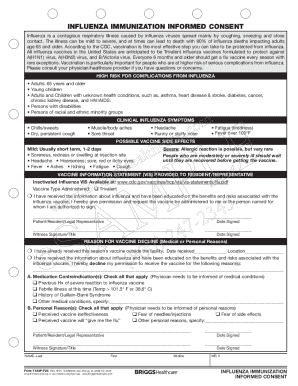
The Informed Consent for Vaccination is a healthcare form used by patients or legal representatives to provide consent for vaccine administration at a pharmacy.
pdfFiller scores top ratings on review platforms




Who needs Vaccination Consent?
Explore how professionals across industries use pdfFiller.

Vaccination Consent is needed by:
-
Patients seeking vaccination at pharmacies
-
Legal representatives of patients
-
Pharmacies administering vaccines
-
Healthcare providers requiring authorization
-
Public health officials managing immunizations
-
Insurance companies processing claims
Comprehensive Guide to Vaccination Consent
What is the Informed Consent for Vaccination?
The Informed Consent for Vaccination is a crucial document in the healthcare context, designed to ensure patients fully understand the implications of receiving a vaccination. This form outlines the necessary information that a patient or their legal representative must provide, including personal details and acknowledgment of vaccine risks and benefits.
In the pharmacy setting, this consent form serves as a formal agreement between the patient and healthcare provider, ensuring clarity on what the vaccination entails. It also necessitates specific patient information, ensuring legal and medical compliance.
Purpose and Benefits of the Informed Consent for Vaccination
Obtaining informed consent is vital for multiple reasons. Firstly, it guarantees that patients are aware of the potential risks and benefits associated with the vaccine, which empowers them to make educated health choices. Secondly, this process provides legal protection for healthcare providers, confirming that they have communicated necessary information to the patient.
Additionally, informed consent facilitates the reporting of immunization data to state registries, promoting public health initiatives and vaccine tracking.
Key Features of the Informed Consent for Vaccination
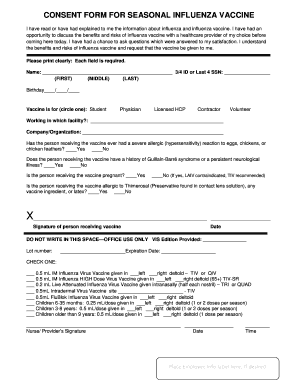
The informed consent form is structured to include specific elements that guide the user through the completion process. It comprises fillable sections where patients enter their personal information, along with checkboxes for answering eligibility questions.
A critical part of the form is the signature section, which confirms consent and authorization. This element is essential for both record-keeping and compliance with healthcare regulations.
Who Needs the Informed Consent for Vaccination?
This consent form is intended for patients and their legal representatives. It must be completed in various scenarios, particularly prior to receiving a vaccination. For minors or individuals unable to consent, guardians play an essential role, ensuring that proper permissions are granted before vaccination can proceed.
By defining the target audience, the form ensures that every individual who requires a vaccination has the information necessary to provide or authorize consent.
How to Fill Out the Informed Consent for Vaccination Online (Step-by-Step)
Filling out the informed consent form online can be streamlined through platforms like pdfFiller. Below are the steps to complete this process:
-
Access the online consent form via pdfFiller.
-
Follow field-by-field instructions to input required information accurately.
-
Review all information entered, ensuring it is complete and correct.
-
Submit the form for processing, adhering to any specific submission guidelines.
Taking these steps ensures that the form is filled out correctly, reducing the likelihood of delays or issues in the vaccination process.
Submission Methods and Delivery of the Informed Consent for Vaccination
The completed informed consent form can be submitted through various methods. Patients can choose to deliver the form in person at the pharmacy or submit it online, depending on the services offered by their healthcare provider.
When submitting, it's important to know where to send the form, such as specific pharmacies or state registries, to ensure correct processing. Typically, patients can expect a set timeframe for processing submissions, which can vary by location and provider.
Security and Compliance for the Informed Consent for Vaccination
Handling personal healthcare documents requires stringent security measures. Platforms like pdfFiller employ advanced data encryption to safeguard sensitive health information, ensuring compliance with regulations such as HIPAA and GDPR.
These compliance measures not only protect user data but also reinforce trust in the service, allowing users to manage their healthcare documentation securely.
What Happens After You Submit the Informed Consent for Vaccination?
After submitting the informed consent form, users can expect a confirmation of receipt and may have the ability to track the status of their submission. This confirmation is essential for keeping patients informed about their vaccination process.
Next steps may include scheduling the vaccination or receiving further instructions from healthcare providers. If necessary, users should also know how to amend or correct their submitted forms to ensure the accuracy of their records.
Sample or Example of a Completed Informed Consent for Vaccination
Providing a completed example of the informed consent form can help users better understand how to fill it out correctly. A breakdown of a filled-out form section by section supports accuracy and completeness, illustrating the information that needs to be provided.
Real-world applications of the consent form underscore its importance in the vaccination process, emphasizing how accuracy can impact a patient's healthcare experience.
Empower Your Vaccination Process with pdfFiller
Utilizing pdfFiller for your informed consent form needs streamlines the process considerably. With features that enhance accessibility and a user-friendly interface, pdfFiller offers a seamless experience for creating and filling out these essential forms.
Moreover, the platform assures users of secure handling of personal documents, reinforcing the importance of maintaining compliance and protecting sensitive information throughout the vaccination journey.
How to fill out the Vaccination Consent
-
1.To access the Informed Consent for Vaccination on pdfFiller, visit their website and log in or create an account.
-
2.Once logged in, use the search bar to find the 'Informed Consent for Vaccination' form.
-
3.Click on the form to open it in pdfFiller's editing interface where you can view the form fields.
-
4.Before starting, gather necessary information including personal identification and eligibility information regarding the vaccination.
-
5.Fill out each field in the form, ensuring you provide accurate and clear information as indicated.
-
6.Use the 'checkboxes' provided to acknowledge understanding of the vaccine risks and benefits.
-
7.After completion, review each section of the form to ensure all required signatures are obtained, especially from the patient or legal representative.
-
8.Finalize the document by checking for any completion errors or missing information.
-
9.Once reviewed, save the document to your pdfFiller account or download it to your device.
-
10.You may also submit the form directly through your pharmacy as per their submission procedures.

Who is eligible to fill out the Informed Consent for Vaccination?
Eligibility to fill out the Informed Consent for Vaccination applies to patients receiving the vaccine and their legal representatives. Ensure you understand the vaccine risks before signing.
Are there any deadlines for submitting this form?
It's advisable to submit the Informed Consent for Vaccination form on the day of the vaccination or a few days in advance. Check with your pharmacy for any specific requirements.
How can I submit the completed consent form?
You can submit the completed Informed Consent for Vaccination form directly to your pharmacy either in person, or as guided by their submission methods, including online upload options.
What information do I need to gather before filling out the form?
Before filling out the form, collect personal identification details, such as name, date of birth, address, and any relevant medical history to assist in answering eligibility questions.
What are common mistakes to avoid when completing this form?
Common mistakes include omitting required signatures, not filling out all necessary fields, or failing to read the instructions carefully. Review each section thoroughly before submission.
How long does it usually take for the consent to be processed?
Processing times for the consent form may vary but are typically immediate when submitted on the day of vaccination, as pharmacies usually do not delay vaccination once consent is obtained.
Do I need to notarize the Informed Consent for Vaccination?
No, notarization is not required for the Informed Consent for Vaccination. Just ensure that the required signatures are provided by the patient or legal representative.
Related Content
Related Forms



Related Catalogs
Get the latest insights from our blog



If you believe that this page should be taken down, please follow our DMCA take down process
here
.
This form may include fields for payment information. Data entered in these fields is not covered by PCI DSS compliance.