
Last updated on
Oct 19, 2026
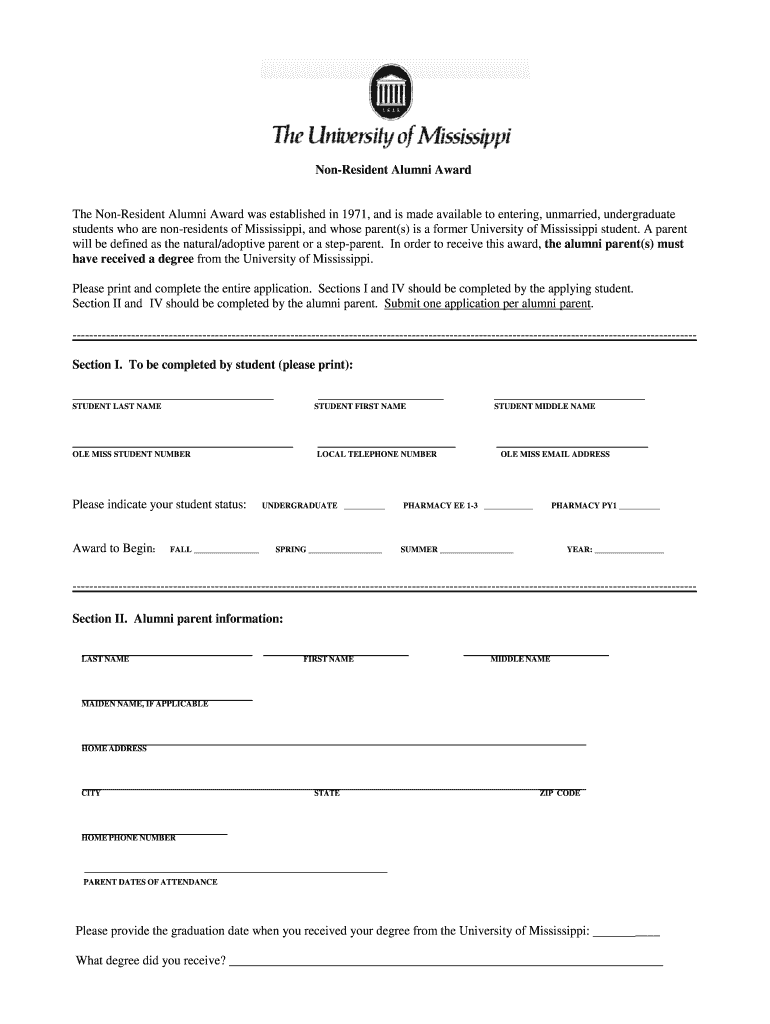
University of Mississippi Non-Resident Alumni Award 2018 free printable template
pdfFiller is not affiliated with any government organization

Fill out
Complete the form online in a simple drag-and-drop editor.

eSign
Add your legally binding signature or send the form for signing.

Share
Share the form via a link, letting anyone fill it out from any device.

Export
Download, print, email, or move the form to your cloud storage.
Why pdfFiller is the best tool for your documents and forms


End-to-end document management
From editing and signing to collaboration and tracking, pdfFiller has everything you need to get your documents done quickly and efficiently.
Accessible from anywhere
pdfFiller is fully cloud-based. This means you can edit, sign, and share documents from anywhere using your computer, smartphone, or tablet.
Secure and compliant
pdfFiller lets you securely manage documents following global laws like ESIGN, CCPA, and GDPR. It's also HIPAA and SOC 2 compliant.
What is University of Mississippi Non-Resident Alumni Award
The Non-Resident Alumni Award Application is a scholarship application form used by non-resident undergraduate students to apply for financial aid based on their parent's alumni status at the University of Mississippi.
pdfFiller scores top ratings on review platforms




Who needs University of Mississippi Non-Resident Alumni Award?
Explore how professionals across industries use pdfFiller.

University of Mississippi Non-Resident Alumni Award is needed by:
-
Non-resident undergraduate students seeking scholarships
-
Parents who are alumni of the University of Mississippi
-
High school counselors assisting students with scholarship applications
-
University financial aid offices processing scholarship forms
-
Educational institutions promoting scholarship opportunities
Comprehensive Guide to University of Mississippi Non-Resident Alumni Award
What is the Non-Resident Alumni Award Application?
The Non-Resident Alumni Award Application is a vital scholarship opportunity designed specifically for non-resident students of Mississippi. This form provides the chance for applicants to receive financial aid, making education more accessible. The award is intended for those whose parent(s) is an Ole Miss alumni, emphasizing a strong connection to the University of Mississippi.
This application not only supports educational pursuits but also strengthens the bond between alumni and their families, creating a legacy of academic excellence.
Purpose and Benefits of the Non-Resident Alumni Award Application
The main purpose of the Non-Resident Alumni Award Application is to ease educational expenses for non-resident students and their families. Awardees can benefit from financial support that contributes significantly to their academic journey at the University of Mississippi.
This scholarship is restricted to children of alumni, fostering a deep sense of community and tradition within the university. By prioritizing these applicants, the scholarship highlights the importance of family legacy in education.
Who Should Apply for the Non-Resident Alumni Award Application?
Target applicants for this scholarship include non-resident students with at least one parent who graduated from Ole Miss. It is crucial for both the student and their alumni parent to be involved in the application process for a successful submission.
Applicants typically should be undergraduate students. Understanding the demographics is essential for ensuring eligibility for this scholarship:
-
Non-resident students
-
Children of Ole Miss alumni
-
Undergraduate status
Eligibility Criteria for the Non-Resident Alumni Award Application
To qualify for the Non-Resident Alumni Award Application, applicants need to meet specific criteria:
-
Must be a non-resident of Mississippi
-
Have a parent who is an Ole Miss alumni
-
Maintain satisfactory academic standing
-
Must be unmarried
These criteria not only ensure that the scholarship targets the right demographics but also promote academic integrity and support for Ole Miss alumni families.
How to Fill Out the Non-Resident Alumni Award Application Online (Step-by-Step)
Filling out the Non-Resident Alumni Award Application online is a straightforward process. Follow these steps for an efficient submission:
-
Gather personal information, including student and parent details.
-
Complete all required fields in the application form accurately.
-
Ensure both the student and parent sign the application.
-
Review all information for accuracy and completeness.
-
Submit the application online before the deadline.
Accurate and honest submissions are vital to prevent delays or rejections.
Digital Signature Requirements for the Non-Resident Alumni Award Application
The Non-Resident Alumni Award Application mandates signatures from both the student and the parent to validate the submission. There are several methods for signing the document:
-
Wet signature: Traditional handwritten signatures.
-
eSigning: Digital signatures provided through secure platforms.
Both methods carry specific requirements, so it’s important to verify the chosen mode of signing complies with application standards.
Submission Methods and Deadlines for the Non-Resident Alumni Award Application
Applicants can submit the Non-Resident Alumni Award Application through various methods to ensure flexibility:
-
Online submission via the designated portal
-
Mailing the application to the specified address
-
In-person submission at the relevant university office
It’s essential to keep track of deadlines to ensure timely submission. Applicants should also follow up to track their application status post-submission.
Common Errors to Avoid When Completing the Non-Resident Alumni Award Application
To maximize your chances of success, be aware of common mistakes when filling out the application:
-
Incomplete sections of the application form
-
Submitting without the required signatures
-
Failing to gather necessary supporting documentation
To avoid these errors, review the application thoroughly and create a checklist to validate all components before submission.
Next Steps After Submission of the Non-Resident Alumni Award Application
After submitting the Non-Resident Alumni Award Application, applicants can expect a confirmation receipt indicating the application has been received. Processing times may vary, so patience is necessary. In case of any discrepancies or needed corrections, applicants can appeal or alter their submissions.
Being aware of common rejection reasons can help in preparing a successful application for future cycles.
Using pdfFiller to Simplify Your Non-Resident Alumni Award Application Process
pdfFiller offers a streamlined solution for completing the Non-Resident Alumni Award Application. With features such as easy form filling, eSigning, and document management, applicants can navigate the process with ease. Security is paramount; pdfFiller employs 256-bit encryption and complies with HIPAA and GDPR regulations to protect sensitive information.
By utilizing pdfFiller’s services, applicants can ensure a smooth application process while keeping their personal data safe.
How to fill out the University of Mississippi Non-Resident Alumni Award
-
1.To access the Non-Resident Alumni Award Application on pdfFiller, visit the pdfFiller website and search for the form by name or use a direct link if available.
-
2.Once you have opened the form, familiarize yourself with the layout, including the fields for personal information and checkboxes that require completion.
-
3.Before you start filling out the form, ensure you gather necessary information including student details, parent alumni status, and any relevant documents that may need to be referenced.
-
4.Begin filling in the blank fields, using the provided instructions as a guide for completing each section accurately.
-
5.Make sure to enter correct information in all required fields. If a section does not apply, use the appropriate checkbox or leave it blank as instructed.
-
6.Once you have completed the form, carefully review all entries to ensure there are no mistakes or omissions. Pay special attention to the signature fields for both the student and the parent.
-
7.To finalize the form, follow pdfFiller's prompts to electronically sign the document or print it out if necessary for physical signatures.
-
8.After signing, save your completed application within pdfFiller, and consider downloading it as a PDF for your records before submission.
-
9.Submit the finished application according to the institution's guidelines, which may include uploading it directly to a portal or mailing it to a specific office.

Who is eligible to apply for the Non-Resident Alumni Award?
Eligibility for the Non-Resident Alumni Award requires applicants to be unmarried undergraduate students who are non-residents of Mississippi and have at least one parent who is a former student of the University of Mississippi.
What is the deadline for submitting the Non-Resident Alumni Award Application?
Deadlines for the Non-Resident Alumni Award Application can vary annually. Always check the University of Mississippi's scholarship webpage or contact the financial aid office for the most current deadlines.
What methods can I use to submit the application?
The completed Non-Resident Alumni Award Application can typically be submitted online through the university's portal or mailed to the financial aid office. Ensure you follow the specific submission instructions provided.
What supporting documents are required with the application?
Applicants may need to provide personal identification information, proof of parent's alumni status, and academic information such as transcripts. Check the application guidelines for a complete list of required documents.
What common mistakes should I avoid when filling out the form?
Common mistakes include incomplete fields, incorrect signatures, and missing required documents. Double-check all information for accuracy and ensure that both the student and parent have signed the application before submission.
How long does it take to process the application?
Processing times for the Non-Resident Alumni Award Application can vary. Typically, applicants can expect to hear back within a few weeks following submission, but checking with the financial aid office may provide more specific timelines.
What should I do if I have further questions about the form?
For any additional questions about the Non-Resident Alumni Award Application, contact the University of Mississippi's financial aid office directly for assistance and clarification on the application process.
University of Mississippi Non-Resident Alumni Award Form Versions
Related Content
Related Forms






Get the latest insights from our blog


If you believe that this page should be taken down, please follow our DMCA take down process
here
.
This form may include fields for payment information. Data entered in these fields is not covered by PCI DSS compliance.