
Last updated on
Oct 31, 2026
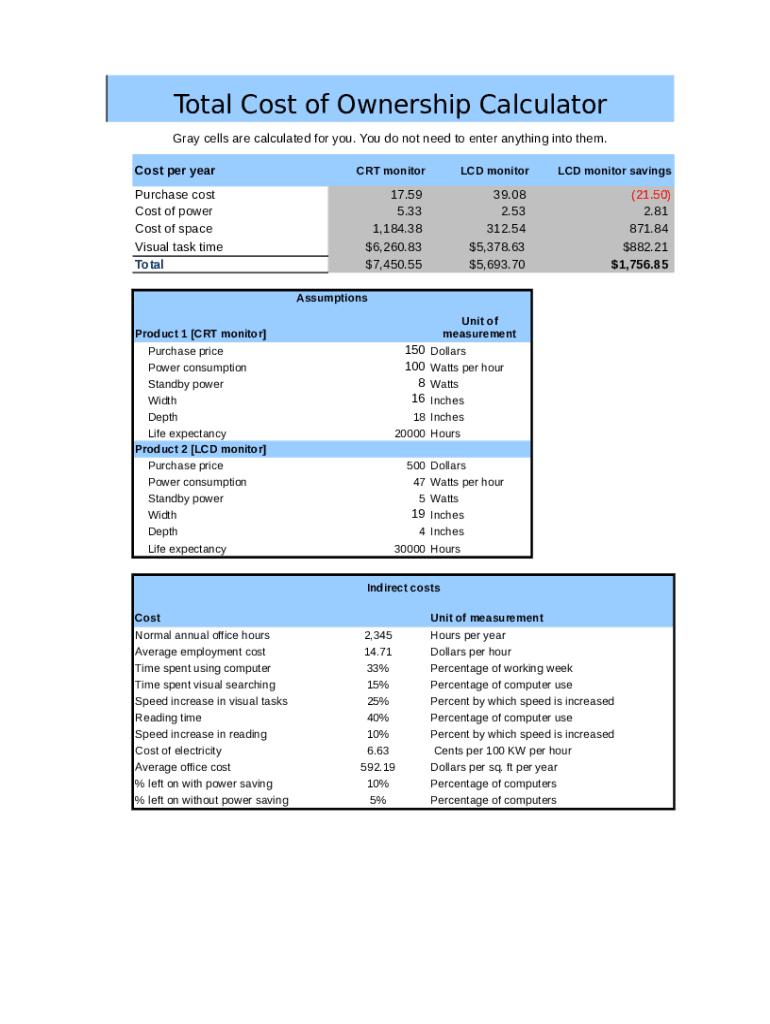
Total Cost Of Ownership Excel free printable template
We are not affiliated with any brand or entity on this form

Fill out
Complete the form online in a simple drag-and-drop editor.

eSign
Add your legally binding signature or send the form for signing.

Share
Share the form via a link, letting anyone fill it out from any device.

Export
Download, print, email, or move the form to your cloud storage.
Why pdfFiller is the best tool for your documents and forms


End-to-end document management
From editing and signing to collaboration and tracking, pdfFiller has everything you need to get your documents done quickly and efficiently.
Accessible from anywhere
pdfFiller is fully cloud-based. This means you can edit, sign, and share documents from anywhere using your computer, smartphone, or tablet.
Secure and compliant
pdfFiller lets you securely manage documents following global laws like ESIGN, CCPA, and GDPR. It's also HIPAA and SOC 2 compliant.
What is Total Cost Of Ownership Excel
The Total Cost of Ownership Calculator is a financial tool used by businesses to compare the annual costs of different products, specifically CRT and LCD monitors.
pdfFiller scores top ratings on review platforms




Who needs Total Cost Of Ownership Excel?
Explore how professionals across industries use pdfFiller.

Total Cost Of Ownership Excel is needed by:
-
Business owners evaluating equipment options
-
Finance managers conducting cost analysis
-
Procurement teams comparing different vendors
-
IT departments assessing technology investments
-
Small businesses looking to optimize budgets
Comprehensive Guide to Total Cost Of Ownership Excel
What is the Total Cost of Ownership Calculator?
The Total Cost of Ownership Calculator serves as a crucial financial tool for businesses to evaluate the comprehensive costs associated with their equipment investments. This calculator is designed to assess both the initial purchase expenses and the ongoing operational costs linked to the equipment. It offers a clear distinction between CRT and LCD monitors, highlighting the variations in cost implications.
Within the tool, users can expect to encounter various calculations that aggregate numerous financial factors into a singular, user-friendly interface aimed at facilitating informed purchasing decisions. By utilizing this tool, businesses can gain insights into their overall investment in equipment.
Purpose and Benefits of Using the Total Cost of Ownership Calculator
Utilizing the Total Cost of Ownership Calculator allows businesses to make well-informed purchasing decisions grounded in comprehensive financial analysis. This calculator offers a detailed breakdown of annual costs associated with equipment, significantly aiding businesses in understanding the long-term financial impacts of their choices.
-
Informed purchasing decisions that consider both upfront and ongoing costs.
-
Detailed annual cost breakdown to reveal potential hidden expenses.
-
Enhanced comprehension of long-term financial implications for better planning.
Key Features of the Total Cost of Ownership Calculator
This calculator is equipped with essential features tailored to streamline the cost analysis process. Among its strengths are multiple fillable fields that encompass various cost parameters, making it simple for users to input relevant data.
-
Fields for entering purchase costs, power consumption, space utilization, and more.
-
Automated calculations within gray cells, reducing manual input errors.
-
User-friendly interface that promotes ease of analysis for results interpretation.
Who Can Benefit from the Total Cost of Ownership Calculator?
The Total Cost of Ownership Calculator caters to a diverse audience, all focused on optimizing their equipment investments. Businesses seeking cost-effective equipment solutions, as well as professionals within IT departments and financial analysis roles, will find this tool exceptionally valuable.
-
Organizations assessing the overall cost-effectiveness of various equipment options.
-
Financial analysts and managers who require detailed insights for strategic decision-making.
-
Companies striving to optimize operational costs through informed analysis.
How to Use the Total Cost of Ownership Calculator Online (Step-by-Step)
To effectively utilize the Total Cost of Ownership Calculator, follow these sequential steps:
-
Access the calculator on pdfFiller by navigating to the respective section.
-
Carefully enter data into the designated fields according to your equipment specifications.
-
Review the automatic calculations provided in the gray cells to ensure accuracy.
Common Errors to Avoid When Using the Calculator
When using the Total Cost of Ownership Calculator, awareness of potential pitfalls is essential for accuracy. Users should be cautious to prevent common missteps that can skew results.
-
Avoid entering incorrect data for purchase costs or utility rates.
-
Fully understand the purpose of gray cells where calculations are automatically done.
-
Always validate the summarized cost breakdown to catch any discrepancies.
Digital Signature Options for Your Analysis
Finalizing calculations electronically is a straightforward process with the Total Cost of Ownership Calculator. Understanding the importance of signing documents for accountability is vital, especially as businesses strive for compliance and security.
-
Digital signatures offer a modern solution for confirming document authenticity.
-
Recognize the differences between digital and wet signatures and their respective uses.
-
Following security guidelines for eSigning ensures the integrity of sensitive data.
How to Save and Share Your Completed Total Cost of Ownership Calculation
Once the analysis is complete, users can easily save or share their findings. Here are the recommended steps:
-
Download the finalized analysis as a PDF for record-keeping.
-
Utilize email or cloud services to share the document with relevant stakeholders.
-
Follow professional standards when printing the completed document for presentations.
Security and Compliance When Using the Total Cost of Ownership Calculator
Ensuring the security of your information while using the Total Cost of Ownership Calculator is paramount. The platform is designed with robust data protection measures to protect sensitive financial data.
-
Utilizes 256-bit encryption to safeguard user information.
-
Compliant with SOC 2 Type II, HIPAA, and GDPR standards to ensure security protocols.
-
Emphasizes the significance of protecting confidential financial details during analysis.
Begin Your Cost Analysis Journey with pdfFiller Today
Embrace the efficiency and security offered by pdfFiller by utilizing the Total Cost of Ownership Calculator. This tool not only enhances your cost analysis process but also fosters better decision-making with user-friendly features and strong support.
How to fill out the Total Cost Of Ownership Excel
-
1.Access pdfFiller and search for the Total Cost of Ownership Calculator form.
-
2.Click on the form to open it in the editing interface.
-
3.Familiarize yourself with the layout—look for sections dedicated to purchase cost, cost of power, and cost of space.
-
4.Before filling out the fields, gather all necessary information regarding the costs associated with the equipment you are evaluating.
-
5.Begin by entering the purchase cost into the designated field; this will serve as a base for calculations.
-
6.Next, input the estimated cost of power usage for the products you are comparing, ensuring to have accurate data on energy consumption.
-
7.Then, fill in details regarding space utilization as this can impact overall costs, especially in office settings.
-
8.If your analysis includes time spent on visual tasks, enter relevant figures in the appropriate fields to assess productivity-related expenses.
-
9.Note that some fields, marked in gray, will auto-calculate based on your entries; no input is required for these sections.
-
10.Once you have completed all relevant fields, review each entry to ensure accuracy, checking calculations for consistency.
-
11.After confirming all information is accurate, save your progress directly on pdfFiller.
-
12.You can also choose to download your completed form as a PDF or submit it directly through pdfFiller for your records.

What is the purpose of the Total Cost of Ownership Calculator?
The Total Cost of Ownership Calculator helps businesses assess the long-term costs associated with purchasing equipment like monitors. By analyzing expenses, companies can make informed decisions about their investments.
Do I need to create an account to use pdfFiller?
Yes, you need to create an account to access and fill out forms on pdfFiller. This will also allow you to save your work and return to it later.
What types of information do I need to complete this calculator?
You will need data regarding the purchase cost of the equipment, the estimated power consumption costs, and information on space utilization and associated costs for a comprehensive analysis.
What are some common mistakes to avoid when filling out this form?
Common mistakes include entering inaccurate purchase or power cost estimates and overlooking the auto-calculated fields. Always double-check your entries for accuracy before saving.
How can I submit the completed form once finished?
Once you’ve completed the form on pdfFiller, you can submit it directly through the platform or download it for your records and submit it by your preferred method later.
Is there any specific software needed to use the Total Cost of Ownership Calculator?
No special software is needed beyond a web browser to access pdfFiller, where the Total Cost of Ownership Calculator is hosted.
Can I edit the form after downloading it?
If you download the form as a PDF from pdfFiller, you can edit it using any PDF editing software. However, edits made to the PDF cannot be saved on pdfFiller.
Related Forms


Get the latest insights from our blog


If you believe that this page should be taken down, please follow our DMCA take down process
here
.
This form may include fields for payment information. Data entered in these fields is not covered by PCI DSS compliance.