
Last updated on
Oct 31, 2026
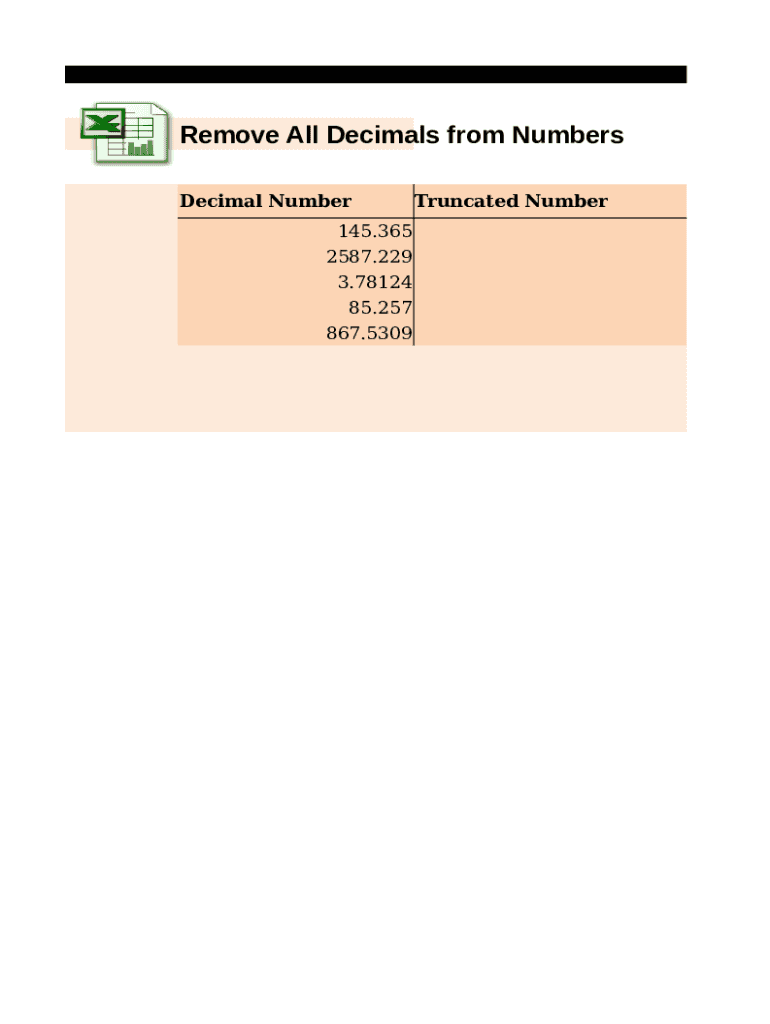
Remove All Decimals free printable template
We are not affiliated with any brand or entity on this form

Fill out
Complete the form online in a simple drag-and-drop editor.

eSign
Add your legally binding signature or send the form for signing.

Share
Share the form via a link, letting anyone fill it out from any device.

Export
Download, print, email, or move the form to your cloud storage.
Why pdfFiller is the best tool for your documents and forms


End-to-end document management
From editing and signing to collaboration and tracking, pdfFiller has everything you need to get your documents done quickly and efficiently.
Accessible from anywhere
pdfFiller is fully cloud-based. This means you can edit, sign, and share documents from anywhere using your computer, smartphone, or tablet.
Secure and compliant
pdfFiller lets you securely manage documents following global laws like ESIGN, CCPA, and GDPR. It's also HIPAA and SOC 2 compliant.
What is Remove All Decimals
The Truncate Decimal Numbers is a document used by businesses to explain a function that truncates decimal numbers and provides examples for practical application.
pdfFiller scores top ratings on review platforms




Who needs Remove All Decimals?
Explore how professionals across industries use pdfFiller.

Remove All Decimals is needed by:
-
Business analysts looking to manage financial data effectively.
-
Accountants needing to prepare precise financial reports.
-
Software developers implementing mathematical functions in applications.
-
Data scientists working with statistical analyses.
-
Financial planners aiming to present clean numerical data.
Comprehensive Guide to Remove All Decimals
What is the Truncate Decimal Numbers Function?
The truncate decimal numbers function is designed to remove decimal places from numerical values without rounding them. This function operates by simply cutting off the decimal portion and presenting the whole number, differentiating it from rounding, which adjusts the number based on its decimal value. For example, truncating 5.78 results in 5, while rounding it would yield 6.
Common scenarios requiring decimal truncation include financial reporting, data analysis, and education, where clear, rounded figures are often preferred over messy decimals.
Purpose and Benefits of Truncating Decimal Numbers
Truncating decimal numbers provides several advantages, particularly in fields such as finance and accounting. It enhances data accuracy by eliminating unnecessary decimal places, making figures easier to read and interpret. This function is particularly helpful in expense tracking, where concise numbers streamline reporting.
User testimonials often highlight the efficiency gained through using the truncate decimal function, emphasizing its role in improving clarity and reducing errors in financial documentation.
Key Features of the Truncate Decimal Numbers Function
The truncate decimal numbers function offers various functionalities tailored to user needs. One feature includes the option to strip all decimals completely or to specify the number of decimal places to retain. This flexibility allows users to adapt the function to suit their specific requirements.
Moreover, pdfFiller integrates this function seamlessly within its document management system, ensuring compatibility across different platforms. Users can expect ease of use and robust performance.
Who Needs the Truncate Decimal Numbers Function?
This function is essential for a broad audience, including professionals in finance, accounting, and data analysis who regularly handle numerical data. Additionally, students and educators in academic settings benefit from the clarity provided by truncation.
Industries such as banking, retail, and scientific research frequently utilize decimal truncation to enhance reporting accuracy and data presentation, making this function an invaluable tool across various sectors.
How to Use the Truncate Decimal Numbers Function Online
To effectively use the truncate decimal numbers function on pdfFiller, follow these steps:
-
Access the pdfFiller website and log into your account.
-
Navigate to the tool for truncating decimal numbers in the document editor.
-
Input the number you wish to truncate and select your desired decimal settings.
-
Review the truncated results, ensuring they meet your expectations.
Utilizing visual aids or screenshots can enhance understanding of these steps, while adhering to best practices ensures accuracy in your truncation process.
Common Errors and How to Avoid Them When Truncating Numbers
Users may encounter several common errors while using the truncate decimal numbers function. Frequent mistakes include failing to check the number set for truncation and inadvertently inputting incorrect values.
To avoid these pitfalls, it is crucial to double-check your inputs and review the results after truncation. Ensuring careful handling of data can greatly minimize errors related to numerical accuracy.
Securely Handling Your Data with pdfFiller
pdfFiller prioritizes the security and compliance of user data. Utilizing 256-bit encryption, the platform is SOC 2 Type II, HIPAA, and GDPR compliant, safeguarding sensitive documents during the truncation process.
Choosing a reliable platform like pdfFiller for managing numerical data not only enhances data protection but also reassures users about their privacy while using the truncation function.
Examples of Professional Uses for the Truncate Decimal Numbers Function
In the professional realm, the truncate decimal numbers function is employed in various applications. For example, finance professionals use it for expense reports to ensure clarity in budgeting.
Additionally, in academic and scientific research, truncation helps convey precise data without unnecessary complexity. User stories often illustrate enhanced efficiency, underscoring the practical applications of this function across sectors.
Experience the Convenience of Truncating Decimal Numbers with pdfFiller
pdfFiller provides an easy and effective way to truncate decimal numbers, highlighting user-friendly features that eliminate the need for downloads. With accessible functionalities for form filling, users can quickly adapt the process to their needs.
Creating an account with pdfFiller or starting a free trial could facilitate your experience in managing decimal truncation effectively.
How to fill out the Remove All Decimals
-
1.Access the Truncate Decimal Numbers form by visiting pdfFiller's website and searching for the form name.
-
2.Open the form within the pdfFiller interface to begin editing. Familiarize yourself with the layout and available tools.
-
3.Before filling out the form, gather examples of decimal numbers you wish to truncate for easy reference.
-
4.In pdfFiller, click on the designated areas to enter your numerical data. You can also use the tools available to enhance your formatting.
-
5.Utilize the preview option to cross-verify that all required information has been correctly entered and displayed.
-
6.Once you have completed the form, review it for any errors. Ensure all decimal truncations are executed as intended.
-
7.After reviewing, you can save the form directly in your pdfFiller account for future access, download it to your device, or submit it electronically via the options provided.

Who can use the Truncate Decimal Numbers document?
The Truncate Decimal Numbers document is designed for anyone needing to handle decimal numbers, including business analysts, accountants, software developers, and financial planners.
What information is required to complete this form?
Users need a list of decimal numbers they wish to truncate and clarity on how many decimal points to remove. Ensure you have all examples ready before starting.
How do I submit the Truncate Decimal Numbers document?
You can submit the Truncate Decimal Numbers form through pdfFiller's platform by either downloading it for email submission or using the electronic submission methods provided by the service.
Are there any common mistakes to avoid when using this form?
Common mistakes include entering incorrect numbers for truncation or failing to review changes before finalizing the document. Always double-check your entries.
What processing times should I expect after submission?
Processing times vary based on how the document is submitted. If using electronic methods, expect quicker acknowledgment, while email submissions may take longer.
Does this document require notarization?
No, the Truncate Decimal Numbers document does not require notarization. It is simply used for truncating numbers and does not involve legal processes.
Is there a specific deadline for using this form?
There is generally no fixed deadline for using the Truncate Decimal Numbers document; it can be utilized whenever necessary for financial reporting or analysis.
Related Forms



Get the latest insights from our blog


If you believe that this page should be taken down, please follow our DMCA take down process
here
.
This form may include fields for payment information. Data entered in these fields is not covered by PCI DSS compliance.