
Last updated on
Oct 31, 2026
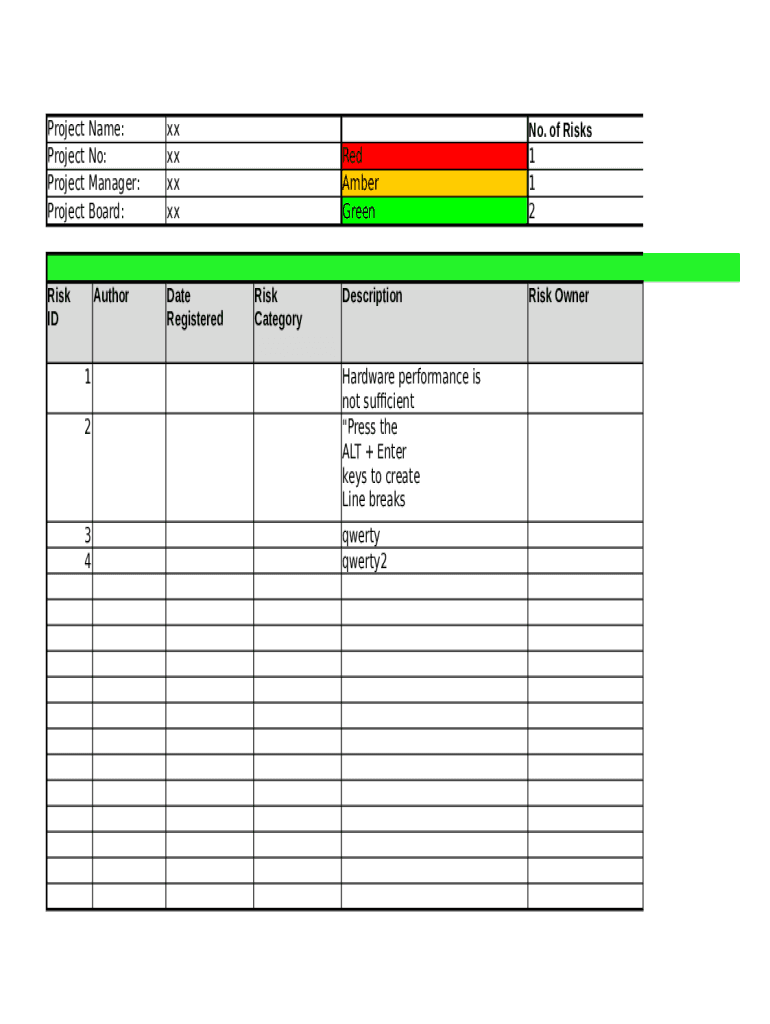
Prince2 Risk Register free printable template
We are not affiliated with any brand or entity on this form

Fill out
Complete the form online in a simple drag-and-drop editor.

eSign
Add your legally binding signature or send the form for signing.

Share
Share the form via a link, letting anyone fill it out from any device.

Export
Download, print, email, or move the form to your cloud storage.
Why pdfFiller is the best tool for your documents and forms


End-to-end document management
From editing and signing to collaboration and tracking, pdfFiller has everything you need to get your documents done quickly and efficiently.
Accessible from anywhere
pdfFiller is fully cloud-based. This means you can edit, sign, and share documents from anywhere using your computer, smartphone, or tablet.
Secure and compliant
pdfFiller lets you securely manage documents following global laws like ESIGN, CCPA, and GDPR. It's also HIPAA and SOC 2 compliant.
What is Prince2 Risk Register
The Risk Register Template is a business form used by project managers to document and manage potential risks in a project.
pdfFiller scores top ratings on review platforms




Who needs Prince2 Risk Register?
Explore how professionals across industries use pdfFiller.

Prince2 Risk Register is needed by:
-
Project Managers
-
Business Analysts
-
Risk Management Teams
-
Project Stakeholders
-
Compliance Officers
Comprehensive Guide to Prince2 Risk Register
What is the Risk Register Template?
The Risk Register Template is a crucial tool in project risk management, designed to document and track potential risks that could impact project outcomes. This template provides a structured approach for identifying risks, allowing teams to assess their likelihood and impact systematically. Documenting risks is essential for ensuring that proactive measures are in place, facilitating effective project management and minimizing potential setbacks.
By incorporating "risk register template" into daily operations, project managers enhance their ability to communicate risks clearly with team members. This process is vital in fostering a culture of transparency and accountability, essential elements in successful project risk management.
Purpose and Benefits of Using a Risk Register Template
A Risk Register Template serves various purposes that significantly improve risk management within projects. It is instrumental in identifying, assessing, and prioritizing risks, ensuring that no potential threat goes unnoticed. By utilizing a comprehensive risk assessment form, teams can better strategize their responses to each identified risk.
-
Facilitates communication among team members regarding known risks.
-
Encourages collaboration and teamwork to address risks effectively.
-
Supports proactive management, increasing the chances of project success.
Overall, the adoption of a business risk template streamlines the risk management process, making it more efficient and effective.
Key Features of the Risk Register Template
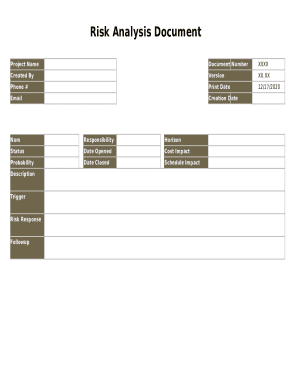
The Risk Register Template includes several key features that enhance its usability and effectiveness in project management. Users will find essential fields designed for easy completion and tracking, ensuring that all information is readily captured and accessible.
-
Risk Description: Outlines the nature of the risk.
-
Risk Owner: Identifies the person responsible for managing the risk.
-
Probability: Assesses the likelihood of the risk occurring.
-
Impact: Evaluates the potential consequences on the project.
-
Response Actions: Details planned responses for each risk.
This systematic approach to risk management increases overall efficiency, facilitating better use of project management tools for successful project execution.
Who Benefits from the Risk Register Template?
The Risk Register Template is designed for a diverse audience involved in project management and risk handling. Professionals such as project managers and team leads are primary users, enabling them to communicate risks effectively within their teams. Organizations engaged in risk management and businesses of varying sizes will also find immense value in implementing this tool.
By using a business risk template, all stakeholders can work together to address and mitigate risks efficiently, fostering an environment conducive to successful project delivery.
How to Fill Out the Risk Register Template Online
Filling out the Risk Register Template is straightforward, especially when using platforms like pdfFiller. The process begins by gathering the required information for each section of the template.
-
Start with the Risk Description, clearly defining the risk.
-
Indicate the Risk Owner responsible for managing the risk.
-
Assess the Probability and Impact to evaluate potential effects.
-
Outline Response Actions to address the identified risks.
Accurate completion is crucial for compliance and effective risk management. Ensure that all fields are filled out carefully to capture detailed information about risks.
Common Mistakes to Avoid When Completing the Risk Register Template
Users frequently encounter pitfalls when completing their Risk Register Template. Recognizing these mistakes can save time and enhance the quality of the risk register.
-
Inaccurate assessments of probability and impact may lead to poor prioritization.
-
Omitting critical information or fields can compromise the register's effectiveness.
-
Failing to update the register regularly can result in outdated risk assessments.
Avoiding these common missteps is essential for successful project risk management.
Security and Compliance in Managing Your Risk Register
When dealing with sensitive documents such as a Risk Register Template, security and compliance are paramount. pdfFiller implements robust measures, including 256-bit encryption, to ensure the confidentiality of project risk information.
It is also crucial to follow regulatory compliance standards, such as HIPAA and GDPR, while managing risks. Secure sharing and proper storage of the completed templates protect sensitive data while facilitating efficient project management.
Why Choose pdfFiller for Your Risk Register Template Needs
pdfFiller offers several advantages for users needing to create and manage their Risk Register Templates. The cloud-based solution provides easy access from any browser, eliminating the need for downloads.
-
Features like eSigning and sharing streamline document workflow.
-
Editing options enhance flexibility in managing risks.
-
A user-friendly interface ensures a seamless experience.
Support resources are also available to assist users throughout their risk management journey.
Next Steps After Completing Your Risk Register Template
After filling out the Risk Register Template, users should follow specific next steps to ensure effective risk management. First, conduct a thorough review and final validation of the completed form to confirm accuracy and completeness.
-
Consider suggested submission methods for internal use or stakeholder sharing.
-
Plan how to track and manage ongoing risks based on the recorded information.
These steps are vital for maintaining effective risk oversight and ensuring project success.
Ready to Manage Your Project Risks with Ease?
Using pdfFiller to complete your Risk Register Template simplifies the experience of online document management. Starting today allows you to efficiently fill out your template while taking advantage of its benefits in project management.
Utilizing the Risk Register Template effectively enables you to enhance risk management practices and boost overall project success.
How to fill out the Prince2 Risk Register
-
1.To access the Risk Register Template on pdfFiller, visit the pdfFiller website and use the search bar to find the template by its name.
-
2.Once you've located the template, click to open it in the pdfFiller editor, which allows for easy editing and filling of the form.
-
3.Before filling out the form, gather necessary information such as specific risks, their impact, probability, and designated owners to provide accurate inputs.
-
4.Begin navigating through the fields; there will be labeled sections for each risk aspect including 'Risk Description', 'Owner', 'Probability', 'Impact', and 'Response Actions'.
-
5.Use the editing tools provided by pdfFiller to enter information in each field. Click on the appropriate field and type the required data directly.
-
6.After entering the information, take a moment to review the filled fields for any errors or omissions to ensure that everything is complete and correct.
-
7.Once you are satisfied with the entries made, look for the options to save your work. You can save directly within pdfFiller or download the completed document to your local device.
-
8.If necessary, you can submit the form electronically through pdfFiller if the recipient accepts digital submissions.

What is the purpose of a Risk Register Template?
The Risk Register Template serves to identify, assess, and manage risks within a project, helping teams to minimize negative impacts on project outcomes.
Who should use this Risk Register Template?
This template is ideal for project managers, business analysts, risk management teams, and compliance officers who need to manage project risks effectively.
Can I submit the Risk Register Template online?
Yes, if the recipient accepts electronic submissions, you can submit the completed template through pdfFiller after finishing your edits.
What information do I need to fill out the form?
Before starting, gather information such as identified risks, their descriptions, potential impact, probability ratings, and responsible owners to complete the template accurately.
Is notarization required for the Risk Register Template?
No, the Risk Register Template does not require notarization, making it easier for project managers to complete and manage without additional legal steps.
How do I review my completed Risk Register Template?
After filling out the fields, carefully review each entry for accuracy, ensuring all required sections are filled before saving or submitting the form.
What common mistakes should I avoid?
Avoid leaving fields incomplete or misjudging risk impact and probabilities, as these mistakes can undermine the effectiveness of the risk management process.
Related Forms





Get the latest insights from our blog


If you believe that this page should be taken down, please follow our DMCA take down process
here
.
This form may include fields for payment information. Data entered in these fields is not covered by PCI DSS compliance.