
Last updated on
Nov 9, 2026

FL All Saints Catholic Church Temporary Child Guardian Consent Form 2013-2026 free printable tem...
pdfFiller is not affiliated with any government organization

Fill out
Complete the form online in a simple drag-and-drop editor.

eSign
Add your legally binding signature or send the form for signing.

Share
Share the form via a link, letting anyone fill it out from any device.

Export
Download, print, email, or move the form to your cloud storage.
Why pdfFiller is the best tool for your documents and forms


End-to-end document management
From editing and signing to collaboration and tracking, pdfFiller has everything you need to get your documents done quickly and efficiently.
Accessible from anywhere
pdfFiller is fully cloud-based. This means you can edit, sign, and share documents from anywhere using your computer, smartphone, or tablet.
Secure and compliant
pdfFiller lets you securely manage documents following global laws like ESIGN, CCPA, and GDPR. It's also HIPAA and SOC 2 compliant.
What is FL All Saints Catholic Church Temporary Child Guardian Consent Form
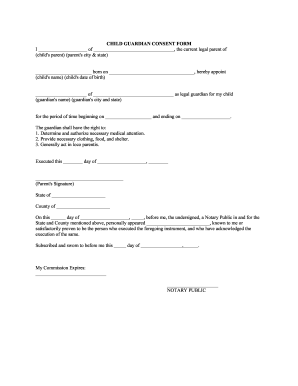
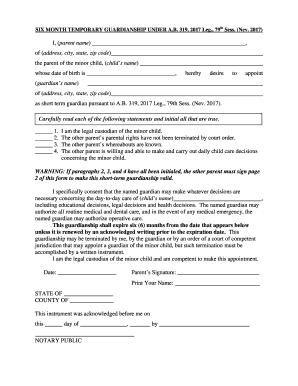
The Temporary Child Guardian Consent Form is a legal document used by parents in Florida to grant temporary guardianship of their child to a designated temporary guardian.
pdfFiller scores top ratings on review platforms




Who needs FL All Saints Catholic Church Temporary Child Guardian Consent Form?
Explore how professionals across industries use pdfFiller.

FL All Saints Catholic Church Temporary Child Guardian Consent Form is needed by:
-
Parents looking to arrange temporary guardianship for their child
-
Temporary guardians designated by the child's parent
-
Notaries required to notarize the consent form
-
Child custody facilitators and lawyers
-
Family law practitioners in Florida
Comprehensive Guide to FL All Saints Catholic Church Temporary Child Guardian Consent Form
What is the Temporary Child Guardian Consent Form?
The Temporary Child Guardian Consent Form serves a crucial purpose for parents in Florida, allowing them to designate a temporary guardian for their child. This form is essential in situations where parents are unable to care for their child, ensuring the child's well-being and decision-making remains uninterrupted. The main function of this document is to provide legal authorization for the temporary guardian during the specified time frame.
Purpose and Benefits of the Temporary Child Guardian Consent Form
This form is utilized by parents to grant consent for a temporary guardian, highlighting the importance of having a reliable individual ready to ensure a child's welfare in their absence. The advantages of using this form include peace of mind for parents, knowing that their child is cared for, and the appointed guardian has the authority to make necessary decisions regarding the child's health and safety. In emergencies, this parental consent for a temporary guardian streamlines access to medical care and other critical needs.
Key Features of the Temporary Child Guardian Consent Form
The Temporary Child Guardian Consent Form is designed with essential features that make it user-friendly and effective for parents in Florida. Key components include:
-
Multiple fillable fields for user input.
-
Checklists that allow parents to detail specific decisions made.
-
Notarization requirement to validate the document legally.
These features collectively ensure clarity and compliance when authorizing temporary guardianship.
Who Needs the Temporary Child Guardian Consent Form?
This form is applicable for parents who need to arrange temporary custodial support for their children. Situations that necessitate this document include travel, medical emergencies, or temporary relocations. Potential temporary guardians, such as family members or friends, must also be aware of this requirement to ensure proper custody arrangements. The form helps in legitimizing the temporary guardian’s responsibilities under various circumstances, aligning with Florida child custody laws.
How to Fill Out the Temporary Child Guardian Consent Form Online (Step-by-Step)
Completing the Temporary Child Guardian Consent Form online is straightforward. Follow these steps:
-
Access the form on pdfFiller’s platform.
-
Fill in the required fields, such as names and dates.
-
Review the information to ensure accuracy.
-
Sign the document, adhering to notarization guidelines.
-
Submit the form electronically or prepare it for physical delivery.
This organized process enables efficient and precise completion of the form, ensuring all necessary details are captured.
Required Documents and Supporting Materials
To validate the Temporary Child Guardian Consent Form, several supporting documents may be necessary. This typically includes:
-
Proof of identification for both the parent and temporary guardian.
-
Documentation verifying the relationship between the child and the guardian.
Ensuring these documents are prepared alongside the form facilitates a smooth approval process and compliance with legal standards.
How to Sign or Notarize the Temporary Child Guardian Consent Form
To ensure the Temporary Child Guardian Consent Form is legally binding, the signature process includes appropriate notarization. Parents can opt for:
-
Digital signatures if submitted through a compliant eSigning platform.
-
Wet signatures, which must be notarized in person.
Adhering to these guidelines confirms the form’s validity and minimizes legal risks regarding custody arrangements.
Submission Methods and Delivery for the Temporary Child Guardian Consent Form
Once completed, the Temporary Child Guardian Consent Form can be submitted through various methods, accommodating user preferences. Options include:
-
Physical delivery by mail or in-person to relevant authorities.
-
Electronic submission via email or authorized online platforms.
These submission methods allow for flexibility, ensuring timely processing of the guardianship arrangement.
Security and Compliance for the Temporary Child Guardian Consent Form
Users can trust pdfFiller to handle sensitive information securely while completing the Temporary Child Guardian Consent Form. The platform employs:
-
256-bit encryption for document protection.
-
Compliance with HIPAA and GDPR regulations to safeguard user data.
This commitment to security ensures that personal details are managed with the utmost confidentiality, providing peace of mind to users.
Get Started with pdfFiller for Your Temporary Child Guardian Consent Form
Utilizing pdfFiller for your Temporary Child Guardian Consent Form simplifies the entire process. The platform’s user-friendly interface allows for easy editing, filling, and signing of the form. Additionally, pdfFiller ensures your data is secure, giving you confidence while managing essential guardianship documents effectively.
How to fill out the FL All Saints Catholic Church Temporary Child Guardian Consent Form
-
1.Access the Temporary Child Guardian Consent Form by visiting pdfFiller and searching for the form by name.
-
2.Once opened, navigate through the document using the scroll bar or the navigation panel on the left.
-
3.Before filling in the form, gather the necessary information such as the child's full name, temporary guardian's details, and the desired duration of guardianship.
-
4.Begin completing the fillable fields by entering the required information, such as the child's full name in the designated area.
-
5.Move on to the temporary guardian's information and fill out their name and contact details as instructed.
-
6.Provide the duration for which the guardianship is applicable, ensuring this aligns with your needs.
-
7.After filling in all fields, review the document to confirm all entries are accurate and complete.
-
8.Ensure that you and the required signatories, such as the parent and notary, have signed where indicated.
-
9.Once finalized, save your work regularly on pdfFiller to avoid data loss.
-
10.Download the finished form as a PDF or submit it electronically through pdfFiller’s submission options, following the prompts provided.

Who is eligible to use the Temporary Child Guardian Consent Form?
Parents or legal guardians in Florida seeking to grant temporary guardianship to another adult are eligible to use this form. It is intended for use when a parent cannot care for their child for a short period.
Is notarization required for this form?
Yes, the Temporary Child Guardian Consent Form requires notarization. This ensures the document is legally binding and acknowledges the legitimacy of the signatures provided.
What is included in the form that needs to be filled out?
The form includes fillable fields for the child's information, the temporary guardian's details, the duration of guardianship, and areas for signatures from the parent and notary.
How should parents sign the form?
Parents must sign the form in the designated area, and their signature should be notarized to validate the consent granted to the temporary guardian.
What are common mistakes to avoid when completing the form?
Common mistakes include overlooking required fields, failing to have the notary sign and stamp the form, and not clearly stating the duration of guardianship. Review all entries carefully before finalizing.
Can the form be edited after submission?
Once the Temporary Child Guardian Consent Form is submitted, it cannot be edited. It is crucial to review the form thoroughly before submission to ensure all information is accurate.
What happens if the temporary guardian needs to extend their guardianship?
If an extension is needed, a new Temporary Child Guardian Consent Form should be completed, stating the updated duration and requiring signatures and notarization again.
Related Forms




Related Catalogs
Get the latest insights from our blog


If you believe that this page should be taken down, please follow our DMCA take down process
here
.
This form may include fields for payment information. Data entered in these fields is not covered by PCI DSS compliance.