
Last updated on
Oct 30, 2026
IRS 2587 2020 free printable template
pdfFiller is not affiliated with IRS

Fill out
Complete the form online in a simple drag-and-drop editor.

eSign
Add your legally binding signature or send the form for signing.

Share
Share the form via a link, letting anyone fill it out from any device.

Export
Download, print, email, or move the form to your cloud storage.
Why pdfFiller is the best tool for your documents and forms


End-to-end document management
From editing and signing to collaboration and tracking, pdfFiller has everything you need to get your documents done quickly and efficiently.
Accessible from anywhere
pdfFiller is fully cloud-based. This means you can edit, sign, and share documents from anywhere using your computer, smartphone, or tablet.
Secure and compliant
pdfFiller lets you securely manage documents following global laws like ESIGN, CCPA, and GDPR. It's also HIPAA and SOC 2 compliant.
What is IRS 2587
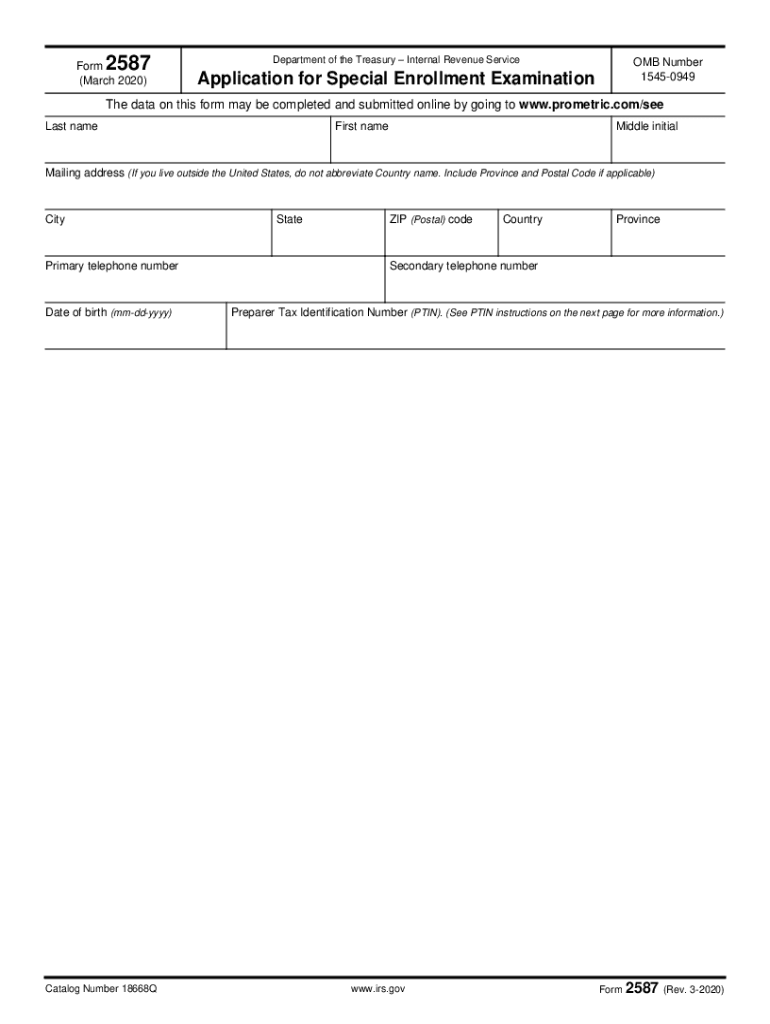
The IRS Form 2587 is an official application document used by tax professionals to register for the Special Enrollment Examination.
pdfFiller scores top ratings on review platforms




I found pdf filler on google accidentally and can't believe there is a software out there with these features. I'm using this extensively for work.
ez to use. can be used anywhere instead of a single system.
Who needs IRS 2587?
Explore how professionals across industries use pdfFiller.

IRS 2587 is needed by:
-
Tax preparers seeking special enrollment certification
-
Individuals looking to become IRS-authorized tax professionals
-
Employees at tax services requiring IRS certification
-
Students studying tax preparation
-
Tax compliance professionals needing formal credentials
-
Enrolled agents pursuing continued professional development
Comprehensive Guide to IRS 2587
What is IRS Form 2587?
IRS Form 2587 is an application used for the Special Enrollment Examination, which is managed by Prometric on behalf of the IRS. This form requires personal information, including your name, address, date of birth, and Preparer Tax Identification Number (PTIN). The form serves to identify applicants who wish to undertake the Special Enrollment Examination, ensuring compliance with the Paperwork Reduction Act and Privacy Act. Understanding IRS Form 2587 is essential for pursuing a career in tax preparation and representation.
Purpose and Benefits of the IRS Form 2587
The Special Enrollment Examination is crucial for tax professionals seeking to enhance their qualifications. By completing IRS Form 2587, candidates can assess their eligibility for this significant certification. The benefits of submitting this application extend beyond mere qualification; they include professional advancement and compliance with federal regulations. This underscores the importance of the form in the context of the tax preparation industry.
-
Facilitates entry into the Special Enrollment Examination
-
Supports career development for tax professionals
-
Ensures adherence to relevant federal laws
Who Needs IRS Form 2587?
IRS Form 2587 is specifically designed for tax professionals who wish to represent taxpayers before the IRS. Individuals in various roles, including tax preparers and enrolled agents, should be aware of the eligibility criteria required for the Special Enrollment Examination. Understanding who needs to fill out this form is essential for targeting the right audience effectively.
How to Fill Out IRS Form 2587 Online
Filling out IRS Form 2587 can be efficiently accomplished online using platforms like pdfFiller. Follow these steps to complete the form:
-
Access the IRS Form 2587 template through pdfFiller.
-
Input your personal information in the designated fields, including your name, address, date of birth, and PTIN.
-
Review all entered data for accuracy.
-
Submit the form online via the Prometric website or directly through pdfFiller.
Utilizing online tools streamlines the process and enhances accuracy for applicants.
Common Errors and How to Avoid Them
Applicants often encounter various pitfalls when completing IRS Form 2587. To minimize errors, consider the following common mistakes:
-
Inaccurate personal information entries, such as incorrect names or PTINs
-
Failing to review the completed form before submission
-
Missing required signatures or dates
Establishing a habit of double-checking information and following validation checkpoints can greatly improve submission accuracy.
Submission Methods for IRS Form 2587
There are multiple methods to submit IRS Form 2587, each with specific guidelines:
-
Online submission through the Prometric website or pdfFiller
-
Mailing the completed form to the designated IRS office
-
In-person delivery at an IRS office
Each method may have associated fees and deadlines, so it’s important to be aware of processing times and costs depending on the chosen submission route.
Tracking & Confirmation Post-Submission
Once you submit IRS Form 2587, it's essential to confirm its receipt. You can monitor the status of your application through the Prometric website. Be aware of the expected timelines for feedback and understand the procedures for amending or correcting any submissions if necessary.
Security and Compliance for IRS Form 2587
When using IRS Form 2587, it’s crucial to prioritize the security of your personal information. pdfFiller employs 256-bit encryption to protect sensitive data, adhering to regulations such as HIPAA and GDPR. Ensuring that your information is safeguarded during the form-filling process is vital, as is understanding the record retention requirements for IRS submissions.
Why Choose pdfFiller for Your IRS Form 2587 Application?
pdfFiller stands out as an ideal choice for filling out IRS Form 2587 due to its user-friendly features. Key benefits include:
-
Ease of use for filling out and submitting forms
-
Comprehensive document management tools
-
Secure eSigning functionalities
These features significantly enhance the user experience and facilitate efficient completion of IRS forms.
Complete Your IRS Form 2587 Today!
To get started with your IRS Form 2587 application, consider utilizing pdfFiller. The platform streamlines the process of filling out and submitting your forms, promoting an efficient experience for users. Take advantage of the benefits provided by pdfFiller and begin your application today.
How to Fill Out Small Business Tax Forms Online with pdfFiller
Struggling with your Schedule C or not sure how to file business taxes as a sole proprietor, LLC, or self-employed professional? This step-by-step pdfFiller tutorial walks you through completing IRS Schedule C quickly and accurately — no printing, no scanning, no stress. Whether you're handling small business tax deductions, tracking self-employed taxes, or preparing your full business tax return, pdfFiller makes it simple right in your browser.

How to fill out the IRS 2587
-
1.Access pdfFiller and navigate to the form section. Search for 'IRS Form 2587' to locate the document.
-
2.Once the form is open, review the fillable fields available on the interface where personal information is required.
-
3.Gather all necessary information before starting, including your last name, first name, middle initial, mailing address, date of birth, and your Preparer Tax Identification Number (PTIN).
-
4.Begin filling in each field with your personal information accordingly, ensuring all entries are accurate and match your official documents.
-
5.pdfFiller allows you to save your progress at any time. Make sure to utilize this feature to avoid losing any information.
-
6.Review the completed form carefully, checking for any errors or missing information. Use pdfFiller's review tools to assist with this process.
-
7.Once everything is confirmed to be correct, save the form, and consider downloading it for your records.
-
8.To submit the application, follow the instructions provided within the form to ensure it reaches the IRS through the proper channels.

Who is eligible to fill out IRS Form 2587?
Individuals interested in becoming authorized tax professionals through the Special Enrollment Examination must fill out IRS Form 2587. This includes current tax preparers and those exploring tax-related careers.
What is the deadline for submitting IRS Form 2587?
While IRS Form 2587 does not have a specific deadline, it is important to register well in advance of the examination date you wish to take. Check Prometric's website for any specific date-related information.
How do I submit IRS Form 2587?
After completing IRS Form 2587, you must submit it electronically via Prometric's website or follow any other submission guidelines provided on the form to ensure it is delivered to the IRS.
What documents do I need when filling out IRS Form 2587?
You typically need personal identification details such as your name, address, date of birth, and PTIN. Additional documentation may be needed depending on your background, so check any specific requirements related to the Special Enrollment Examination.
What are common mistakes to avoid when filling out IRS Form 2587?
Common mistakes include incorrect entries in personal information fields, not providing complete information, and failing to check for updates to the form or submission methods. Always use the latest version of the form and double-check every entry.
How long does it take to process IRS Form 2587?
Processing times for IRS Form 2587 can vary. After submission, allow several weeks for the IRS to process your application and notify you. Always keep an eye on communications from the IRS.
What should I do if I need assistance with IRS Form 2587?
If you encounter issues with IRS Form 2587, consider reaching out to tax professionals for guidance or refer to the IRS website for specific FAQs and support tailored to your needs.
IRS 2587 Form Versions
Related Content
Related Forms





Get the latest insights from our blog


If you believe that this page should be taken down, please follow our DMCA take down process
here
.
This form may include fields for payment information. Data entered in these fields is not covered by PCI DSS compliance.