
Last updated on
Nov 9, 2026
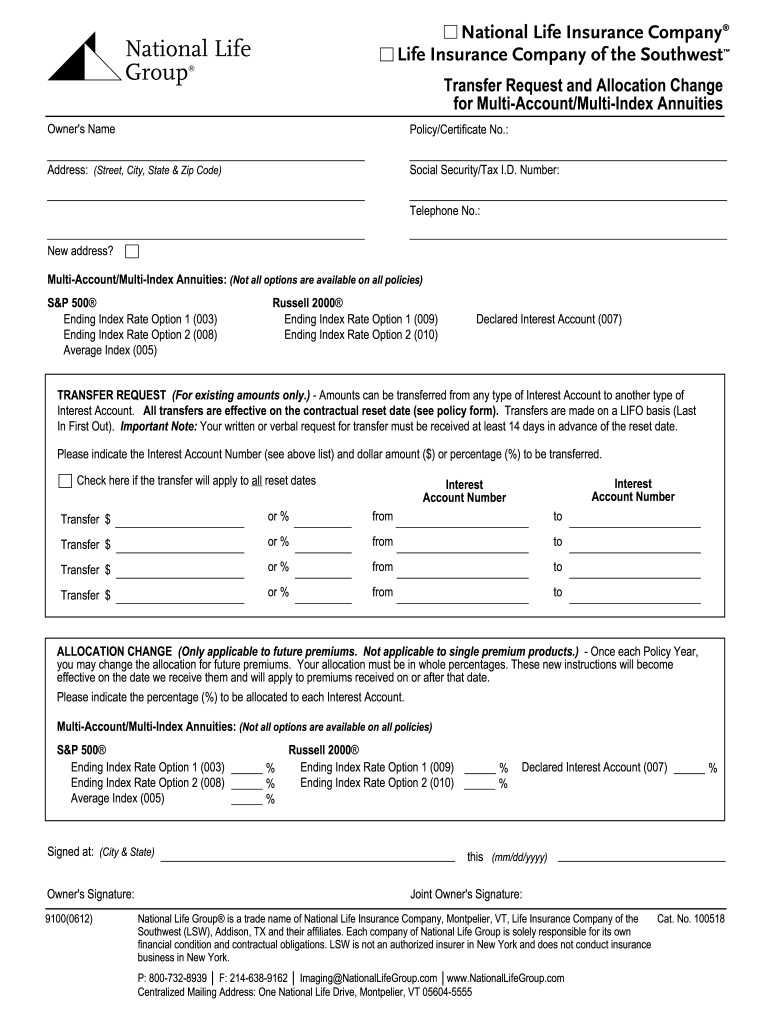
National Life Group 9100 2012-2026 free printable template
pdfFiller is not affiliated with any government organization

Fill out
Complete the form online in a simple drag-and-drop editor.

eSign
Add your legally binding signature or send the form for signing.

Share
Share the form via a link, letting anyone fill it out from any device.

Export
Download, print, email, or move the form to your cloud storage.
Why pdfFiller is the best tool for your documents and forms


End-to-end document management
From editing and signing to collaboration and tracking, pdfFiller has everything you need to get your documents done quickly and efficiently.
Accessible from anywhere
pdfFiller is fully cloud-based. This means you can edit, sign, and share documents from anywhere using your computer, smartphone, or tablet.
Secure and compliant
pdfFiller lets you securely manage documents following global laws like ESIGN, CCPA, and GDPR. It's also HIPAA and SOC 2 compliant.
What is National Life Group 9100
The Transfer Request and Allocation Change for Multi-Account/Multi-Index Annuities is a financial document used by annuity owners to initiate transfers between interest accounts and modify future premium allocations.
pdfFiller scores top ratings on review platforms




Who needs National Life Group 9100?
Explore how professionals across industries use pdfFiller.

National Life Group 9100 is needed by:
-
Annuity Owners seeking to change allocations
-
Joint Owners involved in annuity management
-
Financial Advisors assisting clients with annuities
-
Insurance Professionals handling multi-index annuities
-
Individuals planning retirement investment strategies
Comprehensive Guide to National Life Group 9100
What is the Transfer Request and Allocation Change for Multi-Account/Multi-Index Annuities?
The Transfer Request and Allocation Change form is designed for owners of multi-account and multi-index annuities. This form allows users to request transfers between different interest accounts and modify the allocation of their future premium payments. Typically, this form is utilized by both owners and joint owners of annuities seeking to manage their investments more efficiently.
Purpose and Benefits of the Transfer Request and Allocation Change for Multi-Account/Multi-Index Annuities
Users commonly complete this form for several key reasons: to optimize account management, maintain flexibility in investment strategies, and ensure the best potential returns. The benefits of utilizing the allocation change form include the ability to tailor accounts according to individual financial goals, thereby increasing the effectiveness of investment strategies.
Key Features of the Transfer Request and Allocation Change for Multi-Account/Multi-Index Annuities
This form contains several important elements that aid in facilitating transfer requests, such as:
-
Fillable fields for essential information like owner name and policy number.
-
Checkboxes to select different options for transfers and allocations.
-
Tables for detailing amounts to be transferred and allocated.
These features streamline the process, making it easier for users to submit accurate requests and allocations.
Who Needs the Transfer Request and Allocation Change for Multi-Account/Multi-Index Annuities?
This form is primarily intended for individuals who own or jointly own annuities and need to initiate a transfer or allocation change. Specific scenarios may include changes in financial strategy, lifecycle events, or other personal finance considerations that require updates to their annuity management.
Eligibility Criteria for the Transfer Request and Allocation Change for Multi-Account/Multi-Index Annuities
To successfully submit the Transfer Request and Allocation Change form, users must meet certain eligibility criteria. Key conditions include compliance with Vermont state guidelines, if applicable, and ensuring that all required fields are filled correctly. Familiarity with the specific rules governing multi-account annuities is crucial for a successful submission.
How to Fill Out the Transfer Request and Allocation Change for Multi-Account/Multi-Index Annuities Online (Step-by-Step)
To complete the Transfer Request form using pdfFiller, follow these steps:
-
Access the form on the pdfFiller platform.
-
Fill in your name and policy number accurately.
-
Detail your address and social security or tax ID number.
-
Select your desired transfer and allocation options using checkboxes.
-
Review for common pitfalls such as incomplete fields before submission.
Submission Methods and Delivery of the Transfer Request and Allocation Change for Multi-Account/Multi-Index Annuities
After filling out the form, users need to submit it according to their selected method. Common submission methods include online through pdfFiller or via mail. Deadlines for submission may apply, with users advised to check for any processing time requirements following submission.
Security and Compliance for the Transfer Request and Allocation Change for Multi-Account/Multi-Index Annuities
When handling the Transfer Request and Allocation Change form, security of personal information is paramount. pdfFiller ensures compliance with legal standards such as HIPAA and GDPR, employing 256-bit encryption for data protection during form submission and processing.
Sample or Example of a Completed Transfer Request and Allocation Change for Multi-Account/Multi-Index Annuities
To assist users in accurately completing their form, a sample or example is provided. This illustrative guide highlights key areas of the form, ensuring users understand how to avoid common mistakes and correctly fill in necessary details.
Enhance Your Experience with pdfFiller for the Transfer Request and Allocation Change for Multi-Account/Multi-Index Annuities
Utilizing pdfFiller’s platform provides a user-friendly experience when completing, editing, and submitting the Transfer Request form. Features like eSigning and secure storage further enhance user satisfaction, making the process straightforward and efficient.
How to fill out the National Life Group 9100
-
1.Access the Transfer Request and Allocation Change form by visiting the pdfFiller website and searching for the document title.
-
2.Once you find the form, click on it to open it in the pdfFiller editing interface.
-
3.Before you start filling out the form, gather essential information such as your name, policy number, address, and Social Security or tax I.D. number.
-
4.Begin filling in the Owner's Name and Policy/Certificate No. fields using the information you've collected.
-
5.Continue to complete the Address and Social Security/Tax I.D. Number fields while ensuring all details are accurately entered.
-
6.Utilize the checkboxes and tables provided in the document to indicate the amounts you wish to transfer and how you want to allocate future premiums.
-
7.As you fill the form, make sure each field is completed completely, as missing information may delay processing.
-
8.After filling in all necessary fields, review the form for any errors or omissions to ensure accuracy.
-
9.Once you are satisfied with your entries, save the form using the save feature on pdfFiller.
-
10.You can also download the completed form to your device for your records or submit it directly through pdfFiller as directed.

Who is eligible to use the Transfer Request and Allocation Change form?
This form is primarily for owners and joint owners of Multi-Account/Multi-Index Annuities who wish to request transfers and allocation changes.
Is there a deadline for submitting the transfer request?
Transfers must be requested at least 14 days in advance of the reset date to ensure they are processed in time.
What methods can I use to submit the completed form?
Completed forms can be submitted electronically through pdfFiller or downloaded and sent via standard mail to the appropriate service provider.
What supporting documents are required with this form?
Typically, no additional supporting documents are required, but it's a good practice to verify any specific requirements with your annuity provider.
What are common mistakes to avoid when filling out this form?
Common mistakes include providing incomplete information, missing signatures, and failing to submit the form within the required timeframe.
How long does processing take for transfer requests?
Processing times can vary, but expect a typical window of several days to a few weeks for your transfer request to be completed.
Can I make multiple allocation changes at once?
Allocation changes are generally accepted in whole percentages, and you may list multiple changes within the same form if needed.
Related Content
Related Forms





Get the latest insights from our blog


If you believe that this page should be taken down, please follow our DMCA take down process
here
.
This form may include fields for payment information. Data entered in these fields is not covered by PCI DSS compliance.