
Last updated on
Nov 7, 2026
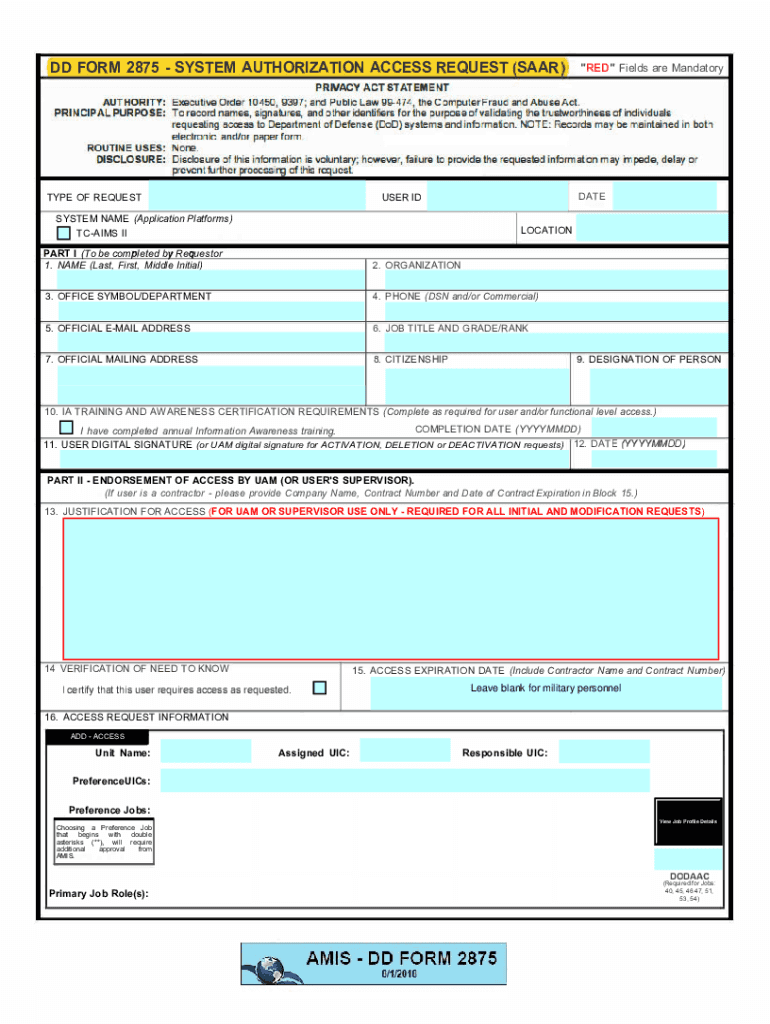
DD 2875 2018 free printable template
pdfFiller is not affiliated with any government organization

Fill out
Complete the form online in a simple drag-and-drop editor.

eSign
Add your legally binding signature or send the form for signing.

Share
Share the form via a link, letting anyone fill it out from any device.

Export
Download, print, email, or move the form to your cloud storage.
Why pdfFiller is the best tool for your documents and forms


End-to-end document management
From editing and signing to collaboration and tracking, pdfFiller has everything you need to get your documents done quickly and efficiently.
Accessible from anywhere
pdfFiller is fully cloud-based. This means you can edit, sign, and share documents from anywhere using your computer, smartphone, or tablet.
Secure and compliant
pdfFiller lets you securely manage documents following global laws like ESIGN, CCPA, and GDPR. It's also HIPAA and SOC 2 compliant.
What is DD 2875
The DD Form 2875 is a government document used by the U.S. Department of Defense to request system authorization access for military personnel.
pdfFiller scores top ratings on review platforms




Good. Although billing issue was a bit of a pain but was resolved in a quick and efficient manner. Love the program.
Excelente aplicación, me ayudo muchísimo con mis documentos!!
Who needs DD 2875?
Explore how professionals across industries use pdfFiller.

DD 2875 is needed by:
-
Requestors seeking system access within the Department of Defense.
-
Supervisors or User Account Managers (UAM) responsible for approving access requests.
-
Security Managers validating trustworthiness for system access.
-
Information Owners assessing the need for access based on operational roles.
-
Account Processors handling access requests for the military.
Comprehensive Guide to DD 2875
What is the DD Form 2875 System Authorization Access Request?
The DD Form 2875 is a crucial document used by the U.S. Department of Defense to request authorization for system access. It serves multiple functions, including the collection of personal details, job information, and security clearance levels. By facilitating the authorization access request process, this form is integral to ensuring the trustworthiness of personnel needing access to sensitive systems.
The form not only outlines the user's role but also underscores the necessity for trustworthiness, significantly impacting national security and system integrity. Understanding the DD Form 2875 is essential for proper compliance within military frameworks.
Purpose and Benefits of the DD Form 2875
The importance of the DD Form 2875 lies in its ability to provide secure access for military personnel to sensitive systems. By utilizing this form, requestors can streamline their access while adhering to Department of Defense standards. It not only benefits the individual requestors by ensuring their data is processed efficiently, but it also bolsters overall security for the Department of Defense.
This access request form promotes the need for compliance with military regulations while contributing to a secure operational environment. Understanding its benefits is essential for all personnel involved in system access procedures.
Who Needs the DD Form 2875 and Eligibility Criteria
Various roles are required to complete the DD Form 2875 faithfully. These roles include:
-
Requestor
-
Supervisor or User Account Manager (UAM)
-
Security Manager
-
Information Owner (AMIS)
-
Account Processor (ASD)
Each role plays a critical part in ensuring the form is filled out correctly, thereby safeguarding sensitive information. Eligibility criteria are fundamental, as they determine who can initiate or endorse requests based on security clearance levels. Collaboration among involved parties cultivates a streamlined process and enhances the security protocol.
How to Fill Out the DD Form 2875 Online (Step-by-Step)
Completing the DD Form 2875 online is straightforward when following these steps:
-
Access the form online and select “Fill Out.”
-
Enter your personal information in the designated fields.
-
Provide job details including your title and role within the organization.
-
Fill in security clearance information accurately.
-
Review all entries for accuracy before finalizing.
Ensure that the data entered is accurate to avoid any rejections. Understanding the specific requirements for each field enhances the accuracy of your submission.
Common Errors and How to Avoid Them
While filling out the DD Form 2875, users often encounter several common errors, including:
-
Missing signatures from required roles
-
Incorrect or incomplete personal information
-
Failure to adhere to formatting requirements
To ensure successful submission, double-check all information for accuracy and completeness. Paying attention to detail can significantly reduce the chances of errors during the submission process.
Submission Methods and What Happens After You Submit
There are several methods available for submitting the DD Form 2875, including:
-
Online submission through designated DoD websites
-
Mailing physical copies to the appropriate department
Once submitted, you can expect a processing period that varies depending on the workload. It is crucial to keep a record of your submission for reference, as this can facilitate follow-ups regarding your access request status.
Security and Compliance for the DD Form 2875
Ensuring the security of information while handling the DD Form 2875 is paramount. Users must adhere to security measures that safeguard personal data, including:
-
Using secure channels for submission
-
Being aware of compliance with regulations like HIPAA and GDPR
Protecting personal information during this process not only ensures compliance but also maintains the integrity of sensitive systems affiliated with the government.
How pdfFiller Can Help with the DD Form 2875
pdfFiller provides a robust suite of features that simplifies the management of the DD Form 2875. Key functionalities include:
-
Fillable digital forms for ease of use
-
eSigning capabilities for secure document approval
-
Advanced security benefits for handling sensitive information
Utilizing pdfFiller can significantly streamline the form submission process, allowing users to focus on accuracy and compliance.
Sample Completed DD Form 2875
A visual reference can greatly assist users in filling out the DD Form 2875 correctly. A completed sample form demonstrates the required layout and the type of information needed in each section, ensuring that users understand how to present their details adequately.
By referring to a filled-out form, users can gain confidence in their own submissions and appreciate the critical information that must be documented.
Next Steps After Completing the Form
After filling out the DD Form 2875, consider the subsequent steps for managing your document effectively:
-
Store your completed form securely, either digitally or physically.
-
Check for any updates or next actions required following your submission.
Continuous tracking of your access request is vital for staying informed about the status of your application and ensuring you meet all subsequent requirements.
How to fill out the DD 2875
-
1.Access the DD Form 2875 on pdfFiller by searching the form name in the pdfFiller search bar.
-
2.Open the form and familiarize yourself with the sections, including personal information, job details, and security clearance fields.
-
3.Gather necessary information such as your personal data, job title, and security clearance level before filling in the form.
-
4.Begin filling in the form by clicking on the blank fields to enter data directly. Use the provided instructions for guidance.
-
5.For fields requiring signatures, ensure that the requestor, supervisor, security manager, and information owner have the opportunity to sign the document.
-
6.Review all entered information carefully to ensure accuracy and completeness before finalizing the form.
-
7.Once satisfied with your entries, save the form on pdfFiller using the 'Save' option.
-
8.You can download a copy of the completed form or submit it directly through pdfFiller’s submit feature.

Who is eligible to fill out the DD Form 2875?
The DD Form 2875 is primarily for military personnel and government employees who need authorization to access Department of Defense systems. Each request must have appropriate signatures from a supervisor, security manager, and information owner.
What is the process for submitting the form?
After filling out the DD Form 2875 on pdfFiller, ensure all required signatures are obtained. You can submit the form online through pdfFiller or download it for manual submission to your appropriate department.
Are there any deadlines for submitting the DD Form 2875?
While the form itself does not have a specific deadline, submissions should be timely to avoid delays in obtaining system access. Check with your department for any internal timelines.
What common mistakes should I avoid when filling out this form?
Ensure that all fields are accurately filled out and that signatures are obtained where required. Failing to gather necessary information or leaving fields blank can lead to processing delays.
How long does it take to process the DD Form 2875?
Processing times can vary based on the department and workload. Generally, allow a few days to a couple of weeks for approval and access setup.
What supporting documents are needed with the DD Form 2875?
Typically, no additional documents are required unless specified by your department. Ensure you have proof of your security clearance level if applicable.
Can I edit the DD Form 2875 after submission?
Once submitted, editing the DD Form 2875 may not be possible. If changes are needed, consult your department to understand the procedure for amending your request.
DD 2875 Form Versions
Related Content
Related Forms






Related Catalogs
Get the latest insights from our blog


If you believe that this page should be taken down, please follow our DMCA take down process
here
.
This form may include fields for payment information. Data entered in these fields is not covered by PCI DSS compliance.