
Last updated on
Oct 31, 2026

NY ST-101 2021 free printable template
pdfFiller is not affiliated with any government organization

Fill out
Complete the form online in a simple drag-and-drop editor.

eSign
Add your legally binding signature or send the form for signing.

Share
Share the form via a link, letting anyone fill it out from any device.

Export
Download, print, email, or move the form to your cloud storage.
Why pdfFiller is the best tool for your documents and forms


End-to-end document management
From editing and signing to collaboration and tracking, pdfFiller has everything you need to get your documents done quickly and efficiently.
Accessible from anywhere
pdfFiller is fully cloud-based. This means you can edit, sign, and share documents from anywhere using your computer, smartphone, or tablet.
Secure and compliant
pdfFiller lets you securely manage documents following global laws like ESIGN, CCPA, and GDPR. It's also HIPAA and SOC 2 compliant.
What is NY ST-101
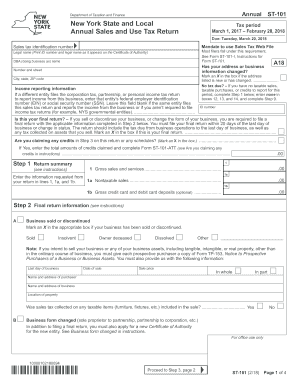
The New York State Annual Sales and Use Tax Return is a state tax document used by businesses to report gross sales and calculate taxes due for New York State.
pdfFiller scores top ratings on review platforms




Who needs NY ST-101?
Explore how professionals across industries use pdfFiller.

NY ST-101 is needed by:
-
Businesses operating in New York
-
Authorized representatives for tax filing
-
Tax preparers handling sales tax returns
-
Accounting professionals managing state tax compliance
-
Individuals responsible for maintaining sales tax documentation
Comprehensive Guide to NY ST-101
What is the New York State Annual Sales and Use Tax Return?
The New York State Annual Sales and Use Tax Return, known as the ST-101 form, is essential for businesses operating within the state. This form is used to report sales and use taxes, ensuring businesses comply with state regulations. Filing the ST-101 is crucial for maintaining accurate tax records and preventing legal issues related to tax compliance.
The ST-101 form collects vital information about gross sales, nontaxable sales, and taxable purchases. Proper completion is essential for businesses to stay in good standing with the New York State Department of Taxation and Finance.
Purpose and Benefits of the New York State Annual Sales and Use Tax Return
Filing the ST-101 form allows businesses to accurately report their sales and use taxes. By recording details about gross sales and nontaxable transactions, businesses can ensure they are not overpaying taxes. Accurate reporting also benefits businesses by helping them avoid penalties associated with late or incorrect submissions.
Additionally, completing the sales and use tax return helps in maintaining transparency in financial reporting, which can be advantageous during audits or other financial assessments.
Who Needs to File the New York State Annual Sales and Use Tax Return?
The requirement to file the New York State Annual Sales and Use Tax Return applies to various businesses, including retailers and service providers that generate taxable income. Businesses that have obtained a sales tax identification number are also required to file the ST-101 form.
-
Retailers with gross sales over a specific threshold.
-
Service providers who charge sales tax on services rendered.
-
Businesses needing to report sales processed both online and in physical locations.
Authorized persons and preparers must meet certain eligibility criteria to file the return on behalf of the business.
When and How to File the New York State Annual Sales and Use Tax Return
The ST-101 form must be submitted annually by March 22. To successfully file the return, businesses can choose from multiple submission methods, including online filing through the New York State Department of Taxation website or by mailing a hard copy of the form.
-
Online submission provides immediate confirmation of receipt.
-
Mail submissions may require additional processing time.
Companies should plan ahead to meet deadlines and ensure all documents are correctly filled out before submission.
Required Documents for Filing the New York State Annual Sales and Use Tax Return
To complete the ST-101 form, businesses need to gather several documents and pieces of information. A checklist can make this process smoother:
-
Business legal name and sales tax identification number.
-
Records of gross sales and nontaxable sales.
-
Documentation of taxable purchases.
-
Signature of an authorized person.
Each section of the form has specific fields that require accurate information to avoid any filing discrepancies.
How to Fill Out the New York State Annual Sales and Use Tax Return Online (Step-by-Step)
Completing the ST-101 form online using pdfFiller is efficient and straightforward. Follow these steps to fill out the form correctly:
-
Access the ST-101 template through pdfFiller.
-
Enter your business name and sales tax ID in the designated fields.
-
Record gross sales, nontaxable sales, and taxable purchases within the appropriate sections.
-
Review the details you have entered to ensure accuracy.
-
Add an electronic signature in the signature field.
-
Submit the completed form using the online platform.
This process simplifies filing while ensuring compliance with state tax regulations.
Common Errors and How to Avoid Them
When completing the ST-101 form, certain errors recur frequently, which can lead to submission rejections. Common mistakes include:
-
Incorrect entries in numerical fields.
-
Failure to sign the form where required.
-
Omissions of required data such as gross sales.
To avoid these errors, it’s critical to review all information before submitting the form. Having a review checklist can assist in catching potential mistakes early.
Security and Compliance When Filing the ST-101 Form
When handling sensitive tax information, security is paramount. Using pdfFiller ensures your data is protected through advanced encryption methods and compliance with data protection regulations such as GDPR and HIPAA.
It is essential to utilize secure platforms for filing tax documents to safeguard personal and financial information from unauthorized access.
Track Your Submission and What Happens Next
After submitting the ST-101 form, businesses can effectively track the status of their submission. Users typically receive a confirmation from the New York State Department of Taxation and Finance, indicating that the form has been successfully filed.
Post-submission, businesses should be prepared for possible audits or reviews of their filings, which are standard procedures in the tax system.
Maximize Your Efficiency with pdfFiller for the ST-101 Form
pdfFiller offers various features that enhance the efficiency of completing the ST-101 form. Users can take advantage of editable fields and the capability to eSign documents directly within the platform.
Leveraging these capabilities ensures a smoother filing experience, allowing businesses to focus on their operations while maintaining compliance with tax requirements.
How to fill out the NY ST-101
-
1.Begin by accessing the ST-101 form on pdfFiller. Use the search bar or navigate to the templates section specifically for New York tax forms.
-
2.Once you have the form open, familiarize yourself with the fields and checkboxes labeled for details such as business name, address, and sales figures.
-
3.Before starting, gather necessary information including your sales data, any nontaxable sales, and taxable purchases from your business records.
-
4.Proceed to fill in the legal name and ID number as indicated in the first section. Ensure all details match your Certificate of Authority.
-
5.Continue through the blank fields, marking checkboxes as needed, especially where it asks if your address has changed and for the final return information.
-
6.Review the sections related to special taxes and tax credits to ensure all applicable items are included in your calculations.
-
7.After completing the form, use the built-in pdfFiller tools to double-check all entered information for accuracy.
-
8.Finalize your form by signing in the designated area, ensuring that the signature belongs to an authorized individual listed within your entity.
-
9.Save your completed form on pdfFiller by clicking the save icon. You can also download a copy for your records or submit it directly through pdfFiller's submission options.

Who is required to file the New York State Annual Sales and Use Tax Return?
Any business that sells taxable goods or services in New York State must file the ST-101 form to report their sales and use taxes.
What is the deadline for submitting the ST-101 form?
The form must be filed by March 22 each year. It is crucial to meet the deadline to avoid penalties and interest on unpaid taxes.
How do I submit the ST-101 once completed?
You can either submit the ST-101 form electronically via pdfFiller or print it out and mail it to the appropriate New York State tax office.
Are there any supporting documents needed with the ST-101?
Generally, you will need documentation of gross sales, nontaxable sales, and taxable purchases to complete the form accurately.
What common mistakes should I avoid when filling out the ST-101?
Be careful to input the correct legal name, ensure all calculations are accurate, and not forget to sign the form before submission.
How long does it take for the ST-101 to be processed?
Processing times can vary, but typically expect a few weeks for New York State to process your sales tax return after submission.
Can I amend my ST-101 after submission?
Yes, if you find errors or changes are needed after submission, you can file an amended return to correct the information.
NY ST-101 Form Versions
Related Forms

Get the latest insights from our blog


If you believe that this page should be taken down, please follow our DMCA take down process
here
.
This form may include fields for payment information. Data entered in these fields is not covered by PCI DSS compliance.