
Last updated on
Oct 31, 2026
Get the free The Marriage Sessions Feedback Form
We are not affiliated with any brand or entity on this form

Fill out
Complete the form online in a simple drag-and-drop editor.

eSign
Add your legally binding signature or send the form for signing.

Share
Share the form via a link, letting anyone fill it out from any device.

Export
Download, print, email, or move the form to your cloud storage.
Why pdfFiller is the best tool for your documents and forms


End-to-end document management
From editing and signing to collaboration and tracking, pdfFiller has everything you need to get your documents done quickly and efficiently.
Accessible from anywhere
pdfFiller is fully cloud-based. This means you can edit, sign, and share documents from anywhere using your computer, smartphone, or tablet.
Secure and compliant
pdfFiller lets you securely manage documents following global laws like ESIGN, CCPA, and GDPR. It's also HIPAA and SOC 2 compliant.
What is Marriage Feedback Form
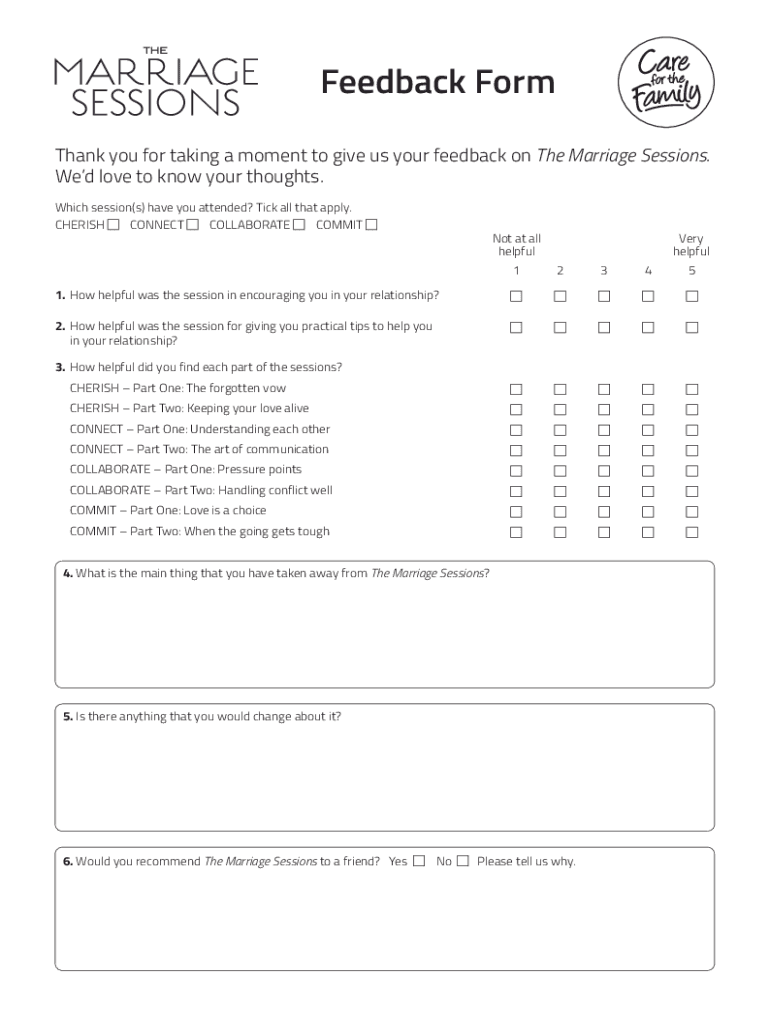
The Marriage Sessions Feedback Form is a personal document used by participants to provide feedback about their experience with The Marriage Sessions.
pdfFiller scores top ratings on review platforms




Who needs Marriage Feedback Form?
Explore how professionals across industries use pdfFiller.

Marriage Feedback Form is needed by:
-
Participants of The Marriage Sessions seeking to share their insights
-
Couples wanting to reflect on workshop content
-
Group leaders collecting participant evaluations
-
Relationship counselors assessing workshop effectiveness
-
Organizations conducting relationship improvement programs
Comprehensive Guide to Marriage Feedback Form
The Marriage Sessions Feedback Form: What It Is
The Marriage Sessions Feedback Form serves an essential purpose in gathering participant feedback after attending The Marriage Sessions. By collecting insights on various session topics, such as communication skills and conflict resolution, the feedback form plays a crucial role in assessing the expected outcomes of the program. Participant input is invaluable for enhancing future workshops and positively impacting couples' relationships.
When couples complete this feedback form, their experiences contribute significantly to the ongoing improvement of the sessions and the relationships of those involved.
Why Use The Marriage Sessions Feedback Form?
Participants gain multiple benefits by sharing their thoughts and experiences through the Marriage Sessions Feedback Form. Submitting feedback leads to actionable insights that help improve relationship dynamics not only for themselves but also for other couples within the community. Engaged couples can foster a larger community by contributing to the overall improvement of relationship-focused workshops.
Ultimately, utilizing this relationship feedback survey encourages participants to reflect on their experiences, enhancing their engagement with the sessions.
Key Features of The Marriage Sessions Feedback Form
The structure of The Marriage Sessions Feedback Form is designed with user-friendliness in mind and includes checkboxes, rating scales, and open-ended questions for detailed responses. It is also crucial for participants to provide demographic information and contact details, which facilitates future updates regarding the sessions.
Users benefit from a fillable, digital format, ensuring ease of use while completing the marriage workshop evaluation. This format streamlines the feedback process, allowing couples to focus on providing thoughtful responses.
Who Should Fill Out The Marriage Sessions Feedback Form?
The Marriage Sessions Feedback Form is specifically targeted at participants who have attended The Marriage Sessions. Couples, group leaders, and facilitators are encouraged to provide their feedback to contribute to the workshop's ongoing improvement.
Honest feedback is essential; it enables future sessions to better meet the needs of engaged couples seeking relationship enhancement.
How to Fill Out The Marriage Sessions Feedback Form Online
Filling out The Marriage Sessions Feedback Form online is simple and efficient. Follow these steps to access and complete the form digitally:
-
Visit the designated pdfFiller link to access the form.
-
Fill in the required fields, including Name, House no/name, Postcode, Email, and Telephone.
-
Review your responses for accuracy and clarity before submission.
This process ensures that each participant's valuable insights are captured effectively.
Next Steps After Completing The Marriage Sessions Feedback Form
Once participants have filled out The Marriage Sessions Feedback Form, they have several options for submission. They can either hand the form directly to a group leader or send it via mail to a specified address. After submission, confirmation of receipt will provide reassurance to participants regarding the tracking of their feedback progress.
Participants can also expect potential follow-up communications and updates based on their feedback, enhancing their continued involvement and engagement.
Ensuring Privacy and Security with Your Feedback
With pdfFiller, personal information submitted through The Marriage Sessions Feedback Form is secured comprehensively. The platform complies with data protection laws and utilizes 256-bit encryption to safeguard responses. This commitment ensures that participants can share their feedback in a safe environment, encouraging honest and constructive input.
Enhance Your Experiences with pdfFiller
Participants are encouraged to take advantage of pdfFiller’s unique features such as eSigning and document management while filling out The Marriage Sessions Feedback Form. The platform's ease of use simplifies the process of completing legal forms online, making it an essential tool for various documentation needs. Leveraging pdfFiller facilitates a seamless and efficient feedback experience for engaged couples.
How to fill out the Marriage Feedback Form
-
1.To access the Marriage Sessions Feedback Form on pdfFiller, start by visiting the website and using the search bar to locate the form using its name.
-
2.Once you find the form, click on it to open the fillable PDF in the pdfFiller editor.
-
3.Before you begin filling out the form, gather necessary information such as your name, house number, postcode, email address, and telephone number for demographic sections.
-
4.Navigate through the form using the toolbar. Click on text fields to enter your information, and use the mouse or keyboard to select options from checkboxes and rating scales.
-
5.Take your time to answer all questions thoroughly, ensuring you provide honest and constructive feedback on your experience with the sessions.
-
6.After completing the form, review all entries to make sure there are no mistakes and that all required fields are filled correctly.
-
7.Once satisfied with your entries, save your progress using the 'Save' option. You can also choose to download a copy of your completed form for your records.
-
8.If you're ready to submit, check if there's an upload option; otherwise, follow the instructions to send the form to the designated group leader or mailing address.

Who is eligible to fill out the Marriage Sessions Feedback Form?
Anyone who has participated in The Marriage Sessions is eligible to fill out the feedback form. This includes couples, individuals seeking relationship improvement, and group members.
What is the deadline for submitting this form?
While no specific deadline is noted for the Marriage Sessions Feedback Form, it is recommended to submit your feedback as soon as possible after attending the sessions to ensure it is relevant and timely.
How should I submit the Marriage Sessions Feedback Form?
You can submit the completed form by handing it to your group leader or mailing it to the address specified in the instructions included with the form.
Will I need to provide any supporting documents with my feedback?
No additional supporting documents are required with the Marriage Sessions Feedback Form. Simply complete the form with your feedback and contact information.
What common mistakes should I avoid when filling out the form?
Ensure all required fields are completed to avoid submission issues. Common mistakes include overlooking checkboxes and not providing sufficient feedback in open-ended questions.
How long will it take to process my feedback?
Processing times for feedback may vary, but you should expect to receive any follow-up communication within a few weeks of submitting your form, depending on the organization's review process.
What if I have questions while filling out the form?
If you have questions during filling out the Marriage Sessions Feedback Form, consider reaching out to your group leader for assistance or review the guidelines provided with the form.
Related Forms




Get the latest insights from our blog


If you believe that this page should be taken down, please follow our DMCA take down process
here
.
This form may include fields for payment information. Data entered in these fields is not covered by PCI DSS compliance.