
Last updated on
Oct 31, 2026

Get the free Customs Declaration Form (TRANSIT CONTROL)
We are not affiliated with any brand or entity on this form

Fill out
Complete the form online in a simple drag-and-drop editor.

eSign
Add your legally binding signature or send the form for signing.

Share
Share the form via a link, letting anyone fill it out from any device.

Export
Download, print, email, or move the form to your cloud storage.
Why pdfFiller is the best tool for your documents and forms


End-to-end document management
From editing and signing to collaboration and tracking, pdfFiller has everything you need to get your documents done quickly and efficiently.
Accessible from anywhere
pdfFiller is fully cloud-based. This means you can edit, sign, and share documents from anywhere using your computer, smartphone, or tablet.
Secure and compliant
pdfFiller lets you securely manage documents following global laws like ESIGN, CCPA, and GDPR. It's also HIPAA and SOC 2 compliant.
What is SAD 502 Form
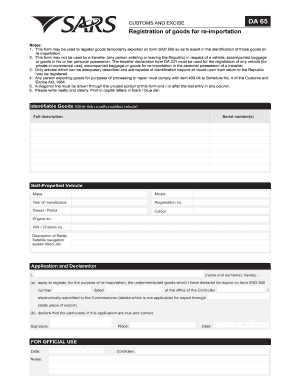
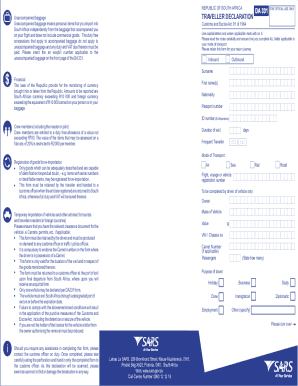
The Customs Declaration Form (TRANSIT CONTROL) is a government document used by importers and exporters to ensure compliance with customs transit requirements.
pdfFiller scores top ratings on review platforms




Who needs SAD 502 Form?
Explore how professionals across industries use pdfFiller.

SAD 502 Form is needed by:
-
Importers requiring customs clearance
-
Exporters managing goods transport
-
Guarantors ensuring transit compliance
-
Removers handling transported goods
-
Logistics and freight companies managing cargo
-
Customs brokers assisting in declaration processes
Comprehensive Guide to SAD 502 Form
What is the Customs Declaration Form (TRANSIT CONTROL)?
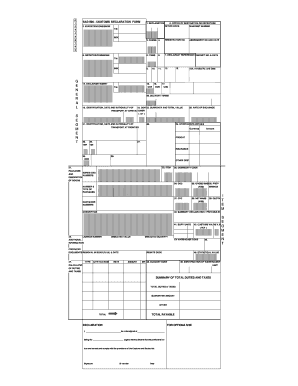
The Customs Declaration Form (TRANSIT CONTROL), known as SAD 502, is a crucial document for customs transit control. This form aids in the correct identification and management of goods being transported across borders. Its main sections identify the roles of the Declarant, Guarantor, and Remover, each responsible for different aspects of the customs process.
Compliance with national transit requirements is essential, as improper handling of this form can lead to significant penalties. Understanding this form's structure and purpose ensures a smooth transit process for your goods.
Who Needs the Customs Declaration Form (TRANSIT CONTROL)?
Individuals and businesses engaging in importing and exporting goods are required to utilize the Customs Declaration Form (TRANSIT CONTROL). Specific roles, such as the Declarant, Guarantor, and Remover, must be filled by individuals who understand their legal responsibilities.
Typical users include importing companies and exporters, freight forwarders, and logistics providers who manage the transportation of goods internationally. Each role has unique requirements based on their specific responsibilities in the transit process.
Key Features of the Customs Declaration Form (TRANSIT CONTROL)
The Customs Declaration Form includes several vital information fields essential for processing such as Importer or Exporter TIN and Office Code. Each section is designed to capture pertinent details necessary for customs clearance.
-
Signature lines require validation from the Declarant, Guarantor, and Remover.
-
Checks within the form help ensure accuracy and completeness of user inputs.
-
Fields are structured to prompt the necessary data capturing to avoid delays.
These features collectively enhance the efficiency of submitting the customs declaration while promoting compliance with national regulations.
How to Fill Out the Customs Declaration Form (TRANSIT CONTROL) Online
Filling out the Customs Declaration Form online is streamlined through platforms like pdfFiller. Begin by accessing the form via pdfFiller, where a digital format is readily available.
-
Select the Customs Declaration Form (TRANSIT CONTROL) from the available forms.
-
Complete each required field accurately, avoiding any missing information.
-
Gather all necessary signatures electronically to ensure validation.
By adhering to these steps, users can efficiently fill out their forms online, minimizing common pitfalls associated with physical documentation.
Submission Methods and Requirements for the Customs Declaration Form (TRANSIT CONTROL)
There are various submission methods for the Customs Declaration Form, including online, in-person, and by mail. Each method has specific processes to follow.
-
Online submissions are typically processed faster than in-person or mailed forms.
-
Ensure submissions are made before deadlines to avoid penalties.
-
Incorrect or late submissions could result in customs delays or additional fees.
Understanding these submission requirements is critical for ensuring compliance and efficiency in the transit of goods.
Common Errors and How to Avoid Them When Filing the Customs Declaration Form
When completing the Customs Declaration Form, users frequently make errors that can complicate the transit process. Common mistakes include providing incorrect TIN information and failing to secure all necessary signatures.
-
Double-check all entries for accuracy before finalizing the submission.
-
Review the completed form for any missing data or required sections.
By employing careful review strategies, users can mitigate the risks associated with filing incorrect information.
Why Use pdfFiller for Your Customs Declaration Form?
pdfFiller provides a user-friendly solution for managing your Customs Declaration Form efficiently. Its features allow for easy editing and eSigning all within a secure cloud environment.
-
pdfFiller ensures compliance with security standards, including HIPAA and GDPR.
-
Users benefit from convenient document storage and easy access from any browser.
The platform's commitment to security and ease of use makes it a trusted choice for handling sensitive documents.
Record Retention and Privacy Considerations for the Customs Declaration Form
It is critical to understand how long to retain the Customs Declaration Form and associated documents. Proper record retention helps ensure compliance with legal requirements.
-
Maintain records for a minimum period as prescribed by regulations.
-
Implement robust data protection practices when managing these documents.
Failure to adhere to these retention guidelines can lead to legal issues and loss of essential documentation.
Final Steps After Submitting the Customs Declaration Form
After submitting the Customs Declaration Form, tracking your submission status is crucial. Users can receive confirmation through various methods, ensuring that their documents are filed correctly.
-
Amendments may be required if corrections are needed post-filing.
-
Understand the procedures for handling any potentially rejected forms to expedite resolution.
Being proactive post-submission helps maintain compliance and ensures smooth transit operations.
Ready to Get Started with Your Customs Declaration Form?
Utilizing pdfFiller's capabilities makes filling out the Customs Declaration Form straightforward and secure. Take advantage of its user-friendly platform to streamline your document management process.
Explore the comprehensive features of pdfFiller to enhance your experience with PDF editing, form filling, and document sharing.
How to fill out the SAD 502 Form
-
1.Access pdfFiller and locate the Customs Declaration Form (TRANSIT CONTROL) in the search bar or by browsing the government forms section.
-
2.Open the form once you've located it, ensuring you have access to all editing features available within pdfFiller.
-
3.Before completing the form, gather all necessary information including the Importer or Exporter TIN, office codes, registration numbers, and dates relevant to your transit requirements.
-
4.Click on each field within the form to enter the required information. pdfFiller allows you to type directly into text boxes and select responses using checkboxes as required by the form.
-
5.Carefully complete all fields, ensuring accuracy to avoid delays in processing. Pay special attention to sections requiring signatures from the declarant, guarantor, and remover.
-
6.Review the completed form for any errors or missing information. Use the 'Preview' feature in pdfFiller to see how it will appear when submitted.
-
7.Finalize the form by adding electronic signatures where necessary, ensuring that all parties have signed off as required.
-
8.Save, download, or submit the form directly from pdfFiller using the available options to ensure it is submitted to the appropriate customs authority.

Who is required to submit the Customs Declaration Form (TRANSIT CONTROL)?
The Customs Declaration Form (TRANSIT CONTROL) must be submitted by importers, exporters, guarantors, and removers involved in the transportation of goods via customs. Each role requires accurate information for compliance.
What documents are needed to complete the form?
When filling out the Customs Declaration Form, you will need documents such as the Importer or Exporter TIN, relevant office codes, registration numbers, and any contractual documents pertinent to the transit of goods.
Can the form be submitted electronically?
Yes, the Customs Declaration Form can be submitted electronically through pdfFiller. Ensure you have signed it properly before submitting to the relevant customs authority as specified.
What common mistakes should I avoid when filling out the form?
Common mistakes include missing required signatures, incorrect TIN entries, and failing to provide accurate registration numbers. Always double-check all information before finalizing the form.
Is there a deadline for submitting this form?
While specific deadlines may vary based on customs regulations and shipping timelines, it's generally advisable to submit the Customs Declaration Form prior to shipping goods to avoid delays.
How long will it take for the form to be processed?
Processing times for the Customs Declaration Form can vary by customs authority. Typically, it can take a few days to confirm clearance, but check with your local customs office for specific timelines.
What happens if the form is filled out incorrectly?
If the Customs Declaration Form is filled out incorrectly, it may lead to delays in clearance, rejection of the form, or penalties. Always consult the instructions and check details thoroughly.




Get the latest insights from our blog


If you believe that this page should be taken down, please follow our DMCA take down process
here
.
This form may include fields for payment information. Data entered in these fields is not covered by PCI DSS compliance.