
Last updated on
Nov 7, 2026
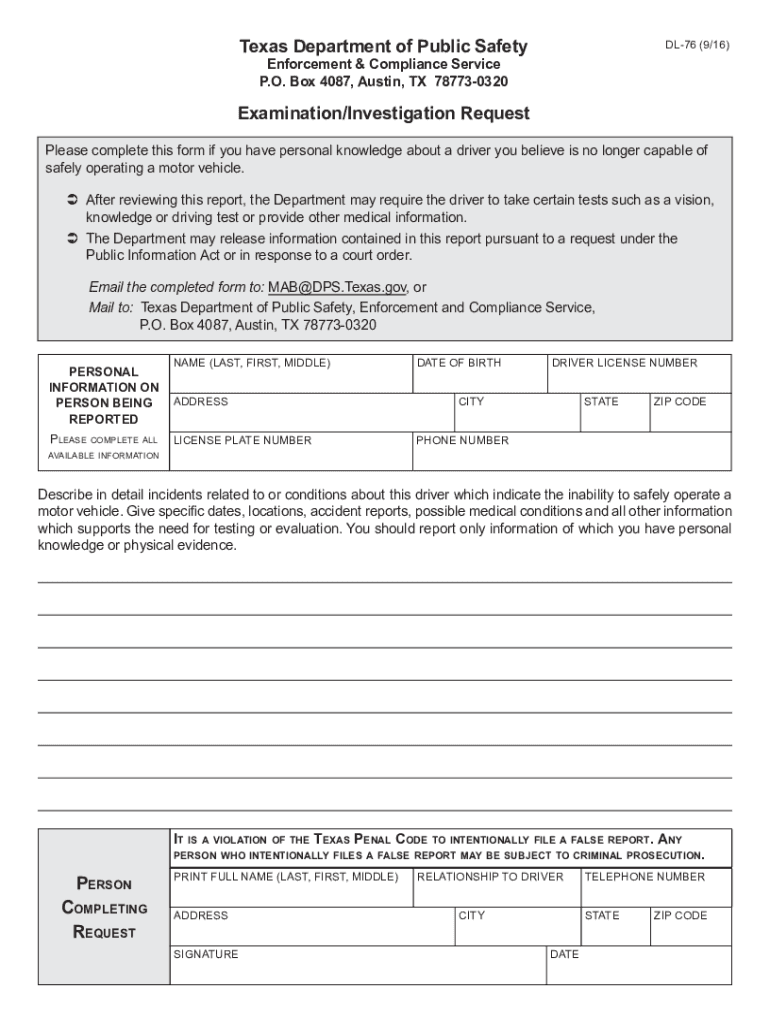
TX DL-76 2016-2026 free printable template
pdfFiller is not affiliated with any government organization

Fill out
Complete the form online in a simple drag-and-drop editor.

eSign
Add your legally binding signature or send the form for signing.

Share
Share the form via a link, letting anyone fill it out from any device.

Export
Download, print, email, or move the form to your cloud storage.
Why pdfFiller is the best tool for your documents and forms


End-to-end document management
From editing and signing to collaboration and tracking, pdfFiller has everything you need to get your documents done quickly and efficiently.
Accessible from anywhere
pdfFiller is fully cloud-based. This means you can edit, sign, and share documents from anywhere using your computer, smartphone, or tablet.
Secure and compliant
pdfFiller lets you securely manage documents following global laws like ESIGN, CCPA, and GDPR. It's also HIPAA and SOC 2 compliant.
What is TX DL-76
The Texas Driver Safety Report Form is a government document used by individuals to report unsafe drivers operating motor vehicles in Texas.
pdfFiller scores top ratings on review platforms




Who needs TX DL-76?
Explore how professionals across industries use pdfFiller.

TX DL-76 is needed by:
-
Concerned citizens witnessing unsafe driving behavior
-
Parents reporting concerns about young or inexperienced drivers
-
Employers monitoring employee driving safety
-
Insurance companies assessing driver risk
-
Law enforcement communities addressing road safety
Comprehensive Guide to TX DL-76
What is the Texas Driver Safety Report Form?
The Texas Driver Safety Report Form is a critical document used to report drivers who may exhibit unsafe behaviors while operating a vehicle. This form serves the purpose of notifying the Texas Department of Public Safety (DPS) about potentially dangerous driving conduct, enabling authorities to take necessary actions. By utilizing the Texas Driver Safety Report Form, concerned individuals can help enhance road safety and potentially prevent accidents.
Purpose and Benefits of the Texas Driver Safety Report Form
Reporting unsafe driving is essential in maintaining community safety. The Texas Driver Safety Report Form allows individuals to formally report concerning behavior, which can lead to appropriate evaluations and interventions. The use of this form not only benefits the community by addressing dangerous drivers but also protects innocent road users. Consequences for the reported driver may include mandatory tests and medical evaluations, reflecting the seriousness of the issue.
Key Features of the Texas Driver Safety Report Form
The Texas Driver Safety Report Form includes several critical sections designed to collect detailed information. Key components of the form include:
-
Personal details of both the reporting individual and the driver in question.
-
Fillable fields requiring specific information such as names and license numbers.
-
Signature lines for both parties to validate the report.
-
The option for online submission via platforms like pdfFiller.
This form is also known as the Texas DL-76 form, and it adheres to the requirements set by the Texas DPS.
Who Needs to Complete the Texas Driver Safety Report Form?
Any individual who witnesses unsafe driving can qualify as a reporting person. This includes anyone observing behaviors like reckless driving, frequent near-misses, or other alarming conduct. The key eligibility criteria revolve around being a concerned citizen who has seen such behaviors firsthand. Responsibility lies with the reporting individual to ensure accurate and honest reporting through the Texas Driver Safety Report Form.
How to Fill Out the Texas Driver Safety Report Form Online (Step-by-Step)
Filling out the Texas Driver Safety Report Form online using pdfFiller is straightforward. Follow these steps for a smooth completion:
-
Access the Texas Driver Safety Report Form template on pdfFiller.
-
Gather necessary information, including the driver’s Name, Date of Birth, and Driver License Number.
-
Complete each fillable section accurately.
-
Review all entries for accuracy.
-
Sign where required and include the Signature Date.
-
Submit the form electronically through pdfFiller’s submission options.
Common Errors and How to Avoid Them
When filling out the Texas Driver Safety Report Form, several common errors can occur. To avoid these mistakes, consider the following tips:
-
Ensure all fillable fields are completed with accurate information.
-
Double-check spelling of names and correctness of license numbers.
-
Review the form multiple times before submission for any overlooked details.
Completing this form accurately is crucial as errors can delay processing or result in dismissal of the report.
Submission Methods and Delivery of the Texas Driver Safety Report Form
Once completed, the Texas Driver Safety Report Form can be submitted through various methods. Options include:
-
Online submission via pdfFiller, ensuring the form is delivered directly to the Texas DPS.
-
Mailing the form, if physical submission is necessary, accompanied by any required supporting documents.
Understanding typical processing times and confirming receipt can also be helpful for the reporting individual.
What Happens After You Submit the Texas Driver Safety Report Form?
After the Texas Driver Safety Report Form has been submitted, several outcomes may arise. The DPS will review the report and determine whether further investigations are warranted. Possible outcomes for the reported driver include required evaluations or tests, while the reporting person may be contacted for additional information. Understanding the implications after submitting the form is important, as there may be consequences for not filing when warranted.
Security and Compliance with the Texas Driver Safety Report Form
When handling sensitive information on the Texas Driver Safety Report Form, especially via pdfFiller, security is paramount. pdfFiller employs robust security measures, including 256-bit encryption, to protect users' data. Moreover, the platform adheres to privacy regulations such as HIPAA and GDPR, ensuring compliance and safety for all users.
Get Started with the Texas Driver Safety Report Form Using pdfFiller
Engage with the Texas Driver Safety Report Form through pdfFiller for a seamless experience. With the convenience of filling out and submitting the form online, users can manage their submissions flexibly and securely. pdfFiller offers a user-friendly interface, making the process straightforward and efficient for all users interested in submitting a Texas driver report form.
How to fill out the TX DL-76
-
1.To access the Texas Driver Safety Report Form on pdfFiller, visit the pdfFiller website and enter the form name in the search bar.
-
2.Once the form appears, click on it to open the editor interface that allows you to fill in the form electronically.
-
3.Before starting, ensure you have all necessary information ready, such as the driver’s personal details, incidents observed, and any relevant documents.
-
4.Navigate through the form using the fillable fields. Click on each field to enter information such as 'Name (Last, First, Middle)', 'Date of Birth', and 'Driver License Number'.
-
5.Use the text boxes to provide detailed descriptions of any incidents or conditions regarding the driver’s safety.
-
6.After completing the form, review all entered information for accuracy and completeness. Check every section, especially the signature lines and date.
-
7.Once satisfied with your completion, you can save your progress by clicking the save button or download the form directly to your device.
-
8.To finalize your submission, print the completed form, or use the email feature to send it to the Texas Department of Public Safety.

Who is eligible to fill out the Texas Driver Safety Report Form?
Anyone who observes unsafe driving behavior by a motor vehicle operator in Texas can fill out the Texas Driver Safety Report Form, including concerned citizens and employers.
What is the deadline for submitting the Texas Driver Safety Report Form?
There is no specific deadline for submitting the Texas Driver Safety Report Form; however, timely reporting of unsafe driving incidents is encouraged to ensure road safety.
How can I submit the completed Texas Driver Safety Report Form?
You can submit the completed form either by printing and mailing it to the Texas Department of Public Safety or by sending it electronically via email if your submission method allows.
What supporting documents are required with the Texas Driver Safety Report Form?
Typically, no additional documents are required to accompany the Texas Driver Safety Report Form, but any evidence of unsafe driving incidents may be helpful to include.
What are common mistakes to avoid when completing the form?
Common mistakes include incomplete fields, missing signatures, and inaccuracies in providing driver or reporting person information. Double-check all entries before submission.
How long does it take for the Texas Department of Public Safety to process the report?
Processing times for the Texas Driver Safety Report Form can vary. It's best to check directly with the Texas Department of Public Safety for their current processing timelines.
Can I update the Texas Driver Safety Report Form after submission?
Once the Texas Driver Safety Report Form is submitted, updates typically require a new report to be filed. Contact the Texas Department of Public Safety for specific procedures.
TX DL-76 Form Versions
Related Forms





Get the latest insights from our blog


If you believe that this page should be taken down, please follow our DMCA take down process
here
.
This form may include fields for payment information. Data entered in these fields is not covered by PCI DSS compliance.