
Last updated on
Nov 9, 2026
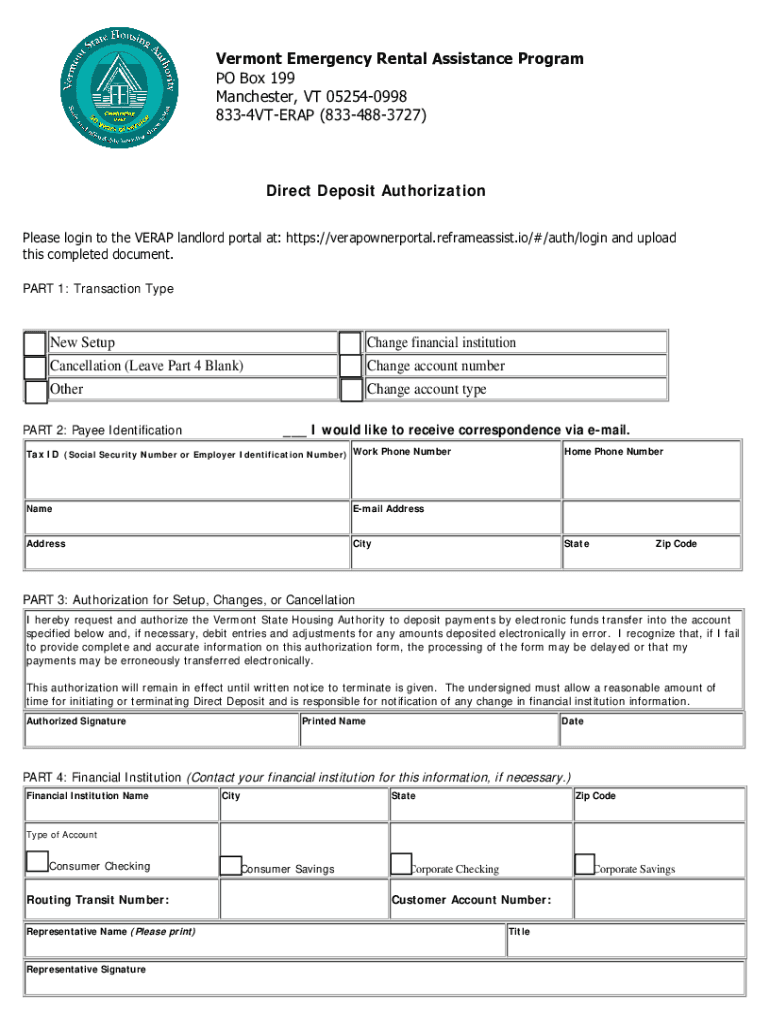
VT Emergency Rental Assistance Program Direct Deposit Authorization 2021-2026 free printable tem...
pdfFiller is not affiliated with any government organization

Fill out
Complete the form online in a simple drag-and-drop editor.

eSign
Add your legally binding signature or send the form for signing.

Share
Share the form via a link, letting anyone fill it out from any device.

Export
Download, print, email, or move the form to your cloud storage.
Why pdfFiller is the best tool for your documents and forms


End-to-end document management
From editing and signing to collaboration and tracking, pdfFiller has everything you need to get your documents done quickly and efficiently.
Accessible from anywhere
pdfFiller is fully cloud-based. This means you can edit, sign, and share documents from anywhere using your computer, smartphone, or tablet.
Secure and compliant
pdfFiller lets you securely manage documents following global laws like ESIGN, CCPA, and GDPR. It's also HIPAA and SOC 2 compliant.
What is VT Emergency Rental Assistance Program Direct Deposit Authorization
The Vermont Direct Deposit Authorization Form is a document used by individuals and businesses to authorize the Vermont State Housing Authority to make electronic deposits into their designated bank accounts.
pdfFiller scores top ratings on review platforms




Who needs VT Emergency Rental Assistance Program Direct Deposit Authorization?
Explore how professionals across industries use pdfFiller.

VT Emergency Rental Assistance Program Direct Deposit Authorization is needed by:
-
Residents of Vermont seeking direct deposit for rental assistance
-
Landlords participating in the Vermont Emergency Rental Assistance Program (VERAP)
-
Businesses needing electronic funds transfer for state payments
-
Individuals requiring steady electronic payments from state agencies
-
Representatives of payees managing payment logistics
Comprehensive Guide to VT Emergency Rental Assistance Program Direct Deposit Authorization
What is the Vermont Direct Deposit Authorization Form?
The Vermont Direct Deposit Authorization Form serves as a crucial tool that allows individuals and organizations to authorize electronic payments into their specified financial accounts. This form is directly associated with the Vermont Emergency Rental Assistance Program (VERAP), ensuring that funds are disbursed efficiently. Within this process, the payee, typically the recipient of assistance, and their representative play a significant role in filling out and submitting the necessary information to facilitate these transactions.
Purpose and Benefits of the Vermont Direct Deposit Authorization Form
The primary benefit of utilizing the Vermont Direct Deposit Authorization Form lies in its ability to streamline the payment process for both landlords and tenants, minimizing delays and maximizing convenience. By enabling direct deposit, users can ensure timely and reliable payments, enhancing financial security. Additionally, this form simplifies the administrative process, making it easier for landlords to receive rental assistance funds directly without complications.
Who Needs the Vermont Direct Deposit Authorization Form?
The Vermont Direct Deposit Authorization Form is essential for various users, including landlords who manage rental properties and tenants seeking assistance. This form is particularly necessary in situations where electronic payments are required to facilitate the rental assistance process. Furthermore, potential representatives, acting on behalf of payees, may also need to complete the form to ensure compliance and proper submission through platforms like the Vermont Landlord Portal.
Key Features of the Vermont Direct Deposit Authorization Form
When filling out the Vermont Direct Deposit Authorization Form, several key fields must be accurately completed to ensure proper processing:
-
Tax ID number of the payee
-
Bank account details (account number and routing number)
-
Signature fields for both the payee and any representatives
This form is designed with user-friendliness in mind, featuring fillable fields and clear instructions that assist users throughout the completion process.
How to Fill Out the Vermont Direct Deposit Authorization Form Online
Completing the Vermont Direct Deposit Authorization Form online involves several straightforward steps:
-
Access the form and read any accompanying instructions.
-
Carefully fill in personal and account information in the designated fields.
-
Double-check details to avoid errors, particularly numerical entries like account information.
-
Review and confirm that all required signatures are present before submission.
Taking care to follow these steps can help minimize mistakes that could lead to processing delays.
How to Sign the Vermont Direct Deposit Authorization Form
Signing the Vermont Direct Deposit Authorization Form can be done through various means, including digital and wet signatures. The requirements for signatures may vary depending on whether the payee or their representative is signing. To securely eSign the document, users should follow these steps:
-
Select the eSignature option on the form.
-
Follow the prompts to create or upload a digital signature.
-
Ensure all signatures are completed prior to submitting the form.
Submission Methods for the Vermont Direct Deposit Authorization Form
The completed Vermont Direct Deposit Authorization Form can be submitted through various methods depending on user convenience:
-
Online submission through the designated portal
-
Mailing the form to the appropriate address
-
In-person delivery to designated offices
Users should also be mindful of any deadlines associated with submissions to ensure timely processing of their requests.
What Happens After You Submit the Vermont Direct Deposit Authorization Form?
Once submitted, the processing of the Vermont Direct Deposit Authorization Form typically follows a defined timeline, which can vary based on workload. Payees can confirm the submission status by checking with the relevant authority and should be prepared to take any necessary follow-up actions or make corrections if their submission is rejected. Common reasons for rejections may involve incorrect information or missing signatures.
Security and Compliance for the Vermont Direct Deposit Authorization Form
Given the sensitive nature of personal and financial information involved, data security is paramount when filling out the Vermont Direct Deposit Authorization Form. Users should adhere to compliance with applicable regulations such as HIPAA and GDPR, ensuring their information is handled responsibly. Utilizing services with robust security measures, including 256-bit encryption, further enhances data protection when managing forms digitally.
Get Started with pdfFiller for Your Vermont Direct Deposit Authorization Form
pdfFiller offers a comprehensive platform for filling out and signing the Vermont Direct Deposit Authorization Form with ease. By using this cloud-based service, users can benefit from a secure and convenient experience, allowing for the saving, printing, and sharing of documents as needed. Leveraging these features ensures a smooth experience from form completion to submission.
How to fill out the VT Emergency Rental Assistance Program Direct Deposit Authorization
-
1.Access pdfFiller and search for the 'Vermont Direct Deposit Authorization Form'. Open the form in the editor.
-
2.Familiarize yourself with the fillable fields and checkboxes included within the form.
-
3.Collect necessary information before starting, including your Tax ID or Social Security Number and bank account details.
-
4.Fill in your identification details such as name, address, and contact information in the corresponding fields.
-
5.Provide your bank’s financial institution information, including the bank name and account number.
-
6.If you are a payee, ensure to fill out the 'Authorized Signature' and date fields accurately.
-
7.Representatives must also sign the form in the designated area, ensuring to include the representative’s details.
-
8.Once all fields are completed, review the information for accuracy and completeness to avoid common mistakes.
-
9.Finalize the form by saving your changes on pdfFiller to ensure all filled entries are retained.
-
10.Download a copy for your records if necessary, and choose the appropriate submission method through pdfFiller to submit your form.

Who is eligible to use the Vermont Direct Deposit Authorization Form?
Any Vermont resident or landlord participating in the Emergency Rental Assistance Program (VERAP) can use this form to authorize direct deposit transactions.
Is there a deadline for submitting the Vermont Direct Deposit Authorization Form?
While specific deadlines may depend on your assistance program or payment schedule, it's best to submit the form as soon as possible to avoid delays in payments.
How do I submit the Vermont Direct Deposit Authorization Form?
You can submit the form electronically through pdfFiller, which provides submission options once your document is finalized and saved.
What supporting documents might be required with this form?
Typically, you may need to provide identification details such as your Tax ID/Social Security Number and financial institution information with the form.
What common mistakes should I avoid when completing this form?
Ensure all fields are filled out correctly, especially your identification and bank information, to prevent issues with direct deposits.
How long does it take for the Vermont State Housing Authority to process this form?
Processing times may vary, but typically it can take a few days to a week depending on the number of applications they receive.
Do I need to have my form notarized?
No, the Vermont Direct Deposit Authorization Form does not require notarization for submission, making it easier for individuals and businesses to complete.
Related Forms



Get the latest insights from our blog



If you believe that this page should be taken down, please follow our DMCA take down process
here
.
This form may include fields for payment information. Data entered in these fields is not covered by PCI DSS compliance.