
Last updated on
Nov 7, 2026

MN UCare Skilled Nursing Home/Swing Bed Admission Notification Form 2022-2026 free printable tem...
pdfFiller is not affiliated with any government organization

Fill out
Complete the form online in a simple drag-and-drop editor.

eSign
Add your legally binding signature or send the form for signing.

Share
Share the form via a link, letting anyone fill it out from any device.

Export
Download, print, email, or move the form to your cloud storage.
Why pdfFiller is the best tool for your documents and forms


End-to-end document management
From editing and signing to collaboration and tracking, pdfFiller has everything you need to get your documents done quickly and efficiently.
Accessible from anywhere
pdfFiller is fully cloud-based. This means you can edit, sign, and share documents from anywhere using your computer, smartphone, or tablet.
Secure and compliant
pdfFiller lets you securely manage documents following global laws like ESIGN, CCPA, and GDPR. It's also HIPAA and SOC 2 compliant.
What is MN UCare Skilled Nursing Home/Swing Bed Admission Notification Form
The Skilled Nursing Home Admission Notification Form is a healthcare document used by skilled nursing facilities to inform UCare about patient admissions, discharges, or changes within 24 hours.
pdfFiller scores top ratings on review platforms




Who needs MN UCare Skilled Nursing Home/Swing Bed Admission Notification Form?
Explore how professionals across industries use pdfFiller.

MN UCare Skilled Nursing Home/Swing Bed Admission Notification Form is needed by:
-
Healthcare providers at skilled nursing homes
-
Patient intake coordinators
-
Administrative staff responsible for patient admissions
-
Nurses managing patient information
-
Medical records personnel
-
UCare case managers
Comprehensive Guide to MN UCare Skilled Nursing Home/Swing Bed Admission Notification Form
What is the Skilled Nursing Home Admission Notification Form?
The Skilled Nursing Home Admission Notification Form is a critical document used to inform UCare about patient admissions, discharges, and changes within a 24-hour timeframe. This form plays a significant role in ensuring timely notifications regarding patient status, which is crucial for a seamless healthcare experience. It requires detailed patient data such as intake assessments and therapy evaluations to be accurately filled out.
Purpose and Benefits of the Skilled Nursing Home Admission Notification Form
This form is designed primarily for healthcare facilities and UCare to facilitate efficient communication regarding patient admissions. By utilizing the skilled nursing home admission form, healthcare providers can streamline the admissions process and ensure compliance with UCare's regulations. Timely notifications help avoid delays and complications in patient care, underscoring the form's importance in the healthcare system.
Who Needs the Skilled Nursing Home Admission Notification Form?
The primary users of this form include skilled nursing facilities and swing bed providers. This notification form is essential in various scenarios such as patient admissions, transfers, or discharges, ensuring that all relevant information is communicated effectively. The responsibility for submitting the form usually falls on the healthcare professional overseeing the patient's care.
Key Features of the Skilled Nursing Home Admission Notification Form
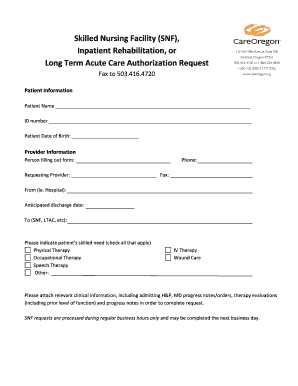
The Skilled Nursing Home Admission Notification Form comprises several essential fields that must be completed, including:
-
Name
-
Date of Birth
-
Hospital Admission Date
-
Facility Name
-
Reason Codes for Admission
Additionally, it includes checkboxes for 'Type of Admission' and other relevant details that simplify data collection for UCare, enhancing overall efficiency in patient registration.
How to Fill Out the Skilled Nursing Home Admission Notification Form Online
To fill out the Skilled Nursing Home Admission Notification Form electronically, follow these steps:
-
Access the form via the pdfFiller platform.
-
Gather necessary information such as patient details and admission specifics.
-
Complete each section accurately, ensuring all required fields are filled.
-
Utilize pdfFiller's tools for easy editing and signing.
This straightforward approach ensures that healthcare facility admissions are handled efficiently.
Submission Methods and Important Filing Details
Once the form is completed, users can submit it through multiple methods, including electronic submission or faxing. Adhering to submission deadlines is essential, as late filings can lead to complications or delays in patient care. Ensure that the submission is directed to the appropriate UCare records office to maintain compliance.
Common Errors and How to Avoid Them
When completing the Skilled Nursing Home Admission Notification Form, common errors can occur. To avoid these issues:
-
Double-check each field for accuracy before submission.
-
Utilize pdfFiller's real-time validation feature to catch errors.
-
Ensure all required information is collected upfront to prevent omissions.
By paying close attention to these details, healthcare professionals can improve the accuracy of form submissions.
Security and Compliance for the Skilled Nursing Home Admission Notification Form
Handling sensitive patient data requires strict adherence to security practices. pdfFiller implements 256-bit encryption, ensuring compliance with HIPAA and GDPR regulations. It is vital for healthcare facilities to protect patient information during the submission of the Skilled Nursing Home Admission Notification Form, safeguarding against data breaches and unauthorized access.
What Happens After You Submit the Skilled Nursing Home Admission Notification Form?
After submission, the form undergoes a review and processing timeline. Users can track the status of their submission to confirm its receipt, ensuring that UCare has the necessary information for patient management. If additional information is required, the submitting healthcare professional should be prepared to provide it promptly.
Enhance Your Experience with pdfFiller
By utilizing pdfFiller, users can streamline their experience when filling out forms like the Skilled Nursing Home Admission Notification Form. The platform offers benefits such as editing and eSigning capabilities, which make document management straightforward and efficient. Explore how pdfFiller can meet your needs in healthcare document submissions.
How to fill out the MN UCare Skilled Nursing Home/Swing Bed Admission Notification Form
-
1.To access the Skilled Nursing Home Admission Notification Form, visit pdfFiller and search for the form name in the search bar.
-
2.Once you find the form, click on it to open in the pdfFiller editor. Familiarize yourself with the interface, including how to navigate and edit fields.
-
3.Gather all necessary patient information before starting, including the patient's name, date of birth, member ID, and relevant medical records.
-
4.Begin filling in the patient information sections, entering details like admission dates, hospital information, and facility name accurately.
-
5.Utilize the fillable fields for checkboxes and dropdowns concerning the type of admission and reason codes.
-
6.Review all entries for accuracy, ensuring that all required fields are filled out and there are no omissions.
-
7.Once completed, use pdfFiller’s review option to ensure that all necessary information is correct and properly formatted.
-
8.To save your work, click on the save or download option that allows you to store the form in your preferred format or location.
-
9.To submit the form, follow the instructions provided by UCare for electronic submission through pdfFiller, or download and print for physical submission.

Who is eligible to use the Skilled Nursing Home Admission Notification Form?
This form is intended for use by skilled nursing facilities and their staff to notify UCare of patient admissions, discharges, or changes. It is crucial for those managing patient intake and information.
Is there a deadline for submitting the Skilled Nursing Home Admission Notification Form?
The form must be submitted to UCare within 24 hours of patient admission, discharge, or changes to ensure timely processing and compliance with healthcare regulations.
What method should I use to submit this form?
The Skilled Nursing Home Admission Notification Form can be submitted electronically through pdfFiller. Alternatively, if printed, it may be submitted via fax or mail according to UCare's submission guidelines.
What supporting documents are required along with the form?
You may need to provide relevant clinical documentation, intake assessments, therapy evaluations, and discharge summaries alongside the filled Skilled Nursing Home Admission Notification Form.
What are common mistakes to avoid when filling out the form?
Common mistakes include omitting necessary data, failing to check required fields, and submitting the form past the 24-hour deadline, which can delay processing times.
How long does it take to process the Skilled Nursing Home Admission Notification Form?
Processing times for the submitted Skilled Nursing Home Admission Notification Form can vary, but timely submission typically allows for faster processing and coordination with UCare.
What details should be included in the admission reason codes?
The reason codes must clearly indicate the patient's condition, need for Skilled Nursing facility care, or specific circumstances leading to the admission, as required by UCare.
MN UCare Skilled Nursing Home/Swing Bed Admission Notification Form Form Versions
Related Forms




Get the latest insights from our blog


If you believe that this page should be taken down, please follow our DMCA take down process
here
.
This form may include fields for payment information. Data entered in these fields is not covered by PCI DSS compliance.