
Last updated on
Nov 9, 2026
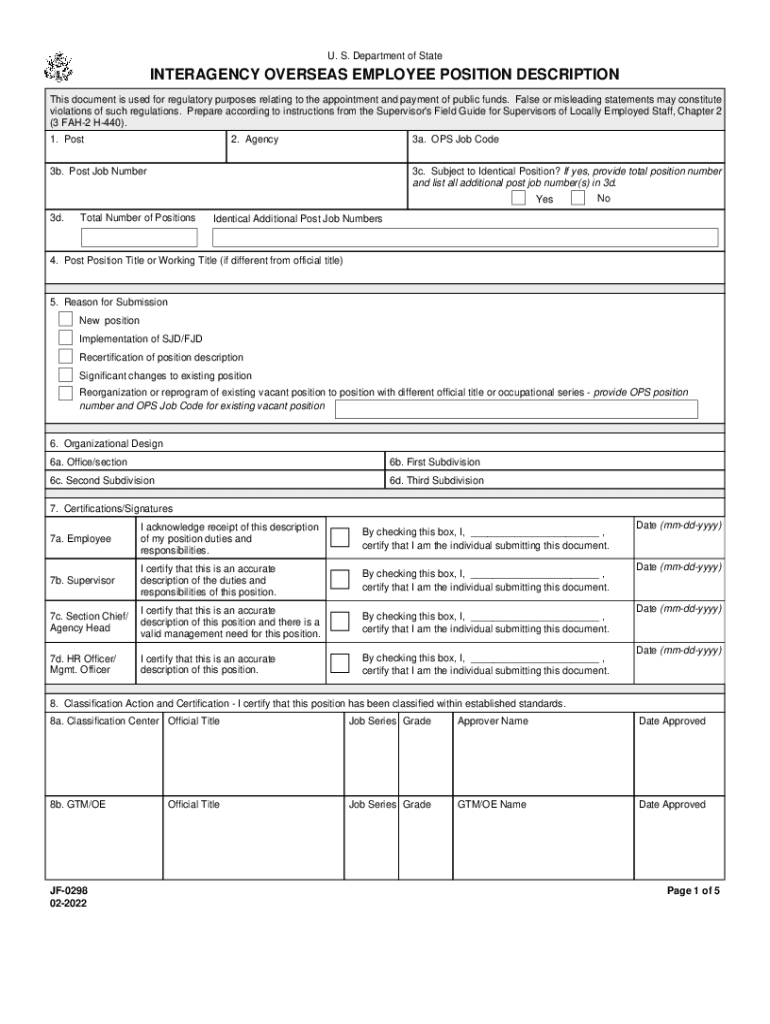
DoS JF-0298 2022-2026 free printable template
We are not affiliated with any brand or entity on this form

Fill out
Complete the form online in a simple drag-and-drop editor.

eSign
Add your legally binding signature or send the form for signing.

Share
Share the form via a link, letting anyone fill it out from any device.

Export
Download, print, email, or move the form to your cloud storage.
Why pdfFiller is the best tool for your documents and forms


End-to-end document management
From editing and signing to collaboration and tracking, pdfFiller has everything you need to get your documents done quickly and efficiently.
Accessible from anywhere
pdfFiller is fully cloud-based. This means you can edit, sign, and share documents from anywhere using your computer, smartphone, or tablet.
Secure and compliant
pdfFiller lets you securely manage documents following global laws like ESIGN, CCPA, and GDPR. It's also HIPAA and SOC 2 compliant.
What is DoS JF-0298
The US State Department Employee Position Description Form is a regulatory document used by the U.S. Department of State to collect detailed information for overseas employee positions.
pdfFiller scores top ratings on review platforms




Who needs DoS JF-0298?
Explore how professionals across industries use pdfFiller.

DoS JF-0298 is needed by:
-
U.S. State Department Employees
-
Supervisors overseeing employee roles
-
Section Chiefs or Agency Heads
-
HR Officers managing employee records
-
Management Officers involved in employee assessments
-
Government Administrators handling position descriptions
Comprehensive Guide to DoS JF-0298
Overview of the US State Department Employee Position Description Form
The US State Department Employee Position Description Form is essential for U.S. State Department employees as it details the responsibilities and requirements of their specific roles. This form plays a critical role in regulatory compliance, especially for overseas employees, ensuring they are properly classified and compensated according to their job duties.
By utilizing the interagency overseas employee form, departments can maintain accurate records that reflect job responsibilities, aiding in transparency and accountability within the agency.
Purpose and Benefits of the US State Department Employee Position Description Form
This form is necessary as it clearly outlines the expectations for employees and defines the scope of their duties. It serves various purposes, including ensuring that job responsibilities are aligned with compensation and regulatory standards.
Benefits include:
-
Improved clarity in job responsibilities
-
Enhanced compliance with U.S. government regulations
-
Accuracy in processing payroll and other financial operations
Who Needs to Complete the US State Department Employee Position Description Form?
The form requires the signatures of various roles, including the Employee, Supervisor, Section Chief or Agency Head, and HR Officer. Each role is crucial for certifying the integrity and accuracy of the form's content.
It is essential that employees involved understand their obligations concerning filling out the overseas employee position form PDF to ensure compliance and understanding of job descriptions.
How to Fill Out the US State Department Employee Position Description Form Online (Step-by-Step)
To complete the US State Department Employee Position Description Form electronically through pdfFiller, follow these steps:
-
Access the form through pdfFiller's online platform.
-
Fill in personal details, including job code, title, and organizational design.
-
Provide detailed information regarding major duties and certifications.
-
Review all input for accuracy before submission.
-
Save and securely store the completed form.
Common Errors and How to Avoid Them When Filling Out the Form
When filling out the US State Department Employee Position Description Form, many users encounter mistakes that can delay processing. Common errors include:
-
Incomplete fields, which may lead to rejection
-
Incorrect job codes or titles
-
Omitting required signatures
To avoid these mistakes, ensure all necessary fields are filled out completely and double-check for accuracy.
How to Sign the US State Department Employee Position Description Form
Signing the US State Department Employee Position Description Form can be done electronically or through traditional means. Understanding the differences between digital and wet signatures is crucial for compliance.
To e-sign using pdfFiller, follow these steps:
-
Select the e-sign option once your form is completed.
-
Follow the prompts to create or choose your signature.
-
Finalize the e-signing process by confirming your signature placement.
Submission Methods and Next Steps After Completing the Form
Once you've completed the US State Department Employee Position Description Form, the next step is to submit it. You can submit the form electronically through pdfFiller or follow your department's submission guidelines.
Required documents may include identification or additional approvals. Users should expect to receive updates on processing timelines and tracking options for their submission.
Security and Compliance for Handling the US State Department Employee Position Description Form
Handling the US State Department Employee Position Description Form requires a strong focus on data privacy and security. Given the sensitive nature of government forms, implementing security measures is vital to protect personal information.
pdfFiller supports compliance with regulations such as HIPAA and GDPR, utilizing features like 256-bit encryption to safeguard user data and ensure safe document management.
Utilizing pdfFiller for Your US State Department Employee Position Description Form Needs
Users are encouraged to leverage pdfFiller’s cloud-based features to streamline their form management processes. The platform offers a range of capabilities including editing, converting, and sharing completed forms securely.
Explore pdfFiller’s services to simplify your document management and enhance the efficiency of handling your position description forms.
How to fill out the DoS JF-0298
-
1.To access the form on pdfFiller, visit the pdfFiller website and use the search function to locate the US State Department Employee Position Description Form.
-
2.Once you have opened the form, familiarize yourself with the interface. Navigate through the document using the scroll bar or arrow keys.
-
3.Before starting to fill out the form, gather all necessary information about the position, such as job code, title, specific duties, certifications, and organizational structure.
-
4.Begin completing the fillable fields by clicking on the respective areas. Input text for job descriptions and responsibilities as needed.
-
5.Use the checkbox options for any applicable responses where choices are presented.
-
6.Ensure that all required signatures are present. Coordinate with the employee, supervisor, section chief, and HR officer to secure their signatures.
-
7.After filling in all necessary details, review the completed form for accuracy and completeness.
-
8.Once finalized, save the document on pdfFiller to your account or computer. Choose the download option to obtain a copy in your desired format.
-
9.Consider submitting the form electronically through pdfFiller if applicable. Review any submission guidelines set forth by the U.S. State Department.

Who is required to sign the US State Department Employee Position Description Form?
The form must be signed by the employee, supervisor, section chief or agency head, and HR officer to certify the accuracy of the position description.
Is notarization required for this form?
No, notarization is not required for the US State Department Employee Position Description Form. All required signatures from concerned parties are sufficient.
What information is needed before filling out the form?
Before starting, gather details such as job code, title, organizational design, certifications, and a list of major duties for the position to ensure the form is filled out accurately.
How can I submit the completed form?
You can save, download, or submit the completed form through pdfFiller, following any specific submission guidelines from the U.S. State Department.
What are common mistakes to avoid when filling out the form?
Common mistakes include leaving fields blank, failing to secure all necessary signatures, and providing incomplete or inaccurate information about the position.
What is the processing time for this form?
Processing times can vary, but it is advisable to submit the form promptly, as processing may take several weeks based on the U.S. State Department's workload.
Are there any specific deadlines for submitting this form?
Deadlines may vary based on specific interagency requirements. It's important to check any departmental communications regarding submission timelines.
Related Forms




Get the latest insights from our blog


If you believe that this page should be taken down, please follow our DMCA take down process
here
.
This form may include fields for payment information. Data entered in these fields is not covered by PCI DSS compliance.