
Last updated on
Nov 6, 2026

AU SRC 040 2021-2026 free printable template
We are not affiliated with any brand or entity on this form

Fill out
Complete the form online in a simple drag-and-drop editor.

eSign
Add your legally binding signature or send the form for signing.

Share
Share the form via a link, letting anyone fill it out from any device.

Export
Download, print, email, or move the form to your cloud storage.
Why pdfFiller is the best tool for your documents and forms


End-to-end document management
From editing and signing to collaboration and tracking, pdfFiller has everything you need to get your documents done quickly and efficiently.
Accessible from anywhere
pdfFiller is fully cloud-based. This means you can edit, sign, and share documents from anywhere using your computer, smartphone, or tablet.
Secure and compliant
pdfFiller lets you securely manage documents following global laws like ESIGN, CCPA, and GDPR. It's also HIPAA and SOC 2 compliant.
What is AU SRC 040
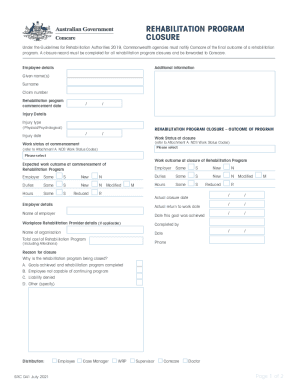
The Rehabilitation Program Form is a legal document used by employees and case managers in Australia to outline rehabilitation goals and responsibilities under the Safety, Rehabilitation and Compensation Act 1988.
pdfFiller scores top ratings on review platforms




Who needs AU SRC 040?
Explore how professionals across industries use pdfFiller.

AU SRC 040 is needed by:
-
Employees seeking rehabilitation support after workplace injuries
-
Case managers overseeing rehabilitation programs
-
Delegates responsible for signing off on rehabilitation plans
-
Employers managing workplace injury claims
-
Comcare representatives evaluating claims
-
Workers' compensation lawyers advising clients
Comprehensive Guide to AU SRC 040
What is the Rehabilitation Program Form?
The Rehabilitation Program Form is a critical document in Australia, designed to facilitate workplace rehabilitation under the Safety, Rehabilitation and Compensation Act 1988. This form lays out the essential structure for an employee's rehabilitation program, including goals, activities, and accountable parties.
Understanding the significance of the Rehabilitation Program Form is vital for both employees and employers. It ensures accountability and clarity in the rehabilitation process by detailing roles and responsibilities.
Purpose and Benefits of the Rehabilitation Program Form
The Rehabilitation Program Form serves numerous purposes that greatly benefit both employees and employers. Its structured approach to rehabilitation enhances clarity and support, guiding the recovery process.
For employees, it provides a clear path forward with defined goals and expectations, while employers benefit from an organized framework that can improve workplace productivity and employee satisfaction.
Who Needs to Complete the Rehabilitation Program Form?
Several key roles are involved in the completion of the Rehabilitation Program Form, each contributing to the document's integrity. These roles include:
-
Employee: Must provide personal information and commit to the rehabilitation process.
-
Case Manager: Oversees the formulation of the rehabilitation program and ensures it meets legal requirements.
-
Delegate: Authorizes the program and verifies the details before implementation.
Each signature is crucial for the successful processing of the form, ensuring a collaborative approach to rehabilitation.
Key Features of the Rehabilitation Program Form
This form includes several important fields to gather necessary information effectively. Key components consist of:
-
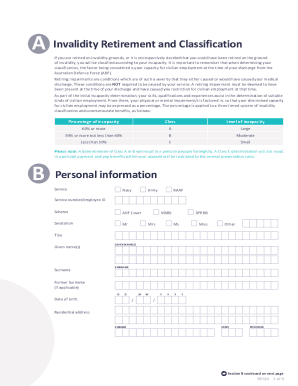
Employee details, such as 'Surname', 'Given name(s)', and 'Date of birth'.
-
Employer details to establish accountability.
-
Service details, which help define the scope of the rehabilitation efforts.
Each section of the form is designed to capture the essential information required for a comprehensive rehabilitation plan.
How to Fill Out the Rehabilitation Program Form Online (Step-by-Step)
Completing the Rehabilitation Program Form online can be simple if you follow these steps:
-
Access the fillable form template through a secure platform.
-
Carefully enter your personal and employer details.
-
Ensure all required fields are completed to maintain accuracy.
-
Review the information for common pitfalls before submission.
-
Submit the completed form through the preferred submission method.
Paying attention to detail will minimize errors and enhance the submission process.
Required Documents and Supporting Materials for the Rehabilitation Program Form
To ensure a smooth submission process, certain supporting documents are required alongside the Rehabilitation Program Form. These typically include:
-
Medical reports documenting the injury.
-
Evidence of work injury to validate the claim.
Having all necessary documentation prepared can prevent unnecessary delays in processing.
Submission Methods and Delivery for the Rehabilitation Program Form
There are multiple methods available for submitting the completed Rehabilitation Program Form. These include:
-
Submitting online through a secure portal.
-
Mailing a printed copy to the relevant authority.
Understanding the expected timelines for processing and confirmation will aid in tracking the progress of your submission.
Common Errors and How to Avoid Them When Filling Out the Rehabilitation Program Form
Filling out the Rehabilitation Program Form inaccurately can lead to delays and complications. Common errors include:
-
Providing incorrect personal or employer details.
-
Missing signatures from required parties.
To avoid these issues, it’s advised to use a review and validation checklist to ensure that all sections are correctly filled out.
Security and Compliance for the Rehabilitation Program Form
Security is paramount when handling sensitive forms like the Rehabilitation Program Form. pdfFiller employs robust measures including:
-
256-bit encryption to safeguard documents.
-
Compliance with regulations such as HIPAA and GDPR to protect user data.
Understanding these practices can reassure users about the safety of their information during the rehabilitation process.
Maximize Your Experience with pdfFiller for the Rehabilitation Program Form
Utilizing pdfFiller can significantly enhance your experience of completing the Rehabilitation Program Form. The platform offers features that streamline the process, including:
-
Editing tools for making necessary adjustments to information.
-
eSigning capabilities for ease of signature collection.
Leveraging these tools provides a more efficient and secure way to fill out and manage your Rehabilitation Program Form.
How to fill out the AU SRC 040
-
1.To access the Rehabilitation Program Form on pdfFiller, visit the website and use the search bar to type in the form name. Select the correct form from the search results.
-
2.Once the form is open, you will see interactive fields where you can enter information. Click on a field to start editing and use the tools provided to navigate through the document.
-
3.Gather all necessary information such as the employee's surname, given names, date of birth, and Comcare claim number before starting to ensure a smooth filling process.
-
4.Review each section of the form carefully. Check that all required fields are filled in accurately and that the correct details are provided based on your situation.
-
5.After completing the form, utilize the review features in pdfFiller to make any necessary changes. Ensure that all signatures are obtained from the relevant parties.
-
6.Once finalized, the form can be saved in your pdfFiller account. You can choose to download it as a PDF or submit it directly through the available submission options.

Who is eligible to use the Rehabilitation Program Form?
The Rehabilitation Program Form is designed for employees who need rehabilitation support after a workplace injury, case managers overseeing the rehabilitation process, and delegates responsible for signing the form.
What is the deadline for submitting the Rehabilitation Program Form?
While specific deadlines may vary, it is advisable to submit the Rehabilitation Program Form as soon as possible after a workplace injury to facilitate timely rehabilitation services.
How do I submit the completed Rehabilitation Program Form?
After filling out the form on pdfFiller, you can submit it directly via the platform or download it to send through your preferred method, whether by email or postal service.
What supporting documents are required with this form?
Typically, you may need to provide documentation such as proof of injury, medical reports, and any other relevant information to support your rehabilitation claim alongside the Rehabilitation Program Form.
What are common mistakes to avoid when filling out this form?
Common mistakes include missing required fields, providing incorrect personal information, failing to obtain necessary signatures, and not reviewing the form for accuracy before submission.
How long does it take to process the Rehabilitation Program Form?
Processing times vary depending on the specific circumstances of each case. It is recommended to follow up with the relevant authorities after submission to check on the status.
Can the Rehabilitation Program Form be filled out electronically?
Yes, the Rehabilitation Program Form can be completed electronically using pdfFiller, which provides interactive fields for easy data entry and submission.
AU SRC 040 Form Versions
Related Forms


Get the latest insights from our blog


If you believe that this page should be taken down, please follow our DMCA take down process
here
.
This form may include fields for payment information. Data entered in these fields is not covered by PCI DSS compliance.