
Last updated on
Nov 9, 2026

MI Application for Building Permit - Grand Rapids Township 2021-2026 free printable template
pdfFiller is not affiliated with any government organization

Fill out
Complete the form online in a simple drag-and-drop editor.

eSign
Add your legally binding signature or send the form for signing.

Share
Share the form via a link, letting anyone fill it out from any device.

Export
Download, print, email, or move the form to your cloud storage.
Why pdfFiller is the best tool for your documents and forms


End-to-end document management
From editing and signing to collaboration and tracking, pdfFiller has everything you need to get your documents done quickly and efficiently.
Accessible from anywhere
pdfFiller is fully cloud-based. This means you can edit, sign, and share documents from anywhere using your computer, smartphone, or tablet.
Secure and compliant
pdfFiller lets you securely manage documents following global laws like ESIGN, CCPA, and GDPR. It's also HIPAA and SOC 2 compliant.
What is MI Application for Building Permit - Grand Rapids Township
The Building Permit Application is a government form used by property owners and contractors to apply for necessary permits for construction projects in Michigan.
pdfFiller scores top ratings on review platforms




Who needs MI Application for Building Permit - Grand Rapids Township?
Explore how professionals across industries use pdfFiller.

MI Application for Building Permit - Grand Rapids Township is needed by:
-
Homeowners planning renovations or new builds
-
Licensed contractors handling construction work
-
Real estate developers with construction projects
-
Architects working on design approvals
-
Property managers overseeing building compliance
-
Local businesses expanding or modifying facilities
Comprehensive Guide to MI Application for Building Permit - Grand Rapids Township
What is the Building Permit Application?
The Building Permit Application in Michigan plays a crucial role in construction and renovation projects. It serves as a formal request to local authorities, ensuring compliance with relevant codes and ordinances. Municipalities like Grand Rapids Township and Cascade Charter Township have specific requirements that emphasize the importance of this application.
By obtaining a building permit, project owners and contractors are legally protected and can execute their projects without fear of violating local regulations.
Purpose and Benefits of the Building Permit Application
Applying for a building permit is essential for lawful construction practices. It safeguards property rights and ensures that projects are conducted safely. The benefits of securing a permit include enhancing safety, liability protection, and compliance with insurance mandates.
Moreover, the application process promotes community oversight, fostering responsible development within neighborhoods.
Key Features of the Building Permit Application
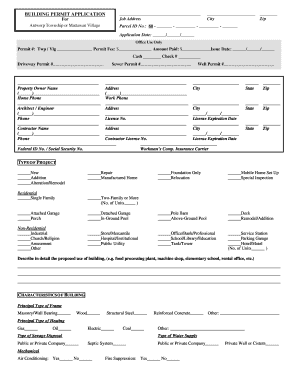
The Building Permit Application includes several key features that aid in its completion. Key fillable fields include the property address, project valuation, and scope of work. Applicants must adhere to signature requirements, with both owners and contractors needing to provide their signatures.
Additionally, the application contains specific instructions regarding compliance with barrier-free laws, ensuring accessibility for all individuals involved in the project.
Who Needs the Building Permit Application?
The Building Permit Application targets various stakeholders in construction. Owners and contractors are the primary applicants, especially for projects that require a permit such as residential and commercial constructions.
Common scenarios necessitating a permit include additions, renovations, and any significant structural changes that impact safety or compliance with local laws.
How to Fill Out the Building Permit Application Online (Step-by-Step)
Filling out the Building Permit Application online using pdfFiller can be straightforward if you follow these steps:
-
Access the application form on the pdfFiller platform.
-
Input your property address, valuation, and scope of work into the fillable fields.
-
Gather necessary information such as your phone number and contractor license.
-
Complete the signature fields for both owner and contractor.
-
Utilize digital signing and submission options seamlessly.
Common Errors and How to Avoid Them
To ensure accuracy when completing the Building Permit Application, be aware of common errors. Frequent mistakes include submitting incomplete fields or providing inaccurate information.
Reviewing the application thoroughly before submission is crucial. Double-check compliance with local requirements to avoid delays in the approval process.
How to Submit the Building Permit Application
Submitting the Building Permit Application can be done through various methods. These options include online submission via pdfFiller, mailing the application, or handing it in person at the designated municipal office.
Be mindful of any associated fees, deadlines, and typical processing times for submissions. Ensure that you know exactly where to send or deliver the completed application for efficient handling.
What Happens After You Submit the Building Permit Application?
After submitting your Building Permit Application, it enters the review process. This process typically has a defined timeline during which local authorities assess your application.
You can track the application status, and in case of rejection, you'll need to understand the steps for correcting or amending your submission to meet the necessary requirements.
Security and Privacy When Using pdfFiller for Your Application
Using pdfFiller for your Building Permit Application ensures that your sensitive documents are handled securely. The platform employs 256-bit encryption and adheres to compliance standards for data protection.
The importance of safeguarding data while filling out legal documents cannot be understated, providing users with peace of mind and convenience for online access and storage of completed applications.
Start Using pdfFiller to Simplify Your Building Permit Application
By utilizing pdfFiller, you can significantly streamline your Building Permit Application process. The platform offers efficiency, ease of use, and the capability for digital signing, making it a valuable resource for applicants.
Start filling out your Building Permit Application today and take advantage of the resources and assistance that pdfFiller provides to ensure a smooth application process.
How to fill out the MI Application for Building Permit - Grand Rapids Township
-
1.Access the Building Permit Application form on pdfFiller by searching for it in the designated forms section. Make sure you are logged in to fill out the form electronically.
-
2.Once you have the form open, navigate through the available fields such as 'Address of Property' and 'Owner Phone'. Use the interactive fields to type in your responses.
-
3.Gather necessary information before you start filling out the form, which includes property details, project valuation, and contractor information. Ensure you have verification of any licenses needed.
-
4.As you complete the form, pay attention to specific instructions provided in the application. Some fields may include checkboxes for compliance and legal agreements that you must acknowledge.
-
5.After filling out all required fields, carefully review the entire form for accuracy. Double-check signature lines and any additional documentation required to avoid delays.
-
6.Once finalized, utilize pdfFiller options to save your progress or download the completed form. Ensure you maintain a copy for your records.
-
7.Finally, submit the completed application according to your local guidelines, either in person or electronically, if available. Make sure to keep submission deadlines in mind.

What are the eligibility requirements for submitting the Building Permit Application?
To submit the Building Permit Application, you must be an owner of the property or a licensed contractor authorized to act on behalf of the owner. Ensure all project details comply with local codes.
Are there any submission deadlines for the Building Permit Application?
Submission deadlines for this application may vary depending on the project type and local government regulations. It is best to check with Grand Rapids Township’s office for specific timelines.
How do I submit the completed Building Permit Application?
Completed applications can typically be submitted in person at the local building department or through their official website if electronic submissions are offered. Verify submission procedures for local specifics.
What supporting documents are needed with the application?
When submitting the Building Permit Application, supporting documents like project plans, contractor licenses, and proof of property ownership are usually required. Check with your local authority for specifics.
What are common mistakes to avoid when filling out this application?
Common mistakes include incomplete sections, missing signatures from the owner or contractor, and failure to attach necessary documentation. Always double-check for accuracy before submission.
How fast is the processing time for the Building Permit Application?
Processing times can vary based on the complexity of the project and local workloads. Generally, expect a few weeks for processing, so plan accordingly to avoid delays.
Can I edit my application after submission?
Once submitted, the application cannot typically be edited. If changes are required, you may need to contact the building department directly for guidance on resubmission.
MI Application for Building Permit - Grand Rapids Township Form Versions
Related Forms




Get the latest insights from our blog


If you believe that this page should be taken down, please follow our DMCA take down process
here
.
This form may include fields for payment information. Data entered in these fields is not covered by PCI DSS compliance.