
Last updated on
Oct 2, 2026

Get the free Supervisor’s Follow-Up Report of Incident
We are not affiliated with any brand or entity on this form

Fill out
Complete the form online in a simple drag-and-drop editor.

eSign
Add your legally binding signature or send the form for signing.

Share
Share the form via a link, letting anyone fill it out from any device.

Export
Download, print, email, or move the form to your cloud storage.
Why pdfFiller is the best tool for your documents and forms


End-to-end document management
From editing and signing to collaboration and tracking, pdfFiller has everything you need to get your documents done quickly and efficiently.
Accessible from anywhere
pdfFiller is fully cloud-based. This means you can edit, sign, and share documents from anywhere using your computer, smartphone, or tablet.
Secure and compliant
pdfFiller lets you securely manage documents following global laws like ESIGN, CCPA, and GDPR. It's also HIPAA and SOC 2 compliant.
What is Incident Report
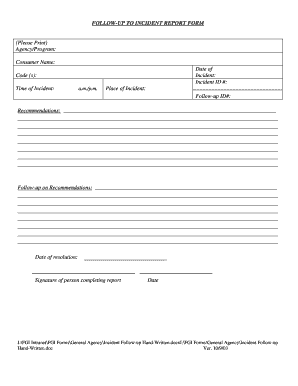
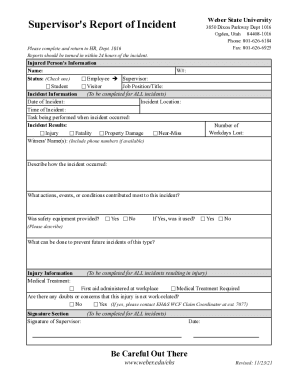
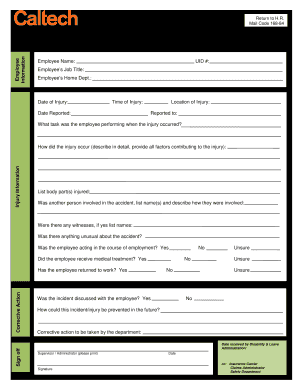
The Supervisor’s Follow-Up Report of Incident is an employment form used by supervisors to document and investigate workplace accidents or injuries.
pdfFiller scores top ratings on review platforms




Who needs Incident Report?
Explore how professionals across industries use pdfFiller.

Incident Report is needed by:
-
Supervisors overseeing workplace safety
-
Affected employees involved in incidents
-
HR personnel managing employee records
-
Safety officers conducting investigations
-
Legal teams in case of disputes
Comprehensive Guide to Incident Report
What is the Supervisor’s Follow-Up Report of Incident?
The Supervisor’s Follow-Up Report of Incident is a crucial document for recording workplace accidents or injuries. Its primary purpose is to provide a formal method of documenting incidents that can enhance workplace safety protocols. This form plays a vital role in proactive incident management by ensuring thorough documentation for future reference.
The report typically includes multiple fillable fields and requires signatures from both the supervisor and the affected employee. This structure ensures clarity in communication and encourages accountability regarding incident management.
Purpose and Benefits of the Supervisor’s Follow-Up Report of Incident
The Supervisor’s Follow-Up Report of Incident offers several key benefits for both supervisors and employees. By documenting incidents accurately, it aids in identifying preventive measures that can minimize the risk of future accidents. This documentation is essential for compliance with workplace regulations and safety protocols.
Furthermore, the report ensures proper documentation that can be referenced in any potential investigations or safety audits. This not only promotes a safer workplace but also represents the organization’s commitment to health and safety standards.
Key Features of the Supervisor’s Follow-Up Report of Incident
Several important features enhance the effectiveness of the Supervisor’s Follow-Up Report of Incident. The form includes explicit instructions, ensuring that both supervisors and affected employees understand how to provide accurate information.
-
Fillable fields for incident details, affected body parts, and preventive actions
-
Required signatures from both the supervisor and the affected employee
-
A structured format that promotes clarity and thoroughness in reporting
Who Needs the Supervisor’s Follow-Up Report of Incident?
Both supervisors and affected employees play vital roles in the completion of the Supervisor’s Follow-Up Report of Incident. For supervisors, this document is crucial during the incident recovery process and helps in implementing corrective measures.
Affected employees also benefit from this report, as it gives them a voice in the documentation of their experience, ensuring they understand the safety measures being implemented afterward. Scenarios such as workplace injuries or safety incidents necessitate the use of this report.
How to Fill Out the Supervisor’s Follow-Up Report of Incident Online (Step-by-Step)
Filling out the Supervisor’s Follow-Up Report of Incident online is straightforward if you follow these steps:
-
Gather necessary information, including incident specifics and affected employee details.
-
Navigate to the online form on the pdfFiller platform.
-
Complete each section, ensuring accurate data entry in the relevant fields.
-
Review the form with the affected employee before submission.
-
Ensure both parties sign the report electronically.
Common Errors and How to Avoid Them
While completing the form, individuals often make common mistakes that can lead to inaccuracies. These may include incorrect information entry or missing signatures. To avoid these pitfalls:
-
Double-check all information entered before submission.
-
Use a validation checklist to confirm completeness and accuracy.
-
Review the report together with the affected employee to ensure thoroughness.
Security and Compliance for the Supervisor’s Follow-Up Report of Incident
Protection of sensitive information is paramount when handling the Supervisor’s Follow-Up Report of Incident. pdfFiller employs robust security measures, including 256-bit encryption to safeguard data during form submission.
Additionally, compliance with relevant regulations such as GDPR and HIPAA ensures that sensitive information is handled appropriately. This emphasizes the importance of secure document management within workplace environments.
How to Download and Save the Supervisor’s Follow-Up Report of Incident PDF
After completing the Supervisor’s Follow-Up Report of Incident, users should properly save the document for their records. Follow these steps:
-
Choose the download option once the form is fully completed.
-
Select your preferred file format for saving the document.
-
Ensure that the file is stored securely for future reference.
Accessing the report after completion is simple, allowing easy retrieval when needed.
What Happens After You Submit the Supervisor’s Follow-Up Report of Incident?
After submitting the Supervisor’s Follow-Up Report of Incident, the next steps involve processing the document. Users should expect confirmation of submission and can track the status of their report through the platform.
In the event that corrections or amendments are necessary post-submission, clearly defined protocols should be followed to ensure that modifications are accurately reflected in subsequent records.
Experience Seamless Document Management with pdfFiller
pdfFiller streamlines the process of filling out, signing, and managing forms like the Supervisor’s Follow-Up Report of Incident. The platform's online capabilities provide a user-friendly experience, allowing users to handle workplace documents efficiently and securely.
With extensive features tailored for various document types, pdfFiller enhances productivity and ensures that workplace documentation meets the highest standards of compliance and safety.
How to fill out the Incident Report
-
1.Access pdfFiller and log in to your account. If you do not have an account, you can create one easily.
-
2.In the search bar, type 'Supervisor’s Follow-Up Report of Incident' and select the form from the results.
-
3.Click on 'Fill' to open the document in the editing interface. Ensure you are familiar with the form's layout before starting.
-
4.Gather essential information, such as the details of the incident, affected employees, body parts involved, and any preventive actions taken.
-
5.Begin filling in the fields from the top of the document. Use the provided instructions to describe the incident clearly and accurately.
-
6.Utilize checkboxes where applicable. Ensure to mark all relevant details, particularly in sections describing preventive measures and accident prevention.
-
7.Once all fields are completed, review the form carefully. Make sure all required signatures, including the affected employee’s, are secured.
-
8.After reviewing, finalize your document by clicking the 'Save' option. Consider downloading a copy for your records.
-
9.You can submit the form electronically through pdfFiller or print it out for physical submission, depending on your organization’s procedures.

Who is required to sign the Supervisor's Follow-Up Report of Incident?
Both the supervisor and the affected employee are required to sign the Supervisor’s Follow-Up Report of Incident to validate the information documented in the report.
What type of incidents should be reported using this form?
The form should be used to report any workplace accidents or injuries, especially those that involve employee safety and health, ensuring all relevant details are captured thoroughly.
Is there a deadline for submitting this report after an incident?
While the specific deadline can vary by company policy, it is generally advisable to submit the Supervisor’s Follow-Up Report as soon as possible after the incident occurs, ideally within 24 hours.
What should I do if I encounter issues while filling out the form on pdfFiller?
If you face difficulties while completing the form, consult the pdfFiller help resources or contact their support team for assistance to ensure your form is filled out correctly.
Can I make changes to the form after I have submitted it?
Once submitted, changes may require an additional process depending on your organization’s guidelines. Always keep a copy of the submitted form for reference.
What if I need to include additional information that doesn't fit in the provided fields?
If additional information is necessary, consider attaching a separate document or note that provides the extra details, and reference it in the report for clarity.
Related Content
Related Forms




Related Catalogs
Get the latest insights from our blog


If you believe that this page should be taken down, please follow our DMCA take down process
here
.
This form may include fields for payment information. Data entered in these fields is not covered by PCI DSS compliance.