
Last updated on
Nov 7, 2026
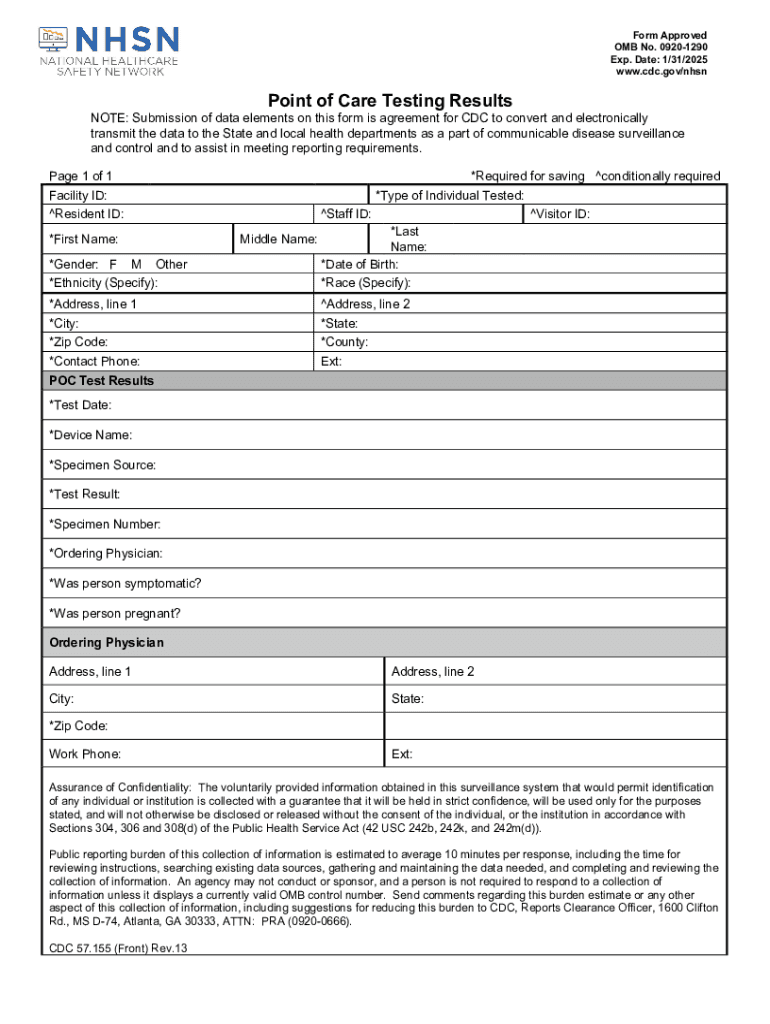
NHSN CDC 57.155 2023-2026 free printable template
pdfFiller is not affiliated with any government organization

Fill out
Complete the form online in a simple drag-and-drop editor.

eSign
Add your legally binding signature or send the form for signing.

Share
Share the form via a link, letting anyone fill it out from any device.

Export
Download, print, email, or move the form to your cloud storage.
Why pdfFiller is the best tool for your documents and forms


End-to-end document management
From editing and signing to collaboration and tracking, pdfFiller has everything you need to get your documents done quickly and efficiently.
Accessible from anywhere
pdfFiller is fully cloud-based. This means you can edit, sign, and share documents from anywhere using your computer, smartphone, or tablet.
Secure and compliant
pdfFiller lets you securely manage documents following global laws like ESIGN, CCPA, and GDPR. It's also HIPAA and SOC 2 compliant.
What is NHSN CDC 57.155
The CDC Point of Care Testing Results Form is a healthcare document used by medical professionals to report testing results to the CDC and local health departments.
pdfFiller scores top ratings on review platforms




Who needs NHSN CDC 57.155?
Explore how professionals across industries use pdfFiller.

NHSN CDC 57.155 is needed by:
-
Healthcare providers conducting point-of-care testing
-
Laboratory technicians managing test results
-
Public health officials requiring disease surveillance data
-
Physicians ordering point-of-care tests
-
Patients undergoing testing as part of communicable disease management
Comprehensive Guide to NHSN CDC 57.155
What is the CDC Point of Care Testing Results Form?
The CDC Point of Care Testing Results Form is a critical instrument in healthcare reporting, specifically designed for the submission of point-of-care testing results to the Centers for Disease Control and Prevention (CDC) and local health departments. This form plays a vital role in promoting effective communicable disease surveillance and control efforts by ensuring accurate and timely reporting from healthcare facilities.
Its primary use involves:
-
Reporting testing results to relevant public health authorities.
-
Facilitating the tracking of communicable diseases across various populations.
-
Enhancing the overall safety and effectiveness of public health initiatives.
Purpose and Benefits of the CDC Point of Care Testing Results Form
The CDC Point of Care Testing Results Form is essential for accurate public health reporting. Its benefits extend to both healthcare facilities and local health departments, particularly in disease tracking and mitigation efforts.
-
Accurate reporting is crucial for safeguarding public health.
-
It supports healthcare providers in maintaining compliance with healthcare regulations.
-
Reliable submissions are integral to tracking disease outbreaks and managing response strategies.
Key Features of the CDC Point of Care Testing Results Form
This form includes a variety of essential components that contribute to its effectiveness in healthcare reporting. Key features encompass:
-
Required fields such as personal details, test results, and physician information for comprehensive data collection.
-
Specific sections like 'Specimen Source' and 'Ordering Physician' that are crucial for accurate diagnosis and follow-up.
-
Fillable fields and digital submission capabilities that streamline the reporting process.
Who Needs the CDC Point of Care Testing Results Form?
The CDC Point of Care Testing Results Form is designed for healthcare providers and testing facilities involved in point-of-care testing. Eligibility to use this form is determined by specific needs, typically including:
-
Healthcare professionals who conduct point-of-care tests.
-
Facilities that are required to report their findings to health authorities.
-
Professionals from various fields who take part in submitting test results.
How to Fill Out the CDC Point of Care Testing Results Form Online
To ensure accurate reporting, users can follow these step-by-step instructions to complete the form:
-
Access the CDC Point of Care Testing Results Form via the designated online platform.
-
Fill in each section carefully, ensuring all required fields are completed.
-
Double-check common pitfalls, such as omitted details or inaccuracies.
-
Review the form for compliance with reporting standards before submission.
Submission Methods and Delivery of the CDC Point of Care Testing Results Form
Submitting the CDC Point of Care Testing Results Form can be done through several methods:
-
Online submission for immediate processing.
-
Mailing the form to the appropriate health department if online option is unavailable.
-
Confirmation options to ensure submission has been received and tracked.
Users should also be aware of deadlines and processing times associated with their submissions.
Security and Compliance for the CDC Point of Care Testing Results Form
Handling the CDC Point of Care Testing Results Form involves strict adherence to data security and compliance standards. Key aspects to consider include:
-
Understanding HIPAA guidelines to protect patient information.
-
Utilizing secure features like 256-bit encryption to maintain data integrity.
-
Complying with specific state regulations and federal laws regarding health information.
Engage with pdfFiller for Effortless Form Completion
Utilizing pdfFiller for completing the CDC Point of Care Testing Results Form offers numerous advantages. It provides:
-
Capabilities for editing, signing, and managing the document efficiently.
-
Ease of filling out, saving, and submitting the form online.
-
Confidence in secure handling of sensitive health information throughout the process.
How to fill out the NHSN CDC 57.155
-
1.To begin, access the CDC Point of Care Testing Results Form on pdfFiller by typing its name in the search bar or selecting it from the healthcare forms category.
-
2.Once opened, familiarize yourself with the form layout, which includes multiple fillable fields for patient and test information.
-
3.Before starting, gather all necessary personal information, such as the individual's full name, date of birth, address, and contact details, as well as specifics about the test conducted.
-
4.Navigate through the fillable fields, clicking on each section to input required information like Facility ID, Test Date, Device Name, and Specimen Source.
-
5.Make sure to fill out all applicable fields, including those concerning the ordering physician and whether the individual was symptomatic or pregnant.
-
6.After you’ve entered all necessary information, review each section to ensure accuracy, checking spelling and completeness before finalizing the form.
-
7.To save your work, click the 'Save' icon; alternatively, you can download the form directly to your device by choosing the 'Download' option.
-
8.Once completed and reviewed, you can submit the form electronically via pdfFiller by selecting the ‘Submit’ option, ensuring all necessary data is included.

Who is eligible to use the CDC Point of Care Testing Results Form?
The form is applicable for healthcare providers, laboratories, and public health professionals needing to report point-of-care testing results for various communicable diseases.
Are there deadlines for submitting the CDC Point of Care Testing Results Form?
While specific deadlines may vary by local health department, it's crucial to submit the form as soon as possible after testing to ensure timely disease surveillance and control.
What methods can I use to submit the form?
The form can be submitted electronically through pdfFiller or printed and mailed to the appropriate health department. Check with local guidelines for specific submission options.
What supporting documents are needed with the form?
Typically, no additional documents are required beyond the information captured on the form, but you should confirm with local health authorities if there are any specific requirements.
What are common mistakes to avoid when completing this form?
Common mistakes include incomplete fields, incorrect personal information, and failing to include all required test details. Always double-check for accuracy before submission.
How long does processing take after submission?
Processing times can vary, but you can expect a timeframe of several days to weeks, depending on the volume of submissions and local health department operations.
Can the form be edited after submission?
Once submitted, changes cannot typically be made. Contact your local health department immediately if you realize there is an error that needs correction.
NHSN CDC 57.155 Form Versions
Related Forms



Get the latest insights from our blog


If you believe that this page should be taken down, please follow our DMCA take down process
here
.
This form may include fields for payment information. Data entered in these fields is not covered by PCI DSS compliance.