
Last updated on
Oct 31, 2026

IE HSA Pregnancy Risk Assessment Template Form 2018-2026 free printable template
We are not affiliated with any brand or entity on this form

Fill out
Complete the form online in a simple drag-and-drop editor.

eSign
Add your legally binding signature or send the form for signing.

Share
Share the form via a link, letting anyone fill it out from any device.

Export
Download, print, email, or move the form to your cloud storage.
Why pdfFiller is the best tool for your documents and forms


End-to-end document management
From editing and signing to collaboration and tracking, pdfFiller has everything you need to get your documents done quickly and efficiently.
Accessible from anywhere
pdfFiller is fully cloud-based. This means you can edit, sign, and share documents from anywhere using your computer, smartphone, or tablet.
Secure and compliant
pdfFiller lets you securely manage documents following global laws like ESIGN, CCPA, and GDPR. It's also HIPAA and SOC 2 compliant.
What is IE HSA Pregnancy Risk Assessment Template Form
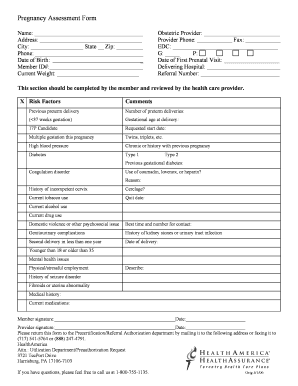
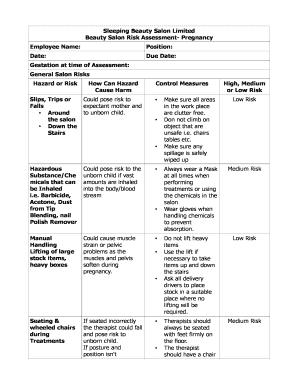
The Pregnancy Risk Assessment Form is a workplace document used by employers in the UK to evaluate and manage risks to pregnant, postnatal, or breastfeeding employees.
pdfFiller scores top ratings on review platforms




Who needs IE HSA Pregnancy Risk Assessment Template Form?
Explore how professionals across industries use pdfFiller.

IE HSA Pregnancy Risk Assessment Template Form is needed by:
-
Employers assessing workplace safety for pregnant employees
-
Human Resources professionals managing employee health and safety
-
Managers or supervisors responsible for employee well-being
-
Occupational health specialists conducting workplace assessments
-
Compliance officers ensuring adherence to UK health regulations
Comprehensive Guide to IE HSA Pregnancy Risk Assessment Template Form
What is the Pregnancy Risk Assessment Form?
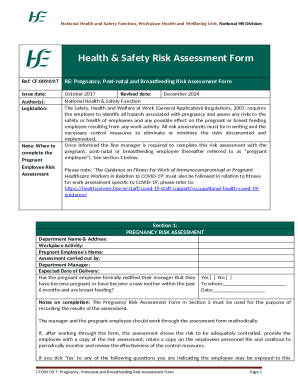
The Pregnancy Risk Assessment Form is a crucial document utilized by employers in the UK to safeguard the well-being of pregnant, postnatal, and breastfeeding employees. This form plays a significant role within the context of the Protection of Pregnant, Post Natal and Breastfeeding Employees Regulations 2007, ensuring that workplaces address specific risks associated with pregnancy. Key components of the form include employee details, a thorough risk assessment of workplace hazards, and tailored recommendations for mitigating identified risks.
Purpose and Benefits of the Pregnancy Risk Assessment Form
The primary purpose of the Pregnancy Risk Assessment Form is to enhance employee safety by identifying potential risks in the workplace during pregnancy. Conducting a thorough assessment benefits employees greatly, as it fosters a safe environment conducive to their health and well-being. Additionally, employers who utilize this form can ensure compliance with legal regulations while creating a supportive atmosphere. Regular reviews and updates to the form throughout the pregnancy timeline are essential to adapt to any changes in circumstances.
Key Features of the Pregnancy Risk Assessment Form
This form stands out due to its user-friendly design and effective layout. It includes a fillable template that allows for easy completion across various sections, addressing different risks and providing recommendations. Essential fields such as 'Name', 'Date', and 'Employee's Signature' are prominently featured, along with checkboxes for assessing risks. Furthermore, the flexibility of customization allows adjustments to the form based on specific workplace conditions, enhancing its practicality.
Who Needs the Pregnancy Risk Assessment Form?
The Pregnancy Risk Assessment Form is necessary for various stakeholders in the workplace. Pregnant, postnatal, and breastfeeding employees must have this form available to assess their specific needs. Additionally, managers and supervisors play a vital role in the assessment process, ensuring suitable measures are in place. Inclusivity is crucial, making it important to identify all eligible employees who might require the assessment.
How to Fill Out the Pregnancy Risk Assessment Form Online
Filling out the Pregnancy Risk Assessment Form online is a straightforward process when the necessary information is gathered first. Follow these steps to complete the form efficiently:
-
Prepare necessary details including employee information and specific workplace hazards.
-
Carefully complete each field, including personal details and risk assessments.
-
Check for accuracy before submitting, ensuring all sections are filled out correctly.
-
Double-check for any common errors, such as missed signatures or incomplete fields.
Digital Signature and Submission Methods
Understanding the signing and submission methods for the Pregnancy Risk Assessment Form is crucial. Digital signatures offer a streamlined process compared to traditional wet signatures. To submit the form digitally:
-
Follow on-screen instructions for eSigning.
-
Ensure the document is complete before sending it for processing.
-
Explore other submission methods, such as physical copies if necessary.
What Happens After Submission?
After submitting the Pregnancy Risk Assessment Form, it’s important to know what to expect. Generally, the form will undergo a review process, which may take a certain period. Employees should inquire about how to track their submission or confirm receipt. Follow-up actions might be necessary based on the assessment results, making awareness essential for all involved parties.
Security and Compliance When Using the Pregnancy Risk Assessment Form
Security is paramount when handling sensitive data related to the Pregnancy Risk Assessment Form. pdfFiller ensures that all data is managed securely and in compliance with applicable regulations. Privacy measures are in place to protect documents linked to pregnancy, including encryption methods that safeguard information against unauthorized access. Compliance with regulations like HIPAA and GDPR is strictly adhered to, reinforcing the trustworthiness of the process.
Enhance Your Experience with pdfFiller
Utilizing pdfFiller for the Pregnancy Risk Assessment Form offers numerous advantages. Users can easily modify documents, utilize eSigning capabilities, and access online storage for better organization. The platform's user-friendly interface allows for practical demonstrations of all features, enhancing the overall experience while managing forms. Additionally, users gain access to a wealth of resources to streamline their form management tasks.
How to fill out the IE HSA Pregnancy Risk Assessment Template Form
-
1.Access pdfFiller and use the search bar to locate the 'Pregnancy Risk Assessment Form.' Click to open the form.
-
2.Familiarize yourself with the sections of the form. Note areas designated for employee details, workplace hazards, and risk management recommendations.
-
3.Gather necessary information before filling out the form. This includes employee name, job title, details of the pregnancy, and relevant hazard assessments.
-
4.Use the fillable fields to input the required information. Click on each field to type or select options from checkboxes as needed.
-
5.Carefully assess the workplace hazards listed in the form. Consult with the pregnant employee to understand their specific concerns and any particular risks they face.
-
6.Complete all sections related to risk assessments and recommendations for mitigating hazards. Be thorough to ensure comprehensive evaluations are captured.
-
7.Once the form is completed, review all entries for accuracy and completeness. Ensure both the employee's details and risk assessments are correct.
-
8.After finalizing the content, save your progress. Use the 'Save' option to store the completed form in your pdfFiller account.
-
9.If required, download the completed form by selecting the download option. This allows you to keep an offline copy or send it for review.
-
10.Submit the form as per your organization’s policy. You may be given options on pdfFiller to email the form directly to HR or the responsible manager.

Who needs to sign the Pregnancy Risk Assessment Form?
The form must be signed by the employee. Managers or supervisors do not require a signature, but they are responsible for reviewing the content.
What should be included in the employee details section?
The employee details section should include the employee's full name, job title, department, and any relevant health or pregnancy details important for the risk assessment.
How often should the Pregnancy Risk Assessment Form be reviewed?
The form should be reviewed regularly throughout the employee's pregnancy to ensure ongoing safety and the effectiveness of implemented risk management recommendations.
Is it mandatory to use the Pregnancy Risk Assessment Form in the UK?
Yes, under the Protection of Pregnant, Post Natal and Breastfeeding Employees Regulations 2007, employers are required to assess risks and manage them for pregnant and breastfeeding employees.
What should be done if hazards are identified?
If hazards are identified during the assessment, the form provides recommendations for risk management, which should be implemented immediately to ensure employee safety.
Are any additional supporting documents required?
While no additional documents are specified in the metadata, it is often advisable to include any medical certificates or consent forms relevant to the employee's condition.
How long does it take to process the assessments listed on the form?
The processing time can vary based on the complexity of the identified risks and the employer's policies. Generally, it should be completed promptly to ensure employee safety.
IE HSA Pregnancy Risk Assessment Template Form Form Versions
Related Forms




Get the latest insights from our blog


If you believe that this page should be taken down, please follow our DMCA take down process
here
.
This form may include fields for payment information. Data entered in these fields is not covered by PCI DSS compliance.