
Last updated on
Nov 6, 2026

Get the free California UI Identity Verification Form
We are not affiliated with any brand or entity on this form

Fill out
Complete the form online in a simple drag-and-drop editor.

eSign
Add your legally binding signature or send the form for signing.

Share
Share the form via a link, letting anyone fill it out from any device.

Export
Download, print, email, or move the form to your cloud storage.
Why pdfFiller is the best tool for your documents and forms


End-to-end document management
From editing and signing to collaboration and tracking, pdfFiller has everything you need to get your documents done quickly and efficiently.
Accessible from anywhere
pdfFiller is fully cloud-based. This means you can edit, sign, and share documents from anywhere using your computer, smartphone, or tablet.
Secure and compliant
pdfFiller lets you securely manage documents following global laws like ESIGN, CCPA, and GDPR. It's also HIPAA and SOC 2 compliant.
What is CA UI Identity Form
The California UI Identity Verification Form is an identity verification document used by claimants to verify their identity when applying for Unemployment Insurance benefits in California.
pdfFiller scores top ratings on review platforms




This is my first time using PDF filler. So far I think it is easy to understand and easy to use.
Site could be more mobile friendly. I'm still learning but so far it has done exactly what I needed and greatly improved my ability to get the docs back I send.
Who needs CA UI Identity Form?
Explore how professionals across industries use pdfFiller.

CA UI Identity Form is needed by:
-
Individuals filing for Unemployment Insurance benefits in California
-
California Employment Development Department (EDD) claimants
-
People seeking to verify their identity for UI claims
-
Residents of California applying for financial assistance
-
Individuals required to submit identity documents to the EDD
Comprehensive Guide to CA UI Identity Form
What is the California UI Identity Verification Form?
The California UI Identity Verification Form, or DE 1326E, is essential for individuals applying for Unemployment Insurance (UI) benefits. This document plays a crucial role in confirming a claimant's identity, helping to prevent fraud and ensuring that only eligible individuals receive benefits. The California Employment Development Department (EDD) is responsible for overseeing the implementation and use of this form. The DE 1326E includes multiple key components: personal information sections, employer details, and specific fields that require signatures.
Purpose and Benefits of the California UI Identity Verification Form
The purpose of the California UI Identity Verification Form is to ensure that claimants are properly verified before they can access unemployment benefits. This verification is vital as it protects against fraudulent claims, allowing the EDD to maintain the integrity of the UI process. By completing the form, claimants can expedite their claims, gain peace of mind, and comply with legal requirements. Utilizing this form not only streamlines the benefits process but also safeguards the interests of both the claimants and the state.
Who Needs the California UI Identity Verification Form?
The DE 1326E form is necessary for all claimants who have applied for UI benefits in California. Specific situations that trigger the requirement for this form include identity verification requests made by the EDD. These requests can arise due to discrepancies in the application, previous claims, or other safeguards to validate identity. Claimants, as primary stakeholders, must complete this form to move forward in their benefits application process.
When to File or Submit the California UI Identity Verification Form
Submitting the California UI Identity Verification Form is time-sensitive. Claimants must return the completed form within 10 calendar days of receiving notification from the EDD. Failing to submit on time can result in delays or denial of benefits. In situations where there are unique circumstances, such as identity theft concerns, expedited submissions may be necessary to ensure timely processing of claims.
Required Documents for Identity Verification
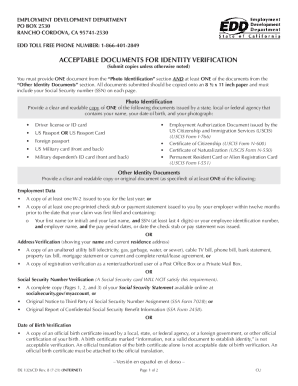
When completing the DE 1326E form, claimants must provide supporting documents for identity verification. Accepted documents include:
-
Driver’s license
-
Passport
-
State-issued ID
-
Social Security card
It is advisable for claimants to gather these documents before starting the form to ensure a complete submission. Providing accurate information is essential to avoid complications during the verification process.
How to Fill Out the California UI Identity Verification Form Online
Completing the California UI Identity Verification Form is straightforward. Follow these steps:
-
Access the DE 1326E form through a reliable platform such as pdfFiller.
-
Fill in all required fields, including personal information and employer details.
-
Double-check for any incomplete sections.
-
Utilize tools available on pdfFiller to assist with any formatting needs.
-
Sign the form electronically if using an eSigning feature.
By adhering to these steps, claimants can ensure their forms are filled out accurately and efficiently.
Common Errors and How to Avoid Them
Many claimants encounter common pitfalls when filling out the California UI Identity Verification Form. Frequent errors include incomplete fields, incorrect personal information, and missing signatures. To mitigate these issues, claimants should:
-
Carefully review each section of the form before submission.
-
Cross-reference details with supporting documents.
-
Use a checklist to ensure all sections are completed.
A thorough review before submission can significantly reduce the likelihood of errors and improve processing times.
Submitting the California UI Identity Verification Form
There are various methods for submitting the California UI Identity Verification Form. Claimants can choose to submit their forms:
-
Online through the EDD portal or pdfFiller
-
By mail directly to the EDD office
After submitting, claimants are encouraged to track the status of their submission through the EDD’s online services. No fees are required for submission, and processing times may vary based on the chosen submission method.
Security and Compliance When Handling the California UI Identity Verification Form
When dealing with the California UI Identity Verification Form, ensuring the security of sensitive data is paramount. pdfFiller employs robust security features, including 256-bit encryption, to protect user information during the form completion and submission process. Additionally, pdfFiller complies with relevant data protection regulations, such as HIPAA and GDPR, which reinforces the importance of privacy and security when handling personal documentation.
Take Advantage of pdfFiller for Your California UI Identity Verification Form
PdfFiller provides an efficient platform for editing and managing the California UI Identity Verification Form. Users benefit from easy access to tools that facilitate seamless form completion and secure submissions. With features like eSigning and online document management, claimants can confidently create, fill, and submit their forms—all while ensuring compliance with necessary regulations.
How to fill out the CA UI Identity Form
-
1.Access the California UI Identity Verification Form by visiting pdfFiller's website and searching for the form by name or form number (DE 1326E).
-
2.Once you find the form, click on it to open it in pdfFiller's editing interface.
-
3.Before starting, gather the necessary documents for identity verification, such as your driver's license, passport, and Social Security number.
-
4.Begin completing the form by filling in your personal details in the designated fields, including your name, address, and contact information.
-
5.Fill out the employer details and any other required sections, ensuring that all information is accurate and matches your identification documents.
-
6.Use the checkboxes to confirm your understanding of the requirements and to indicate the identity documents you are submitting.
-
7.Sign the form electronically within pdfFiller, making sure that your signature is clear and matches your identification.
-
8.Once all fields are filled and reviewed for accuracy, look for the option to save your work or download the form directly from pdfFiller.
-
9.You can either print the form to submit it by mail or submit it electronically, based on the instructions provided by the EDD.

What documents do I need to complete the California UI Identity Verification Form?
You will need identity verification documents such as a driver's license, passport, or any other official documents that establish your identity. Make sure all documents are current and valid.
Is there a deadline for submitting the California UI Identity Verification Form?
Yes, claimants must submit this form and the required documents within 10 calendar days from the date of the request to avoid any disruption in receiving benefits.
How can I submit the California UI Identity Verification Form?
You can submit the form either by mailing it to the EDD address provided on the form or electronically via online submission options, if available.
What common mistakes should I avoid when completing this form?
Common mistakes include not signing the form, providing inaccurate information, or failing to submit the required identity documents. Always double-check your entries for errors.
How long does it take to process the California UI Identity Verification Form?
Processing times can vary, but typically, it may take several weeks for the EDD to review your submission and update your account status once the form is submitted.
Do I need to notarize the California UI Identity Verification Form?
No, the California UI Identity Verification Form does not require notarization. However, ensure that your signature is clear and legible.
What if I miss the deadline to submit the identity verification form?
If you miss the deadline, contact the EDD immediately to discuss your situation. You may need to provide additional documentation to continue receiving your UI benefits.
Related Forms



Get the latest insights from our blog


If you believe that this page should be taken down, please follow our DMCA take down process
here
.
This form may include fields for payment information. Data entered in these fields is not covered by PCI DSS compliance.