
Last updated on
Nov 9, 2026

Fannie Mae Form 1072/1055 2016 free printable template
pdfFiller is not affiliated with any government organization

Fill out
Complete the form online in a simple drag-and-drop editor.

eSign
Add your legally binding signature or send the form for signing.

Share
Share the form via a link, letting anyone fill it out from any device.

Export
Download, print, email, or move the form to your cloud storage.
Why pdfFiller is the best tool for your documents and forms


End-to-end document management
From editing and signing to collaboration and tracking, pdfFiller has everything you need to get your documents done quickly and efficiently.
Accessible from anywhere
pdfFiller is fully cloud-based. This means you can edit, sign, and share documents from anywhere using your computer, smartphone, or tablet.
Secure and compliant
pdfFiller lets you securely manage documents following global laws like ESIGN, CCPA, and GDPR. It's also HIPAA and SOC 2 compliant.
What is Fannie Mae Form 1072/1055
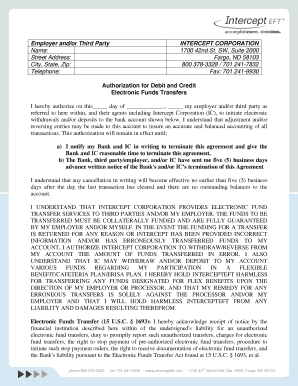
The Authorization for Automatic Transfer of Funds is a financial document used by lenders to authorize electronic transfers of funds for real estate transactions.
pdfFiller scores top ratings on review platforms




Who needs Fannie Mae Form 1072/1055?
Explore how professionals across industries use pdfFiller.

Fannie Mae Form 1072/1055 is needed by:
-
Lenders and financial institutions
-
Real estate agents and brokers
-
Master Sellers and Servicers
-
Sub-servicers in the real estate industry
-
Account holders initiating transfers
-
Individuals dealing with electronic fund transfers
-
Property buyers and sellers
Comprehensive Guide to Fannie Mae Form 1072/1055
What is the Authorization for Automatic Transfer of Funds?
The Authorization for Automatic Transfer of Funds is a vital form used in real estate transactions, primarily to facilitate the electronic transfer of funds. This authorization involves providing Fannie Mae the ability to initiate such transfers, thereby streamlining the funding process. Form 1072 and Form 1055 are both recognized as interchangeable forms that can be utilized for this purpose, simplifying the compliance requirements in real estate dealings.
Purpose and Benefits of the Authorization for Automatic Transfer of Funds
This form is essential for any transactions that involve electronic funds transfer due to its ability to ensure a smooth process. The authorization enhances transaction efficiency, provides enhanced security, and guarantees compliance with NACHA Operating Rules. Furthermore, using the form can significantly ease the funding process in real estate deals, thus benefiting all parties involved.
Key Features of the Authorization for Automatic Transfer of Funds
To properly authorize transfers, the form includes several essential elements. Key fields must be completed, including details such as the account holder's information, remittance options, and checkboxes to confirm the authorization. Ensuring accuracy in these sections is critical, as it affects the overall transfer process.
Who Needs the Authorization for Automatic Transfer of Funds?
The target audience for this form primarily includes lenders and servicers within real estate transactions. Specific roles such as Master Sellers, Servicers, and Sub-servicers are required to utilize the form to maintain compliance and facilitate smooth financial operations during funding processes.
How to Fill Out the Authorization for Automatic Transfer of Funds Online (Step-by-Step)
Users should follow these steps to complete the Authorization for Automatic Transfer of Funds accurately:
-
Gather all necessary identification details and contact information.
-
Access the online form and input the required information into each designated field.
-
Double-check the entered information for accuracy before moving to the signature section.
-
Sign the form as per the requirements outlined.
Common Errors and How to Avoid Them
When filling out this authorization form, users may encounter several common pitfalls. These include missing signatures, providing incorrect account information, or leaving sections incomplete. To avoid these issues, it’s advisable to review the form thoroughly and ensure all necessary information is provided correctly on the first attempt.
How to Sign the Authorization for Automatic Transfer of Funds
Signing the Authorization for Automatic Transfer of Funds requires clarity on the different methods available. Users should understand the distinction between digital signatures and traditional wet signatures. It is also important to acknowledge that electronically signed forms hold legal validity in real estate transactions, which streamlines the process for all parties.
Where to Submit the Authorization for Automatic Transfer of Funds
After completion, the next step involves submitting the authorization form to the appropriate entity. This may include Fannie Mae or the lender involved in the transaction. Users should also be aware of any deadlines or timelines to ensure timely processing and compliance.
Security and Compliance with the Authorization for Automatic Transfer of Funds
Using the Authorization for Automatic Transfer of Funds demands a focus on data security and compliance. Various protocols protect user information, including encryption methods and adherence to regulations like HIPAA and GDPR. Understanding these measures is crucial for safeguarding sensitive financial data throughout electronic transactions.
Transform Your Document Management Experience with pdfFiller
Utilizing pdfFiller for the Authorization for Automatic Transfer of Funds can significantly enhance the form-filling process. This platform simplifies the tasks of completing, signing, and managing documents by offering a user-friendly interface and cloud accessibility. Additionally, pdfFiller ensures that documents remain secure and protected, addressing users' concerns regarding sensitive information.
How to fill out the Fannie Mae Form 1072/1055
-
1.Start by visiting pdfFiller's website and logging into your account. If you don’t have an account, create one free of charge.
-
2.Once logged in, use the search bar to locate the 'Authorization for Automatic Transfer of Funds' form. You can also browse through the Real Estate Forms category to find it.
-
3.Open the form in pdfFiller's editing interface. You will see multiple fields that need to be filled in.
-
4.Before you begin filling out the form, ensure you have your identification details, contact information, bank account info, and any remittance options ready. This will make the process smoother.
-
5.Click on each blank field to enter the required information. Make sure to double-check numbers and account details to avoid errors.
-
6.Utilize checkboxes where applicable to select your remittance preferences. Instructions are often provided within the form to assist you.
-
7.Once you have filled all necessary fields, review the completed form carefully. Verify that all sections are filled accurately and all signatures are included.
-
8.After reviewing, save your progress. You can download the form as a PDF or, if required, submit it directly through pdfFiller by following the provided submission process.
-
9.To submit, you may need to enter email addresses for recipients or follow any provided links to finalize the submission. Make sure to check for any additional confirmation steps.
-
10.Finally, ensure to keep a copy of the submitted form for your records either by downloading it or saving it within your pdfFiller account.

Who is eligible to complete the Authorization for Automatic Transfer of Funds?
Any lender representative, financial institution, or authorized individual involved in real estate transactions can complete the Authorization for Automatic Transfer of Funds.
What documents are needed to fill out this form?
To complete the form, you'll need identification details, contact information, account holder information, and specific remittance options for electronic fund transfers.
Are there any deadlines for submitting this form?
Deadlines typically vary based on the specific transactions involved. It is best to consult with your lender or real estate agent for specific cutoff dates related to fund transfers.
How do I submit the completed form?
You can submit the completed Authorization for Automatic Transfer of Funds directly through pdfFiller or download it and send it via email to the required parties as directed.
What common mistakes should I avoid while filling out the form?
Common mistakes include omitting required signatures, entering inaccurate account information, and failing to double-check the filled fields. Take your time to review everything before submitting.
How long does it take to process this form?
Processing times for the Authorization for Automatic Transfer of Funds may vary depending on the lender's policies. Typically, it can take a few business days to confirm the transfer.
Do I need to notarize this form?
No, the Authorization for Automatic Transfer of Funds does not require notarization. However, it must be signed by the appropriate parties involved in the transaction.
Fannie Mae Form 1072/1055 Form Versions
Related Content
Related Forms



Get the latest insights from our blog


If you believe that this page should be taken down, please follow our DMCA take down process
here
.
This form may include fields for payment information. Data entered in these fields is not covered by PCI DSS compliance.