
Last updated on
Oct 19, 2026

ValueOptions Outpatient Retrospective Review Form 2014-2026 free printable template
pdfFiller is not affiliated with any government organization

Fill out
Complete the form online in a simple drag-and-drop editor.

eSign
Add your legally binding signature or send the form for signing.

Share
Share the form via a link, letting anyone fill it out from any device.

Export
Download, print, email, or move the form to your cloud storage.
Why pdfFiller is the best tool for your documents and forms


End-to-end document management
From editing and signing to collaboration and tracking, pdfFiller has everything you need to get your documents done quickly and efficiently.
Accessible from anywhere
pdfFiller is fully cloud-based. This means you can edit, sign, and share documents from anywhere using your computer, smartphone, or tablet.
Secure and compliant
pdfFiller lets you securely manage documents following global laws like ESIGN, CCPA, and GDPR. It's also HIPAA and SOC 2 compliant.
What is ValueOptions Outpatient Retrospective Review Form
The Outpatient Retrospective Review Form is a healthcare document used by providers to request authorization for outpatient services and demonstrate medical necessity.
pdfFiller scores top ratings on review platforms




Who needs ValueOptions Outpatient Retrospective Review Form?
Explore how professionals across industries use pdfFiller.

ValueOptions Outpatient Retrospective Review Form is needed by:
-
Healthcare providers seeking authorization for outpatient services
-
Insurance companies reviewing medical necessity claims
-
Patients requiring outpatient treatment approval
-
Medical billing specialists processing claims
-
Administrators in healthcare facilities managing treatment authorizations
Comprehensive Guide to ValueOptions Outpatient Retrospective Review Form
What is the Outpatient Retrospective Review Form?
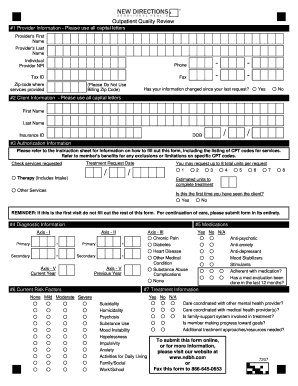
The Outpatient Retrospective Review Form is a vital document used in the healthcare context to ensure proper authorization for outpatient services. This form serves the purpose of gathering extensive information that supports the medical necessity of treatments being administered to patients. Key data captured includes patient details, diagnostic information, and treatment reports, all of which are essential for validating treatment requests from healthcare providers.
Additionally, the relationship between this form and treatment authorization is crucial. It facilitates the process of confirming that the requested services meet the required medical necessity standards, thereby expediting approvals and ensuring patients receive timely care.
Purpose and Benefits of the Outpatient Retrospective Review Form
Healthcare providers need the Outpatient Retrospective Review Form primarily to secure authorizations for outpatient services efficiently. By utilizing this form, providers can streamline the authorization processes, facilitating smoother treatment journeys for their patients. This form not only aids in expediting treatment approvals but also enhances communication between patients and providers, ensuring that the treatment processes are clearly documented and justified.
Benefits for both patients and providers include the assurance that treatment plans align with medical necessity guidelines, reducing the likelihood of delays or denials in service provision. Ultimately, effective utilization of this healthcare authorization form supports better healthcare outcomes.
Key Features of the Outpatient Retrospective Review Form
The Outpatient Retrospective Review Form comprises essential fields necessary for accurate data capture. Key sections include:
-
Patient details, including demographics and medical history
-
Provider information with contact details
-
DSM diagnosis to clarify the medical condition
-
Treatment report to summarize the services provided
-
A signature line to ensure provider authority and accountability
Each of these fields plays a significant role in validating healthcare service requests, making the form a comprehensive clinical information tool required for accurate treatment authorization.
Who Needs the Outpatient Retrospective Review Form?
The primary users of the Outpatient Retrospective Review Form are healthcare providers, including physicians and specialists involved in patient care. These providers are responsible for accurately completing and signing the form to validate their treatment recommendations. By understanding the roles they play in this process, providers can ensure that the form is filled out correctly and submitted promptly, thus facilitating efficient authorization timelines.
How to Fill Out the Outpatient Retrospective Review Form Online (Step-by-Step)
Filling out the Outpatient Retrospective Review Form digitally using pdfFiller is straightforward. Follow this step-by-step guide:
-
Access pdfFiller and select the Outpatient Retrospective Review Form template.
-
Enter the patient’s name and relevant treatment details in the designated fields.
-
Complete the DSM diagnosis and treatment report sections accurately.
-
Ensure the provider's signature is included for authority and authorization.
-
Review all entered data for accuracy to avoid common errors before submission.
Pay attention to fields requiring specific information, as incomplete submissions may lead to processing delays.
Submission Methods for the Outpatient Retrospective Review Form
Once completed, the Outpatient Retrospective Review Form can be submitted through various methods. Providers can choose digital submission via email or through healthcare systems that facilitate electronic forms. It's essential to confirm submission methods, as requirements may vary across Florida or other states. Providers should also ensure they receive a confirmation of submission to track the process effectively.
Security and Compliance for Handling the Outpatient Retrospective Review Form
When handling the Outpatient Retrospective Review Form, security measures are paramount. pdfFiller implements robust actions like 256-bit encryption to protect sensitive healthcare data. Additionally, the platform adheres to HIPAA and GDPR compliance, ensuring that all health information is managed in line with privacy regulations. This level of security reinforces the importance of data protection within the healthcare sector, providing peace of mind to both providers and patients.
What Happens After You Submit the Outpatient Retrospective Review Form?
After the submission of the Outpatient Retrospective Review Form, the verification and authorization process begins. Typically, providers can anticipate timelines for authorization based on the information submitted. They can also check the application status through their healthcare network or contact relevant parties to inquire about delays or common rejection reasons.
Sample Completed Outpatient Retrospective Review Form
To aid in understanding how to complete the Outpatient Retrospective Review Form, a visual or downloadable sample of a filled-out form is available. This example highlights key sections with annotations, emphasizing the importance of completeness to prevent delays in the authorization process. Providers are encouraged to refer to this sample to familiarize themselves with required details.
Maximize Your Efficiency with pdfFiller
Providers are encouraged to utilize pdfFiller not only for filling out the Outpatient Retrospective Review Form but also for broader document management. Key features of pdfFiller include editing capabilities, eSigning, and secure sharing of sensitive healthcare documents. Choosing pdfFiller ensures efficient handling of essential forms while maintaining high standards of security and ease of use.
How to fill out the ValueOptions Outpatient Retrospective Review Form
-
1.Access the Outpatient Retrospective Review Form on pdfFiller by searching for its name or navigating through the healthcare forms category.
-
2.Open the form in pdfFiller’s editor interface, where you can see the blank fields that need to be completed.
-
3.Before you begin filling out the form, gather necessary information including patient details, DSM diagnosis, treatment report, and provider information.
-
4.Start filling in the fields by clicking on each blank area; use your keyboard to enter text or select options from checkboxes when applicable.
-
5.Make sure to complete all required fields to avoid any delays in processing, especially those relating to medical necessity.
-
6.Once you have filled out the form, review it for accuracy. Ensure all information is correct and compliant.
-
7.Finalize the form in pdfFiller by double-checking the details and ensuring that the provider's signature line is signed.
-
8.To save, download, or submit the completed form, look for the options in the top right corner of the pdfFiller editor and choose your preferred method.

Who is eligible to use the Outpatient Retrospective Review Form?
The Outpatient Retrospective Review Form is intended for healthcare providers who need to request authorization for outpatient services and demonstrate medical necessity on behalf of their patients.
What is the deadline for submitting the Outpatient Retrospective Review Form?
Submission deadlines may vary depending on the insurance provider's policies. It is advisable to submit the form as soon as possible to ensure timely processing of treatment authorizations.
How do I submit the Outpatient Retrospective Review Form?
You can submit the completed Outpatient Retrospective Review Form either through the insurance company's online portal or by mailing it directly to their designated address, depending on their submission guidelines.
What supporting documents do I need to include with the form?
Typically, you should include clinical information that supports the medical necessity, such as treatment reports and any relevant patient medical records, along with the completed Outpatient Retrospective Review Form.
What common mistakes should I avoid when filling out this form?
Common mistakes include leaving required fields blank, providing incorrect information, and failing to obtain the necessary provider signature. Double-check your form for completeness before submission.
How long does it take to process the Outpatient Retrospective Review Form?
Processing times may vary depending on the insurer. Generally, you can expect a response within 5-10 business days after submission, but this timeframe can differ based on specific insurance requirements.
What concerns specifically arise when using the Outpatient Retrospective Review Form?
Concerns may include clarity on what constitutes valid medical necessity, ensuring all required information is accurately filled, and understanding the implications of incomplete or incorrect submissions.
ValueOptions Outpatient Retrospective Review Form Form Versions
Related Content
Related Forms





Get the latest insights from our blog


If you believe that this page should be taken down, please follow our DMCA take down process
here
.
This form may include fields for payment information. Data entered in these fields is not covered by PCI DSS compliance.