
Last updated on
Oct 23, 2026

UK I&I1 2016-2026 free printable template
We are not affiliated with any brand or entity on this form

Fill out
Complete the form online in a simple drag-and-drop editor.

eSign
Add your legally binding signature or send the form for signing.

Share
Share the form via a link, letting anyone fill it out from any device.

Export
Download, print, email, or move the form to your cloud storage.
Why pdfFiller is the best tool for your documents and forms


End-to-end document management
From editing and signing to collaboration and tracking, pdfFiller has everything you need to get your documents done quickly and efficiently.
Accessible from anywhere
pdfFiller is fully cloud-based. This means you can edit, sign, and share documents from anywhere using your computer, smartphone, or tablet.
Secure and compliant
pdfFiller lets you securely manage documents following global laws like ESIGN, CCPA, and GDPR. It's also HIPAA and SOC 2 compliant.
What is UK I&I1
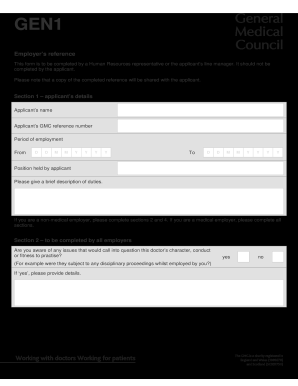
The Character Reference Form is a legal document used by individuals in the UK to provide a character assessment for applicants with the General Medical Council regarding fitness to practice.
pdfFiller scores top ratings on review platforms




Who needs UK I&I1?
Explore how professionals across industries use pdfFiller.

UK I&I1 is needed by:
-
Professional referees in the medical field
-
Individuals applying for GMC registration
-
Employers in healthcare settings
-
Legal representatives for applicants
-
Community leaders or mentors for providing endorsements
Comprehensive Guide to UK I&I1
What is the Character Reference Form?
The Character Reference Form is a vital document in the UK, primarily used to provide a character reference for individuals applying for registration with the General Medical Council (GMC). This form is particularly relevant when there are concerns regarding an applicant’s fitness to practise medicine.
In the context of GMC registration, the character reference form GMC serves as a means for referees to convey their insights regarding an applicant's character and professionalism. It is essential that the form includes comprehensive details to support the applicant’s case, particularly when addressing fitness issues.
Purpose and Benefits of the Character Reference Form
The character reference form is crucial for applicants facing fitness concerns as it enables them to present a balanced narrative about their qualifications and character. A strong recommendation from an impartial referee can significantly influence GMC decisions, potentially impacting the applicant's career.
Furthermore, presenting an unbiased perspective is paramount, as it enhances the credibility of the information provided, ultimately aiding in the assessment process by the GMC.
Who Needs the Character Reference Form?
The individuals who typically require this form are those in pursuit of GMC registration, especially if their fitness to practise has been questioned. It is essential that the referees providing the reference possess relevant qualifications and are regarded as reputable figures within their community.
Utilizing a professional character reference template can streamline this process, ensuring that all necessary information is included and presented in a suitable manner.
Key Features of the Character Reference Form
The character reference form includes several key fields that must be completed. These fields consist of:
-
Name (including title and family name/surname)
-
Profession
-
Place of work
-
Your relationship to the applicant
Additionally, the form requests detailed explanations regarding any issues related to fitness to practise, which underscores the importance of thorough responses. The user-friendly design features fillable fields that facilitate easier completion of the form.
How to Fill Out the Character Reference Form Online
Filling out the character reference form online can be accomplished efficiently using pdfFiller. Follow these steps for a seamless experience:
-
Access the form through pdfFiller's platform.
-
Fill in the required fields, including personal and professional information.
-
Provide detailed explanations as requested in the form.
-
Utilize eSigning features to sign the document digitally.
-
Share or submit the completed form as needed.
pdfFiller also offers additional functionalities, such as the ability to collaborate with others and safely store completed documents.
Validation Checklist and Common Errors to Avoid
To ensure the accurate completion of your character reference form, follow this validation checklist:
-
Confirm all required sections are filled out.
-
Double-check the details provided in each field.
Common mistakes include omitting important information or failing to provide sufficient detail regarding the applicant's fitness to practise. Correct and thorough completion is vital to prevent delays in processing.
Submission Methods and Steps for the Character Reference Form
Once the character reference form is completed, submit it to the GMC via the following methods:
-
Email the completed document to the GMC.
-
Mail the form directly to their address in Manchester.
Consider any associated fees or timing implications linked to your chosen submission method to ensure prompt processing of your reference.
What Happens After You Submit the Character Reference Form?
After submission, the GMC will review the provided character reference. Applicants can expect potential review timelines, which may vary based on case complexity. Staying informed about the application status is advisable.
Common reasons for rejection often include insufficient detail or bias in the reference. Addressing these concerns upfront can help strengthen your submission.
Securely Manage Your Character Reference Form with pdfFiller
When handling sensitive documents, pdfFiller implements robust security measures to ensure confidentiality and compliance with regulations such as HIPAA and GDPR. Utilizing pdfFiller’s features for editing, storage, and sharing can enhance your document management experience.
Always prioritize the protection of personal information during the submission process to maintain privacy and security.
Start Filling Your Character Reference Form Today!
Take action today by using pdfFiller to complete your character reference form efficiently and securely. Leveraging pdfFiller will simplify the process while ensuring alignment with regulatory requirements. Embrace the platform's capabilities to meet all your document needs effectively.
How to fill out the UK I&I1
-
1.Access the Character Reference Form on pdfFiller by logging into your account and searching for the document name in the template search bar.
-
2.Once you find the form, click on it to open. Use the editing tools provided by pdfFiller to start filling out the fields.
-
3.Before starting, gather essential information such as the applicant's details, your professional background, and your relationship to the applicant to provide accurate insights.
-
4.Begin by entering your name, title, and surname in the designated fields of the form. Ensure to include correct titles and spellings to maintain professionalism.
-
5.Proceed to fill in your profession and place of work. Use the dropdowns or text fields to input this information accurately.
-
6.Locate the section where you describe your relationship to the applicant. Provide a clear overview that establishes your credibility as a referee.
-
7.Take your time in the section requiring detailed explanations about the applicant's character and any concerns regarding their fitness to practice. Write elaborately yet concisely.
-
8.Utilize the commenting features of pdfFiller to add notes or reminders to yourself as you complete the form.
-
9.Once all fields are filled, carefully review the entire document for any errors or omissions using pdfFiller's reviewing tools.
-
10.Finalize the form by clicking the save button. You can download the completed form directly to your device or share it via email.
-
11.To submit the form to the GMC, ensure it is either emailed directly from pdfFiller or printed and sent to their designated address in Manchester.

Who can complete the Character Reference Form?
The form should be completed by a professional or person of good standing who is familiar with the applicant's character and can provide an impartial assessment.
What are the submission methods for this form?
You can submit the completed Character Reference Form either by emailing it directly to the GMC or mailing it to their address in Manchester. Ensure all details are correct before submission.
Are there any deadlines for submitting the Character Reference Form?
While specific deadlines may vary based on individual applications, it is advisable to submit the Character Reference Form as soon as possible to avoid delays in the registration process with the GMC.
What information do I need before filling out the form?
Before filling out the Character Reference Form, collect details such as the applicant’s full name, your profession, your relationship to the applicant, and any specific comments about their character or fitness to practice.
What are some common mistakes to avoid?
Common mistakes include providing incomplete information, failing to proofread for spelling errors, or not clearly outlining your relationship to the applicant, which is crucial for establishing your credibility.
Is notarization required for the Character Reference Form?
No, notarization is not required for the Character Reference Form; however, it should be completed with accurate and honest information to ensure its integrity.
What happens after I submit the Character Reference Form?
After submission, the GMC will review the document as part of the applicant’s registration process. Processing times may vary, so check with the GMC for updates.
UK I&I1 Form Versions
Related Content
Related Forms




Related Catalogs
Get the latest insights from our blog



If you believe that this page should be taken down, please follow our DMCA take down process
here
.
This form may include fields for payment information. Data entered in these fields is not covered by PCI DSS compliance.