
Last updated on
Nov 9, 2026

HI DHS 1123 2013-2026 free printable template
pdfFiller is not affiliated with any government organization

Fill out
Complete the form online in a simple drag-and-drop editor.

eSign
Add your legally binding signature or send the form for signing.

Share
Share the form via a link, letting anyone fill it out from any device.

Export
Download, print, email, or move the form to your cloud storage.
Why pdfFiller is the best tool for your documents and forms


End-to-end document management
From editing and signing to collaboration and tracking, pdfFiller has everything you need to get your documents done quickly and efficiently.
Accessible from anywhere
pdfFiller is fully cloud-based. This means you can edit, sign, and share documents from anywhere using your computer, smartphone, or tablet.
Secure and compliant
pdfFiller lets you securely manage documents following global laws like ESIGN, CCPA, and GDPR. It's also HIPAA and SOC 2 compliant.
What is HI DHS 1123
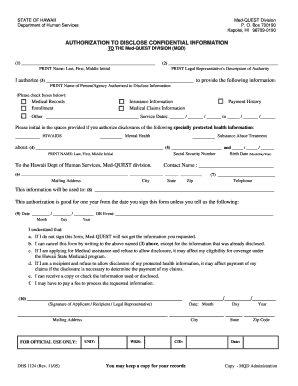
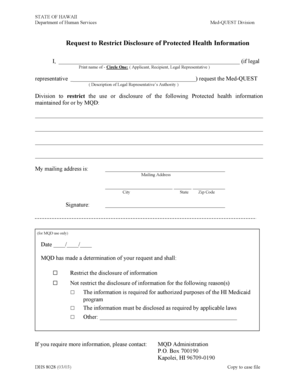
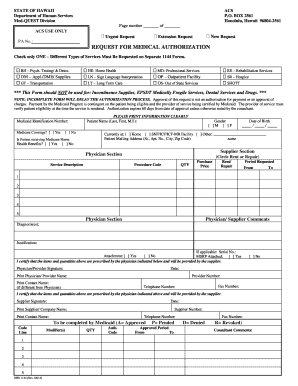
The Hawaii Med-Quest Authorization Form is a medical records release document used by individuals to authorize the disclosure of confidential information by the Med-Quest Division of Hawaii.
pdfFiller scores top ratings on review platforms




Who needs HI DHS 1123?
Explore how professionals across industries use pdfFiller.

HI DHS 1123 is needed by:
-
Applicants for Med-Quest services
-
Recipients of healthcare services in Hawaii
-
Legal representatives assisting applicants
-
Healthcare providers requesting information
-
Family members helping recipients submit records
Comprehensive Guide to HI DHS 1123
What is the Hawaii Med-Quest Authorization Form?
The Hawaii Med-Quest Authorization Form is a crucial document that facilitates the authorized release of confidential medical information. Issued by the Med-Quest Division of the Hawaii Department of Human Services, this form allows individuals to specify which personal health details can be disclosed, to whom, and for what purpose. It serves to empower individuals in managing their healthcare information while ensuring compliance with privacy laws. The authorization is valid for one year unless revoked by the applicant.
Purpose and Benefits of the Hawaii Med-Quest Authorization Form
This authorization form plays a significant role in the healthcare process by enabling the disclosure of essential information needed for effective service delivery. Authorizing the release of medical records is critical for healthcare providers to access necessary data for treatment, ensuring that individuals receive timely and appropriate care. Moreover, the form offers key benefits to applicants, such as improved access to medical services while maintaining patient privacy and control over personal information.
Who Needs the Hawaii Med-Quest Authorization Form?
The target audience for the Hawaii Med-Quest Authorization Form primarily includes individuals seeking Med-Quest services, as well as their legal representatives. This form is vital for anyone applying for benefits under Hawaii’s Medicaid program or receiving assistance. Additionally, legal representatives who act on behalf of applicants may also be required to submit this authorization to facilitate necessary communication and treatment plans.
How to Fill Out the Hawaii Med-Quest Authorization Form Online (Step-by-Step)
Filling out the Hawaii Med-Quest Authorization Form through pdfFiller is straightforward. Follow these steps for a seamless experience:
-
Navigate to the form on the pdfFiller platform.
-
Fill in the required fields, ensuring accurate entry of information.
-
Pay close attention to the instruction prompts for each section.
-
Review all entries before submission to avoid common mistakes.
Completing the form accurately is critical to ensure timely processing of your healthcare needs.
Field-by-Field Instructions for the Hawaii Med-Quest Authorization Form
Understanding each field on the Louisiana Med-Quest Authorization Form is necessary to complete it correctly. Here are significant components of the form:
-
Name: Enter your full name, specifying Last, First, and Middle Initial.
-
Signature of Applicant/Legal Representative: Make sure to provide your signature where indicated.
-
Checkboxes: These indicate specific authorizations you are granting; read instructions to understand their implications.
Paying attention to these details helps avoid errors that could delay processing.
Submitting the Hawaii Med-Quest Authorization Form
Once you have completed the Hawaii Med-Quest Authorization Form, you can submit it through various methods:
-
Online submission via pdfFiller.
-
Mailing the completed form to the appropriate office.
It is important to check if there are any associated fees for the submission process. After sending your form, confirm its successful submission through proper channels to ensure it has been received.
What Happens After You Submit the Hawaii Med-Quest Authorization Form?
After submitting the form, recipients can expect a processing period. During this time, stay proactive by checking the status of your submission. Here are steps to follow:
-
Note the estimated time for processing based on guidelines provided.
-
If you encounter issues or if the submission is marked as incomplete, follow up accordingly.
Following these steps ensures that you remain informed throughout the process.
Security and Compliance for the Hawaii Med-Quest Authorization Form
User privacy and data security are paramount when completing the Hawaii Med-Quest Authorization Form. pdfFiller implements several measures to protect your information, including:
-
Encryption protocols preserving the confidentiality of your data.
-
Compliance with HIPAA and GDPR regulations, ensuring your personal health information is managed securely.
Taking these precautions is essential in safeguarding sensitive information throughout the process.
Why Choose pdfFiller for the Hawaii Med-Quest Authorization Form?
pdfFiller stands out for efficiently handling the Hawaii Med-Quest Authorization Form. Its user-friendly platform allows for easy filling, signing, and secure storage of documents. Key benefits include:
-
Access to tools like eSignatures which streamline the signing process.
-
PDF editing capabilities that enhance form customization.
These features collectively improve the efficiency of managing your Med-Quest Authorization Form.
Final Thoughts on Using the Hawaii Med-Quest Authorization Form
Utilizing the Hawaii Med-Quest Authorization Form is essential for managing your health information effectively. Through pdfFiller, completing the document is not only easier but also assures secure handling of your sensitive data. Take the first step towards simplifying your healthcare documentation by using pdfFiller for all your form-filling needs.
How to fill out the HI DHS 1123
-
1.To begin, access the Hawaii Med-Quest Authorization Form on pdfFiller by searching for its title in the search bar or navigating to the healthcare forms section.
-
2.Once the form is open, familiarize yourself with the interface. You will see fillable fields and checkboxes to complete.
-
3.Before starting, gather necessary information including your personal details and the specifics of the information you wish to disclose.
-
4.Begin filling out the form by entering your last name, first name, and middle initial in the designated fields. Make sure to include accurate contact information.
-
5.Use checkboxes to specify the information you wish to authorize for disclosure, ensuring clarity on what details are shared.
-
6.Designate the individuals or entities to whom the information will be released, providing their names and relationship to the applicant.
-
7.Look for sections detailing the purpose of the disclosure. Clearly articulate the reasons for the request in the provided area.
-
8.After completing all fields, review the form thoroughly to ensure all information is accurate and complete. Check for any omissions or errors.
-
9.Finalize the form by signing it digitally within pdfFiller. Make sure that the signature corresponds to the name submitted.
-
10.Once satisfied, look for options to save or download the completed form. You can also submit it directly through pdfFiller if required.

Who is eligible to sign the Hawaii Med-Quest Authorization Form?
The form can be signed by the applicant, the recipient of services, or a legal representative. Make sure to ensure proper designation when completing the form to avoid delays.
What happens if I don’t complete the form accurately?
Inaccuracies on the form can lead to delays in processing your authorization. Carefully follow the filling instructions and review all provided information before submitting.
Is there a deadline for submitting the Hawaii Med-Quest Authorization Form?
While there is no specific deadline mentioned, it's important to submit the form as soon as possible to prevent any disruptions in your healthcare services. The form is valid for one year unless revoked.
Do I need to include additional documents when submitting the form?
Typically, no additional documents are required; however, check with the Med-Quest Division to ensure you meet any specific requirements based on your situation.
How can I submit the completed Hawaii Med-Quest Authorization Form?
The completed form can be submitted directly through pdfFiller if you're using the service. Alternatively, print and mail it to the Med-Quest Division.
What should I do if my authorization needs to be revoked?
To revoke your authorization, you must submit a revocation form to the Med-Quest Division in writing. Make sure to specify the details clearly.
How long does it take to process the Hawaii Med-Quest Authorization Form?
Processing times can vary, but typically you should expect a response within a few weeks. Check with the Med-Quest Division for specific inquiries related to your case.
HI DHS 1123 Form Versions
Related Content
Related Forms


Get the latest insights from our blog


If you believe that this page should be taken down, please follow our DMCA take down process
here
.
This form may include fields for payment information. Data entered in these fields is not covered by PCI DSS compliance.