
Last updated on
Oct 19, 2026

NY Annual Reporting Requirements 2016-2026 free printable template
pdfFiller is not affiliated with any government organization

Fill out
Complete the form online in a simple drag-and-drop editor.

eSign
Add your legally binding signature or send the form for signing.

Share
Share the form via a link, letting anyone fill it out from any device.

Export
Download, print, email, or move the form to your cloud storage.
Why pdfFiller is the best tool for your documents and forms


End-to-end document management
From editing and signing to collaboration and tracking, pdfFiller has everything you need to get your documents done quickly and efficiently.
Accessible from anywhere
pdfFiller is fully cloud-based. This means you can edit, sign, and share documents from anywhere using your computer, smartphone, or tablet.
Secure and compliant
pdfFiller lets you securely manage documents following global laws like ESIGN, CCPA, and GDPR. It's also HIPAA and SOC 2 compliant.
What is NY Annual Reporting Requirements
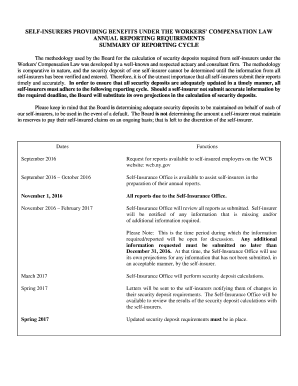
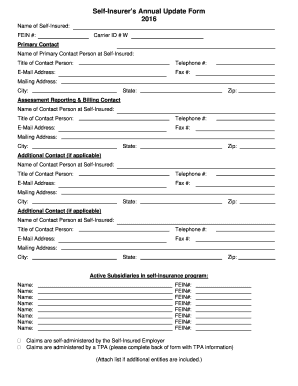
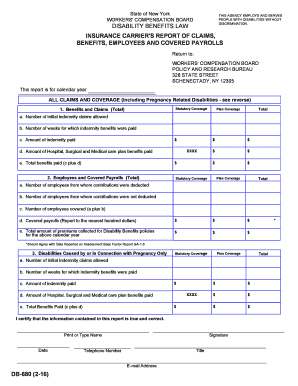
The New York Annual Reporting Requirements for Self-Insurers is a document outlining the 2016 reporting obligations for self-insured employers under the New York State Workers’ Compensation Law.
pdfFiller scores top ratings on review platforms




Who needs NY Annual Reporting Requirements?
Explore how professionals across industries use pdfFiller.

NY Annual Reporting Requirements is needed by:
-
Self-insured employers in New York
-
Human resources managers overseeing workers' compensation
-
Legal professionals advising self-insurers
-
Compliance officers handling government regulations
-
Accountants managing financial reporting for self-insurers
Comprehensive Guide to NY Annual Reporting Requirements
What Are the New York Annual Reporting Requirements for Self-Insurers?
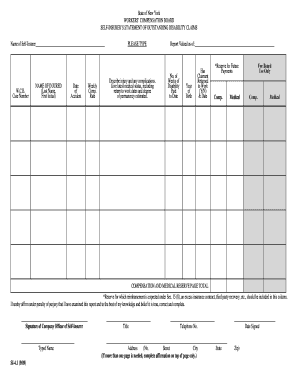
Under New York State Workers’ Compensation Law, self-insured employers are obligated to adhere to specific annual reporting requirements. This includes the submission of essential forms, notably Form SI-4, among others. Compliance with these regulations plays a vital role in maintaining worker protections and fulfilling legal responsibilities for self-insurers in New York.
Purpose and Importance of the New York Annual Reporting Requirements for Self-Insurers
The primary function of the New York annual reporting requirements is to ensure adequate protection for workers within the state. By fulfilling these obligations, employers not only safeguard their employees but also reinforce their commitment to responsible business practices. Non-compliance can lead to significant consequences, including penalties and interruptions in the ability to provide self-insured benefits.
Who Needs to Submit the New York Annual Reporting Requirements?
Self-insurers, as defined by New York State Workers’ Compensation Law, are required to submit annual reports. Entities or individuals that meet the eligibility criteria for self-insurance must file these reports. This includes various businesses that opt for self-insured status rather than traditional workers' compensation insurance.
When to File the New York Annual Reporting Requirements
Important deadlines for submitting forms such as SI-4 and SI-6 must be adhered to strictly. Late filing can result in repercussions that may affect the reporting entity's operations. It is essential to keep in mind that these reports are submitted annually, aligning with established due dates.
Required Documents and Information for the New York Reporting Requirements
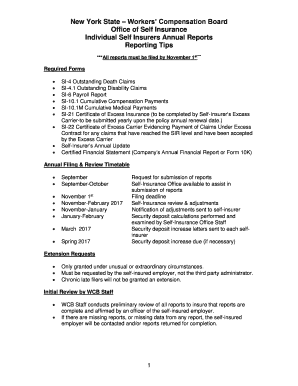
To comply with the New York annual reporting requirements, self-insurers must gather several specific documents. Required forms include, but are not limited to:
-
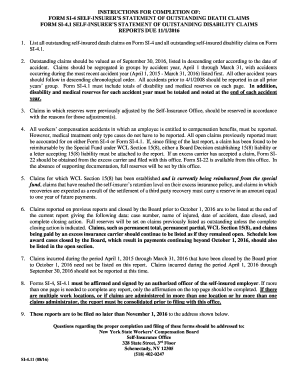
Form SI-4
-
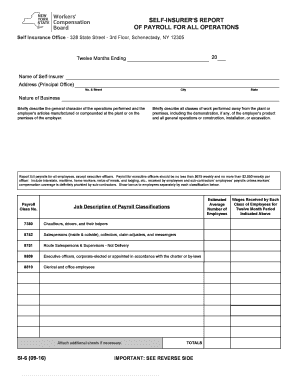
Form SI-6
-
Form SI-10.1
-
Form SI-21
Additionally, it's vital to follow any specific instructions related to each form and ensure that all necessary information is prepared before submission.
Step-by-Step Guide on How to Fill Out the New York Annual Reporting Forms
Filling out the New York annual reporting forms involves several detailed steps. Start with Form SI-4, focusing on these common areas:
-
Specific identification fields, including employer information
-
Financial data relevant to self-insured obligations
Common errors often arise in sections that require supporting documents; thus, careful attention during completion can help prevent these mistakes.
How to Submit the New York Annual Reporting Requirements
Submit the New York annual reporting forms through various methods, including online, by mail, or in person. It is crucial for self-insurers to track their submission status and ensure confirmation of receipt to prevent potential issues later. For paper submissions, specific addresses are designated for sending forms, while digital submissions offer a more streamlined approach.
After Submission: What Happens Next?
Once the annual reporting forms are submitted, the processing of these documents begins. Self-insurers should be aware of how to check the status of their applications and understand the potential for delays or rejections. Should revisions be necessary, clear steps are available for correcting or amending previously submitted forms.
Security and Compliance for Handling Annual Reporting Documents
Using reliable platforms like pdfFiller enhances security during the completion and submission of reporting forms. Adhering to privacy standards is crucial for self-insurers, given the sensitivity of the submitted information. Ensuring that all data is protected contributes to overall compliance with industry regulations.
Get Assistance with the New York Annual Reporting Requirements through pdfFiller
pdfFiller offers a user-friendly solution for filling out and submitting forms online. The platform allows users to edit, sign, and manage submissions securely, emphasizing convenience and reliability in handling legal documents such as self-insurer reports.
How to fill out the NY Annual Reporting Requirements
-
1.To access the New York Annual Reporting Requirements for Self-Insurers form on pdfFiller, begin by visiting their website and utilizing the search function to find the specific form.
-
2.Once located, click on the form to open it in the pdfFiller interface, where you can begin completing it online.
-
3.Before filling the form, gather all needed information, including previous annual reports, employee data, and specific form details like Form SI-4 or SI-10.1.
-
4.As you navigate the pdfFiller interface, utilize the fill-in fields to enter relevant information accurately. Ensure that your entries are complete and correct.
-
5.You can review your completed form at any point by clicking the preview option. Revisit any sections as necessary to make adjustments.
-
6.After thoroughly reviewing the details, proceed to finalizing your form. This will involve checking for any missed fields and ensuring all information aligns with requirements.
-
7.Finally, save your completed form on pdfFiller. You may also choose to download a copy for your records or directly submit the form as per your submission method.

Who is required to complete the New York annual reporting requirements for self-insurers?
Self-insured employers under the New York State Workers' Compensation Law must complete the annual reporting requirements, ensuring compliance with local regulations.
What are the submission deadlines for this form?
Deadlines for submitting annual reports can vary. It's important to check the latest guidelines on the New York State Workers' Compensation Board's website for specific dates.
How do I submit the New York Annual Reporting Requirements for Self-Insurers?
You can submit the completed form directly through pdfFiller or follow the specified submission instructions provided on the form regarding mailing or electronic submission.
What supporting documents are needed with the form?
Typically, you will need to include previous reporting submissions and any relevant confirmations regarding your workers' compensation benefits through self-insurance.
What are some common mistakes to avoid when filling this form?
Ensure that all fields are completed accurately and double-check numerical entries. Omitting required forms or sending incomplete submissions can lead to delays.
How long does it take to process the form after submission?
Processing times may vary depending on the volume of submissions received. Generally, allow several weeks for your submission to be processed by the relevant department.
Is notarization required for this form?
No, notarization is not necessary for the New York Annual Reporting Requirements for Self-Insurers, as it does not contain any fillable fields.
NY Annual Reporting Requirements Form Versions
Related Content
Related Forms

Get the latest insights from our blog


If you believe that this page should be taken down, please follow our DMCA take down process
here
.
This form may include fields for payment information. Data entered in these fields is not covered by PCI DSS compliance.