
Last updated on
Oct 31, 2026
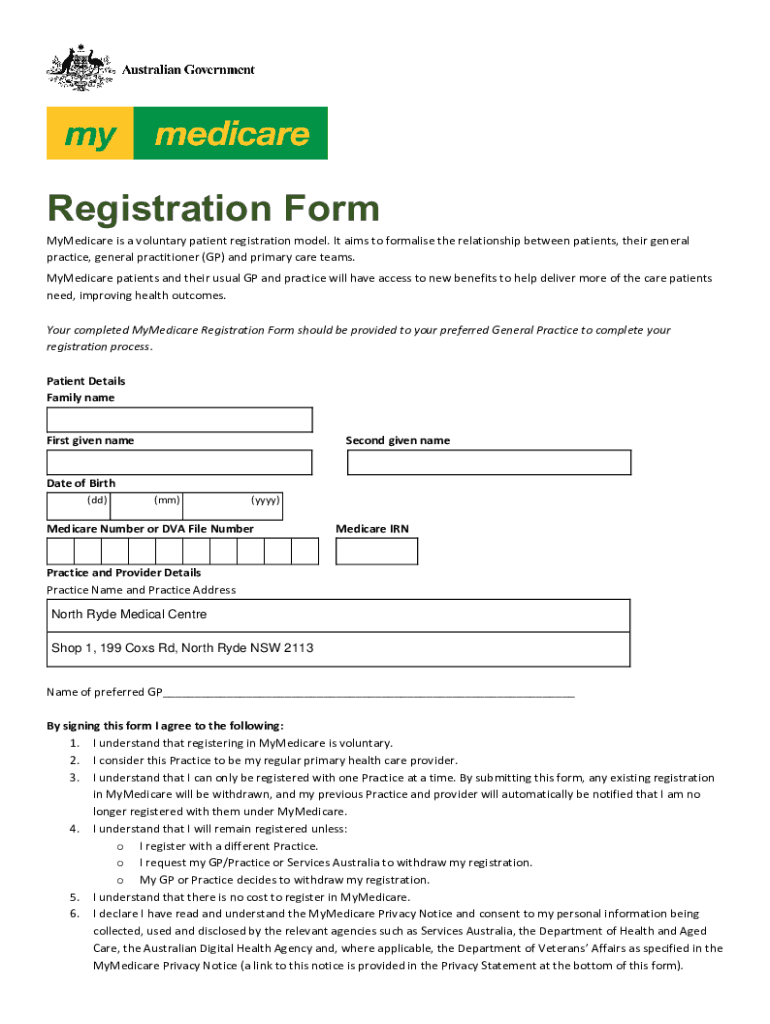
Get the free MyMedicare Registration Form
We are not affiliated with any brand or entity on this form

Fill out
Complete the form online in a simple drag-and-drop editor.

eSign
Add your legally binding signature or send the form for signing.

Share
Share the form via a link, letting anyone fill it out from any device.

Export
Download, print, email, or move the form to your cloud storage.
Why pdfFiller is the best tool for your documents and forms


End-to-end document management
From editing and signing to collaboration and tracking, pdfFiller has everything you need to get your documents done quickly and efficiently.
Accessible from anywhere
pdfFiller is fully cloud-based. This means you can edit, sign, and share documents from anywhere using your computer, smartphone, or tablet.
Secure and compliant
pdfFiller lets you securely manage documents following global laws like ESIGN, CCPA, and GDPR. It's also HIPAA and SOC 2 compliant.
What is MyMedicare Registration
The MyMedicare Registration Form is a healthcare document used by patients in Australia to establish their relationship with a general practitioner (GP) and primary care teams.
pdfFiller scores top ratings on review platforms




Who needs MyMedicare Registration?
Explore how professionals across industries use pdfFiller.

MyMedicare Registration is needed by:
-
Patients needing to register with a GP
-
Parents or guardians registering a child for healthcare services
-
General practices requiring patient information
-
Healthcare administrators managing patient records
-
Individuals seeking to formalize consent for medical treatment
Comprehensive Guide to MyMedicare Registration
What is the MyMedicare Registration Form?
The MyMedicare Registration Form is a crucial document for patients in Australia, enabling them to formalize their relationship with a general practice and their general practitioner (GP). This form serves to collect essential patient information, including their Family Name, Date of Birth, and Medicare Number, which facilitates a structured approach to healthcare delivery.
By completing the MyMedicare Registration Form, patients ensure that their health records are accurately maintained, which is vital for ongoing and coordinated care within the healthcare system. This formal relationship is maintained through the collection of information that supports efficient access to healthcare services.
Purpose and Benefits of the MyMedicare Registration Form
The MyMedicare Registration Form enhances patient access to healthcare services in Australia. By registering with a GP and primary care team, patients benefit from improved coordination of their healthcare, leading to a more seamless patient experience.
Among the key benefits is the ability for healthcare providers to track patient history efficiently, allowing for personalized care. Additionally, registering with a GP can facilitate quicker referrals to specialists and timely communication regarding health updates, ultimately empowering patients in their healthcare journey.
Who Needs the MyMedicare Registration Form?
Eligible patients, including adults, children, and their representatives, such as parents or guardians, need to complete the MyMedicare Registration Form. This requirement is particularly crucial during specific circumstances, including when individuals are establishing care with a new GP or if there have been significant changes to their healthcare situation.
Patients are encouraged to ensure a thorough understanding of their eligibility to avoid any delays in accessing necessary healthcare services.
Eligibility Criteria for the MyMedicare Registration Form
To qualify for using the MyMedicare Registration Form, individuals must meet specific prerequisites. This includes being a resident of Australia and having valid Medicare details. Ensuring that these criteria are met is important to streamline the registration process.
By adhering to these eligibility requirements, patients can anticipate a more efficient registration experience, minimizing any potential delays in receiving care.
How to Fill Out the MyMedicare Registration Form Online (Step-by-Step)
-
Access the MyMedicare Registration Form through the appropriate online portal.
-
Fill in the required fields, including Family Name, Date of Birth, and Medicare Number.
-
Review the information for accuracy before submission.
-
Sign the form, either digitally or with a wet signature.
-
Submit the completed form to your preferred general practice online or via mail.
Common Errors to Avoid When Completing the MyMedicare Registration Form
Patients often make several common mistakes while filling out the MyMedicare Registration Form. Incorrectly entering vital information such as the Medicare Number or Date of Birth can lead to delays and complications in the registration process.
To validate information before submission, patients should double-check all entries and ensure no fields are left incomplete. This diligence helps prevent errors that could affect their healthcare access.
How to Sign the MyMedicare Registration Form
Signing the MyMedicare Registration Form can be done through various options. Patients may choose to provide a wet signature or utilize a digital signing method, ensuring compliance with validation requirements. It is essential to review the specific signature requirements outlined on the form.
This signature serves not only as a verification of the information provided but also as an acknowledgment of consent for the registration process to commence.
Where to Submit the MyMedicare Registration Form
Upon completing the MyMedicare Registration Form, patients have multiple submission options available. The form can be submitted online directly through their healthcare provider's portal or sent via traditional mail.
It’s advisable for patients to confirm the preferred submission methods with their selected general practice to ensure timely processing of their registration.
What Happens After You Submit the MyMedicare Registration Form?
After submitting the MyMedicare Registration Form, patients can expect a processing timeline that varies based on the general practice’s protocols. Upon completion, a confirmation notification may be sent to the patient, detailing the next steps or actions that might be required on their part.
Prompt follow-up ensures that patients remain informed about their registration status and any further actions they might need to undertake to facilitate their healthcare experience.
Using pdfFiller to Complete the MyMedicare Registration Form
Using pdfFiller for filling out the MyMedicare Registration Form offers numerous advantages. This cloud-based platform allows users to efficiently edit, fill, and e-sign the form without the need for downloads, providing a convenient means to manage sensitive documents.
pdfFiller assures users of stringent security measures for handling personal information, including 256-bit encryption and compliance with HIPAA and GDPR standards, ensuring that patient data remains safe and confidential throughout the process.
How to fill out the MyMedicare Registration
-
1.To access the MyMedicare Registration Form, visit pdfFiller and search for 'MyMedicare Registration Form.' Click on the form to open it in the editor.
-
2.Once the form is open, familiarize yourself with the layout and find the sections that require your information.
-
3.Before starting, gather necessary documents including your Medicare Number or DVA File Number, Family Name, Date of Birth, and any other relevant patient details.
-
4.Navigate to each field, clicking on blank spaces to enter your information directly. Use the fillable fields to input details accurately.
-
5.If you're a parent or guardian completing the form on behalf of a minor, ensure to fill in the minor's information correctly and provide your own details where required.
-
6.Review the entered information for accuracy, ensuring you have completed all mandatory fields indicated by asterisks or highlighted areas.
-
7.To finalize the form, check the section stating your consent and signature. You may need to click to sign electronically on pdfFiller.
-
8.Once completed, utilize the 'Save' option to keep a copy of the form. You can also download it in various formats or submit it directly to your general practice through the app.

Who is eligible to use the MyMedicare Registration Form?
The MyMedicare Registration Form is intended for patients in Australia who are establishing registration with a general practitioner. Parents or guardians may also register on behalf of minors.
What information do I need to complete the MyMedicare Registration Form?
You will need your Family Name, Date of Birth, Medicare Number or DVA File Number, and a signature from the patient or their parent/guardian.
How do I submit the MyMedicare Registration Form?
The form must be signed and submitted to your preferred general practice. You can do this either by saving and printing the form to hand in or electronically via a submission function if available.
What common mistakes should I avoid when filling out the MyMedicare Registration Form?
Avoid leaving mandatory fields blank or providing incorrect personal information. Ensure that the signatures are present and valid to prevent delays in processing.
How long does it take to process the MyMedicare Registration Form?
Processing times can vary by practice. Typically, it may take a few days to a week for your registration to be updated in their system, depending on their workload.
Are there any fees associated with submitting the MyMedicare Registration Form?
Generally, the form is free to fill and submit. However, check with your general practice for any specific fees related to establishing the patient account.
Related Forms





Get the latest insights from our blog


If you believe that this page should be taken down, please follow our DMCA take down process
here
.
This form may include fields for payment information. Data entered in these fields is not covered by PCI DSS compliance.