
Last updated on
Oct 19, 2026

Get the free Closing Settlement Statement
We are not affiliated with any brand or entity on this form

Fill out
Complete the form online in a simple drag-and-drop editor.

eSign
Add your legally binding signature or send the form for signing.

Share
Share the form via a link, letting anyone fill it out from any device.

Export
Download, print, email, or move the form to your cloud storage.
Why pdfFiller is the best tool for your documents and forms


End-to-end document management
From editing and signing to collaboration and tracking, pdfFiller has everything you need to get your documents done quickly and efficiently.
Accessible from anywhere
pdfFiller is fully cloud-based. This means you can edit, sign, and share documents from anywhere using your computer, smartphone, or tablet.
Secure and compliant
pdfFiller lets you securely manage documents following global laws like ESIGN, CCPA, and GDPR. It's also HIPAA and SOC 2 compliant.
What is Closing Settlement Statement
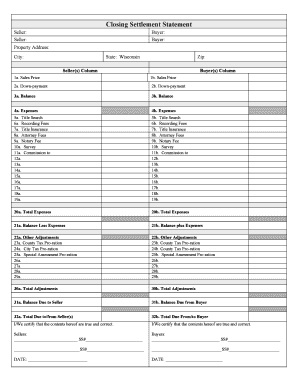
The Closing Settlement Statement is a closing document used by sellers and buyers in Vermont to detail financial transactions during a property closing.
pdfFiller scores top ratings on review platforms




Who needs Closing Settlement Statement?
Explore how professionals across industries use pdfFiller.

Closing Settlement Statement is needed by:
-
Home sellers in Vermont
-
Home buyers in Vermont
-
Real estate agents handling property transactions
-
Mortgage lenders involved in the closing process
-
Title companies ensuring proper documentation
-
Legal professionals assisting in real estate closings
Comprehensive Guide to Closing Settlement Statement
What is the Closing Settlement Statement?
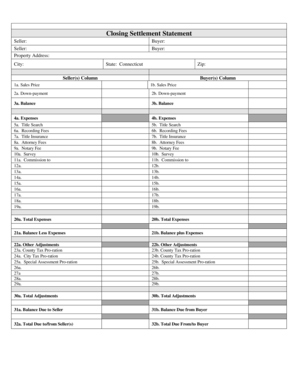
The Closing Settlement Statement is a vital document in real estate transactions, particularly in Vermont. It serves to detail financial exchanges and obligations between the seller and buyer, ensuring clarity in property transactions. This statement includes important details such as the sales price, down payment, and associated fees involved in the deal.
This document is not just informative; it also requires signatures from both the seller and buyer, verifying their agreement on the details presented. The requirement for signatures enhances its validity, making it a crucial component of real estate closing documents in Vermont.
Purpose and Benefits of Using the Closing Settlement Statement
The Closing Settlement Statement is essential for both sellers and buyers during real estate transactions. It clarifies financial responsibilities and entitlements, preventing disputes by documenting all transactions in detail. This meticulous documentation is especially important in adhering to Vermont's state-specific regulations.
Utilizing this financial statement helps provide both parties with a comprehensive understanding of their obligations, thus fostering smoother transaction closures.
Key Features of the Closing Settlement Statement
This document boasts several significant components necessary for a comprehensive transaction overview. Key sections typically include the sales price, adjustments made, and itemized expenses incurred by the buyer and seller. A thorough understanding of these sections is crucial for accurately completing the statement.
Users must pay close attention to the various fields and checks to ensure that all information is correctly filled out. Accuracy in this document is paramount to ensure compliance and to avoid potential disputes.
Who Needs the Closing Settlement Statement?
The Closing Settlement Statement is crucial for both sellers and buyers, as they play fundamental roles in completing and signing the document. Real estate agents and legal representatives are also involved, guiding their clients through the process and ensuring compliance with relevant regulations.
This form is essential for all real estate transactions in Vermont, as it solidifies the financial agreements made between parties involved.
How to Fill Out the Closing Settlement Statement Online
To complete the Closing Settlement Statement online, users can begin by accessing the form through pdfFiller's platform. Starting the process requires simple navigation to the appropriate form section within the application.
As you fill out the document, it’s important to follow field-by-field guidance to avoid common pitfalls. Utilize the validation checklist provided at the end to confirm that every required section is accurately completed before submitting the document for processing.
Signing the Closing Settlement Statement: Digital vs. Wet Signatures
The signature requirements for the Closing Settlement Statement vary based on the method of signing. In Vermont, wet signatures are traditionally accepted; however, digital signatures are also gaining popularity due to their convenience. Users leveraging pdfFiller can benefit from its eSigning process, which offers a secure and efficient method for executing the document.
When considering security, both digital and physical signatures have their merits. Users should weigh the convenience of eSigning against the traditional method’s provisions in Vermont law.
Where and How to Submit the Closing Settlement Statement
Submitting the Closing Settlement Statement requires careful consideration of available methods. Users can choose between electronic submission through designated platforms or opt for traditional mailing procedures.
It is critical to be aware of deadlines and processing times to ensure timely submission. Additionally, consider any potential fees that may be associated with these submission methods to avoid unexpected expenses.
Security and Compliance When Handling the Closing Settlement Statement
Document security is paramount when managing the Closing Settlement Statement. pdfFiller employs various security measures, including 256-bit encryption, to adhere to HIPAA and GDPR compliance, ensuring privacy while handling sensitive financial documents.
Users are advised to implement best practices in securely storing and sharing completed forms to maintain confidentiality and protect personal data.
Next Steps After Completing the Closing Settlement Statement
After filling out the Closing Settlement Statement, users should confirm the document's accuracy. This step is crucial before proceeding with submission to prevent any discrepancies that might arise later.
It's also beneficial to know how to track submissions and rectify any mistakes that might occur post-filing. Being informed about follow-up procedures can help manage any inquiries regarding the status of submissions and address potential rejections swiftly.
Experience Hassle-Free Document Management with pdfFiller
pdfFiller offers a user-friendly platform for completing the Closing Settlement Statement, emphasizing ease of use. The platform facilitates not only form completion and editing but also secure eSigning options, making the entire process efficient.
The high level of document security provided by pdfFiller gives users peace of mind while managing their real estate documents. Users are encouraged to explore additional related real estate forms available on the platform for comprehensive document management solutions.
How to fill out the Closing Settlement Statement
-
1.Access pdfFiller and log in or create an account if you are a new user.
-
2.Search for the 'Closing Settlement Statement' form in the template library.
-
3.Open the form by clicking on its title to begin editing.
-
4.Review the form and gather necessary financial information, including sales price, down payment and any applicable expenses.
-
5.Carefully fill out each section, entering the information for both the seller and buyer as required.
-
6.Use checkboxes and blank fields to complete additional details as needed.
-
7.Refer to any explicit instructions provided on pdfFiller for guidance on how to accurately fill in the form fields.
-
8.Once all fields are completed, review the form for accuracy and completeness.
-
9.Finalize the document by ensuring both parties provide their signatures in the specified areas.
-
10.Save the completed form to your pdfFiller account or download it in your desired format.
-
11.If required, submit the completed Closing Settlement Statement through the appropriate channels.

What is the purpose of the Closing Settlement Statement?
The Closing Settlement Statement provides a detailed record of the financial transactions between the buyer and seller during a property closing, ensuring both parties understand their financial obligations.
Who is required to sign the statement?
Both the seller and the buyer are required to sign the Closing Settlement Statement to certify the accuracy of the information provided.
Do I need to notarize the form?
No, the Closing Settlement Statement does not require notarization according to current guidelines.
What information do I need before filling out the form?
Gather important financial details such as the sales price, down payment amount, expenses, adjustments, and any relevant agreements with the buyer or seller.
How should I submit the completed form?
After completing the form, you can save it on pdfFiller, download it for personal records, or submit it according to your real estate transaction's closing process requirements.
What common mistakes should I avoid when filling out the form?
Ensure that all financial figures are accurately entered, both parties' signatures are present, and all sections of the form are completed to avoid processing delays.
Is there a deadline for submitting the Closing Settlement Statement?
While specific deadlines can vary by transaction, it is generally advisable to complete and submit the Closing Settlement Statement before the official closing date to ensure a smooth process.
Related Content
Related Forms




Get the latest insights from our blog



If you believe that this page should be taken down, please follow our DMCA take down process
here
.
This form may include fields for payment information. Data entered in these fields is not covered by PCI DSS compliance.