
Last updated on
Oct 19, 2026
DAF Form 797 2023-2026 free printable template
We are not affiliated with any brand or entity on this form

Fill out
Complete the form online in a simple drag-and-drop editor.

eSign
Add your legally binding signature or send the form for signing.

Share
Share the form via a link, letting anyone fill it out from any device.

Export
Download, print, email, or move the form to your cloud storage.
Why pdfFiller is the best tool for your documents and forms


End-to-end document management
From editing and signing to collaboration and tracking, pdfFiller has everything you need to get your documents done quickly and efficiently.
Accessible from anywhere
pdfFiller is fully cloud-based. This means you can edit, sign, and share documents from anywhere using your computer, smartphone, or tablet.
Secure and compliant
pdfFiller lets you securely manage documents following global laws like ESIGN, CCPA, and GDPR. It's also HIPAA and SOC 2 compliant.
What is DAF Form 797
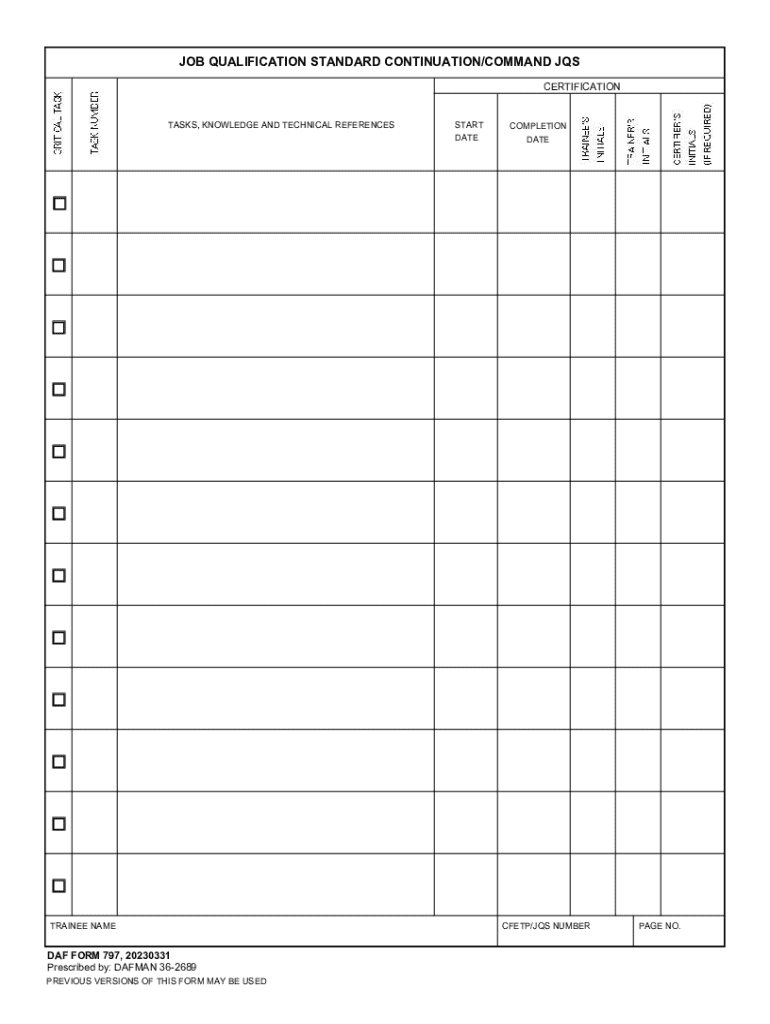
The Job Qualification Standard Form (DAF Form 797) is a performance review document used by trainees to certify their tasks and technical knowledge.
pdfFiller scores top ratings on review platforms




Who needs DAF Form 797?
Explore how professionals across industries use pdfFiller.

DAF Form 797 is needed by:
-
Military trainees seeking certification.
-
Supervisors responsible for evaluating performance.
-
HR professionals managing employee qualifications.
-
Training coordinators overseeing skill development.
-
Administrative staff processing employment forms.
Comprehensive Guide to DAF Form 797
What is the Job Qualification Standard Form?
The Job Qualification Standard Form, known as DAF Form 797, is essential for documenting trainees' certifications within military training. This form serves the purpose of systematically recording the tasks, knowledge, and technical references necessary for a trainee's certification. Its significance extends to performance evaluations, where it helps ensure that trainees meet the required standards in their roles.
This standardized documentation contributes to the effectiveness of military training by providing clear evidence of a trainee's qualifications. By integrating this form into the evaluation process, both trainees and their supervisors can maintain a consistent and accountable system for tracking progress and competencies.
Purpose and Benefits of the Job Qualification Standard Form
The primary role of the Job Qualification Standard Form in the certification process is to facilitate accurate record-keeping and accountability among military trainees. This form not only aids in gathering essential data regarding a trainee's progress but also ensures compliance with DAFMAN 36-2689, which governs military training documentation.
Among the benefits of utilizing this form are:
-
Standardized documentation that enhances clarity and consistency.
-
Accountability in tracking trainee progress and performance.
-
Facilitation of compliance with military regulations.
Key Features of the Job Qualification Standard Form
The Job Qualification Standard Form is composed of several essential components. Key fields include the trainee’s name, certification tasks, performance review aspects, and completion dates. Each section is designed for clarity, allowing easy navigation for users.
Additionally, the inclusion of signature lines and date fields is critical to the certification process. These components ensure that all entries are verified and authenticated, contributing significantly to the form's overall reliability.
Who Needs the Job Qualification Standard Form?
This form is primarily required for trainees within the military. It applies across various roles and ranks, and its proper use has a direct impact on career progression. For instance, this documentation helps supervisors evaluate a trainee's readiness for advancement, ultimately influencing their professional development within the military structure.
By utilizing the Job Qualification Standard Form, trainees can demonstrate their compliance with required competencies, fostering greater accountability and better career outcomes.
How to Fill Out the Job Qualification Standard Form Online
Completing the Job Qualification Standard Form online is straightforward, particularly with tools like pdfFiller. Follow these steps to fill out the form:
-
Access pdfFiller’s platform and search for the Job Qualification Standard Form.
-
Download the form and open it in the pdfFiller editor.
-
Fill in the required fields, including the trainee's name and certification tasks.
-
Review your entries to ensure accuracy.
-
Save the completed form and prepare it for submission.
This process emphasizes ease of use and ensures that the Job Qualification Standard Form is accessible to all users.
Common Errors and How to Avoid Them
When completing the Job Qualification Standard Form, common mistakes can lead to significant issues in documentation. Frequent errors include:
-
Omitting signature or date fields.
-
Leaving mandatory sections incomplete.
To avoid these pitfalls, it is critical to review all entries carefully before submission. Implementing a checklist can help verify that all necessary information is accurately completed, ensuring a smooth certification process.
How to Sign and Submit the Job Qualification Standard Form
Signing the Job Qualification Standard Form can be done in several ways, providing flexibility for users. Options include eSigning through trusted platforms like pdfFiller or using traditional manual signatures.
Once signed, the form can be submitted through various methods, including electronic submission via email or direct upload to designated military systems. Always check for specific submission requirements to ensure compliance with organizational protocols.
What Happens After You Submit the Job Qualification Standard Form?
After submitting the Job Qualification Standard Form, users can expect a confirmation of receipt. The processing time may vary based on the submitting authority’s protocols, and it is advisable to maintain records of submission.
To track the progress of your submitted form, follow up with the relevant department or use any tracking tools provided through your military unit's system.
Security and Compliance When Using the Job Qualification Standard Form
When managing the Job Qualification Standard Form, security measures are vital, especially when handling sensitive trainee data. PdfFiller implements 256-bit encryption to ensure that documents are securely processed and stored.
Moreover, compliance with relevant regulations such as HIPAA and GDPR is paramount. This adherence safeguards the confidentiality of personal information, providing users with peace of mind while using digital documentation services.
Get Started with Your Job Qualification Standard Form Today!
Utilizing pdfFiller for your Job Qualification Standard Form is a straightforward and secure way to manage your documentation needs. The platform offers various features, including form storage and sharing capabilities, to simplify the entire process.
With pdfFiller, users can efficiently fill out the Job Qualification Standard Form while ensuring their data remains secure and compliant with military standards.
How to fill out the DAF Form 797
-
1.Access the Job Qualification Standard Form by navigating to pdfFiller's website and using the search function to find DAF Form 797.
-
2.Once the form is open, familiarize yourself with the available fields including trainee name, form number, and completion dates.
-
3.Gather all necessary information such as the trainee's name, relevant task descriptions, and certification dates before starting the form.
-
4.Begin filling in the form by clicking on the blank fields. Use pdfFiller's tools to type in the appropriate information clearly and accurately.
-
5.Ensure to provide complete details in each section, including any specific instructions if provided in the form.
-
6.Once you’ve filled out all required fields, take a moment to review the information for any errors or missing entries.
-
7.Make sure the trainee's signature is included in the designated area as this is a prerequisite for certification.
-
8.After finalizing your entries, save your progress. You can download the completed form or submit it directly through pdfFiller.

Who is eligible to use the Job Qualification Standard Form?
Any military trainee or individual undergoing training that requires certification of tasks and skills can use the Job Qualification Standard Form (DAF Form 797). The form is specifically designed for performance evaluation.
Are there any deadlines associated with this form?
Deadlines for submitting the Job Qualification Standard Form may vary based on specific training programs or institutional requirements. It's advisable to check with your training coordinator for specific timelines.
What methods can be used to submit the form?
You can submit the Job Qualification Standard Form by downloading it after completion and then emailing or mailing it to the appropriate supervisor or HR department as per their submission guidelines.
What supporting documents are required with the form?
Typically, no additional documents are required alongside the Job Qualification Standard Form. However, it's wise to check if any specific training assessments or certifications need to be attached.
What are common mistakes to avoid when completing this form?
Common mistakes include leaving blank fields, incorrect signing, or providing inaccurate dates. Always double-check the form for completeness and accuracy before submission.
How long does it take to process this form?
Processing times for the Job Qualification Standard Form may vary depending on the reviewing authority. Generally, you should allow for a few days to a few weeks for processing.
What should I do if I encounter difficulties while filling out the form?
If you experience difficulties, consider checking the pdfFiller help section for guidance or consult with a supervisor or HR representative for assistance with the Job Qualification Standard Form.
DAF Form 797 Form Versions
Related Content
Related Forms




Get the latest insights from our blog


If you believe that this page should be taken down, please follow our DMCA take down process
here
.
This form may include fields for payment information. Data entered in these fields is not covered by PCI DSS compliance.