
Last updated on
Oct 17, 2026
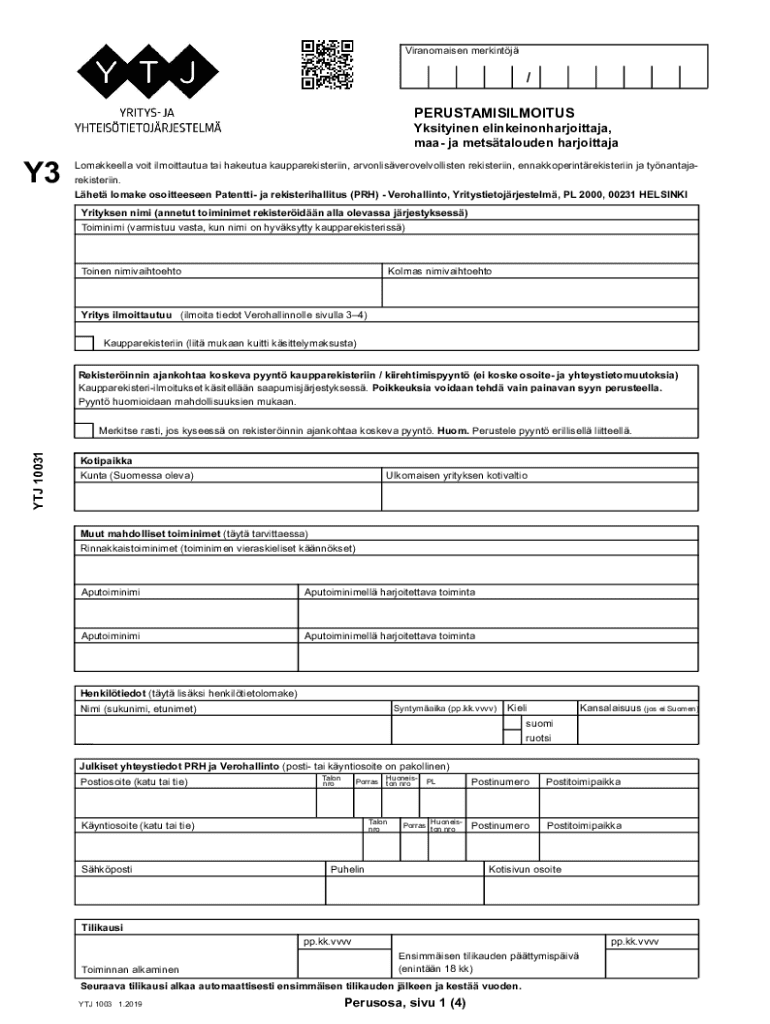
FI YTJ 1003 2019-2026 free printable template
We are not affiliated with any brand or entity on this form

Fill out
Complete the form online in a simple drag-and-drop editor.

eSign
Add your legally binding signature or send the form for signing.

Share
Share the form via a link, letting anyone fill it out from any device.

Export
Download, print, email, or move the form to your cloud storage.
Why pdfFiller is the best tool for your documents and forms


End-to-end document management
From editing and signing to collaboration and tracking, pdfFiller has everything you need to get your documents done quickly and efficiently.
Accessible from anywhere
pdfFiller is fully cloud-based. This means you can edit, sign, and share documents from anywhere using your computer, smartphone, or tablet.
Secure and compliant
pdfFiller lets you securely manage documents following global laws like ESIGN, CCPA, and GDPR. It's also HIPAA and SOC 2 compliant.
What is FI YTJ 1003
The Finnish Business Registration Form is a business license application used by individuals to register their business with the Trade Register, VAT Register, and other regulatory bodies in Finland.
pdfFiller scores top ratings on review platforms




Who needs FI YTJ 1003?
Explore how professionals across industries use pdfFiller.

FI YTJ 1003 is needed by:
-
Entrepreneurs looking to start a new business in Finland
-
Existing business owners needing to update registration details
-
Spouses of business owners wishing to co-manage the business
-
International businesses planning to establish a presence in Finland
-
Freelancers and consultants seeking official business recognition
Comprehensive Guide to FI YTJ 1003
What is the Finnish Business Registration Form?
The Finnish Business Registration Form, also known as Y3, is a crucial document for anyone looking to start a business in Finland. Its primary function is to facilitate registration with the Finnish Patent and Registration Office (PRH) and ensure compliance with local laws. For business owners, this form acts as the gateway to accessing essential business licenses, enabling them to operate legally in Finland.
The importance of the Finnish business registration form cannot be overstated. It is the first step in establishing a business presence, which opens doors to numerous opportunities in the Finnish market. Completing this form allows businesses to register with the Finnish Trade Register, ensuring they are recognized as legitimate entities.
Purpose and Benefits of the Finnish Business Registration Form
Registering your business using the Finnish Business Registration Form is essential for several reasons. Firstly, it is a legal requirement that ensures your business complies with Finnish regulations. This registration enables businesses to access the VAT Register, Advance Payment Register, and Employer Register, which are critical for operating within the tax framework.
The advantages of using this form extend beyond mere compliance. By registering, businesses become eligible for tax benefits, which can significantly affect financial planning and operational advantages. This makes the form an invaluable tool for entrepreneurs in Finland.
Who Needs the Finnish Business Registration Form?
The Finnish Business Registration Form is specifically designed for business owners in Finland. Anyone who intends to start a business, whether as a sole proprietor or as part of a larger entity, must complete this form to fulfill legal obligations.
Eligibility criteria for filling out this form include defining what constitutes a business under Finnish law. This applies to various entities, from freelancers to corporations, all of whom must adhere to the registration requirements to ensure their operations are compliant with local regulations.
Required Documents and Information for the Finnish Business Registration Form
To effectively complete the Finnish Business Registration Form, several key documents and details must be prepared. Essential items include the business name, contact information, and a description of the business activities.
In addition to these core requirements, applicants should include any supporting documents mandated by the Finnish Patent and Registration Office (PRH) or the Tax Administration. These documents are crucial for verifying the information provided on the registration form.
How to Fill Out the Finnish Business Registration Form Online (Step-by-Step)
Filling out the Finnish Business Registration Form online can be done by following these steps:
-
Open the official Finnish business registration website.
-
Locate the Y3 form and click to start the registration process.
-
Enter your business name in the field labeled 'Yrityksen nimi'.
-
Provide your personal name under the 'Nimi' field.
-
Input your address in the 'Postiosoite' section.
-
Review all entered details for accuracy and completeness.
-
Submit the form electronically or follow instructions for submitting via other methods.
Before submission, check for common errors, such as missing information or typos, to ensure your application proceeds smoothly.
Common Errors and How to Avoid Them
When filling out the Finnish Business Registration Form, awareness of common mistakes can save time and prevent delays. Issues often arise in specific fields, such as incorrect business names or incomplete contact information.
To minimize errors, review your form thoroughly before submission. Cross-verify all entries against your supporting documents to ensure consistency and accuracy. Such diligence can help avoid common pitfalls during the registration process.
Submission Process for the Finnish Business Registration Form
The submission of the Finnish Business Registration Form can be accomplished through multiple methods. Users have the option to submit the completed form online, in person at designated offices, or via traditional mail.
It is important to be aware of any fees associated with the submission process, including potential processing times. Each submission method may have different timeframes and costs, so choose the one that best suits your needs.
What Happens After You Submit the Finnish Business Registration Form?
Once you submit the Finnish Business Registration Form, you can expect a confirmation of receipt from the relevant authorities. Tracking your application status is possible through the official portal, providing peace of mind during the waiting period.
Approval timelines can vary, so it is essential to be patient. Be prepared for any additional requests for documentation or clarifications that may arise as your application is processed.
How pdfFiller Can Help with the Finnish Business Registration Form
pdfFiller offers a range of features that streamline the completion of the Finnish Business Registration Form. Users can easily edit, eSign, and securely handle documents, making the registration process more manageable and efficient.
The platform's reliability and security are paramount when dealing with sensitive business documents. By leveraging pdfFiller, users can ensure their registrations are completed smoothly and securely.
Secure Your Business Registration with pdfFiller
Utilizing pdfFiller for your business registration needs brings several benefits, including cloud-based editing and a user-friendly interface. The platform prioritizes the security of your personal information throughout the registration process.
Selecting pdfFiller for your business documentation needs ensures an effective and secure form-filling experience, making it easier to get started on your business journey.
How to fill out the FI YTJ 1003
-
1.Access pdfFiller and search for the Finnish Business Registration Form using the search bar.
-
2.Once the form appears, click on it to open in the editor.
-
3.Gather necessary information including your desired business name, personal identification, and details about your business activities before you start filling out the form.
-
4.Navigate the fields by clicking on each section, and use the text boxes to enter your information accurately. Ensure you fill out required fields like business name and contact details.
-
5.For fields like 'Yrityksen nimi', enter your business name as you would like it registered. Double-check for spelling errors.
-
6.Continue to fill other mandatory fields like 'Nimi' and 'Postiosoite' by providing clear and correct information.
-
7.All instructions are located beside relevant fields; follow them to avoid missing any important details.
-
8.If you make a mistake, utilize the erase or ‘undo’ functions to correct entries smoothly.
-
9.After entering all information, review it thoroughly to ensure everything is complete and accurate. Look for any prompts about missing fields.
-
10.Once satisfied, save the form by clicking the save icon, and choose whether to download it or submit through the platform’s e-submit feature.
-
11.If you opt to submit electronically, follow pdfFiller’s prompts for submission and ensure any payment for processing fees is completed.

Who is eligible to complete the Finnish Business Registration Form?
Anyone planning to start a business in Finland can complete the form. This includes both Finnish citizens and foreign nationals looking to register a business locally.
Is there a deadline for submitting the registration form?
While there is no strict deadline for registering a business, it is recommended to complete the form before commencing business activities to comply with local regulations.
How do I submit the form after completing it on pdfFiller?
After filling out the Finnish Business Registration Form on pdfFiller, you can submit it electronically through the platform or download it and mail it to the Finnish Patent and Registration Office.
What supporting documents are required with this registration form?
Typically, you may need to submit identification documents, proof of address, and any licenses relevant to your business type along with the form.
What are common mistakes people make when completing this form?
Common mistakes include overlooking mandatory fields, entering incorrect personal details, and failing to provide necessary supporting documents.
How long does it take to process the business registration form?
Processing times for the Finnish Business Registration Form can vary, but typically, it may take several weeks to complete depending on the workload of the Finnish Patent and Registration Office.
Can the form be completed in English, or is it only in Finnish?
The Finnish Business Registration Form is officially in Finnish. However, you should have access to translation resources to ensure accurate completion if you are not fluent in the language.
FI YTJ 1003 Form Versions
Related Forms





Get the latest insights from our blog


If you believe that this page should be taken down, please follow our DMCA take down process
here
.
This form may include fields for payment information. Data entered in these fields is not covered by PCI DSS compliance.