
Last updated on
Oct 19, 2026

CA BBC 09 2024-2026 free printable template
pdfFiller is not affiliated with any government organization

Fill out
Complete the form online in a simple drag-and-drop editor.

eSign
Add your legally binding signature or send the form for signing.

Share
Share the form via a link, letting anyone fill it out from any device.

Export
Download, print, email, or move the form to your cloud storage.
Why pdfFiller is the best tool for your documents and forms


End-to-end document management
From editing and signing to collaboration and tracking, pdfFiller has everything you need to get your documents done quickly and efficiently.
Accessible from anywhere
pdfFiller is fully cloud-based. This means you can edit, sign, and share documents from anywhere using your computer, smartphone, or tablet.
Secure and compliant
pdfFiller lets you securely manage documents following global laws like ESIGN, CCPA, and GDPR. It's also HIPAA and SOC 2 compliant.
What is CA BBC 09
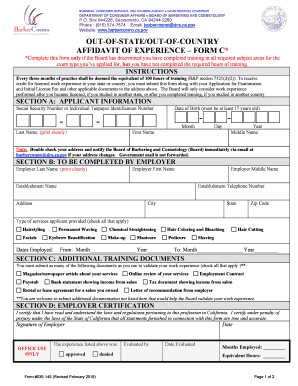
The California Certification Request Application is a government form used by California licensees to request the transfer of their license information to another state.
pdfFiller scores top ratings on review platforms




Who needs CA BBC 09?
Explore how professionals across industries use pdfFiller.

CA BBC 09 is needed by:
-
California licensed professionals needing out-of-state certification
-
Individuals applying for a barber or cosmetology license transfer
-
Licensees seeking to verify their professional credentials
-
Professionals applying for new job positions requiring certification
-
Companies verifying the licenses of potential hires
Comprehensive Guide to CA BBC 09
What is the California Certification Request Application?
The California Certification Request Application serves as a vital tool for California licensees seeking to transfer their licensure information to another state. This application specifically utilizes the BBC 09 Form, which is essential for verification of licenses across state lines. Understanding the significance of this form helps ensure efficient processing and compliance with inter-state licensure requirements.
Purpose and Benefits of the California Certification Request Application
California licensees need to request license information for various reasons, such as pursuing employment opportunities in other states. The California Certification Request Application streamlines the transfer process for certifications, enabling quicker access to job openings and ensuring compliance in terms of legal licensing practices. Using this form can significantly enhance the user experience when transferring certifications, making the transition to new workplaces more efficient.
Eligibility Criteria for the California Certification Request Application
To qualify for the California Certification Request Application, applicants must possess an active California license. This includes various professions, which may range from cosmetologists to barbers, who benefit from the streamlined process of the BBC 09 Form. It's crucial for applicants to verify their eligibility based on their specific license type before proceeding with the application.
When to File the California Certification Request Application
Timeliness is key when submitting the California Certification Request Application. Applicants should be aware of deadlines for submission to avoid any disruption in the licensure process across states. Certain scenarios, such as job changes or relocations, may necessitate immediate filing of the application to ensure that licensing information is up-to-date and compliant with the requirements of the new state.
How to Fill Out the California Certification Request Application
Filling out the California Certification Request Application can be straightforward by following these steps:
-
Access the form through the designated online platform.
-
Complete the personal information section, including your first and last name.
-
Provide your license details such as license type and number.
-
Fill in your address, including city, state, and zip code.
-
Add the last four digits of your Social Security Number for identification purposes.
-
Sign and date the application to certify under penalty of perjury.
Each field on the form has specific instructions to ensure accurate and complete information is submitted for processing.
Common Errors and How to Avoid Them
When completing the California Certification Request Application, several common errors can occur. These mistakes may include incorrect license numbers or mismatched personal details. To prevent these issues, it is advisable to double-check information before submission. Validating each field ensures that the application is processed without unnecessary delays caused by inaccuracies.
Submission Methods and Confirmation of the California Certification Request Application
Applicants can submit the California Certification Request Application through several methods, including digital options for convenience. It is important to keep track of submission status to confirm that the application has been received and is being processed accordingly. Utilizing tracking features can provide peace of mind during this crucial stage of the licensure process.
Handling Sensitive Information Securely
Security is paramount when dealing with sensitive information during the application process. pdfFiller implements robust security measures, including 256-bit encryption, to protect personal data. Choosing a platform like pdfFiller ensures that users can manage their forms safely while maintaining compliance with privacy regulations.
Record Retention and Privacy for the California Certification Request Application
Users should be aware of document retention guidelines concerning the California Certification Request Application. Keeping copies of submitted applications is advisable for a specified duration, ensuring that personal records remain accessible if needed later. Additionally, users have rights regarding their privacy and data protection, especially when handling state forms that contain personal information.
Your Simplified Path with pdfFiller
Using pdfFiller can greatly simplify the process of managing your California Certification Request Application. The platform offers tools for filling out, signing, and submitting forms seamlessly. Users can take advantage of features such as eSigning and PDF editing, enhancing their overall experience and ensuring all documents are complete and compliant.
How to fill out the CA BBC 09
-
1.To access the California Certification Request Application on pdfFiller, go to the pdfFiller website and use the search bar to find the form by entering its name.
-
2.Once you locate the form, click on it to open in the pdfFiller interface, where you can start editing.
-
3.Gather the necessary information, including your license type, license number, last 4 digits of your Social Security Number, and personal details such as your full name and address.
-
4.Begin filling in the form's fields, ensuring you input all required information accurately in the designated areas.
-
5.Use the interface tools to navigate between fields, making it easy to fill in your data without missing any sections.
-
6.Once you have completed the form, review all entered information for accuracy and completeness to avoid any mistakes.
-
7.After reviewing, click the save option to keep your progress or use the download feature to obtain a copy of the completed form for your records.
-
8.To submit the form, follow the instructions provided—generally, you will need to send it directly to the state indicated in your application, often via email, as specified.

Who is eligible to use the California Certification Request Application?
California licensed professionals who need to transfer their license information to another state are eligible to use this application. Licensees seeking to verify their credentials or apply for a new position can also use the form.
What information is required to complete the form?
You will need to provide your license type, license number, last 4 digits of your Social Security Number, and personal identification details such as your name and mailing address.
How do I submit the completed form?
After filling out the California Certification Request Application, it must be sent directly to the state where you desire your license information to be delivered. This is typically done via email as per the submission guidelines.
Are there any common mistakes to avoid while filling out the form?
Ensure all fields are correctly filled out with accurate information. Double-check your details against your official documents to avoid errors that may delay processing.
How long does it take to process the certification request?
Processing times can vary depending on the state you're applying to. It is advisable to submit your request as early as possible and check specific timelines provided by the receiving state.
What fees are associated with the California Certification Request Application?
Typically, there may be fees that vary by state for processing certification requests. Check with the state agency to find out about specific fees and payment methods.
Can I notarize the form before submission?
No, the California Certification Request Application does not require notarization. However, candidates should ensure all information is accurate and signed, as per the form’s instructions.
CA BBC 09 Form Versions
Related Forms



Get the latest insights from our blog



If you believe that this page should be taken down, please follow our DMCA take down process
here
.
This form may include fields for payment information. Data entered in these fields is not covered by PCI DSS compliance.