
Last updated on
Oct 31, 2026

VT VN-020 2013 free printable template
pdfFiller is not affiliated with any government organization

Fill out
Complete the form online in a simple drag-and-drop editor.

eSign
Add your legally binding signature or send the form for signing.

Share
Share the form via a link, letting anyone fill it out from any device.

Export
Download, print, email, or move the form to your cloud storage.
Why pdfFiller is the best tool for your documents and forms


End-to-end document management
From editing and signing to collaboration and tracking, pdfFiller has everything you need to get your documents done quickly and efficiently.
Accessible from anywhere
pdfFiller is fully cloud-based. This means you can edit, sign, and share documents from anywhere using your computer, smartphone, or tablet.
Secure and compliant
pdfFiller lets you securely manage documents following global laws like ESIGN, CCPA, and GDPR. It's also HIPAA and SOC 2 compliant.
What is VT VN-020
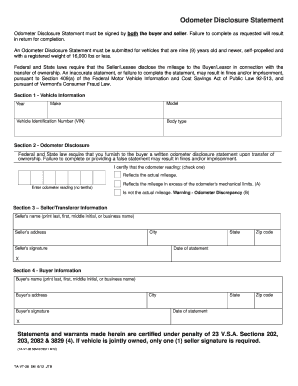
The Vermont Title Alteration Statement is a government form used by individuals to report and certify alterations made to a vehicle title in Vermont.
pdfFiller scores top ratings on review platforms




Who needs VT VN-020?
Explore how professionals across industries use pdfFiller.

VT VN-020 is needed by:
-
Vermont vehicle owners needing title corrections
-
Individuals involved in vehicle sales
-
Persons transferring vehicle ownership
-
Dealerships managing vehicle titles
-
Legal representatives handling title disputes
-
Vermont DMV staff processing title changes
Comprehensive Guide to VT VN-020
What is the Vermont Title Alteration Statement?
The Vermont Title Alteration Statement serves a crucial purpose for vehicle owners, enabling them to report and certify changes made to vehicle titles, secure a bill of sale, or update odometer statements. This form is essential for individuals who need to maintain accurate records regarding their vehicles.
To complete the form, key details are required, including the title number, Vehicle Identification Number (VIN) or Hull Identification Number (HIN), and current mileage. These details ensure that all modifications are properly documented, thereby safeguarding the legal standing of the vehicle.
Purpose and Benefits of the Vermont Title Alteration Statement
This form is vital for vehicle owners in Vermont as it clarifies their ownership status and helps avoid legal complications. Keeping title information accurate is not just a matter of record-keeping; it has significant legal implications, particularly when buying, selling, or transferring a vehicle.
Benefits include reducing the potential for future disputes and ensuring that all parties involved have a clear understanding of the vehicle's history. Proper documentation through forms like the Vermont Title Alteration Statement not only helps maintain trust but also safeguards your investment.
Who Needs the Vermont Title Alteration Statement?
Individuals and circumstances that necessitate the use of this form include those facing title errors, odometer discrepancies, changes in ownership, or any other alterations that impact the integrity of vehicle title documentation.
It is the responsibility of the person making the alteration to file the form. This requirement underscores the importance of maintaining accurate vehicle records and complying with Vermont’s vehicle registration regulations.
When and How to Submit the Vermont Title Alteration Statement
The Vermont Title Alteration Statement should be completed immediately upon becoming aware of any alterations. Timely submission is key to maintaining compliance and ensuring accurate records.
Submissions can be made through various methods, including online options for faster processing. Additionally, mail-in submissions are available, but it's crucial to keep deadlines in mind to avoid any penalties.
-
Online submission through designated DMV portals
-
Mail the completed form to the appropriate DMV address
-
Be aware of submission deadlines to prevent complications
How to Fill Out the Vermont Title Alteration Statement Online (Step-by-Step)
Filling out the Vermont Title Alteration Statement online can be streamlined by using pdfFiller. Begin by accessing the form and following these steps:
-
Enter the title number from your existing title.
-
Provide the year, make, and model of the vehicle.
-
Input the VIN or HIN for identification purposes.
-
Specify the current mileage accurately.
-
Detail the alterations or errors that necessitate the filing.
This step-by-step approach helps ensure that all necessary information is captured, reducing the risk of errors during the submission process.
Common Errors and How to Avoid Them
When filling out the Vermont Title Alteration Statement, common mistakes often include misreporting the VIN, omitting required details, or incorrect mileage entries. Each of these errors can lead to delays or complications in processing your title.
To avoid these issues, double-check all entries for accuracy. It's wise to validate your information thoroughly before submission, ensuring that everything aligns with other official documents.
-
Verify the VIN or HIN for accuracy
-
Ensure all fields are completed
-
Check that the reported mileage matches your vehicle's odometer
Security and Compliance for the Vermont Title Alteration Statement
Security is paramount when handling sensitive documents such as the Vermont Title Alteration Statement. It's essential to use platforms with robust security features to protect your vehicle information from unauthorized access.
pdfFiller offers data encryption and adheres to stringent compliance regulations, including HIPAA and GDPR, ensuring that your personal information remains confidential and secure throughout the filing process.
What Happens After You Submit the Vermont Title Alteration Statement?
After submission, you can expect a processing timeline, which typically varies based on the volume of submissions. Individuals can track their submission status through the DMV's official portals or by contacting customer service.
-
Check submission status online for real-time updates
-
Be aware of possible outcomes including further review or approval
Understanding these steps can alleviate anxiety and allow you to prepare for any next actions necessary.
How pdfFiller Can Help with the Vermont Title Alteration Statement
pdfFiller simplifies the process of managing the Vermont Title Alteration Statement through its cloud-based capabilities. Users can easily edit, fill, and securely eSign the document, making it user-friendly for anyone who may need to use this form.
With features such as document sharing and storage, pdfFiller ensures a hassle-free experience for managing your Vermont DMV forms, helping you complete the process seamlessly and securely.
How to fill out the VT VN-020
-
1.To access the Vermont Title Alteration Statement, visit pdfFiller's website and search for the form by its name.
-
2.Once you locate the form, click on it to open it in the pdfFiller editor.
-
3.Ensure you have the necessary information handy, such as the title number, vehicle year, make, model, VIN, and mileage.
-
4.Begin filling out the form by clicking on each field and typing in the relevant information, ensuring accuracy in each entry.
-
5.If applicable, utilize checkboxes for any options detailed in the instructions provided on the form.
-
6.For detailed explanations of alterations or errors, use the designated text fields to provide clarity on each item.
-
7.Once all fields are completed and checked for accuracy, review the entire form for any missing information.
-
8.After confirming that all information is correct, navigate to the save options in pdfFiller, where you can choose to download a copy or submit it directly through the platform.
-
9.To download the completed form, select the download button and choose your preferred file format.

Who is eligible to fill out the Vermont Title Alteration Statement?
Any individual who has made alterations to a vehicle title in Vermont is eligible to complete the Vermont Title Alteration Statement. This includes personal vehicle owners and representatives handling title changes.
What information do I need before filling out this form?
Before starting the Vermont Title Alteration Statement, gather your vehicle title number, year, make, model, VIN, mileage, and a detailed explanation of the error or alteration.
How do I submit the completed form?
After completing the Vermont Title Alteration Statement on pdfFiller, you can submit the form online or download it for mail submission to the Vermont DMV. Ensure you adhere to their submission guidelines.
Are there any penalties for incorrect information?
Yes, submitting incorrect information on the Vermont Title Alteration Statement can carry penalties under Vermont state law. It is crucial to provide accurate details.
What are common mistakes to avoid when filling out this form?
Common mistakes include leaving fields blank, providing incorrect title numbers, and failing to explain alterations clearly. Review your entries carefully to avoid these errors.
When is the deadline for submitting this form?
While specific deadlines may vary, it is recommended to submit the Vermont Title Alteration Statement as soon as alterations are made to prevent issues with your vehicle title registration.
How long does it take for the form to be processed?
Processing times for the Vermont Title Alteration Statement can vary. However, it typically takes several business days once submitted to the Vermont DMV for review and approval.
VT VN-020 Form Versions
Related Forms




Get the latest insights from our blog


If you believe that this page should be taken down, please follow our DMCA take down process
here
.
This form may include fields for payment information. Data entered in these fields is not covered by PCI DSS compliance.