
Last updated on
Oct 16, 2026
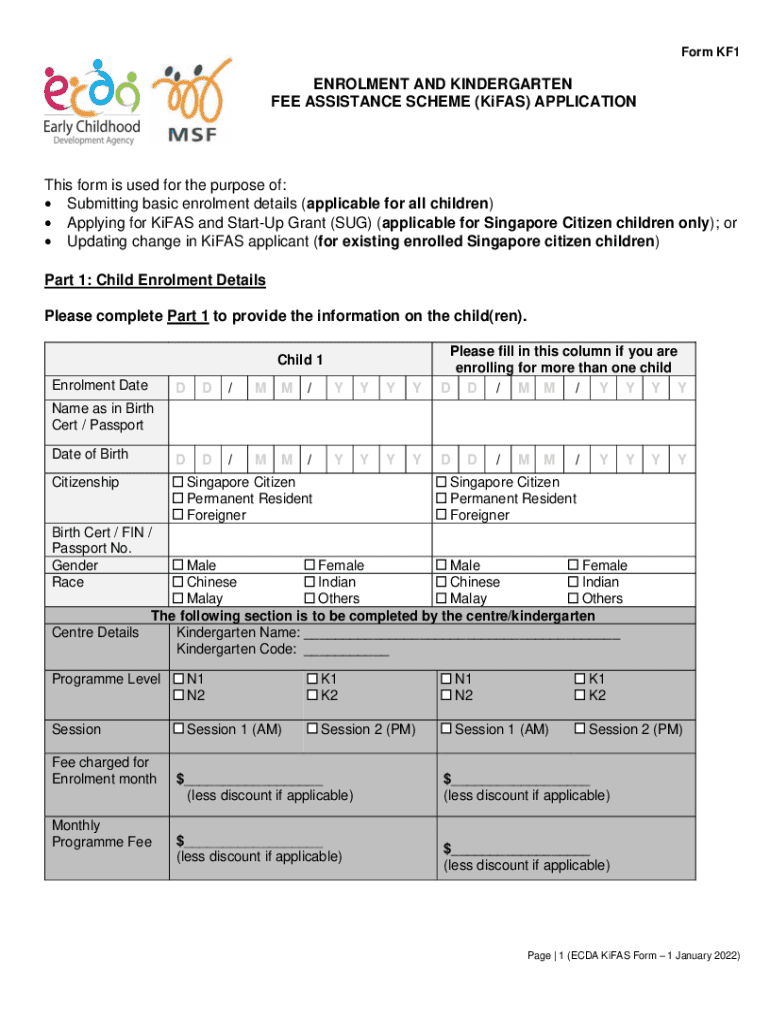
SG ECDA Form KF1 2022-2026 free printable template
We are not affiliated with any brand or entity on this form

Fill out
Complete the form online in a simple drag-and-drop editor.

eSign
Add your legally binding signature or send the form for signing.

Share
Share the form via a link, letting anyone fill it out from any device.

Export
Download, print, email, or move the form to your cloud storage.
Why pdfFiller is the best tool for your documents and forms


End-to-end document management
From editing and signing to collaboration and tracking, pdfFiller has everything you need to get your documents done quickly and efficiently.
Accessible from anywhere
pdfFiller is fully cloud-based. This means you can edit, sign, and share documents from anywhere using your computer, smartphone, or tablet.
Secure and compliant
pdfFiller lets you securely manage documents following global laws like ESIGN, CCPA, and GDPR. It's also HIPAA and SOC 2 compliant.
What is SG ECDA Form KF1
The KiFAS Application Form KF1 is an education form used by parents to enroll children in kindergarten and apply for financial assistance under the Kindergarten Fee Assistance Scheme in Singapore.
pdfFiller scores top ratings on review platforms




Who needs SG ECDA Form KF1?
Explore how professionals across industries use pdfFiller.

SG ECDA Form KF1 is needed by:
-
Parents enrolling their children in kindergarten in Singapore
-
Guardians applying for the Kindergarten Fee Assistance Scheme (KiFAS)
-
Individuals seeking the Start-Up Grant for early childhood education
-
Typically Singapore Citizens looking for enrollment of their children
-
Families needing financial assistance in early childhood education
Comprehensive Guide to SG ECDA Form KF1
What is the KiFAS Application Form KF1?
The KiFAS application form KF1 is a crucial document used for enrolling children in kindergarten in Singapore and for seeking financial assistance. This form is significant as it underlies the processes for accessing the Kindergarten Fee Assistance Scheme and other financial aids available to families. By utilizing the KF1 form, parents can ensure they meet the necessary requirements for kindergarten enrollment and obtain financial support.
Purpose and Benefits of the KiFAS Application Form KF1
The primary purpose of the KiFAS application form KF1 is to facilitate the enrollment of children in kindergarten while allowing families to apply for financial assistance. Utilizing this form provides several benefits, including:
-
Access to the Kindergarten Fee Assistance Scheme, which helps lower educational costs.
-
Eligibility for the Start-Up Grant, offering financial support to newly enrolling students.
-
Simplified application processes for eligible Singaporean families.
Eligibility Criteria for the KiFAS Application Form KF1
To qualify for the KiFAS application form KF1, applicants must meet specific criteria. Parents or guardians must be Singapore citizens, and they need to demonstrate financial eligibility. Required documents include:
-
Income statements to show household earnings.
-
Identification documents such as NRIC or passports.
-
Proof of residence within Singapore.
How to Fill Out the KiFAS Application Form KF1 Online (Step-by-Step)
Filling out the KiFAS application form KF1 online is designed to be straightforward and user-friendly. Follow these steps to complete the electronic form:
-
Access the KiFAS form PDF through the official platform.
-
Begin by entering the child's name as it appears on official documents.
-
Fill in citizenship details accurately to prevent processing delays.
-
Provide the applicant’s contact information and relationship to the child.
-
Review all entries carefully before submission to avoid errors.
Field-by-Field Instructions for Completing the KiFAS Application Form KF1
Understanding each section of the KiFAS application form KF1 is vital to ensure successful submission. Here’s a breakdown of essential fields:
-
Child's Name: Enter the full name as indicated in the birth certificate or passport.
-
Citizenship: Clearly state the child’s citizenship status.
-
Applicant's Details: Provide accurate contact information, including phone number and address.
-
Common Errors to Avoid: Double-check for typos in names and identification numbers.
How to Submit the KiFAS Application Form KF1
The KiFAS application form KF1 can be submitted through various methods to accommodate all applicants. These methods include:
-
Online submission using the designated portal for quicker processing.
-
Physical delivery to the specified locations, if preferred.
Make sure to adhere to submission deadlines to avoid any penalties associated with late filings.
What Happens After You Submit the KiFAS Application Form KF1?
Once the KiFAS application form KF1 is submitted, applicants can expect specific processing protocols. Typically, the process includes:
-
A timeframe within which the application will be reviewed.
-
Notification of application status via the email provided.
-
Instructions for tracking the progress of your application online.
Common Rejection Reasons and Solutions for the KiFAS Application Form KF1
Applications for the KiFAS form may be rejected for several reasons. Common issues include:
-
Incomplete information or missing fields.
-
Failure to meet the specific eligibility criteria.
-
Submission of incorrect or outdated documents.
If rejected, applicants should carefully review the reason for rejection and take corrective action by resubmitting the corrected form promptly.
Security and Compliance When Using the KiFAS Application Form KF1
When completing the KiFAS application form KF1, the security of sensitive data is paramount. Applicants are encouraged to use secure platforms. pdfFiller implements important security measures including:
-
256-bit encryption to protect submitted data.
-
Compliance with regulations such as GDPR and HIPAA to ensure privacy.
Why Choose pdfFiller for Your KiFAS Application Form Needs
pdfFiller enhances the process of filling out and submitting the KiFAS application form by offering a range of beneficial features including:
-
eSigning capabilities for fast, secure approvals.
-
Cloud access that enables form storage and retrieval from any device.
-
Additional document management tools for organization and efficiency.
Choosing pdfFiller ensures a smooth experience for all your KiFAS application needs.
How to fill out the SG ECDA Form KF1
-
1.Begin by accessing the KiFAS Application Form KF1 on pdfFiller. Type 'KiFAS Application Form KF1' into the search bar after logging into your pdfFiller account.
-
2.Once you have located the form, click on it to open. Familiarize yourself with the layout—there will be multiple sections including child, applicant, and spouse details.
-
3.Before filling in the form, gather essential information such as the child’s birth certificate, your NRIC or FIN, employment details, and household income documents.
-
4.Start filling in the fields systematically. For each section, carefully enter the required details. Make sure to input your child's name as it appears on their birth certificate or passport.
-
5.Use checkboxes where applicable and ensure that all necessary fields are completed, particularly those that are marked as mandatory.
-
6.Review the information you’ve entered for accuracy, checking for any fields that may have been missed or incorrectly filled.
-
7.If you need to save your progress, utilize the save options provided in pdfFiller. This will allow you to continue later without losing your work.
-
8.After reviewing the entire form for any errors, finalize your documents for submission. Use the submit feature on pdfFiller when you are ready to send your application.
-
9.Finally, download a copy of the completed form for your records. This can be done through the download button in pdfFiller. Ensure you have all necessary supporting documents ready for submission.

What are the eligibility requirements for the KiFAS Application?
Eligibility for the KiFAS Application Form KF1 typically requires that the applicant is a Singapore Citizen with a child enrolled in a kindergarten. Income must be within specified limits to qualify for financial assistance.
Is there a deadline for submitting the KiFAS Application Form KF1?
Yes, forms must be submitted during the specified enrollment period set by educational institutions in Singapore. Be sure to check the official guidelines for exact dates to ensure timely processing.
How do I submit the KiFAS Application after filling it out?
Once you have filled out the KiFAS Application Form on pdfFiller, you can submit the form electronically through their submission feature. Alternatively, you can print it and submit it in person to the respective kindergarten.
What supporting documents are needed for the KiFAS Application?
Supporting documents generally include the child's birth certificate, the parent's NRIC or FIN, proof of employment status, and income documentation. Ensure all documents are submitted as specified in the form instructions.
What common mistakes should I avoid when filling out the form?
Common mistakes include incorrect spelling of names, missing mandatory fields, and not providing accurate income details. Always double-check your entries and follow all form-specific instructions.
How long does it take to process the KiFAS Application?
Processing times for the KiFAS Application can vary, but applicants typically receive feedback within a few weeks. It is important to apply early to avoid delays.
What if I need to make changes after submitting the form?
If you need to make changes after submission, contact the relevant educational institution directly. They will guide you on the process for making amendments or submitting additional information.
SG ECDA Form KF1 Form Versions
Related Forms





Get the latest insights from our blog



If you believe that this page should be taken down, please follow our DMCA take down process
here
.
This form may include fields for payment information. Data entered in these fields is not covered by PCI DSS compliance.